Live Mesh - How to restore online database?

danielson

New member
Local time
8:34 AM
Messages
23
After a fresh install, i would like to recuperate and sync again my data presently online using Windows desktop app called Live Mesh.

Anyone familiar with the procedure?
 

My Computer My Computer

OS
Windows 7 Home
Well you install Mesh again, then you sync up the folder with the one in the cloud like you did before.
 

My Computer My Computer

Computer type
PC/Desktop
Computer Manufacturer/Model Number
Alienware Aurora ALX R4
OS
Windows 10 Pro (x64)
CPU
Intel Core i7-3930K (3.2GHz - 4.5GHz)
Motherboard
Alienware Aurora-R4 x79
Memory
4x Samsung 4GB PC3-12800 DDR3 (16GB 1600MHz)
Graphics Card(s)
Nvidia Geforce GTX 690
Sound Card
SteelSeries Siberia Elite
Monitor(s) Displays
Dell UltraSharp U3011
Screen Resolution
2560x1600
Hard Drives
Samsung 850 Pro 256 GB, Seagate 1TB Desktop Hybrid HDD, 2x Western Digital 4TB Green HDD
PSU
875W Some Dell PSU <.<
Case
Alienware Aurora ALX
Cooling
Custom Liquid Cooling (EK CPU & GPU blocks) dual EK 480RAD
Keyboard
Logitech G710+ Mechanical
Mouse
Logitech G700s
Internet Speed
Verizon Fios (50 mbps average)
Other Info
Server: Intel NUC D54250WYK: i5-4250U, 16GB, 256 GB mSATA, Windows Server 2012 R2
Okay.

When i log into Live Mesh, it creates a new profile for me (that i understand).
If i go the devices via Live Mesh, i am confronted with two profiles.
One is my original, the second is the new profile Live Mesh automatically creates.
If i remove the created one, i am logged out of Live Mesh and have to start over.
Same story happens again.

 

My Computer My Computer

OS
Windows 7 Home
It depends on how you're using Live Mesh. If you are using the free 5Gb storage available in SkyDrive as your "cloud" as I do, then this is what works for me.

After a clean install or image restore:

Go to the Live Mesh 2011 website Windows Live Mesh 2011
Sign in and click on the Go to the Devices website to see the PCs you can connect to link at the bottom right of the page.

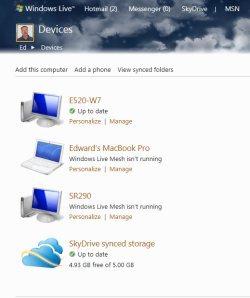
Delete your original "device" (Click on manage, click on "Stop using this service").
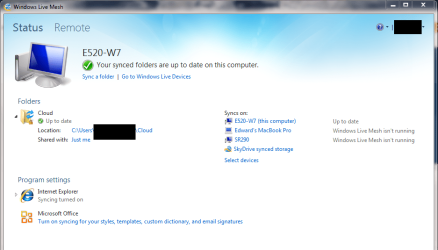
Re-install Live Mesh 2011, sign in to it and re-sync to your cloud.

For clarity:

I have a folder in SkyDrive named "Cloud"
I create a local folder in my "devices" (Desktop PC, notebook, MacBook) named "Cloud" also. Doesn't have to be named that, of course. Could call it anything.
I sync the SkyDrive "Cloud" folder with my local "Cloud" folder.
 

Attachments

  • mesh-devices.PNG
    mesh-devices.PNG
    46.2 KB · Views: 5
  • mesh-status.PNG
    mesh-status.PNG
    58.6 KB · Views: 6

My Computer My Computer

Computer Manufacturer/Model Number
Dell E520
OS
Windows 7 Enterprise x64 SP1, Ubuntu 11.04 x64
CPU
Core2Quad Q6700 - 2.66 GHz
Motherboard
Whatever the heck Dell put in there...
Memory
8 Gig Mushkin DDR2 800 MHz
Graphics Card(s)
EVGA NVIDIA 9800GT - 512MB DDR3
Monitor(s) Displays
2 x 19" ViewSonic LCD
Screen Resolution
2560x1024
Hard Drives
1 Intel X25-M 120G SSD, 1 300G VelociRaptor, 1 WD Caviar Black 1TB
PSU
PCPower & Cooling Silencer 500 Watt
Internet Speed
15/2 Roadrunner Cable
Other Info
NOD32 AV - Malwarebytes
WiFi Ed, dat's the best explanation i've had yet! ;)

I always thought that by doing so,
my online data was also deleted.
 

My Computer My Computer

OS
Windows 7 Home
Glad I could help :)
 

My Computer My Computer

Computer Manufacturer/Model Number
Dell E520
OS
Windows 7 Enterprise x64 SP1, Ubuntu 11.04 x64
CPU
Core2Quad Q6700 - 2.66 GHz
Motherboard
Whatever the heck Dell put in there...
Memory
8 Gig Mushkin DDR2 800 MHz
Graphics Card(s)
EVGA NVIDIA 9800GT - 512MB DDR3
Monitor(s) Displays
2 x 19" ViewSonic LCD
Screen Resolution
2560x1024
Hard Drives
1 Intel X25-M 120G SSD, 1 300G VelociRaptor, 1 WD Caviar Black 1TB
PSU
PCPower & Cooling Silencer 500 Watt
Internet Speed
15/2 Roadrunner Cable
Other Info
NOD32 AV - Malwarebytes
Back
Top