"Local Area Connection" Doesn't have a valid IP configuration.

Partywaffle

New member
Local time
6:11 PM
Messages
8
"Local Area Connection" Doesn't have a valid IP configuration.

I'm running into an issue which is hindering the enjoyment I am getting out of my system. Quite frequently I am getting these issues where I lose connection to the internet at random times. I then "Trouble Shoot" problems with the connection and I get the fixed issue of: "Local Area Connection Doesn't have a valid IP configuration."

I've looked in several other posts, and nothing has quite worked out for me thus far. I have general medium level of understanding relating to computers. Hope to hear an answer soon.

Thanks in advanced.
 

My Computer My Computer

OS
windows 7
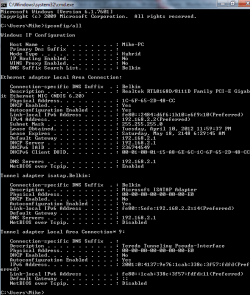
Can you post a screenshot of your ipconfig /all output?

Or try this:

Copy and paste these lines in Note pad.

@Echo on
pushd\windows\system32\drivers\etc
attrib -h -s -r hosts
echo 127.0.0.1 localhost>HOSTS
attrib +r +h +s hosts
popd
ipconfig /release
ipconfig /renew
ipconfig /flushdns
netsh winsock reset all
netsh int ip reset all
shutdown -r -t 1
del %0

Save as flush.bat to your desktop. Right click on the flush.bat file to run it as Administrator.

Your computer will reboot itself.
 

My Computer My Computer

OS
Windows 7 Ultimate x64
Here is my ipconfig.
 

Attachments

  • ipcongif.png
    ipcongif.png
    18.1 KB · Views: 377

My Computer My Computer

OS
windows 7

My Computer My Computer

Computer type
PC/Desktop
Computer Manufacturer/Model Number
Skylake Special #666
OS
Windows 10 Pro x64
CPU
Intel Core i7 6700K
Motherboard
Asus Sabertooth Z170 Mark 1
Memory
GSkill TridentZ RGB 16GB 3600 16-16-16-36
Graphics Card(s)
EVGA GTX 980 Ti SC x2
Sound Card
Realtek High Definition
Monitor(s) Displays
AOC G2460PG
Screen Resolution
1920 x 1080 144Hz
Hard Drives
Samsung 860 Pro 256GB, Seagate Barracuda 4TB x2
PSU
EVGA 1000 P2, EVGA White Custom Braided Cables
Case
Corsair Vengeance C70 Gunmetal Black
Cooling
Corsair H100i v2, Corsair ML120 x2, Thermal Grizzly Kryonaut
Keyboard
Logitech G910 Orion Spectrum
Mouse
Logitech G700s
Internet Speed
Verizon Fios Quantum Gateway 75/75
Antivirus
Windows Defender, Malwarebytes Free 3.8.3
Browser
Chrome
Other Info
Corsair SP120 x4, LG Blu-ray Drive, Durabrand HT-395 100 Watt Dolby Digital Amp, Corsair H2100 Wireless 7.1 Headset
So I see you have new lease times. But I've never seen a lease expire in the year 2048! Are you connected directly to a single router, which is directly connected to your modem? Or a double router setup? If it's a single router setup, your DNS addresses are also wrong.
 

My Computer My Computer

OS
Windows 7 Ultimate x64
Are you sure you ran flush.bat in an elevated command prompt?
 

My Computer My Computer

OS
Windows 7 Ultimate x64
So I see you have new lease times. But I've never seen a lease expire in the year 2048! Are you connected directly to a single router, which is directly connected to your modem? Or a double router setup? If it's a single router setup, your DNS addresses are also wrong.
Are you sure you ran flush.bat in an elevated command prompt?

I did run flush.bat, and I am connected to a single router which is connected to a modem via Ethernet cable.
 

My Computer My Computer

OS
windows 7
But are you sure you ran flush.bat from an elevated (administrator) command prompt?
 

My Computer My Computer

OS
Windows 7 Ultimate x64
But are you sure you ran flush.bat from an elevated (administrator) command prompt?

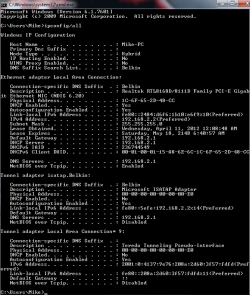
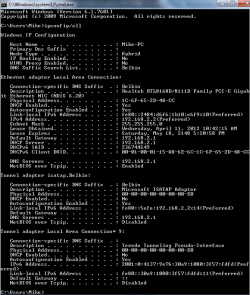
I was pretty sure I ran it as admin, however I re-ran flush.bat as admin and here is my new ipconfig.
EDIT: I am still having the same issues though.
 

Attachments

  • NEWNEWipconfig.png
    NEWNEWipconfig.png
    17.8 KB · Views: 61
Last edited:

My Computer My Computer

OS
windows 7
Can you get in to your router's configuration pages? Type 192.168.2.1 into the address bar of your web browser and press enter. Find out what DNS addresses are assigned and post them here (your PC is not getting valid addresses from the router).

Also go to Control Panel -> All Control Panel Items -> Network and Sharing Center and click on "Change Adapter Settings". Right click on "Local Area Connection" and select properties. Left click "Internet Protocol Version 4 (TCP/IPv4)" and click properties. Are the two radio buttons "Obtain ... automatically" selected? If the radio button for DNS is not set to auto, what addresses appear there?

Cancel or "X" out of that dialog and do the same for the "Internet Protocol Version 6 (TCP/IPv6)" item. Then cancel or "X" out of all the popup dialog boxes.

I'm also wondering about the info in the section about "tunnel adapter isatap:Belkin". Do you know if you're doing any IPv6 over IPv4 using secured connections? I wonder how it's DNS value got set....
 

My Computer My Computer

OS
Windows 7 Ultimate x64
DNS Address: 65-32-5-111
Secondary DNS Address: 65-32-5-112
I followed your instructions to get into my IPv4 properties and it obtains IP address automatically, as well as DNS server address automatically.
Am not sure how to "do" something over IPv6 rather than IPv4.
 

My Computer My Computer

OS
windows 7
DNS Address: 65-32-5-111
Secondary DNS Address: 65-32-5-112
So those are the DNS addresses in your router? You have internet service with Road Runner?

If so, and those dialog boxes I asked you about were set to auto, that tells me that the flush.bat file didn't take.

To run that flush.bat file successfully, you right click the flush.bat icon on the desktop, then left click on "Run as Administrator".

Is that what you did? If not, try it again, the way I just described...
 

My Computer My Computer

OS
Windows 7 Ultimate x64
DNS Address: 65-32-5-111
Secondary DNS Address: 65-32-5-112
So those are the DNS addresses in your router? You have internet service with Road Runner?

If so, and those dialog boxes I asked you about were set to auto, that tells me that the flush.bat file didn't take.

To run that flush.bat file successfully, you right click the flush.bat icon on the desktop, then left click on "Run as Administrator".

Is that what you did? If not, try it again, the way I just described...


I do have Road Runner.
I ran flush.bat as admin twice. I will open CMD this time as admin, and then type in the values of flush.bat.
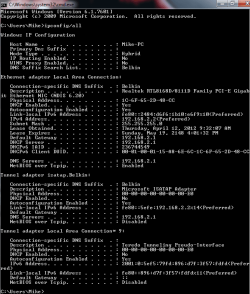
Edit: here is my new ipconfig/all since typing in the values from flush.bat manually.
 

Attachments

  • ipconfig latest.png
    ipconfig latest.png
    17.7 KB · Views: 31

My Computer My Computer

OS
windows 7
I'm running into an issue which is hindering the enjoyment I am getting out of my system. Quite frequently I am getting these issues where I lose connection to the internet at random times. I then "Trouble Shoot" problems with the connection and I get the fixed issue of: "Local Area Connection Doesn't have a valid IP configuration."

I've looked in several other posts, and nothing has quite worked out for me thus far. I have general medium level of understanding relating to computers. Hope to hear an answer soon.

Thanks in advanced.


If you haven't done so already you should reset your router, should be a button on the side of the router for this or you can unplug it for about ten minutes.

After that you can access the routers set up page by typing 192.168.2.1 into the URL of your browser. Password might be admin.

I would also try using a different DNS server, you can try typing these DNS servers into your routers set up page as a test 8.8.8.8 and 8.8.4.4

If you haven't updated the driver for network adaptor now would be a good time to do that. :)
 

My Computer My Computer

Computer type
PC/Desktop
Computer Manufacturer/Model Number
Home built
OS
Windows 7 Ult, Windows 8.1 Pro,
CPU
Q9650-4.275GHz, E8600 4.5GHz, E6750-3.8GHz
Motherboard
Evga 780i FTW
Memory
G.Skill PC2 9600 1200Mhz 5 5 5 15 2T
Graphics Card(s)
GTX480
Sound Card
Asus Xonar D2
Monitor(s) Displays
HannsG
Screen Resolution
1680X1050
Hard Drives
GSkill Phoenix Pro 120GB SSD
PSU
ThermalTake Toughpower 1000Watt modular
Case
ThermalTake XaserV
Cooling
Xigmatek S1283
Keyboard
Logitech G15
Mouse
Logitech G9
Internet Speed
T1
Good ideas by chev65. I would also suggest shutting down everything together: modem, router, and all connected (wired and wireless) devices. Wait a minute or so, then start the modem. Wait for it fully come online and then start the router. When the router fully comes on line then go ahead and start the other connected devices.
 

My Computer My Computer

OS
Windows 7 Ultimate x64
Thanks everyone for your help. I will definitely attempt to shut everything down for 10 minutes, and then start booting up.
I did have a concern which I just stumbled upon. I was having severe issues with network connection again "Local Are Connection" doesn't have a valid ip. I then turned on my laptop and noticed that I was able to connect to the internet, but still was having issues on my PC.
Any thoughts on this?
 

My Computer My Computer

OS
windows 7
I'm so sorry to have missed your previous post.

I would go ahead and do the full shutdown and sequential startup.

If that doesn't work, go to Control Panel -> All Control Panel Items -> Network and Sharing Center and click on "Change Adapter Settings". Right click on "Local Area Connection" and select properties. Post a screen shot of the dialog box you get.
 

My Computer My Computer

OS
Windows 7 Ultimate x64
a fix

The only thing that has worked for me was to contact the manifacturer.

My laptop had gone into hibernation over the weekend and I was having the same porblem on Monday morning.
Any HP support had me take out the battery and unplug the mains power. Hold down the power button for 20 secs and low and behold it worked.
I had to reboot the modem/router for one last time.

Turns out that hibernation stores files on the HD and this screwed with the IP address.

Hope it helps someone else
 

My Computer My Computer

OS
Windows 7 Ultimate 32&64bit
Back
Top