Solved "Local Area Connection" missing in "Change adapter Settings".. Plz hlp

vishalsahu
Just one point before you go any further, Have we established that the LAN connection was working before you installed the new (Illegal) Operating System?

Yes , Mitchell it was alright before I messed up my System (unintentional ). I am taking a backup before i proceed further. But Can I ask Something... Is deleting partitions(wiping) necessary??
It's good news on the LAN issue then, that should work OK when you get your licenced version up and running!
Greg's advice is to follow his guide to the letter. He really is the expert on this. Forget what i said about the Darik's Boot and Nuke and just delete the partitions during install except the Dell OEM Tools partition that Greg says in his guide.
 

My Computer My Computer

At a glance

Microsoft Windows 7 Home Premium 64-bit 7601 ...Intel(R) Core(TM) i7-3770 CPU @ 3.40GHz8.00 GBIntel(R) HD Graphics 4000
Computer type
PC/Desktop
OS
Microsoft Windows 7 Home Premium 64-bit 7601 Multiprocessor Free Service Pack 1
CPU
Intel(R) Core(TM) i7-3770 CPU @ 3.40GHz
Motherboard
ASUSTeK COMPUTER INC. P8H77-M
Memory
8.00 GB
Graphics Card(s)
Intel(R) HD Graphics 4000
Sound Card
On Board
Monitor(s) Displays
Dell 24"
Screen Resolution
1920 x 1080
Hard Drives
(1) INTEL SSDSC2CT180A3 ATA Device (2) ST500DM002-1BD142 ATA Device (3) WDC WD3200AAKS-75L9A0 ATA Device (4) Generic- Compact Flash USB Device (5) Generic- MS/MS-Pro USB Device (6) Generic- SD/MMC USB Device (7) Generic- SM/xD-Picture USB
PSU
500w Corsair
Case
Cooler Master
Cooling
3 Fans
Keyboard
Logitech MK300
Mouse
Logitech WOM
Internet Speed
75Mb
Antivirus
Norton 360
Browser
Firefox, Opera, IE
vishalsahu
Just one point before you go any further, Have we established that the LAN connection was working before you installed the new (Illegal) Operating System?

Yes , Mitchell it was alright before I messed up my System (unintentional ). I am taking a backup before i proceed further. But Can I ask Something... Is deleting partitions(wiping) necessary??
It's good news on the LAN issue then, that should work OK when you get your licenced version up and running!
Greg's advice is to follow his guide to the letter. He really is the expert on this. Forget what i said about the Darik's Boot and Nuke and just delete the partitions during install except the Dell OEM Tools partition that Greg says in his guide.


Hi Mitchell, I went through those steps to install a Genuine version of Windows 7 Home Premium. But I am afraid to say, It dint help.I suppose now the problem could be with the hardware and I want to thank Greg , Kari and you for your precious time spent in assisting me.

Thank you very much
Vishal
 

My Computer My Computer

At a glance

Windows 7 ultimate SP1
Computer type
Laptop
Computer Manufacturer/Model Number
Dell
OS
Windows 7 ultimate SP1
Did you install the motherboard (chipset) driver before trying to install network adapter drivers?
 

My Computer My Computer

At a glance

Windows 10 Pro x64 EN-GB1.6 GHz Intel Core i7-720QM Processor6 GBATI Mobility Radeon HD 5850 Graphics
Computer type
Laptop
Computer Manufacturer/Model Number
HP ENVY 17-1150eg
OS
Windows 10 Pro x64 EN-GB
CPU
1.6 GHz Intel Core i7-720QM Processor
Memory
6 GB
Graphics Card(s)
ATI Mobility Radeon HD 5850 Graphics
Sound Card
Beats sound system with integrated subwoofer
Monitor(s) Displays
17" laptop display, 22" LED and 32" Full HD TV through HDMI
Screen Resolution
1600*900 (1), 1920*1080 (2&3)
Hard Drives
Internal: 2 x 500 GB SATA Hard Disk Drive 7200 rpm
External: 2TB for backups, 3TB USB3 network drive for media
Cooling
As Envy runs a bit warm, I have it on a Cooler Master pad
Keyboard
Logitech diNovo Media Desktop Laser (bluetooth)
Mouse
Logitech Performance Mouse MX
Internet Speed
50/10 Mbps VDSL
Antivirus
Windows Defender 4.3.9431.0
Browser
Maxthon 3.5.2., IE11
Look in Device Manager to see what devices are without drivers.

Then download and install them from the Support Downloads webpage for your model PC. Driver Install - Device Manager

If you need help ask back. I gave you steps earlier to which you didn't reply.

What does it say when you place your cursor on the connection icon in bottom right System tray? It will either be a five-bar or tiny TV screen icon. Click on that icon to see if it offers networks to connect. If not rightclick on that icon to Run Troubleshooter.
 
Last edited:
vishalsahu
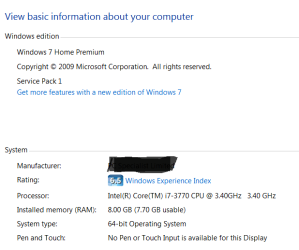
Please go to Control Panel, click "System and Security" and then "System" and post a screenshot of the top two sections. Should look something like this:

system.PNG
 

My Computer My Computer

At a glance

Microsoft Windows 7 Home Premium 64-bit 7601 ...Intel(R) Core(TM) i7-3770 CPU @ 3.40GHz8.00 GBIntel(R) HD Graphics 4000
Computer type
PC/Desktop
OS
Microsoft Windows 7 Home Premium 64-bit 7601 Multiprocessor Free Service Pack 1
CPU
Intel(R) Core(TM) i7-3770 CPU @ 3.40GHz
Motherboard
ASUSTeK COMPUTER INC. P8H77-M
Memory
8.00 GB
Graphics Card(s)
Intel(R) HD Graphics 4000
Sound Card
On Board
Monitor(s) Displays
Dell 24"
Screen Resolution
1920 x 1080
Hard Drives
(1) INTEL SSDSC2CT180A3 ATA Device (2) ST500DM002-1BD142 ATA Device (3) WDC WD3200AAKS-75L9A0 ATA Device (4) Generic- Compact Flash USB Device (5) Generic- MS/MS-Pro USB Device (6) Generic- SD/MMC USB Device (7) Generic- SM/xD-Picture USB
PSU
500w Corsair
Case
Cooler Master
Cooling
3 Fans
Keyboard
Logitech MK300
Mouse
Logitech WOM
Internet Speed
75Mb
Antivirus
Norton 360
Browser
Firefox, Opera, IE
As the clean install has failed to resolve your problem at least you had a back up ready. Were you able to revert your system?
 

My Computer My Computer

At a glance

Microsoft Windows 7 Home Premium 64-bit 7601 ...Intel(R) Core(TM) i7-3770 CPU @ 3.40GHz8.00 GBIntel(R) HD Graphics 4000
Computer type
PC/Desktop
OS
Microsoft Windows 7 Home Premium 64-bit 7601 Multiprocessor Free Service Pack 1
CPU
Intel(R) Core(TM) i7-3770 CPU @ 3.40GHz
Motherboard
ASUSTeK COMPUTER INC. P8H77-M
Memory
8.00 GB
Graphics Card(s)
Intel(R) HD Graphics 4000
Sound Card
On Board
Monitor(s) Displays
Dell 24"
Screen Resolution
1920 x 1080
Hard Drives
(1) INTEL SSDSC2CT180A3 ATA Device (2) ST500DM002-1BD142 ATA Device (3) WDC WD3200AAKS-75L9A0 ATA Device (4) Generic- Compact Flash USB Device (5) Generic- MS/MS-Pro USB Device (6) Generic- SD/MMC USB Device (7) Generic- SM/xD-Picture USB
PSU
500w Corsair
Case
Cooler Master
Cooling
3 Fans
Keyboard
Logitech MK300
Mouse
Logitech WOM
Internet Speed
75Mb
Antivirus
Norton 360
Browser
Firefox, Opera, IE
vishalsahu
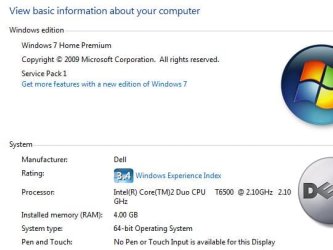
Please go to Control Panel, click "System and Security" and then "System" and post a screenshot of the top two sections. Should look something like this:

View attachment 264638

Sorry For Late reply.

Here is the screenshot u asked.

I have taken the complete backup of data. I did not try reverting back to Win 7 ultimate
 

Attachments

  • System.JPG
    System.JPG
    31.3 KB · Views: 5

My Computer My Computer

At a glance

Windows 7 ultimate SP1
Computer type
Laptop
Computer Manufacturer/Model Number
Dell
OS
Windows 7 ultimate SP1
Look in Device Manager to see what devices are without drivers.

Then download and install them from the Support Downloads webpage for your model PC. Driver Install - Device Manager

If you need help ask back. I gave you steps earlier to which you didn't reply.

What does it say when you place your cursor on the connection icon in bottom right System tray? It will either be a five-bar or tiny TV screen icon. Click on that icon to see if it offers networks to connect. If not rightclick on that icon to Run Troubleshooter.


Hey Greg ,
I am sorry that I missed to reply you, But I followed steps that you mentioned. And when I place my cursor on the Connection Icon. It says "Not Connected- Connections not available".

Thanks Greg you offered and guided me along with Mitchell
 

My Computer My Computer

At a glance

Windows 7 ultimate SP1
Computer type
Laptop
Computer Manufacturer/Model Number
Dell
OS
Windows 7 ultimate SP1
Look in Device Manager to see what devices are without drivers.

Then download and install them from the Support Downloads webpage for your model PC. Driver Install - Device Manager

If you need help ask back. I gave you steps earlier to which you didn't reply.

What does it say when you place your cursor on the connection icon in bottom right System tray? It will either be a five-bar or tiny TV screen icon. Click on that icon to see if it offers networks to connect. If not rightclick on that icon to Run Troubleshooter.


Hey Greg ,
I am sorry that I missed to reply you, But I followed steps that you mentioned. And when I place my cursor on the Connection Icon. It says "Not Connected- Connections not available".

Thanks Greg you offered and guided me along with Mitchell
Well at least you are now legal and can remain a member of the Forum so help is at hand!
Greg said "What does it say when you place your cursor on the connection icon in bottom right System tray? It will either be a five-bar or tiny TV screen icon. Click on that icon to see if it offers networks to connect. If not rightclick on that icon to Run Troubleshooter."
I note what you see when you hover over the icon but did you right click on it as Greg suggested?
 

My Computer My Computer

At a glance

Microsoft Windows 7 Home Premium 64-bit 7601 ...Intel(R) Core(TM) i7-3770 CPU @ 3.40GHz8.00 GBIntel(R) HD Graphics 4000
Computer type
PC/Desktop
OS
Microsoft Windows 7 Home Premium 64-bit 7601 Multiprocessor Free Service Pack 1
CPU
Intel(R) Core(TM) i7-3770 CPU @ 3.40GHz
Motherboard
ASUSTeK COMPUTER INC. P8H77-M
Memory
8.00 GB
Graphics Card(s)
Intel(R) HD Graphics 4000
Sound Card
On Board
Monitor(s) Displays
Dell 24"
Screen Resolution
1920 x 1080
Hard Drives
(1) INTEL SSDSC2CT180A3 ATA Device (2) ST500DM002-1BD142 ATA Device (3) WDC WD3200AAKS-75L9A0 ATA Device (4) Generic- Compact Flash USB Device (5) Generic- MS/MS-Pro USB Device (6) Generic- SD/MMC USB Device (7) Generic- SM/xD-Picture USB
PSU
500w Corsair
Case
Cooler Master
Cooling
3 Fans
Keyboard
Logitech MK300
Mouse
Logitech WOM
Internet Speed
75Mb
Antivirus
Norton 360
Browser
Firefox, Opera, IE
If it says Networks are available then you'd left click to connect to your network.

If this fails, rightclick to run Troubleshooter.

In Post #18 I gave you very specific instructions on what to do during reinstall: plug in by ethernet cable, run all Important and Optional Updates after enabling Automatically get recommended drivers and updates for your hardware (Step 3).

There was no reply to these steps as if you had just ignored them. Why? Why would you ask for help here and then just ignore or skip our suggestions. Do you have some problem that keeps you from following simple instructions?
 
Did you install the motherboard (chipset) driver before trying to install network adapter drivers?


I actually Installed Chipset after Marvel(Ethernet controller)
 

My Computer My Computer

At a glance

Windows 7 ultimate SP1
Computer type
Laptop
Computer Manufacturer/Model Number
Dell
OS
Windows 7 ultimate SP1
If it says Networks are available then you'd left click to connect to your network.

If this fails, rightclick to run Troubleshooter.

In Post #18 I gave you very specific instructions on what to do during reinstall: plug in by ethernet cable, run all Important and Optional Updates after enabling Automatically get recommended drivers and updates for your hardware (Step 3).

There was no reply to these steps as if you had just ignored them. Why? Why would you ask for help here and then just ignore or skip our suggestions. Do you have some problem that keeps you from following simple instructions?


Greg , I'll do everything again.
 

My Computer My Computer

At a glance

Windows 7 ultimate SP1
Computer type
Laptop
Computer Manufacturer/Model Number
Dell
OS
Windows 7 ultimate SP1
I would say yet again "Greg said "What does it say when you place your cursor on the connection icon in bottom right System tray? It will either be a five-bar or tiny TV screen icon. Click on that icon to see if it offers networks to connect. If not rightclick on that icon to Run Troubleshooter."
I note what you see when you hover over the icon but did you right click on it as Greg suggested?"
 

My Computer My Computer

At a glance

Microsoft Windows 7 Home Premium 64-bit 7601 ...Intel(R) Core(TM) i7-3770 CPU @ 3.40GHz8.00 GBIntel(R) HD Graphics 4000
Computer type
PC/Desktop
OS
Microsoft Windows 7 Home Premium 64-bit 7601 Multiprocessor Free Service Pack 1
CPU
Intel(R) Core(TM) i7-3770 CPU @ 3.40GHz
Motherboard
ASUSTeK COMPUTER INC. P8H77-M
Memory
8.00 GB
Graphics Card(s)
Intel(R) HD Graphics 4000
Sound Card
On Board
Monitor(s) Displays
Dell 24"
Screen Resolution
1920 x 1080
Hard Drives
(1) INTEL SSDSC2CT180A3 ATA Device (2) ST500DM002-1BD142 ATA Device (3) WDC WD3200AAKS-75L9A0 ATA Device (4) Generic- Compact Flash USB Device (5) Generic- MS/MS-Pro USB Device (6) Generic- SD/MMC USB Device (7) Generic- SM/xD-Picture USB
PSU
500w Corsair
Case
Cooler Master
Cooling
3 Fans
Keyboard
Logitech MK300
Mouse
Logitech WOM
Internet Speed
75Mb
Antivirus
Norton 360
Browser
Firefox, Opera, IE
I want to add another thing.... I had Run the Dell Diagnostics. via Dell Website. And All the tests were done. and were positive. No issue was raised by the diagnostic.
 

My Computer My Computer

At a glance

Windows 7 ultimate SP1
Computer type
Laptop
Computer Manufacturer/Model Number
Dell
OS
Windows 7 ultimate SP1
I would say yet again "Greg said "What does it say when you place your cursor on the connection icon in bottom right System tray? It will either be a five-bar or tiny TV screen icon. Click on that icon to see if it offers networks to connect. If not rightclick on that icon to Run Troubleshooter."
I note what you see when you hover over the icon but did you right click on it as Greg suggested?"


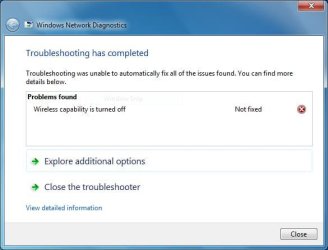
I did Mitchell , I'm afraid it still can't recognize the LAN Hardware. The Troubleshoot was only contented to Wireless and asked to switch ON the Wireless Capability. Nothing there about LAN

Here is the snip.
 

Attachments

  • Troubleshoot.JPG
    Troubleshoot.JPG
    31.5 KB · Views: 2

My Computer My Computer

At a glance

Windows 7 ultimate SP1
Computer type
Laptop
Computer Manufacturer/Model Number
Dell
OS
Windows 7 ultimate SP1

My Computer My Computer

At a glance

Windows 7 ultimate SP1
Computer type
Laptop
Computer Manufacturer/Model Number
Dell
OS
Windows 7 ultimate SP1

My Computer My Computer

At a glance

Windows 7 ultimate SP1
Computer type
Laptop
Computer Manufacturer/Model Number
Dell
OS
Windows 7 ultimate SP1
That was a step which was given you to do before reinstall. Didn't you already reinstall?

If so did you reinstall plugged in by Ethernet cable as you were told? It should have started up connected if so.

The troubleshooter is quite clear you have your wireless switched off on the laptop. Press the wireless button to turn it on. It is normally close to the power button or on the sides.
 
That was a step which was given you to do before reinstall. Didn't you already reinstall?

If so did you reinstall plugged in by Ethernet cable as you were told? It should have started up connected if so.

The troubleshooter is quite clear you have your wireless switched off on the laptop. Press the wireless button to turn it on. It is normally close to the power button or on the sides.

Greg , The Wireless is working fine.. I'm using Wi-fi to connect to internet. The area of Concern is LAN. Yup , I did Re-install but ethernet was not plugged in (I forgot to do so). But Anyways, It asked for connection as connected with my wi-fi during install.

What shall i do now to get the LAN back?
 

My Computer My Computer

At a glance

Windows 7 ultimate SP1
Computer type
Laptop
Computer Manufacturer/Model Number
Dell
OS
Windows 7 ultimate SP1
Back
Top