Solved Local Area Connection missing from network adapters, no connection

Cpwildstar1000

New member
Local time
3:39 AM
Messages
12
I have a Windows 7 Home Premium computer that is not connected to the internet. I have checked the drivers and they are all installed correctly and operational. When I go into the adapter settings there is no Local Area Connection adapter. I have included some screen shots of what I am seeing if they help.

-Chris
 

Attachments

  • Device Manager.PNG
    Device Manager.PNG
    39.7 KB · Views: 20
  • LAC no show.PNG
    LAC no show.PNG
    23.6 KB · Views: 10

My Computer My Computer

Computer type
PC/Desktop
OS
Windows 7 Home Premium x64
Welcome to the Seven Forums.

In that computer management window (while Device Manager is selected in the left pane), select View from the menu bar. Then uncheck View hidden devices. Do you see any Network adapters now?
 

My Computer My Computer

Computer type
Laptop
Computer Manufacturer/Model Number
Employer provided Dell Latitude
OS
W7 Pro SP1 64bit
CPU
i7
Memory
8GB
Graphics Card(s)
Intel HD Graphics
Hard Drives
crappy SSD
Antivirus
Employer mandated Symantec Endpoint Protection
Browser
Pale Moon 64bit, IE11 64bit & Chrome 64bit
No, the network adapter catagory does not show up
 

My Computer My Computer

Computer type
PC/Desktop
OS
Windows 7 Home Premium x64
Then it seems that the Operating System does not have the drivers needed to "see" the network adapter(s).

Who made the computer? Acer? Dell? HP?
Model number?
 

My Computer My Computer

Computer type
Laptop
Computer Manufacturer/Model Number
Employer provided Dell Latitude
OS
W7 Pro SP1 64bit
CPU
i7
Memory
8GB
Graphics Card(s)
Intel HD Graphics
Hard Drives
crappy SSD
Antivirus
Employer mandated Symantec Endpoint Protection
Browser
Pale Moon 64bit, IE11 64bit & Chrome 64bit
It is a custom built computer, the motherboard is a TA870U3+ from biostar
 

My Computer My Computer

Computer type
PC/Desktop
OS
Windows 7 Home Premium x64
If you have already installed the W7 LAN driver from here...
TA870U3+ :: Motherboard :: BIOSTAR
...and there were no errors during that install
...then I'll have to ask other forum members for help.
 

My Computer My Computer

Computer type
Laptop
Computer Manufacturer/Model Number
Employer provided Dell Latitude
OS
W7 Pro SP1 64bit
CPU
i7
Memory
8GB
Graphics Card(s)
Intel HD Graphics
Hard Drives
crappy SSD
Antivirus
Employer mandated Symantec Endpoint Protection
Browser
Pale Moon 64bit, IE11 64bit & Chrome 64bit
I don't see any type of network interface at all showing up under Network Adaptors. Usually you would see the NIC with no drivers installed but I don't even see that.

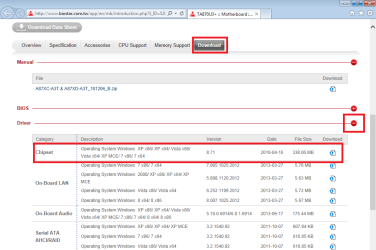
I would think that installing the chipset drivers for this board first then installing the onboard LAN drivers would allow for an internet connection.

It's always a good idea to obtain the drivers for a particular board before installing the Op system, that way if you can't get online you have the drivers handy without having to search for them using another machine.
 

My Computer My Computer

Computer type
PC/Desktop
Computer Manufacturer/Model Number
Home built
OS
Windows 7 Ult, Windows 8.1 Pro,
CPU
Q9650-4.275GHz, E8600 4.5GHz, E6750-3.8GHz
Motherboard
Evga 780i FTW
Memory
G.Skill PC2 9600 1200Mhz 5 5 5 15 2T
Graphics Card(s)
GTX480
Sound Card
Asus Xonar D2
Monitor(s) Displays
HannsG
Screen Resolution
1680X1050
Hard Drives
GSkill Phoenix Pro 120GB SSD
PSU
ThermalTake Toughpower 1000Watt modular
Case
ThermalTake XaserV
Cooling
Xigmatek S1283
Keyboard
Logitech G15
Mouse
Logitech G9
Internet Speed
T1
Try using this WinAudit - Download to locate the onboard chip. From there you can google to get a driver package for it onto a thumbdrive for install on the failing system.
 

My Computer My Computer

Computer type
PC/Desktop
OS
win 7 pro 64bit
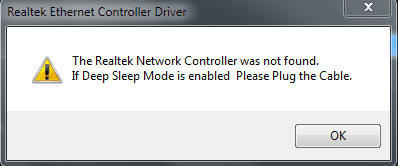
Usernameissues, I tried to install the windows 7 drivers and it came up with the error in the picture. Chev65, Dont know where i can find the chipset drivers.
 

Attachments

  • Capture.PNG
    Capture.PNG
    5.6 KB · Views: 36
Last edited:

My Computer My Computer

Computer type
PC/Desktop
OS
Windows 7 Home Premium x64
The only reference that I can find about the network in winaudit shows me what I could see in device manager in the first post. I might not be looking in the right place, never used the program.
 

My Computer My Computer

Computer type
PC/Desktop
OS
Windows 7 Home Premium x64

My Computer My Computer

Computer type
Laptop
Computer Manufacturer/Model Number
Employer provided Dell Latitude
OS
W7 Pro SP1 64bit
CPU
i7
Memory
8GB
Graphics Card(s)
Intel HD Graphics
Hard Drives
crappy SSD
Antivirus
Employer mandated Symantec Endpoint Protection
Browser
Pale Moon 64bit, IE11 64bit & Chrome 64bit
CP have you tried to update the LAN driver with the Ethernet cable connected? Are you getting lights on the RJ45 jack?
Check the BIOS under Chipset Menu - Onboard Peripherals Configuration and verify that the Realtek PCIE NIC is Enabled.
 

My Computer My Computer

Computer type
Laptop
Computer Manufacturer/Model Number
HP Pavillion DV7 laptop
OS
Win 7 Ultimate 64 bit
CPU
i5
Memory
8 GB
Hard Drives
Hitachi 1 TB HD
Crucial M4 256 MB SSD

My Computer My Computer

Computer type
PC/Desktop
Computer Manufacturer/Model Number
Home built
OS
Windows 7 Ult, Windows 8.1 Pro,
CPU
Q9650-4.275GHz, E8600 4.5GHz, E6750-3.8GHz
Motherboard
Evga 780i FTW
Memory
G.Skill PC2 9600 1200Mhz 5 5 5 15 2T
Graphics Card(s)
GTX480
Sound Card
Asus Xonar D2
Monitor(s) Displays
HannsG
Screen Resolution
1680X1050
Hard Drives
GSkill Phoenix Pro 120GB SSD
PSU
ThermalTake Toughpower 1000Watt modular
Case
ThermalTake XaserV
Cooling
Xigmatek S1283
Keyboard
Logitech G15
Mouse
Logitech G9
Internet Speed
T1
I think that it might be a bad card, because I can hook it up with an attachment to usb and it works fine. I also get the icon in the network connections panel.
 

My Computer My Computer

Computer type
PC/Desktop
OS
Windows 7 Home Premium x64
I think that it might be a bad card, because I can hook it up with an attachment to usb and it works fine. I also get the icon in the network connections panel.

This is a fairly common problem with the LAN adaptor not showing up, it could be a hardware problem although you can sometimes bring the adaptor back up by shutting down the PC completely, unplug the power cord and then push the power button to bleed all power. Restart and see if the LAN adaptor comes up again. Clearing the cmos is another way to fix this problem.
 

My Computer My Computer

Computer type
PC/Desktop
Computer Manufacturer/Model Number
Home built
OS
Windows 7 Ult, Windows 8.1 Pro,
CPU
Q9650-4.275GHz, E8600 4.5GHz, E6750-3.8GHz
Motherboard
Evga 780i FTW
Memory
G.Skill PC2 9600 1200Mhz 5 5 5 15 2T
Graphics Card(s)
GTX480
Sound Card
Asus Xonar D2
Monitor(s) Displays
HannsG
Screen Resolution
1680X1050
Hard Drives
GSkill Phoenix Pro 120GB SSD
PSU
ThermalTake Toughpower 1000Watt modular
Case
ThermalTake XaserV
Cooling
Xigmatek S1283
Keyboard
Logitech G15
Mouse
Logitech G9
Internet Speed
T1
USB attachment is wireless or Ethernet LAN? Did you go into your BIOS and verify that LAN was enabled? SHould have defaulted to enabled but that would depend on where you got your mainboard. If it is a new card - contact manufacturer because it would be under warranty.
 

My Computer My Computer

Computer type
Laptop
Computer Manufacturer/Model Number
HP Pavillion DV7 laptop
OS
Win 7 Ultimate 64 bit
CPU
i5
Memory
8 GB
Hard Drives
Hitachi 1 TB HD
Crucial M4 256 MB SSD
It was a ethernet usb. It is enabled, and the card is kinda old. I got a new card and it is working fine.
 

My Computer My Computer

Computer type
PC/Desktop
OS
Windows 7 Home Premium x64
I dont know how to mark it as solved on my phone, so ill have to try to do it later
 

My Computer My Computer

Computer type
PC/Desktop
OS
Windows 7 Home Premium x64
I dont know how to mark it as solved on my phone, so ill have to try to do it later

I'm glad the new adaptor worked. That last one gave up the ghost I guess. I'll mark as solved. :)
 

My Computer My Computer

Computer type
PC/Desktop
Computer Manufacturer/Model Number
Home built
OS
Windows 7 Ult, Windows 8.1 Pro,
CPU
Q9650-4.275GHz, E8600 4.5GHz, E6750-3.8GHz
Motherboard
Evga 780i FTW
Memory
G.Skill PC2 9600 1200Mhz 5 5 5 15 2T
Graphics Card(s)
GTX480
Sound Card
Asus Xonar D2
Monitor(s) Displays
HannsG
Screen Resolution
1680X1050
Hard Drives
GSkill Phoenix Pro 120GB SSD
PSU
ThermalTake Toughpower 1000Watt modular
Case
ThermalTake XaserV
Cooling
Xigmatek S1283
Keyboard
Logitech G15
Mouse
Logitech G9
Internet Speed
T1
Try using this WinAudit - Download to locate the onboard chip. From there you can google to get a driver package for it onto a thumbdrive for install on the failing system.

:mad:BEWARE - I downloaded that Win Audit from Softonics and the Virus Scanner lit up with "Trojan:Semnager"

Trojan.Semnager | Symantec

VIRUS LADEN SOFTWARE. Apparently my scanner cleaned the files.
 

My Computer My Computer

Computer type
PC/Desktop
OS
W7-64
Back
Top