Local Area Connection Network Cable Unplugged

yjrkanth

New member
Local time
1:28 PM
Messages
4
Trying to connect Lenovo 3000 G430 4152 Laptop using windows 7 32 bit to a wireless network

Wifi lists the available wireless networks but fails to connect. However, this laptop gets connected to
Internet through dongle. And another laptop gets connected to this home wireless setup with no hazzles.

Coming to this problematic lenovo laptop: there was no problem connecting this laptop through wireless a few days back but today it is giving this trouble - Network connections tags Local Area Connection as "Network Cable Unplugged"

I've downloaded drivers from Lenovo website, but no result.

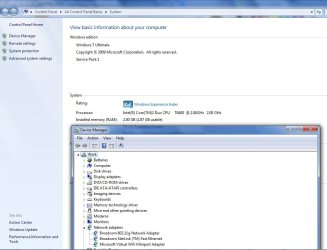
Attached screenshots.

Thanks for your help!
 

Attachments

  • Net Con.jpg
    Net Con.jpg
    93.7 KB · Views: 9
  • Sys.jpg
    Sys.jpg
    151 KB · Views: 10

My Computer

Computer type
Laptop
Computer Manufacturer/Model Number
Lenovo
OS
Windows 7 Ultimate 32bit; Service Pack 1
CPU
Intel Core 2 Duo T6400
Memory
2 GB
Antivirus
Avira
Browser
chrome
Hi...I did try solutions provided here in this forum but the issue remains...

I made changes to speed option of LAN adapter to 100 full duplex and Awol too 100Mbps

Any other working solution might help...

I want this laptop to use wireless network

appreciate your help buddies...thanks!
 

My Computer

Computer type
Laptop
Computer Manufacturer/Model Number
Lenovo
OS
Windows 7 Ultimate 32bit; Service Pack 1
CPU
Intel Core 2 Duo T6400
Memory
2 GB
Antivirus
Avira
Browser
chrome
Welcome to Seven Forums,

Might be worth to try something simple to start off, it won't hurt to do a System Restore. Go back to a point when your Xbox was able to connect to your laptop.

Verify that all your Network Services are Started from Control Panel=> Performance and Maintenance=> Admin Tools=> Services. Check the Dependencies Tab as well and make sure that the Services are all Started.
• COM+ Event System (for WZC issues)
• Computer Browser
• DHCP Client
• DNS Client
• Network Connections
• Network Location Awareness
• Remote Procedure Call (RPC)
• Server
• TCP/IP Netbios helper
• WLAN AutoConfig ( Vista wireless configurations only)
• Workstation
 

My Computer

Computer Manufacturer/Model Number
Lenovo Desktop/Samsung Laptop
OS
Win7 & Win8 64bit
CPU
Intel i5
Internet Speed
Charter-20 Mbps
Antivirus
Avast
Browser
FF, IE9 and Chrome

My Computer

Computer type
Laptop
Computer Manufacturer/Model Number
Lenovo
OS
Windows 7 Ultimate 32bit; Service Pack 1
CPU
Intel Core 2 Duo T6400
Memory
2 GB
Antivirus
Avira
Browser
chrome
Apologize for the late reply, I was gone due to a very hectic schedule. See if there's any Mac filtering enabled from the router setting, try to disable it for now. For your wireless issue, try changing the wireless mode from the router to G or B/G? Also, try changing the wireless security (WPA, WPA2, etc...).

If above recommendation is unsuccessful, you may also reset the TCP/IP and Winsock.

Click on Start=> All Programs => Accessories and right click on Command Prompt, select "Run as Administrator" to open a command prompt.
Reset IPv4 TCP/IP stack to installation defaults. netsh int ipv4 reset reset.log press enter
Reset IPv6 TCP/IP stack to installation defaults. netsh int ipv6 reset reset.log press enter
Reset WINSOCK entries to installation defaults: netsh winsock reset catalog press enter
Restart the computer after.
Thanks for the reply, 2xg!

issue remains unresolved though..

Also I tried out solutions from here Network cable unplugged but isn't [Solved]

wish something will resolve this issue....
 

My Computer

Computer Manufacturer/Model Number
Lenovo Desktop/Samsung Laptop
OS
Win7 & Win8 64bit
CPU
Intel i5
Internet Speed
Charter-20 Mbps
Antivirus
Avast
Browser
FF, IE9 and Chrome
Hi buddy....

Tried your suggestion on resetting TCP/IP and Winsock, but skipped suggested steps for router settings as present configuration works well for another laptop running window 7.

At present, dongle lets me stay connected with internet. Looking forward to the solution for this irksome trouble and to using wifi.

Many thanks for your patience!
 

My Computer

Computer type
Laptop
Computer Manufacturer/Model Number
Lenovo
OS
Windows 7 Ultimate 32bit; Service Pack 1
CPU
Intel Core 2 Duo T6400
Memory
2 GB
Antivirus
Avira
Browser
chrome
Back
Top