Local Area Connection Status - Create Shortcut

How to Create a "Local Area Network Connection Status" Shortcut in Windows 7 and Windows 8

   Information
This will show you how to create a Local Area Network Connection Status shortcut to view status information, such as connection duration, speed, and amounts of data transmitted and received; and use any diagnostic tools available for a particular network connection in Windows 7 and Windows 8.


EXAMPLE: Local Area Connection Status
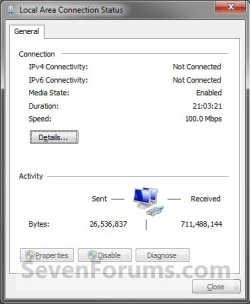
Example.jpg


Here's How:
1. Right click on the Network icon in the Notification area, and click on Open Network and Sharing Center. (see screenshot below)
A) Go to step 3.
icon.jpg
OR

2. Open the Control Panel (icons view), and click on the Network and Sharing Center icon.

3. Click on the Change adapter settings link in the left blue pane. (see screenshot below)
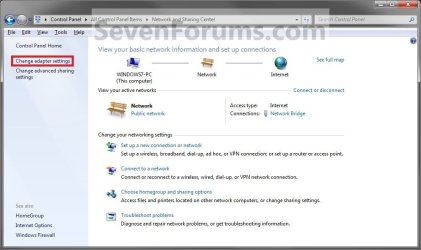
Step1.jpg
4. Right click on the network connection that you want to have a Local Area Connection Status shortcut for, then click on Create Shortcut. (see screenshot below)
Step2.jpg
5. Click on Yes for the shortcut to be placed on the desktop. (see screenshot below)
NOTE: If you click No, then the shortcut will not be created.
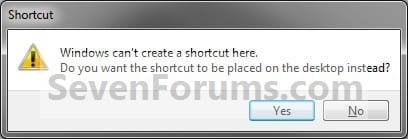
Step3.jpg
6. You can now place the shortcut where you like for easy use.
That's it,
Shawn


Last edited:
Now, how can I pin this shortcut to the taskbar?
 

My Computer

OS
Windows 7 Ultimate SP1 32-bit
CPU
Intel Core i5 CPU - 760 @2.80 GHz
Motherboard
Asus P7P55 D E-LX
Memory
4 GB (3.5 usable)
Graphics Card(s)
Nvidia GTX 460 768MB
Sound Card
Via VT1708S
Monitor(s) Displays
LG Flatron E2350 LCD LED
Screen Resolution
1920x1080
Hard Drives
Seagate Baraccuda 320 GB 7200 SATA
PSU
Gigabyte Superb 720
Case
Coolermaster CM690 Nvidia Edition
Cooling
6x120mm LED fans
Keyboard
Dell
Mouse
A4Tech X-710BH
Internet Speed
2.05 Mbps
Other Info
Coolermaster Hyper TX3 CPU air cooler
Hello Edwarde, and welcome to Seven Forums.

You could enable Quick Launch, and place the shortcut in the Quick Launch folder.

Hope this helps,
Shawn
 

My Computer

Computer type
PC/Desktop
Computer Manufacturer/Model Number
Self built custom
OS
64-bit Windows 11 Pro for Workstations
CPU
Intel i7-8700K OC'd to 5 GHz
Motherboard
ASUS ROG Maximus XI Formula Z390
Memory
64 GB (4x16GB) G.SKILL TridentZ RGB DDR4 3600 MHz
Graphics Card(s)
ASUS ROG-STRIX-GTX1080TI-O11G-GAMING
Sound Card
Integrated
Monitor(s) Displays
2 x Samsung Odyssey G7 27"
Screen Resolution
2560x1440
Hard Drives
1TB Samsung 990 PRO M.2,
4TB Samsung 990 PRO PRO M.2,
TerraMaster F8 SSD Plus NAS
PSU
Seasonic Prime Titanium 850W
Case
Thermaltake Core P3
Cooling
Corsair Hydro H115i
Keyboard
Logitech wireless K800
Mouse
Logitech MX Master 4
Internet Speed
2 Gb/s Download and 100 Mb/s Upload
Antivirus
Malwarebyte Anti-Malware Premium
Browser
Google Chrome
Other Info
Logitech Z625 speaker system,
Logitech BRIO 4K Pro webcam,
HP Color LaserJet Pro MFP M477fdn,
APC SMART-UPS RT 1000 XL - SURT1000XLI,
Galaxy S23 Plus phone
Thanks for the reply but I'd rather like my shortcuts pinned to the taskbar which is a neat feature of Windows 7. Thank you for your time.
 

My Computer

OS
Windows 7 Ultimate SP1 32-bit
CPU
Intel Core i5 CPU - 760 @2.80 GHz
Motherboard
Asus P7P55 D E-LX
Memory
4 GB (3.5 usable)
Graphics Card(s)
Nvidia GTX 460 768MB
Sound Card
Via VT1708S
Monitor(s) Displays
LG Flatron E2350 LCD LED
Screen Resolution
1920x1080
Hard Drives
Seagate Baraccuda 320 GB 7200 SATA
PSU
Gigabyte Superb 720
Case
Coolermaster CM690 Nvidia Edition
Cooling
6x120mm LED fans
Keyboard
Dell
Mouse
A4Tech X-710BH
Internet Speed
2.05 Mbps
Other Info
Coolermaster Hyper TX3 CPU air cooler
It would be pinned to the taskbar inside Quick Launch though.
 

My Computer

Computer type
PC/Desktop
Computer Manufacturer/Model Number
Self built custom
OS
64-bit Windows 11 Pro for Workstations
CPU
Intel i7-8700K OC'd to 5 GHz
Motherboard
ASUS ROG Maximus XI Formula Z390
Memory
64 GB (4x16GB) G.SKILL TridentZ RGB DDR4 3600 MHz
Graphics Card(s)
ASUS ROG-STRIX-GTX1080TI-O11G-GAMING
Sound Card
Integrated
Monitor(s) Displays
2 x Samsung Odyssey G7 27"
Screen Resolution
2560x1440
Hard Drives
1TB Samsung 990 PRO M.2,
4TB Samsung 990 PRO PRO M.2,
TerraMaster F8 SSD Plus NAS
PSU
Seasonic Prime Titanium 850W
Case
Thermaltake Core P3
Cooling
Corsair Hydro H115i
Keyboard
Logitech wireless K800
Mouse
Logitech MX Master 4
Internet Speed
2 Gb/s Download and 100 Mb/s Upload
Antivirus
Malwarebyte Anti-Malware Premium
Browser
Google Chrome
Other Info
Logitech Z625 speaker system,
Logitech BRIO 4K Pro webcam,
HP Color LaserJet Pro MFP M477fdn,
APC SMART-UPS RT 1000 XL - SURT1000XLI,
Galaxy S23 Plus phone
I now have Local Area Connection shortcut pinned inside Quick Launch, now how do I pin the shortcut in my taskbar?
 

My Computer

OS
Windows 7 Ultimate SP1 32-bit
CPU
Intel Core i5 CPU - 760 @2.80 GHz
Motherboard
Asus P7P55 D E-LX
Memory
4 GB (3.5 usable)
Graphics Card(s)
Nvidia GTX 460 768MB
Sound Card
Via VT1708S
Monitor(s) Displays
LG Flatron E2350 LCD LED
Screen Resolution
1920x1080
Hard Drives
Seagate Baraccuda 320 GB 7200 SATA
PSU
Gigabyte Superb 720
Case
Coolermaster CM690 Nvidia Edition
Cooling
6x120mm LED fans
Keyboard
Dell
Mouse
A4Tech X-710BH
Internet Speed
2.05 Mbps
Other Info
Coolermaster Hyper TX3 CPU air cooler
There's not an option to pin the shortcut directly to the taskbar normally. Quick Launch is the workaround to have the shortcut on the taskbar.

You would use step 5 in OPTION ONE in the tutorial to drag Quick Launch wider or narrower for how many shortcuts in Quick Launch that you want to see on the taskbar.

http://www.sevenforums.com/tutorials/888-quick-launch-enable-disable.html
 

My Computer

Computer type
PC/Desktop
Computer Manufacturer/Model Number
Self built custom
OS
64-bit Windows 11 Pro for Workstations
CPU
Intel i7-8700K OC'd to 5 GHz
Motherboard
ASUS ROG Maximus XI Formula Z390
Memory
64 GB (4x16GB) G.SKILL TridentZ RGB DDR4 3600 MHz
Graphics Card(s)
ASUS ROG-STRIX-GTX1080TI-O11G-GAMING
Sound Card
Integrated
Monitor(s) Displays
2 x Samsung Odyssey G7 27"
Screen Resolution
2560x1440
Hard Drives
1TB Samsung 990 PRO M.2,
4TB Samsung 990 PRO PRO M.2,
TerraMaster F8 SSD Plus NAS
PSU
Seasonic Prime Titanium 850W
Case
Thermaltake Core P3
Cooling
Corsair Hydro H115i
Keyboard
Logitech wireless K800
Mouse
Logitech MX Master 4
Internet Speed
2 Gb/s Download and 100 Mb/s Upload
Antivirus
Malwarebyte Anti-Malware Premium
Browser
Google Chrome
Other Info
Logitech Z625 speaker system,
Logitech BRIO 4K Pro webcam,
HP Color LaserJet Pro MFP M477fdn,
APC SMART-UPS RT 1000 XL - SURT1000XLI,
Galaxy S23 Plus phone
It's not what I had in mind though, but for now it'll do. Thank you very much for your time and patience.
 

My Computer

OS
Windows 7 Ultimate SP1 32-bit
CPU
Intel Core i5 CPU - 760 @2.80 GHz
Motherboard
Asus P7P55 D E-LX
Memory
4 GB (3.5 usable)
Graphics Card(s)
Nvidia GTX 460 768MB
Sound Card
Via VT1708S
Monitor(s) Displays
LG Flatron E2350 LCD LED
Screen Resolution
1920x1080
Hard Drives
Seagate Baraccuda 320 GB 7200 SATA
PSU
Gigabyte Superb 720
Case
Coolermaster CM690 Nvidia Edition
Cooling
6x120mm LED fans
Keyboard
Dell
Mouse
A4Tech X-710BH
Internet Speed
2.05 Mbps
Other Info
Coolermaster Hyper TX3 CPU air cooler
You're welcome. I wished that it was. If I find something that may allow you to, I'll post back with it. :)
 

My Computer

Computer type
PC/Desktop
Computer Manufacturer/Model Number
Self built custom
OS
64-bit Windows 11 Pro for Workstations
CPU
Intel i7-8700K OC'd to 5 GHz
Motherboard
ASUS ROG Maximus XI Formula Z390
Memory
64 GB (4x16GB) G.SKILL TridentZ RGB DDR4 3600 MHz
Graphics Card(s)
ASUS ROG-STRIX-GTX1080TI-O11G-GAMING
Sound Card
Integrated
Monitor(s) Displays
2 x Samsung Odyssey G7 27"
Screen Resolution
2560x1440
Hard Drives
1TB Samsung 990 PRO M.2,
4TB Samsung 990 PRO PRO M.2,
TerraMaster F8 SSD Plus NAS
PSU
Seasonic Prime Titanium 850W
Case
Thermaltake Core P3
Cooling
Corsair Hydro H115i
Keyboard
Logitech wireless K800
Mouse
Logitech MX Master 4
Internet Speed
2 Gb/s Download and 100 Mb/s Upload
Antivirus
Malwarebyte Anti-Malware Premium
Browser
Google Chrome
Other Info
Logitech Z625 speaker system,
Logitech BRIO 4K Pro webcam,
HP Color LaserJet Pro MFP M477fdn,
APC SMART-UPS RT 1000 XL - SURT1000XLI,
Galaxy S23 Plus phone
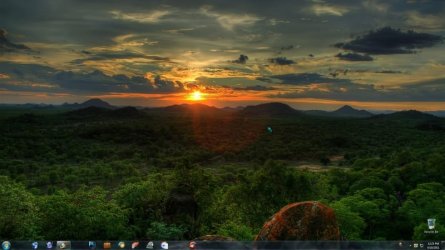
A downscaled image of the finished product. Thanks again.desktop screenshot.jpg
 

My Computer

OS
Windows 7 Ultimate SP1 32-bit
CPU
Intel Core i5 CPU - 760 @2.80 GHz
Motherboard
Asus P7P55 D E-LX
Memory
4 GB (3.5 usable)
Graphics Card(s)
Nvidia GTX 460 768MB
Sound Card
Via VT1708S
Monitor(s) Displays
LG Flatron E2350 LCD LED
Screen Resolution
1920x1080
Hard Drives
Seagate Baraccuda 320 GB 7200 SATA
PSU
Gigabyte Superb 720
Case
Coolermaster CM690 Nvidia Edition
Cooling
6x120mm LED fans
Keyboard
Dell
Mouse
A4Tech X-710BH
Internet Speed
2.05 Mbps
Other Info
Coolermaster Hyper TX3 CPU air cooler
At step 4, where Shawn says to right click & create a Shortcut, I just did something else instead. I dragged the icon to my Startup folder on the Start Menu. Not quite the question this Tutorial set out to answer, but I suspect you could do the same to pin it elsewhere, like on the Taskbar. It would be interesting to hear if that indeed does what you want. I note that it's been over a year since you posted so maybe there's been changes Microsoft has made to the software to allow things that it didn't used to allow.
 

My Computer

Computer type
PC/Desktop
Computer Manufacturer/Model Number
ASUS (assembled myself)
OS
Windows 7 Professional 64-bit
CPU
Intel Core i7-4790K Quad CPU @ 4.00 GHz
Motherboard
ASUS Z97-AR, Intel Z97 Express chipset, ATX form factor
Memory
2x4G DDR3 1600MHz DIMMs
Graphics Card(s)
Intel HD Graphics 4600 on mobo; NVidia GeForce GT 710 PCI-E
Sound Card
Realtek High Definition Audio, integrated on mobo
Monitor(s) Displays
Dell SE2417HGX, 20.5"x11.5" viewable area; 32" Toshiba HDTV
Screen Resolution
1920 x 1080 @ 60 Hz, 32-bit color depth
Hard Drives
Western Digital 500G SATA
Seagate 150G SATA
2 x Seagate 6T SATA
2 x Seagate 18T SATA
PSU
EVGA 500B (500 Watts)
Case
NZXT H230 mid-tower
Cooling
CPU fan, PSU fan, 2 case fans, NVidia fan
Keyboard
Perixx 513H
Mouse
Touch pad integrated into keyboard
Internet Speed
Intel Ethernet Conn(2)I218-V, on mobo, ISP=cableTV 400Mbps
Antivirus
Comodo
Browser
Firefox
Other Info
Ext'l DVD rec: LG HL-DT-ST DVDRAM GP10NB20 USB
Monitor conn to VideoPort via HDMI-to-VideoPort adap
Realtek ALC892 8-channel High Definition Audio CODEC featuring Crystal Sound 2
Audio conn to surr recv via 25' optical S/PDIF TOSLINK audio cable
SYSINFO: 11 NIC ports but only 1 actively conn via DHCP to ISP
ISP bundled w/ cable TV+cell, claims 400Mbps,
but really 50 million bytes/sec
Hello Willy,

Yes, you could create the same shortcut by dragging it like that as well. Neither one will have a pin to Start Menu/Taskbar option though. However, you could add it to Quick Launch if you wanted it on the taskbar, or manually move the shortcut in the Start Menu. :)
 

My Computer

Computer type
PC/Desktop
Computer Manufacturer/Model Number
Self built custom
OS
64-bit Windows 11 Pro for Workstations
CPU
Intel i7-8700K OC'd to 5 GHz
Motherboard
ASUS ROG Maximus XI Formula Z390
Memory
64 GB (4x16GB) G.SKILL TridentZ RGB DDR4 3600 MHz
Graphics Card(s)
ASUS ROG-STRIX-GTX1080TI-O11G-GAMING
Sound Card
Integrated
Monitor(s) Displays
2 x Samsung Odyssey G7 27"
Screen Resolution
2560x1440
Hard Drives
1TB Samsung 990 PRO M.2,
4TB Samsung 990 PRO PRO M.2,
TerraMaster F8 SSD Plus NAS
PSU
Seasonic Prime Titanium 850W
Case
Thermaltake Core P3
Cooling
Corsair Hydro H115i
Keyboard
Logitech wireless K800
Mouse
Logitech MX Master 4
Internet Speed
2 Gb/s Download and 100 Mb/s Upload
Antivirus
Malwarebyte Anti-Malware Premium
Browser
Google Chrome
Other Info
Logitech Z625 speaker system,
Logitech BRIO 4K Pro webcam,
HP Color LaserJet Pro MFP M477fdn,
APC SMART-UPS RT 1000 XL - SURT1000XLI,
Galaxy S23 Plus phone
Hello,

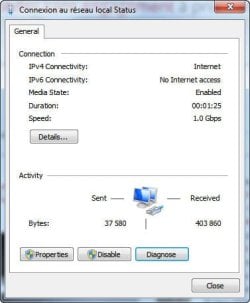
I'm using a Win7 64bits desktop machine. So, I'm not Wifi connected, I'm cable network connected (higher speed). As time to time I've to be NOT connected. The "Local Area Network Connection Status" has no "Enable" button (see here bellow attached image). So, I've to physically disconnect and connect the cable from my machine.
1) After disabling the via the "Local Area Network Connection Status", It is possible to toggle the "Disable" to "Enable"?
If not, how can I enable the Local Area Network Connection easily like for the wireless?

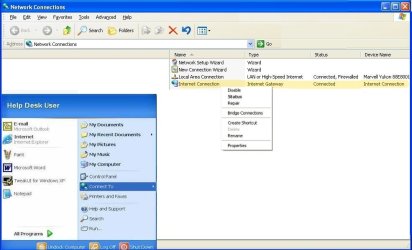
2) It is possible to display both shortcuts (wireless and Local) to "Connect to" as WinXP?
and Enable/Disable from those shortcuts?

Regards
 

Attachments

  • NetworkConnections.jpg
    NetworkConnections.jpg
    59.1 KB · Views: 687
  • Network_Connexion.jpg
    Network_Connexion.jpg
    20.8 KB · Views: 2,492

My Computer

OS
Windows 7 Ultimate x32

My Computer

Computer type
PC/Desktop
Computer Manufacturer/Model Number
Self built custom
OS
64-bit Windows 11 Pro for Workstations
CPU
Intel i7-8700K OC'd to 5 GHz
Motherboard
ASUS ROG Maximus XI Formula Z390
Memory
64 GB (4x16GB) G.SKILL TridentZ RGB DDR4 3600 MHz
Graphics Card(s)
ASUS ROG-STRIX-GTX1080TI-O11G-GAMING
Sound Card
Integrated
Monitor(s) Displays
2 x Samsung Odyssey G7 27"
Screen Resolution
2560x1440
Hard Drives
1TB Samsung 990 PRO M.2,
4TB Samsung 990 PRO PRO M.2,
TerraMaster F8 SSD Plus NAS
PSU
Seasonic Prime Titanium 850W
Case
Thermaltake Core P3
Cooling
Corsair Hydro H115i
Keyboard
Logitech wireless K800
Mouse
Logitech MX Master 4
Internet Speed
2 Gb/s Download and 100 Mb/s Upload
Antivirus
Malwarebyte Anti-Malware Premium
Browser
Google Chrome
Other Info
Logitech Z625 speaker system,
Logitech BRIO 4K Pro webcam,
HP Color LaserJet Pro MFP M477fdn,
APC SMART-UPS RT 1000 XL - SURT1000XLI,
Galaxy S23 Plus phone
TNX Brink,

I've already the link but I'm looking to PIN it to Start/Connect To
Regards
 

My Computer

OS
Windows 7 Ultimate x32

My Computer

Computer type
PC/Desktop
Computer Manufacturer/Model Number
Self built custom
OS
64-bit Windows 11 Pro for Workstations
CPU
Intel i7-8700K OC'd to 5 GHz
Motherboard
ASUS ROG Maximus XI Formula Z390
Memory
64 GB (4x16GB) G.SKILL TridentZ RGB DDR4 3600 MHz
Graphics Card(s)
ASUS ROG-STRIX-GTX1080TI-O11G-GAMING
Sound Card
Integrated
Monitor(s) Displays
2 x Samsung Odyssey G7 27"
Screen Resolution
2560x1440
Hard Drives
1TB Samsung 990 PRO M.2,
4TB Samsung 990 PRO PRO M.2,
TerraMaster F8 SSD Plus NAS
PSU
Seasonic Prime Titanium 850W
Case
Thermaltake Core P3
Cooling
Corsair Hydro H115i
Keyboard
Logitech wireless K800
Mouse
Logitech MX Master 4
Internet Speed
2 Gb/s Download and 100 Mb/s Upload
Antivirus
Malwarebyte Anti-Malware Premium
Browser
Google Chrome
Other Info
Logitech Z625 speaker system,
Logitech BRIO 4K Pro webcam,
HP Color LaserJet Pro MFP M477fdn,
APC SMART-UPS RT 1000 XL - SURT1000XLI,
Galaxy S23 Plus phone
This may be partially relevant to what Coucou has mentioned. A handful of times I have Resumed my system from Hibernate and I have found that my Local Area Connection Shortcut in the Start Menu (specifically, in the Startup folder) refuses to open. Normally, after a Resume from Hibernate, that applet is not open. I always have it open but going into Hibernate closes it. So when I Resume, I have to manually relaunch it. I do this from my Startup folder. If I'm doing a full Boot or Restart, the Startup folder gets processed & the Local Area Connection applet does launch. But apparently Resume from Hibernate does not look at the Startup folder.

Anyway, like I said, I've occasionally encountered Resumptions that don't allow the applet to launch. I've found when I drill down from Control Panel, as Brink describes in the original tutorial, and launch the Network and Sharing Center, that my network adapter has become disabled. I don't know why this happens. Normally, the 3 lights on my DSL "modem" are on, meaning my ISP has "trained up" my connection. But Windows thinks the connection is disabled. Like I say, this is just a once in a while thing. Usually the connection is enabled as expected after a Resumption. But when the problem occurs, I correct it like this. From the Network and Sharing Center, click the Troubleshoot Problems link. Then let the system do its thing. You'd think there would be a simple re-enable button somewhere, but the only way I have found to do a re-enable is to let the system run its automatic Troubleshooting song & dance. Which does work, and then I can launch my Local Area Connection Shortcut in the Startup folder. There are both Disable and Diagnose buttons on the applet, and presumably the Disable button changes to an Enable button. But when this problem occurs it's a bit of a Catch-22 because I can't even get the applet to open so I don't have access to those buttons, hence my Troubleshooting solution.
 

My Computer

Computer type
PC/Desktop
Computer Manufacturer/Model Number
ASUS (assembled myself)
OS
Windows 7 Professional 64-bit
CPU
Intel Core i7-4790K Quad CPU @ 4.00 GHz
Motherboard
ASUS Z97-AR, Intel Z97 Express chipset, ATX form factor
Memory
2x4G DDR3 1600MHz DIMMs
Graphics Card(s)
Intel HD Graphics 4600 on mobo; NVidia GeForce GT 710 PCI-E
Sound Card
Realtek High Definition Audio, integrated on mobo
Monitor(s) Displays
Dell SE2417HGX, 20.5"x11.5" viewable area; 32" Toshiba HDTV
Screen Resolution
1920 x 1080 @ 60 Hz, 32-bit color depth
Hard Drives
Western Digital 500G SATA
Seagate 150G SATA
2 x Seagate 6T SATA
2 x Seagate 18T SATA
PSU
EVGA 500B (500 Watts)
Case
NZXT H230 mid-tower
Cooling
CPU fan, PSU fan, 2 case fans, NVidia fan
Keyboard
Perixx 513H
Mouse
Touch pad integrated into keyboard
Internet Speed
Intel Ethernet Conn(2)I218-V, on mobo, ISP=cableTV 400Mbps
Antivirus
Comodo
Browser
Firefox
Other Info
Ext'l DVD rec: LG HL-DT-ST DVDRAM GP10NB20 USB
Monitor conn to VideoPort via HDMI-to-VideoPort adap
Realtek ALC892 8-channel High Definition Audio CODEC featuring Crystal Sound 2
Audio conn to surr recv via 25' optical S/PDIF TOSLINK audio cable
SYSINFO: 11 NIC ports but only 1 actively conn via DHCP to ISP
ISP bundled w/ cable TV+cell, claims 400Mbps,
but really 50 million bytes/sec
Back
Top