
Solved Local Area Connections Properties ?

JoeN

New member
Member
Local time
3:56 AM
Messages
68
Windows 7 64bit desk top machine (not having any problems) just a question

In the Local Area Connections Properties dialog box there are quite a few items and all are checked (see image below), I know I can only "disable" them in Win. 7 as opposed to "deleting" them in XP, I am NOT on a "network" so I do not see why I need the following items "enabled"

Client for M$ networks
QoS packets Scheduler
File & print sharing
Link Layer topology discovery mapper
Link Layer topology discovery responder

Just looking for some input from this forum (if this is posted in the wrong area, let me know and I will move it)

Thanks

Joe
 

Attachments
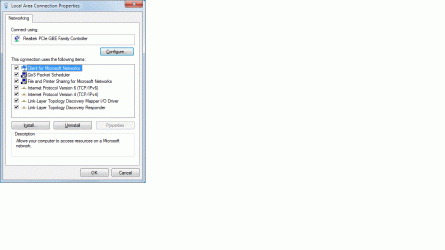
  • Local area connections prop. .gif
    Local area connections prop. .gif
    41.9 KB · Views: 0

My Computer

Computer type
PC/Desktop
Computer Manufacturer/Model Number
custom build
OS
win. 7 64 bit Home Premium
CPU
Intel i7 920 overclocked
Motherboard
Asus P6T
Memory
Corsair 6GB overclocked
Graphics Card(s)
Nivida GTX 960
Monitor(s) Displays
ViewSonic 2365 @ 1920 x 1080 DVI
Hard Drives
80 GB Segate
Antivirus
Avast
Browser
IE & Firefox
To begin with, you're certainly part of some "network" right now, internet at the very least I suppose (correct me if I'm wrong). Internet connections are exactly the same as having other computers in your local network and many network components are needed in the same fashion. Others can be disabled or unistalled as aren't used for internet-only access.
Some of them can be completely deleted, others don't and only allows to disable.

As for the services you mention, "Client for Microsoft networks" and "File and print sharing" can be certainly disabled (you won't be connecting to other Windows computers anyway). "IPv6" protocol is also almost useless as of now, all internet websites use IPv4 with a handful of them accepting both.
No idea about the others.
 

My Computer

Computer type
Laptop
Computer Manufacturer/Model Number
Toshiba Sattelite A665-S6092
OS
Windows 7 Ultimate x64
CPU
Intel Core i7-740QM
Memory
8 GB DDR3
Graphics Card(s)
NVIDIA GeForce 330GT
Screen Resolution
1366x768
Hard Drives
Samsung 840 SSD 500GB
1TB USB3 external HD
Cooling
Coolermaster Notepal U3 notebook cooling pad
Internet Speed
3mbps ASDL
Antivirus
ClamWin 0.98.7
Browser
Opera 12.17 x86 (main), Firefox 38 (sec), IE11 (last resort)
Alejandro85 - Thanks for the reply, yes , the only "network" I am connected to is the "internet".

I have just been looking for something to "tweak" on my computer, in the past I have done all of these "tweaks" on my XP machine, I realize that Win. 7 64bit is a different element all together, having said that here is what I have done and found -

1 - Unchecked (does look like I can "uninstall" if I want) both - Client for M$ networks & File & print sharing (no adverse affect so far)

2 - As for QoS packets Scheduler, leaving this alone "checked" apparently this only comes into play (20% reserve) when a QoS app is running such as Win. Update, Media streaming etc.

3 - Link Layer topology discovery mapper & Link Layer topology discovery responder , looks like this has to do with the "network map", because I have left my computer set as a "public" network my "network map" does NOT show up - if I were to set my computer as a "home network" and leave the 2 items "checked" when I clicked on "see full map" my network map would appear, but "unchecking" these 2 items along with having a "home network" then the "network map" would NOT appear and "error" message would start appearing ( leaving "checked" for now)

Joe
 

My Computer

Computer type
PC/Desktop
Computer Manufacturer/Model Number
custom build
OS
win. 7 64 bit Home Premium
CPU
Intel i7 920 overclocked
Motherboard
Asus P6T
Memory
Corsair 6GB overclocked
Graphics Card(s)
Nivida GTX 960
Monitor(s) Displays
ViewSonic 2365 @ 1920 x 1080 DVI
Hard Drives
80 GB Segate
Antivirus
Avast
Browser
IE & Firefox
Back
Top