Local Area Network doesn't have a valid IP configuration

Gagv

New member
Local time
8:33 AM
Messages
6
A few days ago I arrived to Germany to a study for a semester. In the house where I'm staying there's a modem with a Lan Cable that I'm supposed to use. I plugged it the day I arrived and I notices I had no Internet connection. After running a few diagnoses the system told me that "Local Area network" doesn't have a valid IP configuration. I don't know why this message appears and why can't I connect to the Internet. I've checked so many forums and I'm starting to believe there's no solution to my problem.
I've checked that the IP is in automatic configuration and I've also tried to connect with other modems what I obtain the same result....
PLEASE HELP ME, I will fail all my courses without Internet
 

My Computer

OS
windows 7 enterprise 64 bit
You might need to power down the laptop, then power off the modem. Keep the modem powered off for about 30 seconds then power it back on. let the lights cycle through until you see connectivity on the modem, then (After plugging the ethernet cable into the LAN slot) power the laptop back on.

If it still doesn't work, you may want to check for Antivirus/Security software/Static Ips.
 

My Computer

OS
7 Pro
It doesn't work, what did you say about antivirus?
 

My Computer

OS
windows 7 enterprise 64 bit
Some antivirus softwares my conflict with new ack requests to dhcp servers (your modem in this case).
Simply disabling it may not help, however. What antivirus and security sofware(s) are you running?
 

My Computer

OS
7 Pro
Some useful information here:
"Wireless Network Connection doesn't have a valid IP - Microsoft Answers
.
.


Method 1:
Fixing Common networking connectivity issue:
This article in for Windows Vista but applies for Windows 7 also.

To reset the TCP/IP stack go to this article and either click on "Fix it for me" or follow the instructions to fix it yourself:
How to reset Internet Protocol (TCP/IP)
Method 3:
You could also try ipconfig/release an renew command from the command prompt.
Follow the steps mentioned below.


1. Click on start button.
2. Type cmd in the start search box and press enter.
3. Right-click on the “cmd” and run as administrator.
4. Type the commands “ipconfig /release” and “ipconfig /renew” without the " "
 

My Computer

Computer type
PC/Desktop
Computer Manufacturer/Model Number
Packard Bell
OS
Windows 7 Home Premium 64bit
CPU
Intel(R) Core(TM) i3-2120 CPU @ 3.30GHz
Motherboard
Packard Bell IPISB-AG
Memory
3.00 GB
Graphics Card(s)
(1) Intel(R) HD Graphics (2) VNC Mirror Driver
Sound Card
Realtek High Definition Audio
Monitor(s) Displays
AIO LCD
Screen Resolution
1920 x 1080
Hard Drives
WDC WD10EADX-22TDHB0 ATA Device
Fixed hard disk media
4 partitions
931.51 GB
Keyboard
Wireless
Mouse
Wireless
Antivirus
Microsoft Security Essentials
Browser
IE; Firefox
Other Info
Also:
Samsung N220 Plus Netbook - Windows 7 Home
HP laptop
iPad 5
I'm running the Mac Affee and supose the security softwares from windows
 

My Computer

OS
windows 7 enterprise 64 bit
If it were me? I would uninstall mcafee and related security suites then try again. once successfully connected, I would reinstall antivirus.

Can you try Irene's suggestions before continuing?
 

My Computer

OS
7 Pro
Irene[s suggestion didn't work. I can't reinstall mac Afee because I don't have the driver here I'm studying far away from home. Could it be any other possibility?
 

My Computer

OS
windows 7 enterprise 64 bit
You're plugging directly into a modem without a router? Try the computer via wire at a different location. Try changing the wire. Disable McAfee in MSConfig/Startup (or lose it altogether and switch to MS Security Essentials, free). Open a command window and enter ipconfig /all > %USERPROFILE%\desktop\ip.txt and attach the output file here.
 

My Computer

Computer type
PC/Desktop
Computer Manufacturer/Model Number
dell precision t3400 tower
OS
Linux Lite 3.2 x64; Windows 7, 8.1
CPU
Core2Duo 2.4
Memory
6GB ddr2
Graphics Card(s)
nVidia
Hard Drives
120gb SSD, 1TB HD, 2TB HD; sata II
Internet Speed
12/2
Browser
Vivaldi, Slimjet (Chromium) x64
I dont think it's my mc affe I think it's a problem with the network on my student residence. If I buy a router and turn the connection into a wireless ocnnection. Will it work?
 

My Computer

OS
windows 7 enterprise 64 bit
I would suggest that AFTER you connect the LAN cable between the computer and modem, you power off the modem for 30 seconds, then power it back up. Have the computer turned on while you do this.
 

My Computer

OS
Windows 7 Professional x64
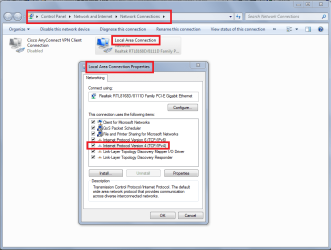
Try pressing the Start button and type in the search box View network
- select View Network Connections from the list which appears above
- right-click Local Area Connection and select Bridge Connections.

Also, from the same right-click sub-menu, touch properties and see that the TCP/IPv4 is checked (see below).
.
.
 

Attachments

  • Network connections.PNG
    Network connections.PNG
    37.8 KB · Views: 47

My Computer

Computer type
PC/Desktop
Computer Manufacturer/Model Number
Packard Bell
OS
Windows 7 Home Premium 64bit
CPU
Intel(R) Core(TM) i3-2120 CPU @ 3.30GHz
Motherboard
Packard Bell IPISB-AG
Memory
3.00 GB
Graphics Card(s)
(1) Intel(R) HD Graphics (2) VNC Mirror Driver
Sound Card
Realtek High Definition Audio
Monitor(s) Displays
AIO LCD
Screen Resolution
1920 x 1080
Hard Drives
WDC WD10EADX-22TDHB0 ATA Device
Fixed hard disk media
4 partitions
931.51 GB
Keyboard
Wireless
Mouse
Wireless
Antivirus
Microsoft Security Essentials
Browser
IE; Firefox
Other Info
Also:
Samsung N220 Plus Netbook - Windows 7 Home
HP laptop
iPad 5
Back
Top