Local Group Policy Editor - Open

How to Open Local Group Policy Editor in Windows


   Information
This tutorial will show you how to open the Local Group Policy Editor in Windows 7, Windows 8, and Windows 10.

To search for a group policy or for it's registry key, value, and etc..., see:

Group Policy Search

and

Download Details - Microsoft Download Center - Group Policy Settings Reference for Windows and Windows Server


   Note
The Local Group Policy Editor is a Microsoft Management Console (MMC) snap-in that provides a single user interface through which all the Computer Configuration and User Configuration settings of Local Group Policy objects can be managed for your computer.
  • Computer Configuration
    Administrators can use Computer Configuration to set policies that are applied to computer, regardless of who logs on to the computers. Computer Configuration typically contains sub-items for software settings, Windows settings, and administrative templates.
  • User Configuration
    Administrators can use User Configuration to set policies that apply to users, regardless of which computer they log on to. User Configuration typically contains sub-items for software settings, Windows settings, and administrative templates.
By default the Local Group Policy Editor is applied to all users unless you use a specific users or groups, or all users except administrators Local Group Policy Editor to apply User Configuration policies.


   Warning

  • You will need to be an administrator to open the Local Group Policy Editor.
  • In Windows 7, the Local Group Policy Editor will only be available in the Professional, Ultimate, and Enterprise editions.
  • In Windows RT, 8, and 8.1, the Local Group Policy Editor will only be available in the Pro and Enterprise editions.
  • In Windows 10, the Local Group Policy Editor will only be available in the Pro, Enterprise, and Education editions.
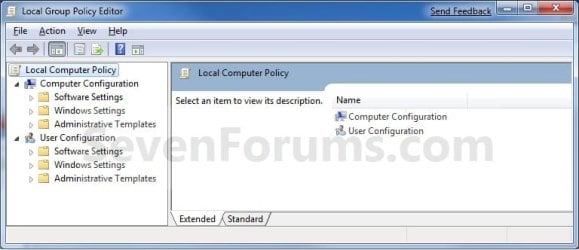
EXAMPLE: Local Group Policy Editor
Group_Policy.jpg
Here's How:
1. Press the Windows + R keys to open the Run dialog, type gpedit.msc, and press Enter. NOTE: This file is located at C:\Windows\System32\gpedit.msc.
2. If prompted by UAC, click on Yes.

3. You can now set and manage the Local Group Policies on your computer to how you want them.
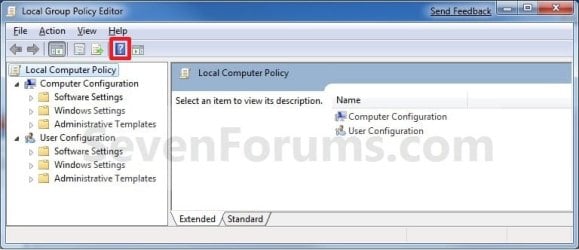
NOTE: For more details and information about how to use the Local Group Policy Editor, click on the blue ? toolbar icon. (See screenshot below)
Group_Policy_Help.jpg
That's it,
Shawn


Last edited:
Trying to open local groups policy to alter the admin creds to allow for global access per our chat in another thread.

However, 'Running' gpedit.msc results in 'cannot find.' Following the path: C:\Windows\System32\gpedit.msc in explorer I only find gpedit.dll.

Any other suggestions on opening this thing?

Thanks,

Mark
 

My Computer

Computer type
PC/Desktop
OS
Windows 7 & Windows 10
Hello Mark,

What edition of Windows 7 do you have installed? It sounds like you have an edition that does not have gpedit.msc incuded. See warning box at the top of the tutorial for more on this. :(
 

My Computer

Computer type
PC/Desktop
Computer Manufacturer/Model Number
Self built custom
OS
64-bit Windows 11 Pro for Workstations
CPU
Intel i7-8700K OC'd to 5 GHz
Motherboard
ASUS ROG Maximus XI Formula Z390
Memory
64 GB (4x16GB) G.SKILL TridentZ RGB DDR4 3600 MHz
Graphics Card(s)
ASUS ROG-STRIX-GTX1080TI-O11G-GAMING
Sound Card
Integrated
Monitor(s) Displays
2 x Samsung Odyssey G7 27"
Screen Resolution
2560x1440
Hard Drives
1TB Samsung 990 PRO M.2,
4TB Samsung 990 PRO PRO M.2,
TerraMaster F8 SSD Plus NAS
PSU
Seasonic Prime Titanium 850W
Case
Thermaltake Core P3
Cooling
Corsair Hydro H115i
Keyboard
Logitech wireless K800
Mouse
Logitech MX Master 4
Internet Speed
2 Gb/s Download and 100 Mb/s Upload
Antivirus
Malwarebyte Anti-Malware Premium
Browser
Google Chrome
Other Info
Logitech Z625 speaker system,
Logitech BRIO 4K Pro webcam,
HP Color LaserJet Pro MFP M477fdn,
APC SMART-UPS RT 1000 XL - SURT1000XLI,
Galaxy S23 Plus phone
Ah, I have the Home Premium--sorry for not reading carefully.

Under User Account Settings, Change User Account, I have Administrator checked off versus Regular User. Are we saying that under this version of the OS that is the best I can do insofar as a 'global guy' with all seeing powers and I cannot get into the Properties to increase power?

Thanks,

Mark
 

My Computer

Computer type
PC/Desktop
OS
Windows 7 & Windows 10
Mark,

No, it just means that everything will have to be done manually through the registry instead in that edition. The only problem is that is not as easy since you have to give a very specific thing you wanted to do, but that's to be posted in a separate thread to keep this one on topic.

As adminstrator, that account should have global access now.
 

My Computer

Computer type
PC/Desktop
Computer Manufacturer/Model Number
Self built custom
OS
64-bit Windows 11 Pro for Workstations
CPU
Intel i7-8700K OC'd to 5 GHz
Motherboard
ASUS ROG Maximus XI Formula Z390
Memory
64 GB (4x16GB) G.SKILL TridentZ RGB DDR4 3600 MHz
Graphics Card(s)
ASUS ROG-STRIX-GTX1080TI-O11G-GAMING
Sound Card
Integrated
Monitor(s) Displays
2 x Samsung Odyssey G7 27"
Screen Resolution
2560x1440
Hard Drives
1TB Samsung 990 PRO M.2,
4TB Samsung 990 PRO PRO M.2,
TerraMaster F8 SSD Plus NAS
PSU
Seasonic Prime Titanium 850W
Case
Thermaltake Core P3
Cooling
Corsair Hydro H115i
Keyboard
Logitech wireless K800
Mouse
Logitech MX Master 4
Internet Speed
2 Gb/s Download and 100 Mb/s Upload
Antivirus
Malwarebyte Anti-Malware Premium
Browser
Google Chrome
Other Info
Logitech Z625 speaker system,
Logitech BRIO 4K Pro webcam,
HP Color LaserJet Pro MFP M477fdn,
APC SMART-UPS RT 1000 XL - SURT1000XLI,
Galaxy S23 Plus phone
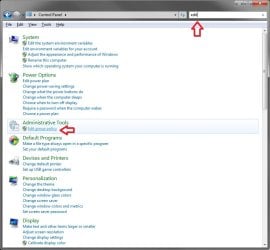
I just typed "edit group policy" in the search. Isn't there a way to navigate to it in control panel?
 

My Computer

OS
Windows 7 Retail
Hi Crimson,

That works just as well as the searching for the file name. You can do a search with "edit" in the Control Panel to get the same result though.
Control_Panel.jpg

Personally, I just created a shortcut from the C:\Windows\System32\gpedit.msc file, and use it to make it easier to open from.

Hope this helps,
Shawn
 

My Computer

Computer type
PC/Desktop
Computer Manufacturer/Model Number
Self built custom
OS
64-bit Windows 11 Pro for Workstations
CPU
Intel i7-8700K OC'd to 5 GHz
Motherboard
ASUS ROG Maximus XI Formula Z390
Memory
64 GB (4x16GB) G.SKILL TridentZ RGB DDR4 3600 MHz
Graphics Card(s)
ASUS ROG-STRIX-GTX1080TI-O11G-GAMING
Sound Card
Integrated
Monitor(s) Displays
2 x Samsung Odyssey G7 27"
Screen Resolution
2560x1440
Hard Drives
1TB Samsung 990 PRO M.2,
4TB Samsung 990 PRO PRO M.2,
TerraMaster F8 SSD Plus NAS
PSU
Seasonic Prime Titanium 850W
Case
Thermaltake Core P3
Cooling
Corsair Hydro H115i
Keyboard
Logitech wireless K800
Mouse
Logitech MX Master 4
Internet Speed
2 Gb/s Download and 100 Mb/s Upload
Antivirus
Malwarebyte Anti-Malware Premium
Browser
Google Chrome
Other Info
Logitech Z625 speaker system,
Logitech BRIO 4K Pro webcam,
HP Color LaserJet Pro MFP M477fdn,
APC SMART-UPS RT 1000 XL - SURT1000XLI,
Galaxy S23 Plus phone
I have the same problem as Mark there, I can't seem to find the correct thread to help me do this in Home Premium. Can somebody point me in the correct direction?
 

My Computer

OS
windows 7 home premium
Hello HomePremium,

Sorry, but the Local Group Policy (gpedit.msc) is not available in the Windows 7 Home Premium edition. See red warning box at top for more on this. Unfortunately, you will have to manually do what you are wanting in the registry instead. :(

If you post what you need in the appropriate forum that best fits the subject, I'm sure that one of us may be able to help you with what needs to be changed in the registry for it. :)
 

My Computer

Computer type
PC/Desktop
Computer Manufacturer/Model Number
Self built custom
OS
64-bit Windows 11 Pro for Workstations
CPU
Intel i7-8700K OC'd to 5 GHz
Motherboard
ASUS ROG Maximus XI Formula Z390
Memory
64 GB (4x16GB) G.SKILL TridentZ RGB DDR4 3600 MHz
Graphics Card(s)
ASUS ROG-STRIX-GTX1080TI-O11G-GAMING
Sound Card
Integrated
Monitor(s) Displays
2 x Samsung Odyssey G7 27"
Screen Resolution
2560x1440
Hard Drives
1TB Samsung 990 PRO M.2,
4TB Samsung 990 PRO PRO M.2,
TerraMaster F8 SSD Plus NAS
PSU
Seasonic Prime Titanium 850W
Case
Thermaltake Core P3
Cooling
Corsair Hydro H115i
Keyboard
Logitech wireless K800
Mouse
Logitech MX Master 4
Internet Speed
2 Gb/s Download and 100 Mb/s Upload
Antivirus
Malwarebyte Anti-Malware Premium
Browser
Google Chrome
Other Info
Logitech Z625 speaker system,
Logitech BRIO 4K Pro webcam,
HP Color LaserJet Pro MFP M477fdn,
APC SMART-UPS RT 1000 XL - SURT1000XLI,
Galaxy S23 Plus phone
Is there a way to permanently add the gpedit.msc to the Computer Management console?

I know I could add a shortcut to the startmenu, but It's a snap-in right? It seems like I should be able to put it in 'Computer Management' right next to Task Scheduler, Event Viewer, Disk Management, etc.

No?

-Kyle
 

My Computer

OS
Windows 7

My Computer

Computer type
PC/Desktop
Computer Manufacturer/Model Number
Self built custom
OS
64-bit Windows 11 Pro for Workstations
CPU
Intel i7-8700K OC'd to 5 GHz
Motherboard
ASUS ROG Maximus XI Formula Z390
Memory
64 GB (4x16GB) G.SKILL TridentZ RGB DDR4 3600 MHz
Graphics Card(s)
ASUS ROG-STRIX-GTX1080TI-O11G-GAMING
Sound Card
Integrated
Monitor(s) Displays
2 x Samsung Odyssey G7 27"
Screen Resolution
2560x1440
Hard Drives
1TB Samsung 990 PRO M.2,
4TB Samsung 990 PRO PRO M.2,
TerraMaster F8 SSD Plus NAS
PSU
Seasonic Prime Titanium 850W
Case
Thermaltake Core P3
Cooling
Corsair Hydro H115i
Keyboard
Logitech wireless K800
Mouse
Logitech MX Master 4
Internet Speed
2 Gb/s Download and 100 Mb/s Upload
Antivirus
Malwarebyte Anti-Malware Premium
Browser
Google Chrome
Other Info
Logitech Z625 speaker system,
Logitech BRIO 4K Pro webcam,
HP Color LaserJet Pro MFP M477fdn,
APC SMART-UPS RT 1000 XL - SURT1000XLI,
Galaxy S23 Plus phone
ok, so let me get this straight...i just plunked down $600 so i could have a full on copy of Windows 7 (i was using RC1 6 days till the march 1 shutdown) and now i cant even tweak or even maybe secure my system with Group Policy Editor? what a joke! are you freaking serious? so, its not bad enough to pay $200 retail for a copy of the OS if i didnt buy this new machine, i'd have to pay $300 retail to get Win 7 Professional? are you &^(^*(^ kidding me? out of all the things to cut? i could have dealt with Windows Media Player being cut out or something...what a joke...
 

My Computer

Computer Manufacturer/Model Number
Gateway DX-4831
OS
Windows 7 Home Premium
CPU
Intel i3 530 2.97 ghz Quad Core :)
Motherboard
Gateway H57 M01
Memory
6 Gb DDR3
Graphics Card(s)
Gigabyte HD 4550 PCI E
Sound Card
onboard
Monitor(s) Displays
Dell 1800FP
Hard Drives
WD 1tb SATA 300
PSU
?
Case
gateway standard
Hello Fishlove, and welcome to Seven Forums.

I'm afraid not with Group Policy for your edition of Windows 7.

http://www.sevenforums.com/tutorials/14422-compare-windows-7-editions.html


You can however still do so using the registry. Just post what you would like to do in the appropriate forum section, or look through the tutorials, to get help for how to do so using the registry instead.

Hope this helps some,
Shawn
 

My Computer

Computer type
PC/Desktop
Computer Manufacturer/Model Number
Self built custom
OS
64-bit Windows 11 Pro for Workstations
CPU
Intel i7-8700K OC'd to 5 GHz
Motherboard
ASUS ROG Maximus XI Formula Z390
Memory
64 GB (4x16GB) G.SKILL TridentZ RGB DDR4 3600 MHz
Graphics Card(s)
ASUS ROG-STRIX-GTX1080TI-O11G-GAMING
Sound Card
Integrated
Monitor(s) Displays
2 x Samsung Odyssey G7 27"
Screen Resolution
2560x1440
Hard Drives
1TB Samsung 990 PRO M.2,
4TB Samsung 990 PRO PRO M.2,
TerraMaster F8 SSD Plus NAS
PSU
Seasonic Prime Titanium 850W
Case
Thermaltake Core P3
Cooling
Corsair Hydro H115i
Keyboard
Logitech wireless K800
Mouse
Logitech MX Master 4
Internet Speed
2 Gb/s Download and 100 Mb/s Upload
Antivirus
Malwarebyte Anti-Malware Premium
Browser
Google Chrome
Other Info
Logitech Z625 speaker system,
Logitech BRIO 4K Pro webcam,
HP Color LaserJet Pro MFP M477fdn,
APC SMART-UPS RT 1000 XL - SURT1000XLI,
Galaxy S23 Plus phone
Hello Fishlove, and welcome to Seven Forums.

I'm afraid not with Group Policy for your edition of Windows 7.

http://www.sevenforums.com/tutorials/14422-compare-windows-7-editions.html


You can however still do so using the registry. Just post what you would like to do in the appropriate forum section, or look through the tutorials, to get help for how to do so using the registry instead.

Hope this helps some,
Shawn

One thing that may be of interest to those using the Group Policy Editor... instead of uninstalling IE in Windows 7 I figured I'd be smooth and just disallow it in local group policy. Seemed to work fine. Then I installed an application that likes to show its web page after the install. What a surprise when IE popped up with the page!!! Turns out even though I was using "Owner" account in Admin group, "Trusted Installer" out ranks it. So even though I disallowed IE to come up, because it was launched at the tail end of the install by a trusted installer, bingo!! There's IE.

The moral of the story is I uninstalled. Only way to avoid surprises.


groschatglace.gif
 

My Computer

Computer Manufacturer/Model Number
HP Media Center
OS
Windows 7 32 bit
CPU
AMD 5200+ dual core
Memory
2 GB
Graphics Card(s)
NVidia GeForce 6150SE 128 MB
Monitor(s) Displays
CRT
Screen Resolution
1280x1024
Hard Drives
500 GB Sata internal :

SIIG USB 3.0 docking stations w/WD Caviar Black 6 Gb/s drives
Keyboard
PS/2
Mouse
PS/2 Wheel Mouse
Other Info
SIIG USB 3.0 PCIexpress card.
Has anyone solved how to do this in home premium?
 

My Computer

Computer type
PC/Desktop
OS
Windows 7 Ultimate x64
Hello Tigpoppa,

The Local Group Policy Editor will only be available in the Windows 7 Professional, Ultimate, and Enterprise editions. You will not have the Local Group Policy Editor available in the Windows 7 Starter, Home Basic, and Home Premium editions.
 

My Computer

Computer type
PC/Desktop
Computer Manufacturer/Model Number
Self built custom
OS
64-bit Windows 11 Pro for Workstations
CPU
Intel i7-8700K OC'd to 5 GHz
Motherboard
ASUS ROG Maximus XI Formula Z390
Memory
64 GB (4x16GB) G.SKILL TridentZ RGB DDR4 3600 MHz
Graphics Card(s)
ASUS ROG-STRIX-GTX1080TI-O11G-GAMING
Sound Card
Integrated
Monitor(s) Displays
2 x Samsung Odyssey G7 27"
Screen Resolution
2560x1440
Hard Drives
1TB Samsung 990 PRO M.2,
4TB Samsung 990 PRO PRO M.2,
TerraMaster F8 SSD Plus NAS
PSU
Seasonic Prime Titanium 850W
Case
Thermaltake Core P3
Cooling
Corsair Hydro H115i
Keyboard
Logitech wireless K800
Mouse
Logitech MX Master 4
Internet Speed
2 Gb/s Download and 100 Mb/s Upload
Antivirus
Malwarebyte Anti-Malware Premium
Browser
Google Chrome
Other Info
Logitech Z625 speaker system,
Logitech BRIO 4K Pro webcam,
HP Color LaserJet Pro MFP M477fdn,
APC SMART-UPS RT 1000 XL - SURT1000XLI,
Galaxy S23 Plus phone
Just wonder could we "port" (copy) the msc/exe from ultimate version to the home premium version and make it works?
 

My Computer

Computer Manufacturer/Model Number
?
OS
Windows 7 Home Premium 64bit
CPU
?
Motherboard
?
Memory
?
Graphics Card(s)
?
Sound Card
?
Monitor(s) Displays
?
Hard Drives
?
PSU
?
Case
?
Cooling
?

My Computer

Computer Manufacturer/Model Number
Too many to describe...
OS
Windows 7 x64 pro/ Windows 7 x86 Pro/ XP SP3 x86
Just wonder could we "port" (copy) the msc/exe from ultimate version to the home premium version and make it works?
Wont work. But GPeditor is basically just a front for the registry so you can change things directly in the registry. For GPeditor equivalences in the reg, see this.

Download Details - Microsoft Download Center - Group Policy Settings Reference for Windows and Windows Server

Got it. Thanks for your help.
I've digged into the registry by searching the xls file!
 

My Computer

Computer Manufacturer/Model Number
?
OS
Windows 7 Home Premium 64bit
CPU
?
Motherboard
?
Memory
?
Graphics Card(s)
?
Sound Card
?
Monitor(s) Displays
?
Hard Drives
?
PSU
?
Case
?
Cooling
?
well, i have the home premium ed, and instead have C:\Windows\System32\compmgmt.msc that opens the same pannel
 

My Computer

Computer Manufacturer/Model Number
Asus n71 JQ 012v
OS
windows 7 64 bits professional
CPU
Intel core i7 cpu
Graphics Card(s)
ATI Mobility Radeon HD 5730
Back
Top