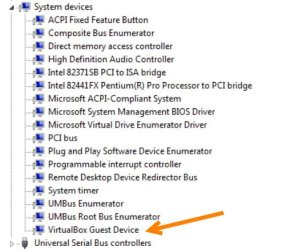
Solved Location for System Device Names as shown in Device Manager

Webbiz

New member
Local time
4:11 PM
Messages
27
I'm trying to locate where the Device Manager is getting the text descriptions for the "System devices".

I've gone through the registry with regedit doing a search on the strings but they do not come up.

So I'm puzzled as to where the device manager is getting these strings as I would like to modify one of the strings from prying eyes.

Anyone?
 

My Computer My Computer

Computer type
PC/Desktop
Computer Manufacturer/Model Number
VirtualBox
OS
Windows 7
CPU
Processor AMD Ryzen 7 3700X 8-Core Processor, 3593 Mhz, 8 Co
Motherboard
X570 AORUS ULTRA
Memory
64g
Graphics Card(s)
GeForce GTX 1050 Ti
Hard Drives
500gb, 500gb, 1T SSD's
PSU
800w
The description and ID are read inside the hardware device. It is read only, can't modify.
 

My Computers My Computers

System One System Two

  • Computer type
    PC/Desktop
    Computer Manufacturer/Model Number
    custom build
    OS
    Windows 7 HP 64
    CPU
    i5 6600K - 800MHz to 4200MHz
    Motherboard
    GA-Z170-HD3P
    Memory
    4+4G GSkill DDR4 3000
    Graphics Card(s)
    IG - Intel 530
    Monitor(s) Displays
    Samsung 226BW
    Screen Resolution
    1680x1050
    Hard Drives
    (1) -1 SM951 – 128GB M.2 AHCI PCIe SSD drive for Windows 7 and Lubuntu
    (2) -1 WD SATA 3 - 1T for Data
    (3) -1 WD SATA 3 - 1T for backup
    PSU
    Thermaltake 450W TR2 gold
    Keyboard
    Old and good Chicony mechanical keyboard
    Mouse
    Logitech mX performance - 9 buttons (had to disable some)
    Internet Speed
    500Mb/s
    Browser
    Firefox 64
    Other Info
    TinyWall firewall
  • Computer type
    Laptop
    System Manufacturer/Model Number
    Asus Q550LF
    OS
    Windows 7 Pro
    CPU
    i7-4500U 800MHz to 3.0GHz
    Motherboard
    Asus Q550LF
    Memory
    (4+4)G DDR3 1600
    Graphics Card(s)
    IG intel 4400 + NVIDIA GeForce GT 745M
    Sound Card
    Realtek
    Monitor(s) Displays
    LG Display LP156WF4-SPH1
    Screen Resolution
    1920 x 1080
    Hard Drives
    BX500 120G SSD for Windows and programs +
    1T HDD for data
    Internet Speed
    500 Mb/s
    Browser
    Firefox
    Other Info
    TinyWall firewall
The description and ID are read inside the hardware device. It is read only, can't modify.

But how would that apply to a Virtual Machine? When I look at the Device Manager, it shows the following which is not inside any hardware I am aware of.

2021-07-28_14-46-24.jpg
 

My Computer My Computer

Computer type
PC/Desktop
Computer Manufacturer/Model Number
VirtualBox
OS
Windows 7
CPU
Processor AMD Ryzen 7 3700X 8-Core Processor, 3593 Mhz, 8 Co
Motherboard
X570 AORUS ULTRA
Memory
64g
Graphics Card(s)
GeForce GTX 1050 Ti
Hard Drives
500gb, 500gb, 1T SSD's
PSU
800w
The description comes from the .inf file

For example "ACPI Fixed Feature Button" is in windows\inf\machine.inf

[HKEY_LOCAL_MACHINE\SYSTEM\CurrentControlSet\Control\Class\{4D36E97D-E325-11CE-BFC1-08002BE10318}\0016]
"InfPath"="machine.inf"
"InfSection"="NO_DRV"
"ProviderName"="Microsoft"
"DriverDateData"=hex:00,80,8c,a3,c5,94,c6,01
"DriverDate"="6-21-2006"
"DriverVersion"="6.1.7601.24576"
"MatchingDeviceId"="acpi\\fixedbutton"
"DriverDesc"="ACPI Fixed Feature Button"
 

My Computers My Computers

System One System Two

  • Computer type
    PC/Desktop
    OS
    7 X64
    CPU
    i5 8400
    Motherboard
    gigabyte b365m ds3h
    Memory
    2x8gb 3200mhz
    Hard Drives
    various
    PSU
    pure power 11 400w cm
    Case
    Coolermaster
    Cooling
    cryorig m9i
  • Computer type
    PC/Desktop
    OS
    7x64
    CPU
    g5400
    Motherboard
    ga b365m ds3h
    Memory
    8gb ddr4 2400
    PSU
    xfx pro 450w
The description comes from the .inf file

For example "ACPI Fixed Feature Button" is in windows\inf\machine.inf

[HKEY_LOCAL_MACHINE\SYSTEM\CurrentControlSet\Control\Class\{4D36E97D-E325-11CE-BFC1-08002BE10318}\0016]
"InfPath"="machine.inf"
"InfSection"="NO_DRV"
"ProviderName"="Microsoft"
"DriverDateData"=hex:00,80,8c,a3,c5,94,c6,01
"DriverDate"="6-21-2006"
"DriverVersion"="6.1.7601.24576"
"MatchingDeviceId"="acpi\\fixedbutton"
"DriverDesc"="ACPI Fixed Feature Button"

Thank you. I found this quite interesting. While the VirtualBox description was listed in the machine.ini file, changing it did nothing. But it got me thinking to look into other .ini files.

So searching for VirtualBox in the folder did nothing. But searching for Oracle came up with some OEM.inf files. In oem2.ini I found the string and changed that (as Admin of course). Ran Device Manager and it worked!!!!

So thank you very much!
 

My Computer My Computer

Computer type
PC/Desktop
Computer Manufacturer/Model Number
VirtualBox
OS
Windows 7
CPU
Processor AMD Ryzen 7 3700X 8-Core Processor, 3593 Mhz, 8 Co
Motherboard
X570 AORUS ULTRA
Memory
64g
Graphics Card(s)
GeForce GTX 1050 Ti
Hard Drives
500gb, 500gb, 1T SSD's
PSU
800w
Webbiz, forgive me for the wrong information.
 

My Computers My Computers

System One System Two

  • Computer type
    PC/Desktop
    Computer Manufacturer/Model Number
    custom build
    OS
    Windows 7 HP 64
    CPU
    i5 6600K - 800MHz to 4200MHz
    Motherboard
    GA-Z170-HD3P
    Memory
    4+4G GSkill DDR4 3000
    Graphics Card(s)
    IG - Intel 530
    Monitor(s) Displays
    Samsung 226BW
    Screen Resolution
    1680x1050
    Hard Drives
    (1) -1 SM951 – 128GB M.2 AHCI PCIe SSD drive for Windows 7 and Lubuntu
    (2) -1 WD SATA 3 - 1T for Data
    (3) -1 WD SATA 3 - 1T for backup
    PSU
    Thermaltake 450W TR2 gold
    Keyboard
    Old and good Chicony mechanical keyboard
    Mouse
    Logitech mX performance - 9 buttons (had to disable some)
    Internet Speed
    500Mb/s
    Browser
    Firefox 64
    Other Info
    TinyWall firewall
  • Computer type
    Laptop
    System Manufacturer/Model Number
    Asus Q550LF
    OS
    Windows 7 Pro
    CPU
    i7-4500U 800MHz to 3.0GHz
    Motherboard
    Asus Q550LF
    Memory
    (4+4)G DDR3 1600
    Graphics Card(s)
    IG intel 4400 + NVIDIA GeForce GT 745M
    Sound Card
    Realtek
    Monitor(s) Displays
    LG Display LP156WF4-SPH1
    Screen Resolution
    1920 x 1080
    Hard Drives
    BX500 120G SSD for Windows and programs +
    1T HDD for data
    Internet Speed
    500 Mb/s
    Browser
    Firefox
    Other Info
    TinyWall firewall

My Computer My Computer

Computer type
PC/Desktop
Computer Manufacturer/Model Number
VirtualBox
OS
Windows 7
CPU
Processor AMD Ryzen 7 3700X 8-Core Processor, 3593 Mhz, 8 Co
Motherboard
X570 AORUS ULTRA
Memory
64g
Graphics Card(s)
GeForce GTX 1050 Ti
Hard Drives
500gb, 500gb, 1T SSD's
PSU
800w
Back
Top