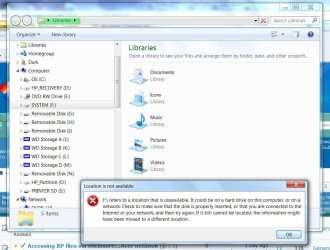
Location is not avalable F:\ refers to a location that is unavailable

frieslander

New member
Local time
11:45 AM
Messages
5
I keep getting the error "Location is not avalable F:\ refers to a location that is unavailable........" in windows 7. Sometimes it shows as "SYSTEM (F) and other times as a picture of a drive with a question mark over it ans F:\. I have done a check disk and the command prompt "gpupdate /force" as suggested on a site but no luck.

I have looked at other solutions but nothing seems to pertain to my specific problem. Any help will be appreciated. I have attached screenshots.
 

Attachments
  • Refers to.jpg
    Refers to.jpg
    89 KB · Views: 15
  • Refers to 2.jpg
    Refers to 2.jpg
    85.9 KB · Views: 10

My Computer My Computer

At a glance

windows 7 home premium Service Pack 1AMD Athlon II X 4 645 Processor 3.10 GHz
Computer Manufacturer/Model Number
HP p7-1054
OS
windows 7 home premium Service Pack 1
CPU
AMD Athlon II X 4 645 Processor 3.10 GHz
Monitor(s) Displays
HP w1907

My Computer My Computer

At a glance

Desk1 7 Home Prem / Desk2 10 Pro / Main lap A...Desk1 i5 3750K / Laptop i7 GTX 860M / Desk2 i...Desk1 8GB (1866) / Desk2 16GB (1333) / Laptop...Desk 1& 2NVidia GTX 650 & Laptops on board Intel
Computer type
PC/Desktop
Computer Manufacturer/Model Number
Own build (new) Desk1 / Asus ROG Win 7 / Desk2 1st build
OS
Desk1 7 Home Prem / Desk2 10 Pro / Main lap Asus ROG 10 Pro 2 laptop Toshiba 7 Pro Asus P2520 7 & 10
CPU
Desk1 i5 3750K / Laptop i7 GTX 860M / Desk2 i5 2500
Motherboard
Desk1 Asus P877-V / Desk2 Gigabyte H67 UD3H / Laptop ?
Memory
Desk1 8GB (1866) / Desk2 16GB (1333) / Laptop 8Gb DDR3
Graphics Card(s)
Desk 1& 2NVidia GTX 650 & Laptops on board Intel
Sound Card
Desk 1 & 2 -XONAR DG Realtek High Def audio Laptop
Monitor(s) Displays
Desk 1 Benq HD 2450 / Desk2 Philips 24" / Laptop 17.5"
Screen Resolution
1920x1080 D1 & D2 & Laptop 1
Hard Drives
Desk1 Samsung 120GB 830 SSD
Asus ROG 256GB 850 Pro SSD
Desk2 Samsung 840 256 SSD
Toshiba 120GB EVO
PSU
Desk 1 Corsair HX 1050/ Laptop ? / Desk 2 Corsair HX 650
Case
Desk 1 Cooler HAF XM ? Toshiba laptop / Desk2 Coolermaster
Cooling
Fans on all Desk1 -2 Desk2 - all Coolermasters 5 Laptop ?
Keyboard
Desk 1 MS Sidewinder X6 Desk 2 MS Sidewinder X 4
Mouse
Desk 1&2 - Gigabyte MS 900 gamer - laptop - Logitec wireless
Internet Speed
ADSL2+
Other Info
One other Desktop (tester) and spare Toshba laptop both with SSD's
Running Kaspersky 2016 ISS on all machines config'd identically
Logitec audio stereo systems on each machine (x3)
Canon MG5250MFC
Router/modem TP-Link running WPA2SK
Thanks for the welcome. I will try that advice tomorrow sometime, I am too tired and sleepy now. Us seniors need to be wide awake before we try anything LOL.

Thanks again, will post my results once I try it.
 

My Computer My Computer

At a glance

windows 7 home premium Service Pack 1AMD Athlon II X 4 645 Processor 3.10 GHz
Computer Manufacturer/Model Number
HP p7-1054
OS
windows 7 home premium Service Pack 1
CPU
AMD Athlon II X 4 645 Processor 3.10 GHz
Monitor(s) Displays
HP w1907
Thanks for the welcome. I will try that advice tomorrow sometime, I am too tired and sleepy now. Us seniors need to be wide awake before we try anything LOL.

Thanks again, will post my results once I try it.
Yep I know what you mean I'm one myself:D
 

My Computer My Computer

At a glance

Desk1 7 Home Prem / Desk2 10 Pro / Main lap A...Desk1 i5 3750K / Laptop i7 GTX 860M / Desk2 i...Desk1 8GB (1866) / Desk2 16GB (1333) / Laptop...Desk 1& 2NVidia GTX 650 & Laptops on board Intel
Computer type
PC/Desktop
Computer Manufacturer/Model Number
Own build (new) Desk1 / Asus ROG Win 7 / Desk2 1st build
OS
Desk1 7 Home Prem / Desk2 10 Pro / Main lap Asus ROG 10 Pro 2 laptop Toshiba 7 Pro Asus P2520 7 & 10
CPU
Desk1 i5 3750K / Laptop i7 GTX 860M / Desk2 i5 2500
Motherboard
Desk1 Asus P877-V / Desk2 Gigabyte H67 UD3H / Laptop ?
Memory
Desk1 8GB (1866) / Desk2 16GB (1333) / Laptop 8Gb DDR3
Graphics Card(s)
Desk 1& 2NVidia GTX 650 & Laptops on board Intel
Sound Card
Desk 1 & 2 -XONAR DG Realtek High Def audio Laptop
Monitor(s) Displays
Desk 1 Benq HD 2450 / Desk2 Philips 24" / Laptop 17.5"
Screen Resolution
1920x1080 D1 & D2 & Laptop 1
Hard Drives
Desk1 Samsung 120GB 830 SSD
Asus ROG 256GB 850 Pro SSD
Desk2 Samsung 840 256 SSD
Toshiba 120GB EVO
PSU
Desk 1 Corsair HX 1050/ Laptop ? / Desk 2 Corsair HX 650
Case
Desk 1 Cooler HAF XM ? Toshiba laptop / Desk2 Coolermaster
Cooling
Fans on all Desk1 -2 Desk2 - all Coolermasters 5 Laptop ?
Keyboard
Desk 1 MS Sidewinder X6 Desk 2 MS Sidewinder X 4
Mouse
Desk 1&2 - Gigabyte MS 900 gamer - laptop - Logitec wireless
Internet Speed
ADSL2+
Other Info
One other Desktop (tester) and spare Toshba laptop both with SSD's
Running Kaspersky 2016 ISS on all machines config'd identically
Logitec audio stereo systems on each machine (x3)
Canon MG5250MFC
Router/modem TP-Link running WPA2SK
Hello and welcome freislander mate just download this and it should open up and show all the drives with their letters.
Partition Manager Server, server partition manager and partition magic server for Windows Server 2000/2003/2008. Server Partition software for Windows Server and None-Server partitions < handy tool to keep for later too.

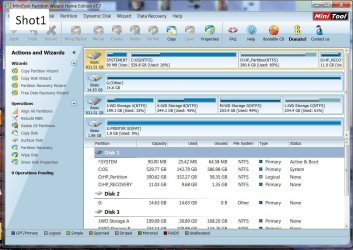
I downloaded the Partition Wizard but it does not show the F: partition (see Shot1).
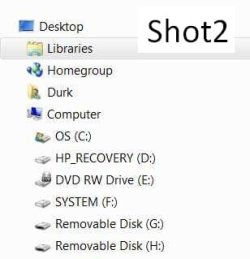
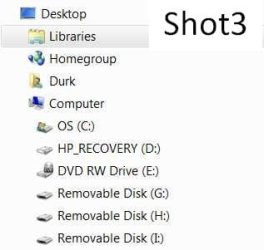
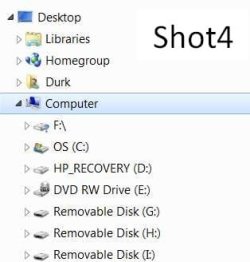
Here is the strange part, as I watch the screen in File Explorer mode the "F:/" will show and then suddenly disappear for a second and then re-appear(see Shot2 and Shot3). After a few minutes it will move up the tree to the spot shown in Shot4.
I have a feeling that maybe I pulled a SD card or USB stick out without ejecting it. This problem has been going on for some months but I was blaming Nero Burning ROM as that is where I always noticed instability in the file trees popping up and down. Just lately did I notice it in File Explorer.
I have a desktop, a laptop, a 10" Acer tablet and a 7" Acer tablet so I have not spend a lot of time on this desktop PC. Now that I know I have a problem it is just BUGGING me. :confused:
 

Attachments

  • Shot1.jpg
    Shot1.jpg
    139 KB · Views: 7
  • Shot 2.jpg
    Shot 2.jpg
    11.1 KB · Views: 53
  • Shot 3.jpg
    Shot 3.jpg
    11.5 KB · Views: 54
  • Shot4.jpg
    Shot4.jpg
    12.6 KB · Views: 9

My Computer My Computer

At a glance

windows 7 home premium Service Pack 1AMD Athlon II X 4 645 Processor 3.10 GHz
Computer Manufacturer/Model Number
HP p7-1054
OS
windows 7 home premium Service Pack 1
CPU
AMD Athlon II X 4 645 Processor 3.10 GHz
Monitor(s) Displays
HP w1907
Any ideas anyone?
 

My Computer My Computer

At a glance

windows 7 home premium Service Pack 1AMD Athlon II X 4 645 Processor 3.10 GHz
Computer Manufacturer/Model Number
HP p7-1054
OS
windows 7 home premium Service Pack 1
CPU
AMD Athlon II X 4 645 Processor 3.10 GHz
Monitor(s) Displays
HP w1907
Verrry Interrrezting........

Just happened to be cruising the forum when this thread caught my attention, and I said to myself.."Self, this sounds damn familiar." Seems my system grew an F:\ ghost drive when I wasn't looking. Not a real problem, but a damn nuisance none the less. So I think I'll try the fix myself, and report my findings....:picnic:
 

My Computer My Computer

At a glance

Windows 7 Home Premium (32), SP1Intel Celeron D 3.2Ghz2GB DDRVIA Chrome 9 IGP
Computer type
PC/Desktop
OS
Windows 7 Home Premium (32), SP1
CPU
Intel Celeron D 3.2Ghz
Motherboard
BIOSTAR P4M900-M7 FE
Memory
2GB DDR
Graphics Card(s)
VIA Chrome 9 IGP
Sound Card
C-Media PCI Audio Device
Monitor(s) Displays
Compaq CV735
Screen Resolution
1152x864
Sorry late reply freislander mate been working. In that PW shot did you scroll down where it says Disk 1 / 2 /3 ? to the bottom?

Plus in the very first post with that System F: did you try right clicking on that?
 

My Computer My Computer

At a glance

Desk1 7 Home Prem / Desk2 10 Pro / Main lap A...Desk1 i5 3750K / Laptop i7 GTX 860M / Desk2 i...Desk1 8GB (1866) / Desk2 16GB (1333) / Laptop...Desk 1& 2NVidia GTX 650 & Laptops on board Intel
Computer type
PC/Desktop
Computer Manufacturer/Model Number
Own build (new) Desk1 / Asus ROG Win 7 / Desk2 1st build
OS
Desk1 7 Home Prem / Desk2 10 Pro / Main lap Asus ROG 10 Pro 2 laptop Toshiba 7 Pro Asus P2520 7 & 10
CPU
Desk1 i5 3750K / Laptop i7 GTX 860M / Desk2 i5 2500
Motherboard
Desk1 Asus P877-V / Desk2 Gigabyte H67 UD3H / Laptop ?
Memory
Desk1 8GB (1866) / Desk2 16GB (1333) / Laptop 8Gb DDR3
Graphics Card(s)
Desk 1& 2NVidia GTX 650 & Laptops on board Intel
Sound Card
Desk 1 & 2 -XONAR DG Realtek High Def audio Laptop
Monitor(s) Displays
Desk 1 Benq HD 2450 / Desk2 Philips 24" / Laptop 17.5"
Screen Resolution
1920x1080 D1 & D2 & Laptop 1
Hard Drives
Desk1 Samsung 120GB 830 SSD
Asus ROG 256GB 850 Pro SSD
Desk2 Samsung 840 256 SSD
Toshiba 120GB EVO
PSU
Desk 1 Corsair HX 1050/ Laptop ? / Desk 2 Corsair HX 650
Case
Desk 1 Cooler HAF XM ? Toshiba laptop / Desk2 Coolermaster
Cooling
Fans on all Desk1 -2 Desk2 - all Coolermasters 5 Laptop ?
Keyboard
Desk 1 MS Sidewinder X6 Desk 2 MS Sidewinder X 4
Mouse
Desk 1&2 - Gigabyte MS 900 gamer - laptop - Logitec wireless
Internet Speed
ADSL2+
Other Info
One other Desktop (tester) and spare Toshba laptop both with SSD's
Running Kaspersky 2016 ISS on all machines config'd identically
Logitec audio stereo systems on each machine (x3)
Canon MG5250MFC
Router/modem TP-Link running WPA2SK
No matter which F drive I clicked on it showed the same error. And it kept popping in and out from view. First it showed further down the expanded file tree and then it would suddenly shift to the top and stay there.

I decided to re-install Windows 7 and am working on it now. Ran into problems as soon as I installed Avast UGH! Found out that even if one refuses Norton it will still be installed in the background. When I installed Avast I got the blue screen error. Uninstalling Norton fixed that.

Now I am in the process of installing all the drivers and programs, a chore.

Thanks for your help, did not realize you worked, like you said you were a senior also. I am retired, left the workforce at the age of 60 after just over 42 years at the same place.

Thanks again.
 

My Computer My Computer

At a glance

windows 7 home premium Service Pack 1AMD Athlon II X 4 645 Processor 3.10 GHz
Computer Manufacturer/Model Number
HP p7-1054
OS
windows 7 home premium Service Pack 1
CPU
AMD Athlon II X 4 645 Processor 3.10 GHz
Monitor(s) Displays
HP w1907
No matter which F drive I clicked on it showed the same error. And it kept popping in and out from view. First it showed further down the expanded file tree and then it would suddenly shift to the top and stay there.

I decided to re-install Windows 7 and am working on it now. Ran into problems as soon as I installed Avast UGH! Found out that even if one refuses Norton it will still be installed in the background. When I installed Avast I got the blue screen error. Uninstalling Norton fixed that.

Now I am in the process of installing all the drivers and programs, a chore.

Thanks for your help, did not realize you worked, like you said you were a senior also. I am retired, left the workforce at the age of 60 after just over 42 years at the same place.

Thanks again.
No worries my friend am also just on retirement after 40+ nursing (RN).

Now you did use the Norton removal tool for getting rid of it? as all the AV's now have their own removal tools. I have found it is usually not much good doing that through Programs and Features or even the Revo app. As matter of fact even after using the Norton tool I have found Symantec entries in the registry - but don't go mucking about in there eh?.

Let us know how it goes.

John
 

My Computer My Computer

At a glance

Desk1 7 Home Prem / Desk2 10 Pro / Main lap A...Desk1 i5 3750K / Laptop i7 GTX 860M / Desk2 i...Desk1 8GB (1866) / Desk2 16GB (1333) / Laptop...Desk 1& 2NVidia GTX 650 & Laptops on board Intel
Computer type
PC/Desktop
Computer Manufacturer/Model Number
Own build (new) Desk1 / Asus ROG Win 7 / Desk2 1st build
OS
Desk1 7 Home Prem / Desk2 10 Pro / Main lap Asus ROG 10 Pro 2 laptop Toshiba 7 Pro Asus P2520 7 & 10
CPU
Desk1 i5 3750K / Laptop i7 GTX 860M / Desk2 i5 2500
Motherboard
Desk1 Asus P877-V / Desk2 Gigabyte H67 UD3H / Laptop ?
Memory
Desk1 8GB (1866) / Desk2 16GB (1333) / Laptop 8Gb DDR3
Graphics Card(s)
Desk 1& 2NVidia GTX 650 & Laptops on board Intel
Sound Card
Desk 1 & 2 -XONAR DG Realtek High Def audio Laptop
Monitor(s) Displays
Desk 1 Benq HD 2450 / Desk2 Philips 24" / Laptop 17.5"
Screen Resolution
1920x1080 D1 & D2 & Laptop 1
Hard Drives
Desk1 Samsung 120GB 830 SSD
Asus ROG 256GB 850 Pro SSD
Desk2 Samsung 840 256 SSD
Toshiba 120GB EVO
PSU
Desk 1 Corsair HX 1050/ Laptop ? / Desk 2 Corsair HX 650
Case
Desk 1 Cooler HAF XM ? Toshiba laptop / Desk2 Coolermaster
Cooling
Fans on all Desk1 -2 Desk2 - all Coolermasters 5 Laptop ?
Keyboard
Desk 1 MS Sidewinder X6 Desk 2 MS Sidewinder X 4
Mouse
Desk 1&2 - Gigabyte MS 900 gamer - laptop - Logitec wireless
Internet Speed
ADSL2+
Other Info
One other Desktop (tester) and spare Toshba laptop both with SSD's
Running Kaspersky 2016 ISS on all machines config'd identically
Logitec audio stereo systems on each machine (x3)
Canon MG5250MFC
Router/modem TP-Link running WPA2SK
I got rid of my ghost drive...and so can you!

EUREKA!! Annoyance banished!! And with a little encouragement, I'll tell you how I did it. O.K., I can't think with all the begging.....

I went on a utilities hunt that took up most of the night. After a bit of frustration, and going thru 2 different retail packages, I hit the jackpot with number 3....Paragon Hard Disk Manager 12 Suite. After slogging thru hours of trying to force a piece of software into doing what I wanted it to do, it only took about 10 minutes - including installation - for Paragon and I to wipe that little bugger off my system and out of my life; and all I had to do was point Paragon at the little sucker, click delete, confirm and ok. Nothing else was quicker or cleaner.

If you want to know more, just e-mail or IM me and I'll share the details. I am reluctant to mark this one solved, but it sure worked for me!

:party::party::party: :what:
 

My Computer My Computer

At a glance

Windows 7 Home Premium (32), SP1Intel Celeron D 3.2Ghz2GB DDRVIA Chrome 9 IGP
Computer type
PC/Desktop
OS
Windows 7 Home Premium (32), SP1
CPU
Intel Celeron D 3.2Ghz
Motherboard
BIOSTAR P4M900-M7 FE
Memory
2GB DDR
Graphics Card(s)
VIA Chrome 9 IGP
Sound Card
C-Media PCI Audio Device
Monitor(s) Displays
Compaq CV735
Screen Resolution
1152x864
EUREKA!! Annoyance banished!! And with a little encouragement, I'll tell you how I did it. O.K., I can't think with all the begging.....

I went on a utilities hunt that took up most of the night. After a bit of frustration, and going thru 2 different retail packages, I hit the jackpot with number 3....Paragon Hard Disk Manager 12 Suite. After slogging thru hours of trying to force a piece of software into doing what I wanted it to do, it only took about 10 minutes - including installation - for Paragon and I to wipe that little bugger off my system and out of my life; and all I had to do was point Paragon at the little sucker, click delete, confirm and ok. Nothing else was quicker or cleaner.

If you want to know more, just e-mail or IM me and I'll share the details. I am reluctant to mark this one solved, but it sure worked for me!

:party::party::party: :what:
Hum sounds pretty cool RJs Dad I know you bought this now but you could have done that for free with the trial download but hey a good tool now you have got it:)
 

My Computer My Computer

At a glance

Desk1 7 Home Prem / Desk2 10 Pro / Main lap A...Desk1 i5 3750K / Laptop i7 GTX 860M / Desk2 i...Desk1 8GB (1866) / Desk2 16GB (1333) / Laptop...Desk 1& 2NVidia GTX 650 & Laptops on board Intel
Computer type
PC/Desktop
Computer Manufacturer/Model Number
Own build (new) Desk1 / Asus ROG Win 7 / Desk2 1st build
OS
Desk1 7 Home Prem / Desk2 10 Pro / Main lap Asus ROG 10 Pro 2 laptop Toshiba 7 Pro Asus P2520 7 & 10
CPU
Desk1 i5 3750K / Laptop i7 GTX 860M / Desk2 i5 2500
Motherboard
Desk1 Asus P877-V / Desk2 Gigabyte H67 UD3H / Laptop ?
Memory
Desk1 8GB (1866) / Desk2 16GB (1333) / Laptop 8Gb DDR3
Graphics Card(s)
Desk 1& 2NVidia GTX 650 & Laptops on board Intel
Sound Card
Desk 1 & 2 -XONAR DG Realtek High Def audio Laptop
Monitor(s) Displays
Desk 1 Benq HD 2450 / Desk2 Philips 24" / Laptop 17.5"
Screen Resolution
1920x1080 D1 & D2 & Laptop 1
Hard Drives
Desk1 Samsung 120GB 830 SSD
Asus ROG 256GB 850 Pro SSD
Desk2 Samsung 840 256 SSD
Toshiba 120GB EVO
PSU
Desk 1 Corsair HX 1050/ Laptop ? / Desk 2 Corsair HX 650
Case
Desk 1 Cooler HAF XM ? Toshiba laptop / Desk2 Coolermaster
Cooling
Fans on all Desk1 -2 Desk2 - all Coolermasters 5 Laptop ?
Keyboard
Desk 1 MS Sidewinder X6 Desk 2 MS Sidewinder X 4
Mouse
Desk 1&2 - Gigabyte MS 900 gamer - laptop - Logitec wireless
Internet Speed
ADSL2+
Other Info
One other Desktop (tester) and spare Toshba laptop both with SSD's
Running Kaspersky 2016 ISS on all machines config'd identically
Logitec audio stereo systems on each machine (x3)
Canon MG5250MFC
Router/modem TP-Link running WPA2SK
I joined this forum just so I could reply to this and maybe help others in the process. I found this thread because I had the same problem just a few minutes ago when I restarted my laptop. First thought was a virus. Thankfully it's not. Turns out I had hooked up a TomTom last week and it wasn't connected when I restarted so the laptop was looking for it. I shut down the icon in the task bar and !Voila! all fixed.
 

My Computer My Computer

At a glance

Vista 64 bit (Vista 32 bit exists?)2.74 gbintegrated
Computer type
Laptop
Computer Manufacturer/Model Number
Gateway
OS
Vista 64 bit (Vista 32 bit exists?)
CPU
2.7
Motherboard
?
Memory
4 gb
Graphics Card(s)
integrated
Hard Drives
500 gb i think
Antivirus
adaware
Browser
Chrome
I joined this forum just so I could reply to this and maybe help others in the process. I found this thread because I had the same problem just a few minutes ago when I restarted my laptop. First thought was a virus. Thankfully it's not. Turns out I had hooked up a TomTom last week and it wasn't connected when I restarted so the laptop was looking for it. I shut down the icon in the task bar and !Voila! all fixed.
Hello and welcome FA all info is handy mate and if you want to get your machine on the move and don't mind losing a bit of the "bling" like transparency try this http://www.sevenforums.com/tutorials/11728-optimize-windows-7-a.html?filter[2]=Performance Maintenance

Plus I see you have some specs which makes a nice change for them in a bit more detail try running this Speccy - Download download from piriform its free and a good check for the temps OS code and a host of stuff handy when you are posting problems:)
 

My Computer My Computer

At a glance

Desk1 7 Home Prem / Desk2 10 Pro / Main lap A...Desk1 i5 3750K / Laptop i7 GTX 860M / Desk2 i...Desk1 8GB (1866) / Desk2 16GB (1333) / Laptop...Desk 1& 2NVidia GTX 650 & Laptops on board Intel
Computer type
PC/Desktop
Computer Manufacturer/Model Number
Own build (new) Desk1 / Asus ROG Win 7 / Desk2 1st build
OS
Desk1 7 Home Prem / Desk2 10 Pro / Main lap Asus ROG 10 Pro 2 laptop Toshiba 7 Pro Asus P2520 7 & 10
CPU
Desk1 i5 3750K / Laptop i7 GTX 860M / Desk2 i5 2500
Motherboard
Desk1 Asus P877-V / Desk2 Gigabyte H67 UD3H / Laptop ?
Memory
Desk1 8GB (1866) / Desk2 16GB (1333) / Laptop 8Gb DDR3
Graphics Card(s)
Desk 1& 2NVidia GTX 650 & Laptops on board Intel
Sound Card
Desk 1 & 2 -XONAR DG Realtek High Def audio Laptop
Monitor(s) Displays
Desk 1 Benq HD 2450 / Desk2 Philips 24" / Laptop 17.5"
Screen Resolution
1920x1080 D1 & D2 & Laptop 1
Hard Drives
Desk1 Samsung 120GB 830 SSD
Asus ROG 256GB 850 Pro SSD
Desk2 Samsung 840 256 SSD
Toshiba 120GB EVO
PSU
Desk 1 Corsair HX 1050/ Laptop ? / Desk 2 Corsair HX 650
Case
Desk 1 Cooler HAF XM ? Toshiba laptop / Desk2 Coolermaster
Cooling
Fans on all Desk1 -2 Desk2 - all Coolermasters 5 Laptop ?
Keyboard
Desk 1 MS Sidewinder X6 Desk 2 MS Sidewinder X 4
Mouse
Desk 1&2 - Gigabyte MS 900 gamer - laptop - Logitec wireless
Internet Speed
ADSL2+
Other Info
One other Desktop (tester) and spare Toshba laptop both with SSD's
Running Kaspersky 2016 ISS on all machines config'd identically
Logitec audio stereo systems on each machine (x3)
Canon MG5250MFC
Router/modem TP-Link running WPA2SK
Looking back on the OP experience in February... I know this is an old thread...


Well, I'm certainly surprised OP didn't have have a problem if you've tried to re-boot since "deleting" that SYSTEM partition. Since there was no further posting, I guess the "problem was solved". But I don't know how this could be.

As you can see from the Partition Wizard screenshot, "SYSTEM" is your small "system reserved" partition which is marked "active". That means it's where Windows' Boot Manager was placed, and that means it's where the BIOS of your machine will go whenever you re-boot. From there, the boot process checks its menu information to see if you have one or more OS's to present on the displayed boot menu (if you have more than one), and eventually continues on to your true "system" partition (i.e. C) which is where Windows was actually installed.

==> That small partition named "SYSTEM" is actually CRUCIAL TO YOUR BOOTABLE ENVIRONMENT. If you deleted it, I'm astonished Paragon would have let you actually do it... since being marked "active" without it you can no longer boot to Windows or anything. You MUST have one active partition on the first hard drive your BIOS knows about in its "boot sequence", in order to boot from a hard drive.

So if Paragon actually allowed this to be done, the entire bootable system integrity of your environment would have just been destroyed, at least not without doing more than just this.

The only real curiosity to me is how it got a letter of F assigned to it in the first place. This small "system reserved" partition is typically 100MB when created by the Win7 installer while installing Windows 7 on a brand new empty hard drive, Boot Manager is placed there, and then the rest of the brand new empty hard drive is typically allocated by default to become your C-partition which is where the operating system itself gets installed.

This 100MB "system reserved" partition normally is UN-LETTERED, and might have a label of "SYSTEM". But it is critical, and performs perfectly for what is is used for WITHOUT A LETTER. Did you perhaps notice it one day, and decide to assign a letter to it?? That's not appropriate. It should remain UN-LETTERED but this isn't a "fatal" issue.

However what IS truly FATAL is if you delete that partition, and don't actually re-establish the Windows Boot Manager into some other partition such as your current C partition, and also then mark that other partition where Boot Manager has now been placed as "active".

==> YOU MUST HAVE AN "ACTIVE" PARTITION ON YOUR FIRST HARD DRIVE FOR THE BIOS SETUP.


Can you please post a current screenshot from Partition Wizard, now that theoretically you've used Paragon to "delete" the absolutely most critical partition on your hard drive (no matter that it was only 90MB).

I'm quite puzzled.

Have you tried to re-boot? Is that partition really gone, or is it actually still there... and maybe just un-lettered now??
 

My Computer My Computer

At a glance

Windows 7 Pro x64 (1), Win7 Pro X64 (2)i5-3350p 3.1Ghz/6MB-cache (1); E8400 3.0Ghz/6...8GB PC3-12800 DDR3 (1); 4GB PC3-10600 DDR3 (2)ATI HD7750 (1), (see TV cards); ATI R7 250 (2)
Computer type
PC/Desktop
Computer Manufacturer/Model Number
Home-built, two systems (1) and (2)
OS
Windows 7 Pro x64 (1), Win7 Pro X64 (2)
CPU
i5-3350p 3.1Ghz/6MB-cache (1); E8400 3.0Ghz/6MB-cache (2)
Motherboard
ASUS P8Z77-V Pro (1); ASUS P5Q3 (2)
Memory
8GB PC3-12800 DDR3 (1); 4GB PC3-10600 DDR3 (2)
Graphics Card(s)
ATI HD7750 (1), (see TV cards); ATI R7 250 (2)
Sound Card
Realtek ALC892 HD Audio (1); Realtek ALC1200 HD Audio (2)
Monitor(s) Displays
Eizo HD2441W LCD, Eizo S2433W (1); Eizo 24" S2433W (2)
Screen Resolution
1920x1200, 1920x1200 (1); 1920x1200 (2)
Hard Drives
(1) 1TB SATA-II (7200RPM), 2x2TB SATA-III (7200RPM), 250GB SATA-III (10000RPM) for OS; 2x2TB external USB 3.0

(2) 320GB SATA-II (7200RPM), 750GB SATA-II (7200RPM), 150GB SATA-II (10000RPM) for OS; 2TB external USB 3.0
PSU
Nesteq ECS-6001 600W (1); Nesteq ECS-5001 500W (2)
Case
Acousti-Case 360 (1) and (2)
Cooling
Noctua NH-U12P SE2 for CPU, 2x120mm case fans (1) and (2)
Keyboard
IBM PS/2 (1) and (2)
Mouse
Logitech MX Revolution wireless (1); Microsoft wired (2)
Internet Speed
100mbps down / 10mbps up
Antivirus
Microsoft Security Essentials; Malwarebyte Anti-Malware Pro
Browser
Firefox
Other Info
Ceton InfiniTV 4-tuner cablecard-enabled TV card as well as Hauppauge HVR-2250 OTA/ATSC 2-tuner TV card in (1), running under Win7 WMC
That is a rally neat post dsperber I didn't know that anything had been deleted plus I have always got the cannot do message if I have accidentally gone to delete that partition - way back when I didn't really know much at all I should add.
The lettering too is quite odd as i have had others ask if they can change the C: to something else why I have no idea but one cannot account for all individuals reasons eh?

I am thinking maybe there were two 100MB partitions because as you rightly say it wouldn't run even if it were deleted and the only way I know of doing that while keeping the large partition is to use another machine to carry out the instruction.;)

PS even a screen shot of the DISKPART readout would be good too
 

My Computer My Computer

At a glance

Desk1 7 Home Prem / Desk2 10 Pro / Main lap A...Desk1 i5 3750K / Laptop i7 GTX 860M / Desk2 i...Desk1 8GB (1866) / Desk2 16GB (1333) / Laptop...Desk 1& 2NVidia GTX 650 & Laptops on board Intel
Computer type
PC/Desktop
Computer Manufacturer/Model Number
Own build (new) Desk1 / Asus ROG Win 7 / Desk2 1st build
OS
Desk1 7 Home Prem / Desk2 10 Pro / Main lap Asus ROG 10 Pro 2 laptop Toshiba 7 Pro Asus P2520 7 & 10
CPU
Desk1 i5 3750K / Laptop i7 GTX 860M / Desk2 i5 2500
Motherboard
Desk1 Asus P877-V / Desk2 Gigabyte H67 UD3H / Laptop ?
Memory
Desk1 8GB (1866) / Desk2 16GB (1333) / Laptop 8Gb DDR3
Graphics Card(s)
Desk 1& 2NVidia GTX 650 & Laptops on board Intel
Sound Card
Desk 1 & 2 -XONAR DG Realtek High Def audio Laptop
Monitor(s) Displays
Desk 1 Benq HD 2450 / Desk2 Philips 24" / Laptop 17.5"
Screen Resolution
1920x1080 D1 & D2 & Laptop 1
Hard Drives
Desk1 Samsung 120GB 830 SSD
Asus ROG 256GB 850 Pro SSD
Desk2 Samsung 840 256 SSD
Toshiba 120GB EVO
PSU
Desk 1 Corsair HX 1050/ Laptop ? / Desk 2 Corsair HX 650
Case
Desk 1 Cooler HAF XM ? Toshiba laptop / Desk2 Coolermaster
Cooling
Fans on all Desk1 -2 Desk2 - all Coolermasters 5 Laptop ?
Keyboard
Desk 1 MS Sidewinder X6 Desk 2 MS Sidewinder X 4
Mouse
Desk 1&2 - Gigabyte MS 900 gamer - laptop - Logitec wireless
Internet Speed
ADSL2+
Other Info
One other Desktop (tester) and spare Toshba laptop both with SSD's
Running Kaspersky 2016 ISS on all machines config'd identically
Logitec audio stereo systems on each machine (x3)
Canon MG5250MFC
Router/modem TP-Link running WPA2SK
Back
Top