Solved log off at specific times

kormath

New member
Local time
4:35 AM
Messages
30
Hey all.

I'm looking for a way to make the computers at the local library here log off at closing time. Unfortunately the library hours are not on a standard schedule. So I need to make the computers log off at 4:50 PM Tuesday - Thursday, and at 1:20 PM on Friday and Saturday. I've tried using the task scheduler but I must be screwing something up as it isn't working the way i want.

Anyone have ideas how I can do this? Preferably without downloading any software but if i have to I can.

Oh and 5 of the computers have W7 Pro 64 bit and 2 have W7 Ultimate 32 bit.
 

My Computer

Computer Manufacturer/Model Number
Dell XPS 420
OS
W7 Ultimate
CPU
Intel Core Quad Q6600
Memory
3Gig
Graphics Card(s)
nVidia Geforce 9400 GT
Sound Card
integrated
Monitor(s) Displays
Dual 19" FP
Hard Drives
500 gig WD
1 Tb Seagate
You might want to use Time limits in Parental controls if these accounts are Standard Accounts if they are Guest accounts then it will not work

If you want you can create a Standard account with No password and prevent it from creating the password

See the following

http://www.sevenforums.com/tutorials/54369-parental-controls-set-time-limits.html

And

Password - Prevent or Allow to Change - Vista Forums

   Note
Method 1 on the first Tutorial works for Editions of Windows 7 Pro, Enterprise and ultimate editions only - However Method 2 works for all versions of Vista and Windows 7
 

My Computer

Computer type
PC/Desktop
Computer Manufacturer/Model Number
Custom Built
OS
Windows 7 Professional x64 SP1 ; Windows Server 2012 R2 Standard
CPU
Intel Core i5 2400 @ 3.10GHz
Motherboard
Foxconn H67MP-S/-V/H67MP
Memory
8.0GB DDR3 @ 665MHz (2GBx4)
Graphics Card(s)
AMD Radeon HD 6870
Sound Card
Realtek High Definition Audio
Monitor(s) Displays
AOC 2243W & SMB1930NW
Screen Resolution
1440x900 & 1920x1080
Hard Drives
977GB Seagate ST31000524AS ATA Drive (SATA)
250GB WD iSCSI attached Drive
PSU
750W Gaming PSU
Case
Novatech Night
Cooling
Fan
Keyboard
Dell Standard PS/2 Keyboard
Mouse
R.A.T 07 Gaming Mouse
Internet Speed
Download: 10 Mbps Ping: 30ms Upload: 0.81 Mbps
Browser
Google Chrome
Other Info
Optiarc DVD RW AD-5260S ATA Device
parental controls will not work as the times the computers need to be turned off are not right on the hour. I think I found out what I was doing wrong with the task scheduler. I had them successfully go into forced hibernate with a task today. However the system that was running an install program using the password from the admin account didn't go into hibernate. I'm guessing the admin account rights to install that program were over-riding the hibernate task.
 

My Computer

Computer Manufacturer/Model Number
Dell XPS 420
OS
W7 Ultimate
CPU
Intel Core Quad Q6600
Memory
3Gig
Graphics Card(s)
nVidia Geforce 9400 GT
Sound Card
integrated
Monitor(s) Displays
Dual 19" FP
Hard Drives
500 gig WD
1 Tb Seagate
Yes that is true but if you use the "standard" Admin then it would Hibernate

Josh
 

My Computer

Computer type
PC/Desktop
Computer Manufacturer/Model Number
Custom Built
OS
Windows 7 Professional x64 SP1 ; Windows Server 2012 R2 Standard
CPU
Intel Core i5 2400 @ 3.10GHz
Motherboard
Foxconn H67MP-S/-V/H67MP
Memory
8.0GB DDR3 @ 665MHz (2GBx4)
Graphics Card(s)
AMD Radeon HD 6870
Sound Card
Realtek High Definition Audio
Monitor(s) Displays
AOC 2243W & SMB1930NW
Screen Resolution
1440x900 & 1920x1080
Hard Drives
977GB Seagate ST31000524AS ATA Drive (SATA)
250GB WD iSCSI attached Drive
PSU
750W Gaming PSU
Case
Novatech Night
Cooling
Fan
Keyboard
Dell Standard PS/2 Keyboard
Mouse
R.A.T 07 Gaming Mouse
Internet Speed
Download: 10 Mbps Ping: 30ms Upload: 0.81 Mbps
Browser
Google Chrome
Other Info
Optiarc DVD RW AD-5260S ATA Device
parental controls will not work as the times the computers need to be turned off are not right on the hour. I think I found out what I was doing wrong with the task scheduler. I had them successfully go into forced hibernate with a task today. However the system that was running an install program using the password from the admin account didn't go into hibernate. I'm guessing the admin account rights to install that program were over-riding the hibernate task.


Hello.

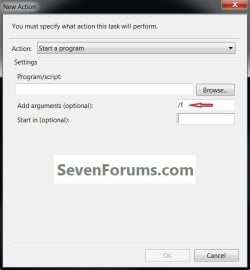
Unless this is what you meant by 'forced' try adding the /f (force) switch under 'arguments' to see if that will sort it for you and be sure to post back with any further questions you may have and to keep us informed.


click to enlarge
f_switch.jpg


My Computer

Computer Manufacturer/Model Number
* BFK Customs *
OS
W 7 64-bit Ultimate
CPU
Intel Q9550 Yorkfield
Motherboard
ASUS P5Q Pro
Memory
8GB Dominator 8500C5D
Graphics Card(s)
ATI : XFX 5870
Sound Card
Realtek HD Audio 7-1
Monitor(s) Displays
1x 47" LCD HDMI & 3x 26" LCD HDMI
Screen Resolution
1920x1080P & 1920x1200
Hard Drives
1x 80GB Intel X25-M G2 SSD : 1x 500GB & 1x 640GB WD Caviar Black(s)
PSU
Corsair 620HX
Case
Cooler Master RC-690
Cooling
Tuniq Tower 120, 2x 140mm and 3x 120mm case fans
Keyboard
Microsoft 500
Mouse
Razer Diamondback 3G
Internet Speed
14 Mb/s
Other Info
1x Koutech 3Gb/s SATA HDD Hot Swap Rack
parental controls will not work as the times the computers need to be turned off are not right on the hour. I think I found out what I was doing wrong with the task scheduler. I had them successfully go into forced hibernate with a task today. However the system that was running an install program using the password from the admin account didn't go into hibernate. I'm guessing the admin account rights to install that program were over-riding the hibernate task.


Hello.

Unless this is what you meant by 'forced' try adding the /f (force) switch under 'arguments' to see if that will sort it for you and be sure to post back with any further questions you may have and to keep us informed.


click to enlarge
View attachment 159149


Yes the -f argument is the force i was talking about.

The computers are set up with 2 user accounts. The first is called Exec and its set up as the admin account we do all the installations etc. with. The 2nd is just a standard user account called Patrons. All the library visitors use the Patrons account to do their email, etc. Some of the customer like to abuse the librarian and refuse to log off the computer at closing time making them stay sometimes up to 45 minutes late while they dink around online. So what we wanted was a task or some way to shut down the computers before closing time to kick those nuisance customers off so the librarians can go home on time.

What I did was create a weekly task for tuesday wednesday and thursday to have the computer hibernate at 4:55 pm. I used the shutdown.exe file from the windows directory and used the -f -h arguments for force close and hibernate.

I also created a message task to give a popup message 5 minutes prior to hibernation warning the user the computer is going to shutdown in 5 minutes.

So far that has worked fine. I'm not sure what ShadowJK meant by a standard admin account, but I think the reason the 3 computers that failed to hibernate (out of the 6) were because I was on the patron account and had given it rights by entering the Exec account (admin) password to install adobe reader. I think that over-rode the task for hibernation even though I had set it to run at the highest priority.

I'll call them tomorrow and see if they went to hibernate properly as scheduled today. Hopefully they did.

The only other problem I have is trying to get the warning popup task message to appear on top of other windows. It is popping up on the task bar but behind the active window. It does flash though on the task bar so people have been opening it to see what it is. I guess that will work but I'd like it on top of all windows so it's plainly visible.
 

My Computer

Computer Manufacturer/Model Number
Dell XPS 420
OS
W7 Ultimate
CPU
Intel Core Quad Q6600
Memory
3Gig
Graphics Card(s)
nVidia Geforce 9400 GT
Sound Card
integrated
Monitor(s) Displays
Dual 19" FP
Hard Drives
500 gig WD
1 Tb Seagate

My Computer

Computer Manufacturer/Model Number
* BFK Customs *
OS
W 7 64-bit Ultimate
CPU
Intel Q9550 Yorkfield
Motherboard
ASUS P5Q Pro
Memory
8GB Dominator 8500C5D
Graphics Card(s)
ATI : XFX 5870
Sound Card
Realtek HD Audio 7-1
Monitor(s) Displays
1x 47" LCD HDMI & 3x 26" LCD HDMI
Screen Resolution
1920x1080P & 1920x1200
Hard Drives
1x 80GB Intel X25-M G2 SSD : 1x 500GB & 1x 640GB WD Caviar Black(s)
PSU
Corsair 620HX
Case
Cooler Master RC-690
Cooling
Tuniq Tower 120, 2x 140mm and 3x 120mm case fans
Keyboard
Microsoft 500
Mouse
Razer Diamondback 3G
Internet Speed
14 Mb/s
Other Info
1x Koutech 3Gb/s SATA HDD Hot Swap Rack
Back
Top