Log On Automatically at Startup

How to Automatically Log On a User Account at Windows 7 Startup


   Information
This will show you how to select or change a user account to have Windows 7 automatically log on to at startup.
   Note

  • If you only have one user account that is not password protected on the computer, then Windows 7 will automatically log on to that account at startup.
  • If you have more than one user account and the user account that you want to have Windows 7 log on to automatically at startup does not have a created password, then leave the password fields blank in step 6 below.
   Warning
This can only be done while logged on to an administrator account. It cannot be done from within a standard account.
If you change the password for the user account you have set to have Windows 7 automatically log on to, then you will also need to change it here as well.


Setting your computer to automatically log on to a user account at startup could pose a security risk if you share the computer or there are other people about that could use your computer. If your computer logs on automatically, they will have the same access as whatever user account you have set to be logged on to at start up.
   Tip
Microsoft has made available a hotfix that will resolve a problem where the taskbar customizations are lost and reset to defaults when automatic logon is enabled in Windows 7 and Windows Server 2008 R2.
EXAMPLE: Log On Screen
NOTE: With Automatic Log On, you will not see this anymore. Windows 7 will boot into the desktop of the selected user account instead.
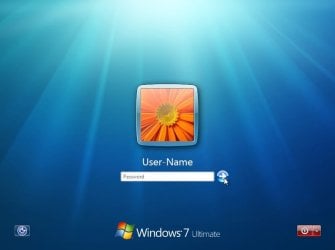
Log-On_Screen.jpg


OPTION ONE

To Turn On or Off Automatic Log On at Startup in Netplwiz


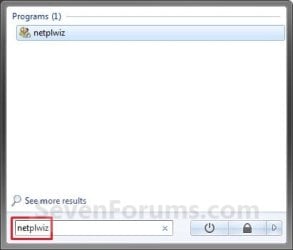
1. Open the Start Menu, type netplwiz in the search box, and press Enter. (see screenshots below)
Start_Menu.jpgStart_Menu2.jpg
2. Do step 3, 4, or 5 below for what you would like to do.


3. To Turn On Automatic Log On for a User Account
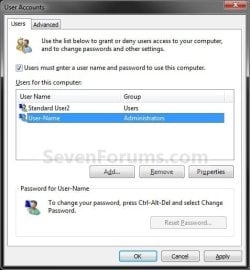
A) Check the Users must enter a user name and password to use this computer box. (see screenshot below)

   Note
If your computer is joined to a domain, then you will not have the Users must enter a user name and password to use this computer option.
Select_User_Name.jpg
B) Click on the user account name, that you want to have automatically log on at startup, to highlight it. (see screenshot above)

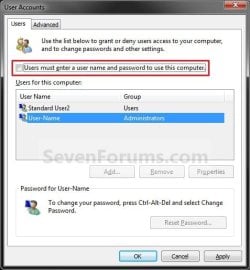
C) Uncheck the Users must enter a user name and password to use this computer box. (see screenshot below)
Uncheck_Box.jpg
D) Click on OK, and go to step 6 below. (see screenshot above)
4. To Turn Off Automatic Log On
A) Check the Users must enter a user name and password to use this computer box. (see screenshot below step 3A)

B) Click on OK. (see screenshot below step 3A)

C) You are finished.
5. To Change the User Account to Automatically Log On to
NOTE: For this step, you would have already had a user account selected to log on to automatically in step 3.
A) Check the Users must enter a user name and password to use this computer box, and click on the Apply button. (see screenshot below step 3A)

   Note
If your computer is joined to a domain, then you will not have the Users must enter a user name and password to use this computer option.


B) Select the other user account name, that you want to have automatically log on at startup instead, to highlight it.

C) Uncheck the Users must enter a user name and password to use this computer box. (see screenshot below step 3C)

D) Click on OK, and go to step 6 below. (see screenshot below step 3C)
6. Enter the User Account Password
A) In the Password field, enter the selected user account's password. (See screenshot below)
NOTE: If the user account does not have a password, then leave this field empty. See the WARNING at the top of the tutorial.

B) In the Confirm Password field, enter the selected user account's password again to confirm that it is the same as in step 6A above.

C) Click on OK.
Password.jpg


OPTION TWO

To Turn On or Off Automatic Log On at Startup in Registry Editor


   Warning
:busted: This option is not as secure as using OPTION ONE above.

It is recommended to use OPTION ONE above if you are able to instead. OPTION ONE will save the password in the Credential Manager where it's encrypted and cannot be viewed by anyone.

This option (OPTION TWO) will save the entered password (steps 4G-4H) in the DefaultPassword string value in Registry Editor where it can be seen by anyone with access.


1. Press the :winkey: + R keys to open the Run dialog, type regedit, and click on OK.

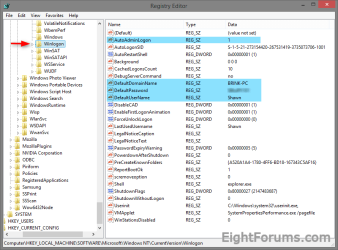
2. In Registry Editor, navigate to the location below. (see screenshot below)
HKEY_LOCAL_MACHINE\SOFTWARE\Microsoft\Windows NT\CurrentVersion\Winlogon
Automatic_log_on_Regsitry-1.png
3. Do step 4 or 5 below for what you would like to do.


4. To Turn On Automatic Log On for a Domain, Local, or Microsoft Account
NOTE: You could also use this step to change what user account you would like Windows 8 to sign-in to automatically at startup.
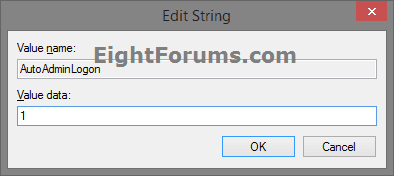
A) In the right pane on Winlogon, double click/tap on the AutoAdminLogon string value to modify it. (see screenshot below step 2)

B) Type 1, and click/tap on OK. (see screenshot below)
Automatic_log_on_Regsitry-1A.png
C) Double click/tap on the DefaultDomainName string value to modify it. (see screenshot below step 2)

D) Type the computer name (if local) or domain name, and click/tap on OK. (see screenshot below)
Automatic_log_on_Regsitry-2.png
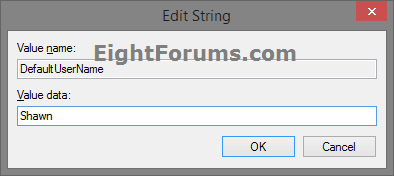
E) Double click/tap on the DefaultUserName string value to modify it. (see screenshot below step 2)

F) Type the user name (ex: Shawn) of the account you want to automatically be signed in to at startup, and click/tap on OK. (see screenshot below)

NOTE: This will be the same name as the user account's C:\Users\(UserName) profile folder.
Automatic_log_on_Regsitry-3.png
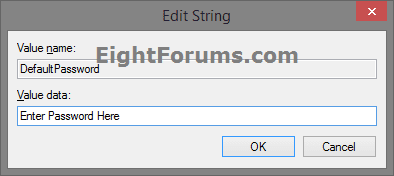
G) Double click/tap on the DefaultPassword string value to modify it. (see screenshot below step 2)

NOTE: If you do not have a DefaultPassword string value, then right click or press and hold on an empty area in the right pane of the Winlogon key, click/tap on New and String Value, type DefaultPassword, and press Enter.

H) Type the password of the user account you want to automatically be signed in to at startup, and click/tap on OK. (see screenshot below)
Automatic_log_on_Regsitry-4.png
I) Go to step 6 below.
5. To Turn Off Automatic Log On for All Users
A) In the right pane on Winlogon, double click/tap on the AutoAdminLogon string value to modify it. (see screenshot below step 2)

B) Type 0 (zero), and click/tap on OK. (see screenshot below step 4B)

C) Right click or press and hold on the DefaultPassword string value, and click/tap on Delete. (see screenshot below step 2)

NOTE: If you do not have a DefaultPassword string value, then that's ok, and go to step 6 below.

D) Click/tap on Yes to confirm. (see screenshot below)
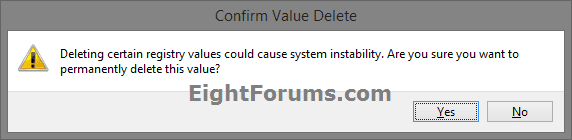
Automatic_log_on_Regsitry-5.png
E) Go to step 6 below.
6. When finished, close Registry Editor.
That's it,
Shawn


Last edited:
Last edited:

My Computer

Computer type
PC/Desktop
Computer Manufacturer/Model Number
Self built custom
OS
64-bit Windows 11 Pro for Workstations
CPU
Intel i7-8700K OC'd to 5 GHz
Motherboard
ASUS ROG Maximus XI Formula Z390
Memory
64 GB (4x16GB) G.SKILL TridentZ RGB DDR4 3600 MHz
Graphics Card(s)
ASUS ROG-STRIX-GTX1080TI-O11G-GAMING
Sound Card
Integrated
Monitor(s) Displays
2 x Samsung Odyssey G7 27"
Screen Resolution
2560x1440
Hard Drives
1TB Samsung 990 PRO M.2,
4TB Samsung 990 PRO PRO M.2,
TerraMaster F8 SSD Plus NAS
PSU
Seasonic Prime Titanium 850W
Case
Thermaltake Core P3
Cooling
Corsair Hydro H115i
Keyboard
Logitech wireless K800
Mouse
Logitech MX Master 4
Internet Speed
2 Gb/s Download and 100 Mb/s Upload
Antivirus
Malwarebyte Anti-Malware Premium
Browser
Google Chrome
Other Info
Logitech Z625 speaker system,
Logitech BRIO 4K Pro webcam,
HP Color LaserJet Pro MFP M477fdn,
APC SMART-UPS RT 1000 XL - SURT1000XLI,
Galaxy S23 Plus phone
Automatic Logon at startup

@ Brink : Your description is excellent, a very helpful post. Thanks.
 

My Computer

Computer Manufacturer/Model Number
Asus N82JQ
OS
Windows 7 home
CPU
Intel i7 Q720
Memory
4G
Graphics Card(s)
NVIDIA GeForce GT 335M
Sound Card
external Alesis IO2
Monitor(s) Displays
Laptop Display
Screen Resolution
1280 x 768
Hard Drives
one internal 600G
one external 350G USB2
one external 500G Firewire
Mouse
Logitech wireless optical
Internet Speed
5mbps
You're most welcome Moondragon. I'm glad that it could help. :)
 

My Computer

Computer type
PC/Desktop
Computer Manufacturer/Model Number
Self built custom
OS
64-bit Windows 11 Pro for Workstations
CPU
Intel i7-8700K OC'd to 5 GHz
Motherboard
ASUS ROG Maximus XI Formula Z390
Memory
64 GB (4x16GB) G.SKILL TridentZ RGB DDR4 3600 MHz
Graphics Card(s)
ASUS ROG-STRIX-GTX1080TI-O11G-GAMING
Sound Card
Integrated
Monitor(s) Displays
2 x Samsung Odyssey G7 27"
Screen Resolution
2560x1440
Hard Drives
1TB Samsung 990 PRO M.2,
4TB Samsung 990 PRO PRO M.2,
TerraMaster F8 SSD Plus NAS
PSU
Seasonic Prime Titanium 850W
Case
Thermaltake Core P3
Cooling
Corsair Hydro H115i
Keyboard
Logitech wireless K800
Mouse
Logitech MX Master 4
Internet Speed
2 Gb/s Download and 100 Mb/s Upload
Antivirus
Malwarebyte Anti-Malware Premium
Browser
Google Chrome
Other Info
Logitech Z625 speaker system,
Logitech BRIO 4K Pro webcam,
HP Color LaserJet Pro MFP M477fdn,
APC SMART-UPS RT 1000 XL - SURT1000XLI,
Galaxy S23 Plus phone
thanks for this good tutorial
i have a question:
in our univercity when i turn on the computer it goes automatically to the windows.i thought I've logged as administrator because i approximately could do everything like install softwares and ....but a day i tried to change the antivirus settings but the options was gray and disable.
so when i read this tutorial i understand that the admin set the system to automatically logg as standard user.
now my question is:
if the admin wants to logg as admin where can he do that?because in boot menu i did not see anything for that
 

My Computer

OS
windows 7 ultimate x64
Hello Muiacir,

Since this is a university computer, I would recommend to use step 4 to turn off automatic log on, so all users must log in for access to the computer.

If you need it set with automatic log on, then you could log off or use switch user from the Start Menu power menu while in the standard account to be able to log on to the administrator account. Just be sure to log out of the administrator account when finished to prevent unauthorized access.

Hope this helps. :)
 

My Computer

Computer type
PC/Desktop
Computer Manufacturer/Model Number
Self built custom
OS
64-bit Windows 11 Pro for Workstations
CPU
Intel i7-8700K OC'd to 5 GHz
Motherboard
ASUS ROG Maximus XI Formula Z390
Memory
64 GB (4x16GB) G.SKILL TridentZ RGB DDR4 3600 MHz
Graphics Card(s)
ASUS ROG-STRIX-GTX1080TI-O11G-GAMING
Sound Card
Integrated
Monitor(s) Displays
2 x Samsung Odyssey G7 27"
Screen Resolution
2560x1440
Hard Drives
1TB Samsung 990 PRO M.2,
4TB Samsung 990 PRO PRO M.2,
TerraMaster F8 SSD Plus NAS
PSU
Seasonic Prime Titanium 850W
Case
Thermaltake Core P3
Cooling
Corsair Hydro H115i
Keyboard
Logitech wireless K800
Mouse
Logitech MX Master 4
Internet Speed
2 Gb/s Download and 100 Mb/s Upload
Antivirus
Malwarebyte Anti-Malware Premium
Browser
Google Chrome
Other Info
Logitech Z625 speaker system,
Logitech BRIO 4K Pro webcam,
HP Color LaserJet Pro MFP M477fdn,
APC SMART-UPS RT 1000 XL - SURT1000XLI,
Galaxy S23 Plus phone
thnaks shawn. i will try your solution and report
 

My Computer

OS
windows 7 ultimate x64
will this work with the Administrator account? i'm the only person that uses my machine, and i hate the idea of having to tell the computer to run things as administrator all the time, it's ridiculous.

If you are talking about the default administrator account (the one enabled by the "net user administrator" command) then, although it's possible to make it your default and only account, i recommend that you use another administrator privleged account. This is because the powerful administrator account has COMPLETE power over your computer, therefor there is no need to use UAC, however, it also makes your computer more vulnerable to viruses and spyware.

I hope this helped,
Surge
 

My Computer

Computer type
PC/Desktop
Computer Manufacturer/Model Number
Custom Build
OS
Windows 7 Enterprise x64
CPU
Intel(R) Core(TM) i5-3570k Ivy Bridge @ 3.40Ghz
Motherboard
ASUS P8Z77-v LX
Memory
4GB
Graphics Card(s)
EVGA 2GB NVIDIA GTX 760
Monitor(s) Displays
SAMSUNG
Screen Resolution
1920 x 1080
Hard Drives
Seagate Barracuda
WesternDigital
PSU
Corsair CX750M 750W Modular PSU
Case
Modded Case
Cooling
3 Input Fans 1 Exhaust fan 2 GPU Exhaust Fans 1 CPU Fan
Keyboard
Logitech Wireless Combo mk360 Keyboard
Mouse
Logitech G400 Gaming Mouse; Logitech Wireless Combo mk360
Internet Speed
27mbps (download) & 7mbps (upload) (FREE, France)
Antivirus
Microsoft Security Essentials
Browser
Google Chrome
Other Info
New Custom built gaming rig.
Hi Shawn,

Are you referring to Remote Desktop Control on post #6? How can i able to log on to other computer using remote desktop control without requiring a user password? Is that possible?
 

My Computer

OS
Windows 7 Home Premium x64

My Computer

Computer type
PC/Desktop
Computer Manufacturer/Model Number
Self built custom
OS
64-bit Windows 11 Pro for Workstations
CPU
Intel i7-8700K OC'd to 5 GHz
Motherboard
ASUS ROG Maximus XI Formula Z390
Memory
64 GB (4x16GB) G.SKILL TridentZ RGB DDR4 3600 MHz
Graphics Card(s)
ASUS ROG-STRIX-GTX1080TI-O11G-GAMING
Sound Card
Integrated
Monitor(s) Displays
2 x Samsung Odyssey G7 27"
Screen Resolution
2560x1440
Hard Drives
1TB Samsung 990 PRO M.2,
4TB Samsung 990 PRO PRO M.2,
TerraMaster F8 SSD Plus NAS
PSU
Seasonic Prime Titanium 850W
Case
Thermaltake Core P3
Cooling
Corsair Hydro H115i
Keyboard
Logitech wireless K800
Mouse
Logitech MX Master 4
Internet Speed
2 Gb/s Download and 100 Mb/s Upload
Antivirus
Malwarebyte Anti-Malware Premium
Browser
Google Chrome
Other Info
Logitech Z625 speaker system,
Logitech BRIO 4K Pro webcam,
HP Color LaserJet Pro MFP M477fdn,
APC SMART-UPS RT 1000 XL - SURT1000XLI,
Galaxy S23 Plus phone
Hello Jan,

No. This tutorial is only for at startup instead.

For RDC, you would want to use this tutorial below instead. :)

http://www.sevenforums.com/tutorials/141774-remote-desktop-connection-automatic-log-turn-off.html

Hi shawn thanks for your reply but what i thought on your post at #6, you were telling Tang that without user account password, some computer can able to connect on his PC easily over the network via RDC, am i correct? As far as i know, i can only connect to another computer over the network via RDC when the client PC has user password and if i know his password. Is it possible that i can connect to the client PC even his user account has no password?
 
Last edited:

My Computer

OS
Windows 7 Home Premium x64
No, you will need to have a password to connect via RDC unless you set it to allow to via Security Policies. Post #6 was for a homegroup and users on the same computer. I should have made that more clear in that post.
 

My Computer

Computer type
PC/Desktop
Computer Manufacturer/Model Number
Self built custom
OS
64-bit Windows 11 Pro for Workstations
CPU
Intel i7-8700K OC'd to 5 GHz
Motherboard
ASUS ROG Maximus XI Formula Z390
Memory
64 GB (4x16GB) G.SKILL TridentZ RGB DDR4 3600 MHz
Graphics Card(s)
ASUS ROG-STRIX-GTX1080TI-O11G-GAMING
Sound Card
Integrated
Monitor(s) Displays
2 x Samsung Odyssey G7 27"
Screen Resolution
2560x1440
Hard Drives
1TB Samsung 990 PRO M.2,
4TB Samsung 990 PRO PRO M.2,
TerraMaster F8 SSD Plus NAS
PSU
Seasonic Prime Titanium 850W
Case
Thermaltake Core P3
Cooling
Corsair Hydro H115i
Keyboard
Logitech wireless K800
Mouse
Logitech MX Master 4
Internet Speed
2 Gb/s Download and 100 Mb/s Upload
Antivirus
Malwarebyte Anti-Malware Premium
Browser
Google Chrome
Other Info
Logitech Z625 speaker system,
Logitech BRIO 4K Pro webcam,
HP Color LaserJet Pro MFP M477fdn,
APC SMART-UPS RT 1000 XL - SURT1000XLI,
Galaxy S23 Plus phone
No, you will need to have a password to connect via RDC unless you set it to allow to via Security Policies. Post #6 was for a homegroup and users on the same computer. I should have made that more clear in that post.

Yes i was asking for a homegroup network, i want to connect to my other computer via RDC without requiring a client user password. Security isn't an issue, this is on an internal network. How would i do that? My OS is Win 7 HP and the client PC is Windows XP Pro.
 

My Computer

OS
Windows 7 Home Premium x64
Yeah, it still must have a password using RDP.

Without password would be towards the sharing between Windows 8 and Windows 7 PCs in a homegroup instead.
 

My Computer

Computer type
PC/Desktop
Computer Manufacturer/Model Number
Self built custom
OS
64-bit Windows 11 Pro for Workstations
CPU
Intel i7-8700K OC'd to 5 GHz
Motherboard
ASUS ROG Maximus XI Formula Z390
Memory
64 GB (4x16GB) G.SKILL TridentZ RGB DDR4 3600 MHz
Graphics Card(s)
ASUS ROG-STRIX-GTX1080TI-O11G-GAMING
Sound Card
Integrated
Monitor(s) Displays
2 x Samsung Odyssey G7 27"
Screen Resolution
2560x1440
Hard Drives
1TB Samsung 990 PRO M.2,
4TB Samsung 990 PRO PRO M.2,
TerraMaster F8 SSD Plus NAS
PSU
Seasonic Prime Titanium 850W
Case
Thermaltake Core P3
Cooling
Corsair Hydro H115i
Keyboard
Logitech wireless K800
Mouse
Logitech MX Master 4
Internet Speed
2 Gb/s Download and 100 Mb/s Upload
Antivirus
Malwarebyte Anti-Malware Premium
Browser
Google Chrome
Other Info
Logitech Z625 speaker system,
Logitech BRIO 4K Pro webcam,
HP Color LaserJet Pro MFP M477fdn,
APC SMART-UPS RT 1000 XL - SURT1000XLI,
Galaxy S23 Plus phone
go to control panel/ administrative tools/ local security policy/ Security options/ Accounts: Limit local account use of blank passwords to console logon only

set that to disable, and you will be able to remote desktop without the need for a password

I found this on some site, unfortunately i dont have the "Local Security Policy" perhaps because my OS is just Home Premium. Thanks for all your tutorial i really learned a lot from you. God bless and ore power to you!
 

My Computer

OS
Windows 7 Home Premium x64

My Computer

Computer type
PC/Desktop
Computer Manufacturer/Model Number
Self built custom
OS
64-bit Windows 11 Pro for Workstations
CPU
Intel i7-8700K OC'd to 5 GHz
Motherboard
ASUS ROG Maximus XI Formula Z390
Memory
64 GB (4x16GB) G.SKILL TridentZ RGB DDR4 3600 MHz
Graphics Card(s)
ASUS ROG-STRIX-GTX1080TI-O11G-GAMING
Sound Card
Integrated
Monitor(s) Displays
2 x Samsung Odyssey G7 27"
Screen Resolution
2560x1440
Hard Drives
1TB Samsung 990 PRO M.2,
4TB Samsung 990 PRO PRO M.2,
TerraMaster F8 SSD Plus NAS
PSU
Seasonic Prime Titanium 850W
Case
Thermaltake Core P3
Cooling
Corsair Hydro H115i
Keyboard
Logitech wireless K800
Mouse
Logitech MX Master 4
Internet Speed
2 Gb/s Download and 100 Mb/s Upload
Antivirus
Malwarebyte Anti-Malware Premium
Browser
Google Chrome
Other Info
Logitech Z625 speaker system,
Logitech BRIO 4K Pro webcam,
HP Color LaserJet Pro MFP M477fdn,
APC SMART-UPS RT 1000 XL - SURT1000XLI,
Galaxy S23 Plus phone
This does not work on my computer

I have done this 6 or 7 times and it does not work on my computer!! What can I do???
 

My Computer

OS
windows 7 64 bit
Hello cowgirlup, and welcome to Seven Forums.

Please go ahead and post back with some screenshots showing what you have set. :)

Just to make sure, this is only for at startup, and not after resuming from sleep, hibernate, or screen saver.

Are you logged in as an administrator?

Are you part of a domain?
 

My Computer

Computer type
PC/Desktop
Computer Manufacturer/Model Number
Self built custom
OS
64-bit Windows 11 Pro for Workstations
CPU
Intel i7-8700K OC'd to 5 GHz
Motherboard
ASUS ROG Maximus XI Formula Z390
Memory
64 GB (4x16GB) G.SKILL TridentZ RGB DDR4 3600 MHz
Graphics Card(s)
ASUS ROG-STRIX-GTX1080TI-O11G-GAMING
Sound Card
Integrated
Monitor(s) Displays
2 x Samsung Odyssey G7 27"
Screen Resolution
2560x1440
Hard Drives
1TB Samsung 990 PRO M.2,
4TB Samsung 990 PRO PRO M.2,
TerraMaster F8 SSD Plus NAS
PSU
Seasonic Prime Titanium 850W
Case
Thermaltake Core P3
Cooling
Corsair Hydro H115i
Keyboard
Logitech wireless K800
Mouse
Logitech MX Master 4
Internet Speed
2 Gb/s Download and 100 Mb/s Upload
Antivirus
Malwarebyte Anti-Malware Premium
Browser
Google Chrome
Other Info
Logitech Z625 speaker system,
Logitech BRIO 4K Pro webcam,
HP Color LaserJet Pro MFP M477fdn,
APC SMART-UPS RT 1000 XL - SURT1000XLI,
Galaxy S23 Plus phone
Hello Shawn I am wanting to keep my password on startup but don't want to have it on a reboot / restart for example after I do Windows updates - any way around this please?

Looking at the tutorial I'd say not but....
 

My Computer

Computer type
PC/Desktop
Computer Manufacturer/Model Number
Own build (new) Desk1 / Asus ROG Win 7 / Desk2 1st build
OS
Desk1 7 Home Prem / Desk2 10 Pro / Main lap Asus ROG 10 Pro 2 laptop Toshiba 7 Pro Asus P2520 7 & 10
CPU
Desk1 i5 3750K / Laptop i7 GTX 860M / Desk2 i5 2500
Motherboard
Desk1 Asus P877-V / Desk2 Gigabyte H67 UD3H / Laptop ?
Memory
Desk1 8GB (1866) / Desk2 16GB (1333) / Laptop 8Gb DDR3
Graphics Card(s)
Desk 1& 2NVidia GTX 650 & Laptops on board Intel
Sound Card
Desk 1 & 2 -XONAR DG Realtek High Def audio Laptop
Monitor(s) Displays
Desk 1 Benq HD 2450 / Desk2 Philips 24" / Laptop 17.5"
Screen Resolution
1920x1080 D1 & D2 & Laptop 1
Hard Drives
Desk1 Samsung 120GB 830 SSD
Asus ROG 256GB 850 Pro SSD
Desk2 Samsung 840 256 SSD
Toshiba 120GB EVO
PSU
Desk 1 Corsair HX 1050/ Laptop ? / Desk 2 Corsair HX 650
Case
Desk 1 Cooler HAF XM ? Toshiba laptop / Desk2 Coolermaster
Cooling
Fans on all Desk1 -2 Desk2 - all Coolermasters 5 Laptop ?
Keyboard
Desk 1 MS Sidewinder X6 Desk 2 MS Sidewinder X 4
Mouse
Desk 1&2 - Gigabyte MS 900 gamer - laptop - Logitec wireless
Internet Speed
ADSL2+
Other Info
One other Desktop (tester) and spare Toshba laptop both with SSD's
Running Kaspersky 2016 ISS on all machines config'd identically
Logitec audio stereo systems on each machine (x3)
Canon MG5250MFC
Router/modem TP-Link running WPA2SK
Hello John,

I'm afraid not. Since reboot/restart takes you to the startup log on screen it's pretty much an either or setting for that. :(
 

My Computer

Computer type
PC/Desktop
Computer Manufacturer/Model Number
Self built custom
OS
64-bit Windows 11 Pro for Workstations
CPU
Intel i7-8700K OC'd to 5 GHz
Motherboard
ASUS ROG Maximus XI Formula Z390
Memory
64 GB (4x16GB) G.SKILL TridentZ RGB DDR4 3600 MHz
Graphics Card(s)
ASUS ROG-STRIX-GTX1080TI-O11G-GAMING
Sound Card
Integrated
Monitor(s) Displays
2 x Samsung Odyssey G7 27"
Screen Resolution
2560x1440
Hard Drives
1TB Samsung 990 PRO M.2,
4TB Samsung 990 PRO PRO M.2,
TerraMaster F8 SSD Plus NAS
PSU
Seasonic Prime Titanium 850W
Case
Thermaltake Core P3
Cooling
Corsair Hydro H115i
Keyboard
Logitech wireless K800
Mouse
Logitech MX Master 4
Internet Speed
2 Gb/s Download and 100 Mb/s Upload
Antivirus
Malwarebyte Anti-Malware Premium
Browser
Google Chrome
Other Info
Logitech Z625 speaker system,
Logitech BRIO 4K Pro webcam,
HP Color LaserJet Pro MFP M477fdn,
APC SMART-UPS RT 1000 XL - SURT1000XLI,
Galaxy S23 Plus phone
Hello John,

I'm afraid not. Since reboot/restart takes you to the startup log on screen it's pretty much an either or setting for that. :(
No worries mate oh and have a merry Christmas - am saying it now because I ma awful at forgetting these occasions LOL!!
 

My Computer

Computer type
PC/Desktop
Computer Manufacturer/Model Number
Own build (new) Desk1 / Asus ROG Win 7 / Desk2 1st build
OS
Desk1 7 Home Prem / Desk2 10 Pro / Main lap Asus ROG 10 Pro 2 laptop Toshiba 7 Pro Asus P2520 7 & 10
CPU
Desk1 i5 3750K / Laptop i7 GTX 860M / Desk2 i5 2500
Motherboard
Desk1 Asus P877-V / Desk2 Gigabyte H67 UD3H / Laptop ?
Memory
Desk1 8GB (1866) / Desk2 16GB (1333) / Laptop 8Gb DDR3
Graphics Card(s)
Desk 1& 2NVidia GTX 650 & Laptops on board Intel
Sound Card
Desk 1 & 2 -XONAR DG Realtek High Def audio Laptop
Monitor(s) Displays
Desk 1 Benq HD 2450 / Desk2 Philips 24" / Laptop 17.5"
Screen Resolution
1920x1080 D1 & D2 & Laptop 1
Hard Drives
Desk1 Samsung 120GB 830 SSD
Asus ROG 256GB 850 Pro SSD
Desk2 Samsung 840 256 SSD
Toshiba 120GB EVO
PSU
Desk 1 Corsair HX 1050/ Laptop ? / Desk 2 Corsair HX 650
Case
Desk 1 Cooler HAF XM ? Toshiba laptop / Desk2 Coolermaster
Cooling
Fans on all Desk1 -2 Desk2 - all Coolermasters 5 Laptop ?
Keyboard
Desk 1 MS Sidewinder X6 Desk 2 MS Sidewinder X 4
Mouse
Desk 1&2 - Gigabyte MS 900 gamer - laptop - Logitec wireless
Internet Speed
ADSL2+
Other Info
One other Desktop (tester) and spare Toshba laptop both with SSD's
Running Kaspersky 2016 ISS on all machines config'd identically
Logitec audio stereo systems on each machine (x3)
Canon MG5250MFC
Router/modem TP-Link running WPA2SK
Back
Top