Log On Automatically at Startup

How to Automatically Log On a User Account at Windows 7 Startup


   Information
This will show you how to select or change a user account to have Windows 7 automatically log on to at startup.
   Note

  • If you only have one user account that is not password protected on the computer, then Windows 7 will automatically log on to that account at startup.
  • If you have more than one user account and the user account that you want to have Windows 7 log on to automatically at startup does not have a created password, then leave the password fields blank in step 6 below.
   Warning
This can only be done while logged on to an administrator account. It cannot be done from within a standard account.
If you change the password for the user account you have set to have Windows 7 automatically log on to, then you will also need to change it here as well.


Setting your computer to automatically log on to a user account at startup could pose a security risk if you share the computer or there are other people about that could use your computer. If your computer logs on automatically, they will have the same access as whatever user account you have set to be logged on to at start up.
   Tip
Microsoft has made available a hotfix that will resolve a problem where the taskbar customizations are lost and reset to defaults when automatic logon is enabled in Windows 7 and Windows Server 2008 R2.
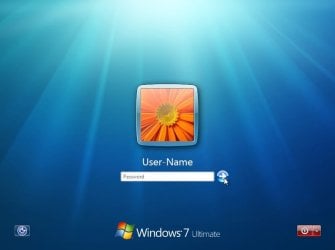
EXAMPLE: Log On Screen
NOTE: With Automatic Log On, you will not see this anymore. Windows 7 will boot into the desktop of the selected user account instead.
Log-On_Screen.jpg


OPTION ONE

To Turn On or Off Automatic Log On at Startup in Netplwiz


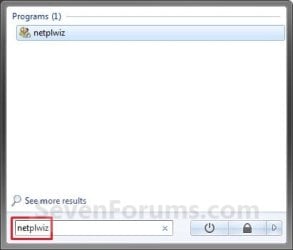
1. Open the Start Menu, type netplwiz in the search box, and press Enter. (see screenshots below)
Start_Menu.jpgStart_Menu2.jpg
2. Do step 3, 4, or 5 below for what you would like to do.


3. To Turn On Automatic Log On for a User Account
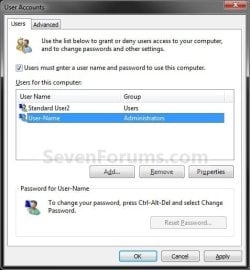
A) Check the Users must enter a user name and password to use this computer box. (see screenshot below)

   Note
If your computer is joined to a domain, then you will not have the Users must enter a user name and password to use this computer option.
Select_User_Name.jpg
B) Click on the user account name, that you want to have automatically log on at startup, to highlight it. (see screenshot above)

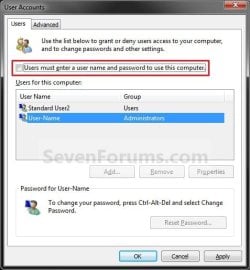
C) Uncheck the Users must enter a user name and password to use this computer box. (see screenshot below)
Uncheck_Box.jpg
D) Click on OK, and go to step 6 below. (see screenshot above)
4. To Turn Off Automatic Log On
A) Check the Users must enter a user name and password to use this computer box. (see screenshot below step 3A)

B) Click on OK. (see screenshot below step 3A)

C) You are finished.
5. To Change the User Account to Automatically Log On to
NOTE: For this step, you would have already had a user account selected to log on to automatically in step 3.
A) Check the Users must enter a user name and password to use this computer box, and click on the Apply button. (see screenshot below step 3A)

   Note
If your computer is joined to a domain, then you will not have the Users must enter a user name and password to use this computer option.


B) Select the other user account name, that you want to have automatically log on at startup instead, to highlight it.

C) Uncheck the Users must enter a user name and password to use this computer box. (see screenshot below step 3C)

D) Click on OK, and go to step 6 below. (see screenshot below step 3C)
6. Enter the User Account Password
A) In the Password field, enter the selected user account's password. (See screenshot below)
NOTE: If the user account does not have a password, then leave this field empty. See the WARNING at the top of the tutorial.

B) In the Confirm Password field, enter the selected user account's password again to confirm that it is the same as in step 6A above.

C) Click on OK.
Password.jpg


OPTION TWO

To Turn On or Off Automatic Log On at Startup in Registry Editor


   Warning
:busted: This option is not as secure as using OPTION ONE above.

It is recommended to use OPTION ONE above if you are able to instead. OPTION ONE will save the password in the Credential Manager where it's encrypted and cannot be viewed by anyone.

This option (OPTION TWO) will save the entered password (steps 4G-4H) in the DefaultPassword string value in Registry Editor where it can be seen by anyone with access.


1. Press the :winkey: + R keys to open the Run dialog, type regedit, and click on OK.

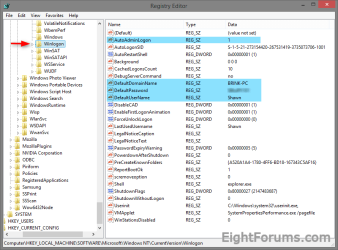
2. In Registry Editor, navigate to the location below. (see screenshot below)
HKEY_LOCAL_MACHINE\SOFTWARE\Microsoft\Windows NT\CurrentVersion\Winlogon
Automatic_log_on_Regsitry-1.png
3. Do step 4 or 5 below for what you would like to do.


4. To Turn On Automatic Log On for a Domain, Local, or Microsoft Account
NOTE: You could also use this step to change what user account you would like Windows 8 to sign-in to automatically at startup.
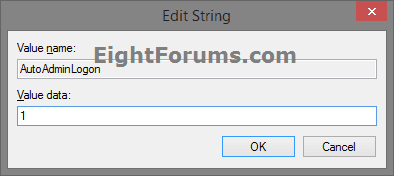
A) In the right pane on Winlogon, double click/tap on the AutoAdminLogon string value to modify it. (see screenshot below step 2)

B) Type 1, and click/tap on OK. (see screenshot below)
Automatic_log_on_Regsitry-1A.png
C) Double click/tap on the DefaultDomainName string value to modify it. (see screenshot below step 2)

D) Type the computer name (if local) or domain name, and click/tap on OK. (see screenshot below)
Automatic_log_on_Regsitry-2.png
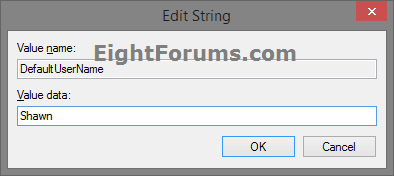
E) Double click/tap on the DefaultUserName string value to modify it. (see screenshot below step 2)

F) Type the user name (ex: Shawn) of the account you want to automatically be signed in to at startup, and click/tap on OK. (see screenshot below)

NOTE: This will be the same name as the user account's C:\Users\(UserName) profile folder.
Automatic_log_on_Regsitry-3.png
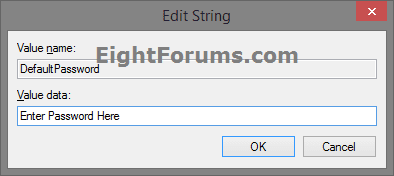
G) Double click/tap on the DefaultPassword string value to modify it. (see screenshot below step 2)

NOTE: If you do not have a DefaultPassword string value, then right click or press and hold on an empty area in the right pane of the Winlogon key, click/tap on New and String Value, type DefaultPassword, and press Enter.

H) Type the password of the user account you want to automatically be signed in to at startup, and click/tap on OK. (see screenshot below)
Automatic_log_on_Regsitry-4.png
I) Go to step 6 below.
5. To Turn Off Automatic Log On for All Users
A) In the right pane on Winlogon, double click/tap on the AutoAdminLogon string value to modify it. (see screenshot below step 2)

B) Type 0 (zero), and click/tap on OK. (see screenshot below step 4B)

C) Right click or press and hold on the DefaultPassword string value, and click/tap on Delete. (see screenshot below step 2)

NOTE: If you do not have a DefaultPassword string value, then that's ok, and go to step 6 below.

D) Click/tap on Yes to confirm. (see screenshot below)
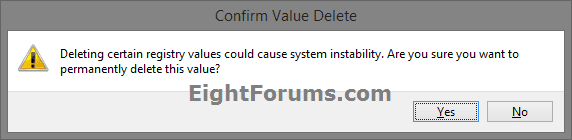
Automatic_log_on_Regsitry-5.png
E) Go to step 6 below.
6. When finished, close Registry Editor.
That's it,
Shawn


Last edited:
Anytime John.

LOL, I hear you. I hope you have a Merry Christmas as well. :)
 

My Computer

Computer type
PC/Desktop
Computer Manufacturer/Model Number
Self built custom
OS
64-bit Windows 11 Pro for Workstations
CPU
Intel i7-8700K OC'd to 5 GHz
Motherboard
ASUS ROG Maximus XI Formula Z390
Memory
64 GB (4x16GB) G.SKILL TridentZ RGB DDR4 3600 MHz
Graphics Card(s)
ASUS ROG-STRIX-GTX1080TI-O11G-GAMING
Sound Card
Integrated
Monitor(s) Displays
2 x Samsung Odyssey G7 27"
Screen Resolution
2560x1440
Hard Drives
1TB Samsung 990 PRO M.2,
4TB Samsung 990 PRO PRO M.2,
TerraMaster F8 SSD Plus NAS
PSU
Seasonic Prime Titanium 850W
Case
Thermaltake Core P3
Cooling
Corsair Hydro H115i
Keyboard
Logitech wireless K800
Mouse
Logitech MX Master 4
Internet Speed
2 Gb/s Download and 100 Mb/s Upload
Antivirus
Malwarebyte Anti-Malware Premium
Browser
Google Chrome
Other Info
Logitech Z625 speaker system,
Logitech BRIO 4K Pro webcam,
HP Color LaserJet Pro MFP M477fdn,
APC SMART-UPS RT 1000 XL - SURT1000XLI,
Galaxy S23 Plus phone
I don't if I can post here for this problem. When I did the tutorial and log on automatically it took me to the windows basic theme. I can't change it back to customize. Let me see if I can go back to other way to log on with my user account without password.
 

My Computer

Computer type
Laptop
Computer Manufacturer/Model Number
compaq
OS
windows Ultimate
Thanks to Shawn

Shawn,


Your suggestion is right-on!! I used it and it worked perfectly!!
Thanks very much for your fine help!


/ Gary E. :)
 

My Computer

OS
Win7
Hello Gary,

You're most welcome. I'm happy to hear that it was able to help. :)
 

My Computer

Computer type
PC/Desktop
Computer Manufacturer/Model Number
Self built custom
OS
64-bit Windows 11 Pro for Workstations
CPU
Intel i7-8700K OC'd to 5 GHz
Motherboard
ASUS ROG Maximus XI Formula Z390
Memory
64 GB (4x16GB) G.SKILL TridentZ RGB DDR4 3600 MHz
Graphics Card(s)
ASUS ROG-STRIX-GTX1080TI-O11G-GAMING
Sound Card
Integrated
Monitor(s) Displays
2 x Samsung Odyssey G7 27"
Screen Resolution
2560x1440
Hard Drives
1TB Samsung 990 PRO M.2,
4TB Samsung 990 PRO PRO M.2,
TerraMaster F8 SSD Plus NAS
PSU
Seasonic Prime Titanium 850W
Case
Thermaltake Core P3
Cooling
Corsair Hydro H115i
Keyboard
Logitech wireless K800
Mouse
Logitech MX Master 4
Internet Speed
2 Gb/s Download and 100 Mb/s Upload
Antivirus
Malwarebyte Anti-Malware Premium
Browser
Google Chrome
Other Info
Logitech Z625 speaker system,
Logitech BRIO 4K Pro webcam,
HP Color LaserJet Pro MFP M477fdn,
APC SMART-UPS RT 1000 XL - SURT1000XLI,
Galaxy S23 Plus phone
That's good to know.

I was planning on running Folding@home when I'm off somewhere and realized that Windows has to perform updates as well and needs to restart the machine and the other program simply can't run from the login prompt. Now I turned automatic log-in on, now how do I turn it back off?
 

My Computer

Computer type
PC/Desktop
Computer Manufacturer/Model Number
Custom
OS
Microsoft Windows 7 Home Premium 64-bit Service Pack 1
CPU
AMD A10-6800K APU with Radeon(tm)™ HD Graphics 4100
Motherboard
ASRock FM2A85X Extreme4-M
Memory
(2) G.Skill F3-12800CL10-8GBXL
Graphics Card(s)
ASUS R7 250 Series (0x6610)
Sound Card
Realtek High Definition Audio
Monitor(s) Displays
Acer X213H LCD monitor, 21"
Screen Resolution
1920 x 1080 x 32 bits @ 60 Hz
Hard Drives
WD Black, 1.0TB, WDC WD1002FAEX-00Z3A0
PSU
Rosewill Quark-650
Case
Raidmax Comet SECC Steel ATX Mid Tower Computer Case
Cooling
1 x 80mm + 2 x 120mm + Stock cooler
Mouse
Gear Head Wireless Optical 5-button mouse
Internet Speed
FTTx 6000 / 1000
Antivirus
Avast! Free Antivirus 2015.10.0.2208
Browser
Google Chrome Version 40.0.2214.115
Other Info
*AMD Dual-Graphics
*Uses OpenDNS
*Uses Folding@Home
*HP 16x Super-Multi DVD Writer
*Superspeed 74-in-1 Card Reader
*Maximum overclock has not been determined.
Hey Honeycomb,

Checking the box and clicking on OK (step 4 in Option One) will turn it off for you. :)
 

My Computer

Computer type
PC/Desktop
Computer Manufacturer/Model Number
Self built custom
OS
64-bit Windows 11 Pro for Workstations
CPU
Intel i7-8700K OC'd to 5 GHz
Motherboard
ASUS ROG Maximus XI Formula Z390
Memory
64 GB (4x16GB) G.SKILL TridentZ RGB DDR4 3600 MHz
Graphics Card(s)
ASUS ROG-STRIX-GTX1080TI-O11G-GAMING
Sound Card
Integrated
Monitor(s) Displays
2 x Samsung Odyssey G7 27"
Screen Resolution
2560x1440
Hard Drives
1TB Samsung 990 PRO M.2,
4TB Samsung 990 PRO PRO M.2,
TerraMaster F8 SSD Plus NAS
PSU
Seasonic Prime Titanium 850W
Case
Thermaltake Core P3
Cooling
Corsair Hydro H115i
Keyboard
Logitech wireless K800
Mouse
Logitech MX Master 4
Internet Speed
2 Gb/s Download and 100 Mb/s Upload
Antivirus
Malwarebyte Anti-Malware Premium
Browser
Google Chrome
Other Info
Logitech Z625 speaker system,
Logitech BRIO 4K Pro webcam,
HP Color LaserJet Pro MFP M477fdn,
APC SMART-UPS RT 1000 XL - SURT1000XLI,
Galaxy S23 Plus phone
Hello i have a massive problem, i set my automatical Login and now few days later i restarted my Server/pc and the Auto Login didnt work and every password i try is wrong?!?!?! I had no password before i did the Auto Login and now i cant Login in my freaking Computer?! Wtf is that, the password is set and the progress of setting the automatical Login went as usual?!

Pls help me fast :o
 

My Computer

Computer type
PC/Desktop
OS
Win 7 Home Premium

My Computer

Computer type
PC/Desktop
Computer Manufacturer/Model Number
Custom Build
OS
Windows 7 Ultimate x64 SP1
CPU
AMD Phenom 2 1090T
Motherboard
Gigabyte GA-890FXA-UD5
Memory
2x8GB Kingston HyperX Fury Black 1600Mhz Unganged
Graphics Card(s)
MSI GTX 970 Gaming 4G
Sound Card
Realtek On-Board HD 7.1 Audio / Logitech G35
Monitor(s) Displays
3xAcer GD245HQ
Screen Resolution
1920x1080
Hard Drives
Samsung 850 Pro 512GB SSD - OS /
WD Caviar Black SATA 3 - 1 TBx2 - Dynamic RAID 0 /
WD Caviar Green SATA 2 - 640GBx2 - Dynamic RAID 0 /
WD Caviar Green SATA 2 - 640GB - Internal Backup /
Seagate Barracude SATA 3 - 3TB - External Backup/ Sync
PSU
HighPower 1000W
Case
Cooler Master HAF 932
Cooling
Noctua NH-D14
Keyboard
Logitech G19
Mouse
Logitech G500
Internet Speed
100/4 Mbit Cable (100GB quota)
Antivirus
ZoneAlarm Extreme Security / MBAM Pro / MBAE Free / SAS Free
Browser
IE 11 - Firefox - Chrome
Other Info
Logitech F710/ G27/ G940/ Z5500 // TrackIR 5 // Nvidia 3D Surround Vision

My Computer

Computer type
PC/Desktop
Computer Manufacturer/Model Number
Custom Build
OS
Windows 7 Ultimate x64 SP1
CPU
AMD Phenom 2 1090T
Motherboard
Gigabyte GA-890FXA-UD5
Memory
2x8GB Kingston HyperX Fury Black 1600Mhz Unganged
Graphics Card(s)
MSI GTX 970 Gaming 4G
Sound Card
Realtek On-Board HD 7.1 Audio / Logitech G35
Monitor(s) Displays
3xAcer GD245HQ
Screen Resolution
1920x1080
Hard Drives
Samsung 850 Pro 512GB SSD - OS /
WD Caviar Black SATA 3 - 1 TBx2 - Dynamic RAID 0 /
WD Caviar Green SATA 2 - 640GBx2 - Dynamic RAID 0 /
WD Caviar Green SATA 2 - 640GB - Internal Backup /
Seagate Barracude SATA 3 - 3TB - External Backup/ Sync
PSU
HighPower 1000W
Case
Cooler Master HAF 932
Cooling
Noctua NH-D14
Keyboard
Logitech G19
Mouse
Logitech G500
Internet Speed
100/4 Mbit Cable (100GB quota)
Antivirus
ZoneAlarm Extreme Security / MBAM Pro / MBAE Free / SAS Free
Browser
IE 11 - Firefox - Chrome
Other Info
Logitech F710/ G27/ G940/ Z5500 // TrackIR 5 // Nvidia 3D Surround Vision
Posted there. :)
 

My Computer

Computer type
PC/Desktop
Computer Manufacturer/Model Number
Self built custom
OS
64-bit Windows 11 Pro for Workstations
CPU
Intel i7-8700K OC'd to 5 GHz
Motherboard
ASUS ROG Maximus XI Formula Z390
Memory
64 GB (4x16GB) G.SKILL TridentZ RGB DDR4 3600 MHz
Graphics Card(s)
ASUS ROG-STRIX-GTX1080TI-O11G-GAMING
Sound Card
Integrated
Monitor(s) Displays
2 x Samsung Odyssey G7 27"
Screen Resolution
2560x1440
Hard Drives
1TB Samsung 990 PRO M.2,
4TB Samsung 990 PRO PRO M.2,
TerraMaster F8 SSD Plus NAS
PSU
Seasonic Prime Titanium 850W
Case
Thermaltake Core P3
Cooling
Corsair Hydro H115i
Keyboard
Logitech wireless K800
Mouse
Logitech MX Master 4
Internet Speed
2 Gb/s Download and 100 Mb/s Upload
Antivirus
Malwarebyte Anti-Malware Premium
Browser
Google Chrome
Other Info
Logitech Z625 speaker system,
Logitech BRIO 4K Pro webcam,
HP Color LaserJet Pro MFP M477fdn,
APC SMART-UPS RT 1000 XL - SURT1000XLI,
Galaxy S23 Plus phone
Suggested enhancement to the tutorial

I used this tutorial & it works great. But only for logging on following a boot, reboot, restart. If you are resuming after a hibernate, this tutorial is not enough. This is something I find totally counterintuitive. You'd think they're all the same. It's the same logon screen whether you reboot or resume so why are there 2 completely separate settings? That's a rhetorical question. I know there's various configurations that might justify it. But from the point of view of a dumb end user (moi) it should have all been taken care of with this tutorial. But n o o o o o o o o . . . .

So my suggestion is that somewhere near the top of this tutorial, make it clear that it covers only the fresh boot/restart scenario and make a reference to the other tutorial for covering resume from hibernate or sleep. The other tutorial is here:

http://www.sevenforums.com/tutorials/10024-password-require-wakeup.html

By the way, that other tutorial says there's an Option One, and an Option One, and an Option Three. I've heard of a phobia about the number 13 but I've never heard of a phobia about the number 2. ;) Then again, I suppose it takes all kinds to make the world go 'round . . .
 

My Computer

Computer type
PC/Desktop
Computer Manufacturer/Model Number
ASUS (assembled myself)
OS
Windows 7 Professional 64-bit
CPU
Intel Core i7-4790K Quad CPU @ 4.00 GHz
Motherboard
ASUS Z97-AR, Intel Z97 Express chipset, ATX form factor
Memory
2x4G DDR3 1600MHz DIMMs
Graphics Card(s)
Intel HD Graphics 4600 on mobo; NVidia GeForce GT 710 PCI-E
Sound Card
Realtek High Definition Audio, integrated on mobo
Monitor(s) Displays
Dell SE2417HGX, 20.5"x11.5" viewable area; 32" Toshiba HDTV
Screen Resolution
1920 x 1080 @ 60 Hz, 32-bit color depth
Hard Drives
Western Digital 500G SATA
Seagate 150G SATA
2 x Seagate 6T SATA
2 x Seagate 18T SATA
PSU
EVGA 500B (500 Watts)
Case
NZXT H230 mid-tower
Cooling
CPU fan, PSU fan, 2 case fans, NVidia fan
Keyboard
Perixx 513H
Mouse
Touch pad integrated into keyboard
Internet Speed
Intel Ethernet Conn(2)I218-V, on mobo, ISP=cableTV 400Mbps
Antivirus
Comodo
Browser
Firefox
Other Info
Ext'l DVD rec: LG HL-DT-ST DVDRAM GP10NB20 USB
Monitor conn to VideoPort via HDMI-to-VideoPort adap
Realtek ALC892 8-channel High Definition Audio CODEC featuring Crystal Sound 2
Audio conn to surr recv via 25' optical S/PDIF TOSLINK audio cable
SYSINFO: 11 NIC ports but only 1 actively conn via DHCP to ISP
ISP bundled w/ cable TV+cell, claims 400Mbps,
but really 50 million bytes/sec
Hi,

i have tried this approach for Windows server 2012 R2 and is not working.

My actual scenario is, i need to run UFT scripts through windows scheduler in Virtual Machine and i have scheduled the task for the same which is working fine when VM is logged in. But i suppose to automatically login to the VM only at the task scheduled time and starts the execution. Please let me know whether the auto login is possible through Task scheduler or..

Thanks
 

My Computer

Computer type
PC/Desktop
OS
Tamilnadu
Hello Diwakar, and welcome to Seven Forums. :)

If you use this method in the VM, the VM will automatically log in whenever the VM starts.

I suppose you could schedule to start the VM a few minutes before it's time to run the UFT scripts, then schedule to stop the VM when the scripts should be finished running.
 

My Computer

Computer type
PC/Desktop
Computer Manufacturer/Model Number
Self built custom
OS
64-bit Windows 11 Pro for Workstations
CPU
Intel i7-8700K OC'd to 5 GHz
Motherboard
ASUS ROG Maximus XI Formula Z390
Memory
64 GB (4x16GB) G.SKILL TridentZ RGB DDR4 3600 MHz
Graphics Card(s)
ASUS ROG-STRIX-GTX1080TI-O11G-GAMING
Sound Card
Integrated
Monitor(s) Displays
2 x Samsung Odyssey G7 27"
Screen Resolution
2560x1440
Hard Drives
1TB Samsung 990 PRO M.2,
4TB Samsung 990 PRO PRO M.2,
TerraMaster F8 SSD Plus NAS
PSU
Seasonic Prime Titanium 850W
Case
Thermaltake Core P3
Cooling
Corsair Hydro H115i
Keyboard
Logitech wireless K800
Mouse
Logitech MX Master 4
Internet Speed
2 Gb/s Download and 100 Mb/s Upload
Antivirus
Malwarebyte Anti-Malware Premium
Browser
Google Chrome
Other Info
Logitech Z625 speaker system,
Logitech BRIO 4K Pro webcam,
HP Color LaserJet Pro MFP M477fdn,
APC SMART-UPS RT 1000 XL - SURT1000XLI,
Galaxy S23 Plus phone
I'm the only user aside from the Hidden Admin. I don't use passwords.

Just did steps 3,4,5 on the first page of this thread. Now I can't open any folders, getting "No mapping between account name and security IDs was done." I haven't changed any usernames. I tried reversing it by checking "must use a username and password." but it didn't work.

My user name has been removed from netplwz--User Accounts. I added it back in and it says I can't because I already have permission to use the computer. I looked this over, but it's too technical. Don't know what a GPO and AD are.
How to fix error “No mapping between account names and security IDs” in Active Directory - RebelAdmin.com

I don't care anymore if it's not automatic, just want to get control back.
 
Last edited:

My Computer

Computer type
PC/Desktop
Computer Manufacturer/Model Number
HP p6-2020t
OS
Win 7 Ult 64-bit
CPU
G620 2.6GHZ Pentium R
Memory
6 GB
Monitor(s) Displays
25" HPLV2311
Screen Resolution
1920 x 1200
Hard Drives
1 SATA, 1 exterior SATA
Case
HP
Cooling
PSU
Antivirus
Glasswire
Browser
Waterfox; Firefox; Chrome for work
Other Info
Firewall--Glasswire
Similar specs in Gateway DX4200
Verizon FIOS Wired network

1 other Win7 computer-- has SSD
Hello [MENTION=512917]RoWin7[/MENTION], :-)

Odd. This should have no affect on anything other than having it automatically log in to your account at startup or not.

Did you do anything else other than this before this issue happened?

Any error messages when you logging in?

For now, you might see if doing a system restore using a restore point dated before this happened may be able to undo it.
 

My Computer

Computer type
PC/Desktop
Computer Manufacturer/Model Number
Self built custom
OS
64-bit Windows 11 Pro for Workstations
CPU
Intel i7-8700K OC'd to 5 GHz
Motherboard
ASUS ROG Maximus XI Formula Z390
Memory
64 GB (4x16GB) G.SKILL TridentZ RGB DDR4 3600 MHz
Graphics Card(s)
ASUS ROG-STRIX-GTX1080TI-O11G-GAMING
Sound Card
Integrated
Monitor(s) Displays
2 x Samsung Odyssey G7 27"
Screen Resolution
2560x1440
Hard Drives
1TB Samsung 990 PRO M.2,
4TB Samsung 990 PRO PRO M.2,
TerraMaster F8 SSD Plus NAS
PSU
Seasonic Prime Titanium 850W
Case
Thermaltake Core P3
Cooling
Corsair Hydro H115i
Keyboard
Logitech wireless K800
Mouse
Logitech MX Master 4
Internet Speed
2 Gb/s Download and 100 Mb/s Upload
Antivirus
Malwarebyte Anti-Malware Premium
Browser
Google Chrome
Other Info
Logitech Z625 speaker system,
Logitech BRIO 4K Pro webcam,
HP Color LaserJet Pro MFP M477fdn,
APC SMART-UPS RT 1000 XL - SURT1000XLI,
Galaxy S23 Plus phone
Sys restore keeps failing, 2 restore points. I can get into the Start Menu, but not Control Panel or anything on the Desktop. Can get into MS services at the top of the Start Menu and Elevated Command Prompt

I did nothing else except MS Updates

I don't log in. I usually keep the computer in sleep and wake it in the morning, so I don't have to log in to a few other programs every day.

My users are Prize-02 (myself), Hidden Admin, and Test User, none needing passwords (yes, i know, don't say it.) Can we fix this with the Hidden Admin?

Logging out and in. If it locks, I'll get you on my other machine.
 

My Computer

Computer type
PC/Desktop
Computer Manufacturer/Model Number
HP p6-2020t
OS
Win 7 Ult 64-bit
CPU
G620 2.6GHZ Pentium R
Memory
6 GB
Monitor(s) Displays
25" HPLV2311
Screen Resolution
1920 x 1200
Hard Drives
1 SATA, 1 exterior SATA
Case
HP
Cooling
PSU
Antivirus
Glasswire
Browser
Waterfox; Firefox; Chrome for work
Other Info
Firewall--Glasswire
Similar specs in Gateway DX4200
Verizon FIOS Wired network

1 other Win7 computer-- has SSD
You might also test with a restart and manually logging in to the account without netplwiz.
 

My Computer

Computer type
PC/Desktop
Computer Manufacturer/Model Number
Self built custom
OS
64-bit Windows 11 Pro for Workstations
CPU
Intel i7-8700K OC'd to 5 GHz
Motherboard
ASUS ROG Maximus XI Formula Z390
Memory
64 GB (4x16GB) G.SKILL TridentZ RGB DDR4 3600 MHz
Graphics Card(s)
ASUS ROG-STRIX-GTX1080TI-O11G-GAMING
Sound Card
Integrated
Monitor(s) Displays
2 x Samsung Odyssey G7 27"
Screen Resolution
2560x1440
Hard Drives
1TB Samsung 990 PRO M.2,
4TB Samsung 990 PRO PRO M.2,
TerraMaster F8 SSD Plus NAS
PSU
Seasonic Prime Titanium 850W
Case
Thermaltake Core P3
Cooling
Corsair Hydro H115i
Keyboard
Logitech wireless K800
Mouse
Logitech MX Master 4
Internet Speed
2 Gb/s Download and 100 Mb/s Upload
Antivirus
Malwarebyte Anti-Malware Premium
Browser
Google Chrome
Other Info
Logitech Z625 speaker system,
Logitech BRIO 4K Pro webcam,
HP Color LaserJet Pro MFP M477fdn,
APC SMART-UPS RT 1000 XL - SURT1000XLI,
Galaxy S23 Plus phone
I logged off, restarted Win, everything's fine. So back to the tute. Is it possible to have automatic logon for Prize-02? All 3 ID's are mine.
 

My Computer

Computer type
PC/Desktop
Computer Manufacturer/Model Number
HP p6-2020t
OS
Win 7 Ult 64-bit
CPU
G620 2.6GHZ Pentium R
Memory
6 GB
Monitor(s) Displays
25" HPLV2311
Screen Resolution
1920 x 1200
Hard Drives
1 SATA, 1 exterior SATA
Case
HP
Cooling
PSU
Antivirus
Glasswire
Browser
Waterfox; Firefox; Chrome for work
Other Info
Firewall--Glasswire
Similar specs in Gateway DX4200
Verizon FIOS Wired network

1 other Win7 computer-- has SSD
Back
Top