Log On Automatically at Startup

How to Automatically Log On a User Account at Windows 7 Startup


   Information
This will show you how to select or change a user account to have Windows 7 automatically log on to at startup.
   Note

  • If you only have one user account that is not password protected on the computer, then Windows 7 will automatically log on to that account at startup.
  • If you have more than one user account and the user account that you want to have Windows 7 log on to automatically at startup does not have a created password, then leave the password fields blank in step 6 below.
   Warning
This can only be done while logged on to an administrator account. It cannot be done from within a standard account.
If you change the password for the user account you have set to have Windows 7 automatically log on to, then you will also need to change it here as well.


Setting your computer to automatically log on to a user account at startup could pose a security risk if you share the computer or there are other people about that could use your computer. If your computer logs on automatically, they will have the same access as whatever user account you have set to be logged on to at start up.
   Tip
Microsoft has made available a hotfix that will resolve a problem where the taskbar customizations are lost and reset to defaults when automatic logon is enabled in Windows 7 and Windows Server 2008 R2.
EXAMPLE: Log On Screen
NOTE: With Automatic Log On, you will not see this anymore. Windows 7 will boot into the desktop of the selected user account instead.
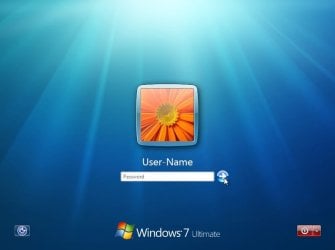
Log-On_Screen.jpg


OPTION ONE

To Turn On or Off Automatic Log On at Startup in Netplwiz


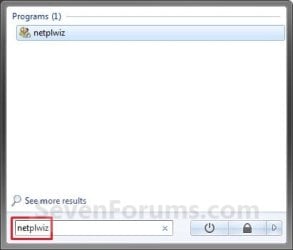
1. Open the Start Menu, type netplwiz in the search box, and press Enter. (see screenshots below)
Start_Menu.jpgStart_Menu2.jpg
2. Do step 3, 4, or 5 below for what you would like to do.


3. To Turn On Automatic Log On for a User Account
A) Check the Users must enter a user name and password to use this computer box. (see screenshot below)

   Note
If your computer is joined to a domain, then you will not have the Users must enter a user name and password to use this computer option.
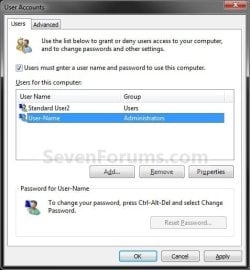
Select_User_Name.jpg
B) Click on the user account name, that you want to have automatically log on at startup, to highlight it. (see screenshot above)

C) Uncheck the Users must enter a user name and password to use this computer box. (see screenshot below)
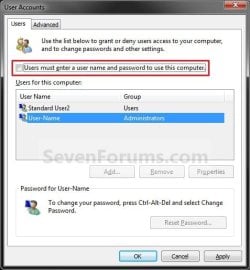
Uncheck_Box.jpg
D) Click on OK, and go to step 6 below. (see screenshot above)
4. To Turn Off Automatic Log On
A) Check the Users must enter a user name and password to use this computer box. (see screenshot below step 3A)

B) Click on OK. (see screenshot below step 3A)

C) You are finished.
5. To Change the User Account to Automatically Log On to
NOTE: For this step, you would have already had a user account selected to log on to automatically in step 3.
A) Check the Users must enter a user name and password to use this computer box, and click on the Apply button. (see screenshot below step 3A)

   Note
If your computer is joined to a domain, then you will not have the Users must enter a user name and password to use this computer option.


B) Select the other user account name, that you want to have automatically log on at startup instead, to highlight it.

C) Uncheck the Users must enter a user name and password to use this computer box. (see screenshot below step 3C)

D) Click on OK, and go to step 6 below. (see screenshot below step 3C)
6. Enter the User Account Password
A) In the Password field, enter the selected user account's password. (See screenshot below)
NOTE: If the user account does not have a password, then leave this field empty. See the WARNING at the top of the tutorial.

B) In the Confirm Password field, enter the selected user account's password again to confirm that it is the same as in step 6A above.

C) Click on OK.
Password.jpg


OPTION TWO

To Turn On or Off Automatic Log On at Startup in Registry Editor


   Warning
:busted: This option is not as secure as using OPTION ONE above.

It is recommended to use OPTION ONE above if you are able to instead. OPTION ONE will save the password in the Credential Manager where it's encrypted and cannot be viewed by anyone.

This option (OPTION TWO) will save the entered password (steps 4G-4H) in the DefaultPassword string value in Registry Editor where it can be seen by anyone with access.


1. Press the :winkey: + R keys to open the Run dialog, type regedit, and click on OK.

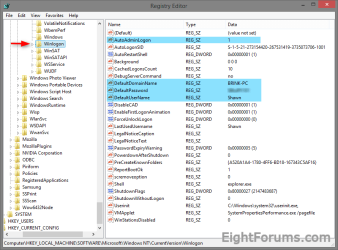
2. In Registry Editor, navigate to the location below. (see screenshot below)
HKEY_LOCAL_MACHINE\SOFTWARE\Microsoft\Windows NT\CurrentVersion\Winlogon
Automatic_log_on_Regsitry-1.png
3. Do step 4 or 5 below for what you would like to do.


4. To Turn On Automatic Log On for a Domain, Local, or Microsoft Account
NOTE: You could also use this step to change what user account you would like Windows 8 to sign-in to automatically at startup.
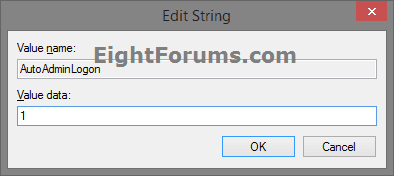
A) In the right pane on Winlogon, double click/tap on the AutoAdminLogon string value to modify it. (see screenshot below step 2)

B) Type 1, and click/tap on OK. (see screenshot below)
Automatic_log_on_Regsitry-1A.png
C) Double click/tap on the DefaultDomainName string value to modify it. (see screenshot below step 2)

D) Type the computer name (if local) or domain name, and click/tap on OK. (see screenshot below)
Automatic_log_on_Regsitry-2.png
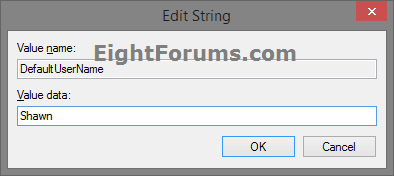
E) Double click/tap on the DefaultUserName string value to modify it. (see screenshot below step 2)

F) Type the user name (ex: Shawn) of the account you want to automatically be signed in to at startup, and click/tap on OK. (see screenshot below)

NOTE: This will be the same name as the user account's C:\Users\(UserName) profile folder.
Automatic_log_on_Regsitry-3.png
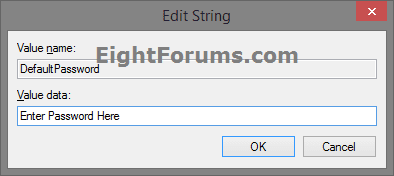
G) Double click/tap on the DefaultPassword string value to modify it. (see screenshot below step 2)

NOTE: If you do not have a DefaultPassword string value, then right click or press and hold on an empty area in the right pane of the Winlogon key, click/tap on New and String Value, type DefaultPassword, and press Enter.

H) Type the password of the user account you want to automatically be signed in to at startup, and click/tap on OK. (see screenshot below)
Automatic_log_on_Regsitry-4.png
I) Go to step 6 below.
5. To Turn Off Automatic Log On for All Users
A) In the right pane on Winlogon, double click/tap on the AutoAdminLogon string value to modify it. (see screenshot below step 2)

B) Type 0 (zero), and click/tap on OK. (see screenshot below step 4B)

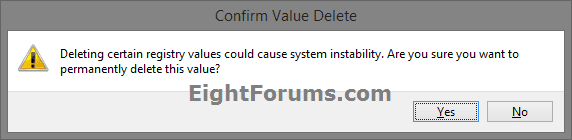
C) Right click or press and hold on the DefaultPassword string value, and click/tap on Delete. (see screenshot below step 2)

NOTE: If you do not have a DefaultPassword string value, then that's ok, and go to step 6 below.

D) Click/tap on Yes to confirm. (see screenshot below)
Automatic_log_on_Regsitry-5.png
E) Go to step 6 below.
6. When finished, close Registry Editor.
That's it,
Shawn


Last edited:
Hello Mawk, and welcome to Seven Forums.

In addition to setting the user account that you want Windows 7 to startup in automatically using this tutorial on the first page, you should also double check to make sure that you have disabled password required on wakeup and to disable the screen saver password protection.

Hope this helps,
Shawn
 

My Computer

Computer type
PC/Desktop
Computer Manufacturer/Model Number
Self built custom
OS
64-bit Windows 11 Pro for Workstations
CPU
Intel i7-8700K OC'd to 5 GHz
Motherboard
ASUS ROG Maximus XI Formula Z390
Memory
64 GB (4x16GB) G.SKILL TridentZ RGB DDR4 3600 MHz
Graphics Card(s)
ASUS ROG-STRIX-GTX1080TI-O11G-GAMING
Sound Card
Integrated
Monitor(s) Displays
2 x Samsung Odyssey G7 27"
Screen Resolution
2560x1440
Hard Drives
1TB Samsung 990 PRO M.2,
4TB Samsung 990 PRO PRO M.2,
TerraMaster F8 SSD Plus NAS
PSU
Seasonic Prime Titanium 850W
Case
Thermaltake Core P3
Cooling
Corsair Hydro H115i
Keyboard
Logitech wireless K800
Mouse
Logitech MX Master 4
Internet Speed
2 Gb/s Download and 100 Mb/s Upload
Antivirus
Malwarebyte Anti-Malware Premium
Browser
Google Chrome
Other Info
Logitech Z625 speaker system,
Logitech BRIO 4K Pro webcam,
HP Color LaserJet Pro MFP M477fdn,
APC SMART-UPS RT 1000 XL - SURT1000XLI,
Galaxy S23 Plus phone
Muchos Gracias

Hey mate!

Thanks so much. I thought that as I didn't have a password, I wouldn't need to turn it off! However, I have done it and now life is good........... No more log-in screeen.....yipeeeeeee :-)

Thanks again.

M
 
You're most welcome Mawk. :)
 

My Computer

Computer type
PC/Desktop
Computer Manufacturer/Model Number
Self built custom
OS
64-bit Windows 11 Pro for Workstations
CPU
Intel i7-8700K OC'd to 5 GHz
Motherboard
ASUS ROG Maximus XI Formula Z390
Memory
64 GB (4x16GB) G.SKILL TridentZ RGB DDR4 3600 MHz
Graphics Card(s)
ASUS ROG-STRIX-GTX1080TI-O11G-GAMING
Sound Card
Integrated
Monitor(s) Displays
2 x Samsung Odyssey G7 27"
Screen Resolution
2560x1440
Hard Drives
1TB Samsung 990 PRO M.2,
4TB Samsung 990 PRO PRO M.2,
TerraMaster F8 SSD Plus NAS
PSU
Seasonic Prime Titanium 850W
Case
Thermaltake Core P3
Cooling
Corsair Hydro H115i
Keyboard
Logitech wireless K800
Mouse
Logitech MX Master 4
Internet Speed
2 Gb/s Download and 100 Mb/s Upload
Antivirus
Malwarebyte Anti-Malware Premium
Browser
Google Chrome
Other Info
Logitech Z625 speaker system,
Logitech BRIO 4K Pro webcam,
HP Color LaserJet Pro MFP M477fdn,
APC SMART-UPS RT 1000 XL - SURT1000XLI,
Galaxy S23 Plus phone
Hi Brink,
So I've followed your instruction to create an 2nd account for my son without password protection.
I've discovered that all settings are lost when creating a new account (I'm wondering if there is a siple way to import all settings from my first administrator account) - icons, wallpaper, etc.
However I would like to come back to automatic booting to my administrator but I think I made a mistake by operating netplwiz from my son account.
Ending up in a mess cause I could not even delete the new account at the end and booting always to the new account.
When I finally end up in deleting it I had an error at startup saying "bad password", the image of my administratot account is disappeared.
At the end by switching 2 times to administrator at boot and deleting "unknow user account" I could recover to the original configuration.
Bye and thanks to share some light on this matter.
 

My Computer

OS
Windows 7
Hello BogoBogo, and welcome to Seven Forums.

Not sure, but I'm guessing that you were trying to delete the new account while still logged into it. If so, then Windows 7 will not let you. You can only delete an account from within another administrator account, and must be logged off of the account you want to delete.

Copying all of the contents in the old account's C:\Users\(user-name) folders, including the hidden AppData folder, into the corresponding new account's C:\Users\(user-name) folders should copy over most of the old account's settings and files into the new one.

Hope this helps,
Shawn
 

My Computer

Computer type
PC/Desktop
Computer Manufacturer/Model Number
Self built custom
OS
64-bit Windows 11 Pro for Workstations
CPU
Intel i7-8700K OC'd to 5 GHz
Motherboard
ASUS ROG Maximus XI Formula Z390
Memory
64 GB (4x16GB) G.SKILL TridentZ RGB DDR4 3600 MHz
Graphics Card(s)
ASUS ROG-STRIX-GTX1080TI-O11G-GAMING
Sound Card
Integrated
Monitor(s) Displays
2 x Samsung Odyssey G7 27"
Screen Resolution
2560x1440
Hard Drives
1TB Samsung 990 PRO M.2,
4TB Samsung 990 PRO PRO M.2,
TerraMaster F8 SSD Plus NAS
PSU
Seasonic Prime Titanium 850W
Case
Thermaltake Core P3
Cooling
Corsair Hydro H115i
Keyboard
Logitech wireless K800
Mouse
Logitech MX Master 4
Internet Speed
2 Gb/s Download and 100 Mb/s Upload
Antivirus
Malwarebyte Anti-Malware Premium
Browser
Google Chrome
Other Info
Logitech Z625 speaker system,
Logitech BRIO 4K Pro webcam,
HP Color LaserJet Pro MFP M477fdn,
APC SMART-UPS RT 1000 XL - SURT1000XLI,
Galaxy S23 Plus phone
Thanks Brink it helps a lot.

BTW when you say "Copying all of the contents in the old account' folders ... into the corresponding new account's folders" you mean overwriting them or adding them?

Moreover I made a copy test to a new folder see if every files are accessibles as administrator, but I got an error with some files in the hidden AppData folder (UsrClass.* and parent.lock) which were already opened in system.
Is this a problem?

Ok in the meantime I made some google search and found another way to do it :
control panel, system, user profile setting, copy button
the only problem is that to copy administrator setting to another profile you must not be logged in as administrator (the profile you are copying) , so I should create another profile just to make this copy?

Bye
 
Last edited:

My Computer

OS
Windows 7
Yes, you would copy and replace into the new account. When copying the contents of the AppData folder, it's fine to skip the ones that are not allowed.

It would make it easier to create another administrator account temporarily to copy them to avoid the "In Use" issue, then just delete this user account afterwards though. :)
 

My Computer

Computer type
PC/Desktop
Computer Manufacturer/Model Number
Self built custom
OS
64-bit Windows 11 Pro for Workstations
CPU
Intel i7-8700K OC'd to 5 GHz
Motherboard
ASUS ROG Maximus XI Formula Z390
Memory
64 GB (4x16GB) G.SKILL TridentZ RGB DDR4 3600 MHz
Graphics Card(s)
ASUS ROG-STRIX-GTX1080TI-O11G-GAMING
Sound Card
Integrated
Monitor(s) Displays
2 x Samsung Odyssey G7 27"
Screen Resolution
2560x1440
Hard Drives
1TB Samsung 990 PRO M.2,
4TB Samsung 990 PRO PRO M.2,
TerraMaster F8 SSD Plus NAS
PSU
Seasonic Prime Titanium 850W
Case
Thermaltake Core P3
Cooling
Corsair Hydro H115i
Keyboard
Logitech wireless K800
Mouse
Logitech MX Master 4
Internet Speed
2 Gb/s Download and 100 Mb/s Upload
Antivirus
Malwarebyte Anti-Malware Premium
Browser
Google Chrome
Other Info
Logitech Z625 speaker system,
Logitech BRIO 4K Pro webcam,
HP Color LaserJet Pro MFP M477fdn,
APC SMART-UPS RT 1000 XL - SURT1000XLI,
Galaxy S23 Plus phone
After considering applying this setting, I opted not to. Windows already logs me on automatically since I did not create a password at installation. There's no advantage in applying this setting, other than having an encrypted password at startup.

The only downside would be that if you have a computer trying to log on to your via a network, they will be able to easily log on to your computer with your account since it did not have a password.
Not true for those of us who have configued their router's security. This is the main reason why I didn't need to apply this tutorials settings. Like I said above, the only advantage to this setting is applying an encrypted password to a user account, and still being able to logon automatically. Which I don't need. I'll give anyone a thousand bucks who can get past my routers firewall. It's just not going to happen. ;)
 

My Computer

Computer Manufacturer/Model Number
NVIDIA
OS
Windows 7 Enterprise x64
CPU
AMD Athlon 64X2 Dual Core 3800+
Motherboard
GeForce 6100-M9
Memory
OCZ Platinum Dual Channel - 4x1Gb
Graphics Card(s)
NVIDIA GeForce 8800 GT PCI Express x16
Sound Card
Creative Audigy Sound Blaster Extreme PCI
Monitor(s) Displays
Compaq 7500
Screen Resolution
1024x768
Hard Drives
C: Seagate ST3250318AS SataII - 250Gb

D: Seagate ST3500418AS SataII - 500Gb
PSU
OCZ 600w Dual 12v Rails
Case
Thermaltake
Cooling
OCZ Heatsinks, Fans, and Thermal Paste on CPU & Chipsets
Keyboard
Logitech
Mouse
Radio Shack PS2
Internet Speed
Cable
Other Info
Dual Pioneer DVD/RW optical drives. LG CD/RW optical drive.
After considering applying this setting, I opted not to. Windows already logs me on automatically since I did not create a password at installation. There's no advantage in applying this setting, other than having an encrypted password at startup.

The only downside would be that if you have a computer trying to log on to your via a network, they will be able to easily log on to your computer with your account since it did not have a password.
Not true for those of us who have configued their router's security. This is the main reason why I didn't need to apply this tutorials settings. Like I said above, the only advantage to this setting is applying an encrypted password to a user account, and still being able to logon automatically. Which I don't need. I'll give anyone a thousand bucks who can get past my routers firewall. It's just not going to happen. ;)
Good for you, MadMaxData. It's always good to have good router security.
 

My Computer

Computer Manufacturer/Model Number
Custom
OS
Windows 7 Professional x64
CPU
Intel i7 2600K OC'd @ 4620 MHz
Motherboard
Asus P8Z68-V Pro
Memory
16GB GSkill Sniper 2133 Mhz (4x4GB)
Graphics Card(s)
EVGA GeForce GTX 480 SuperClocked+
Sound Card
Realtek High Definition Audio
Monitor(s) Displays
2x Acer S273HLbmii 27"
Screen Resolution
2 x 1920x1080
Hard Drives
64GB Crucial M4 SSD

Storage: Hitachi 1TB 5400RPM, Samsung 1.5TB 5400RPM
PSU
Corsair HW Series 750w (modular)
Case
Cooler Master HAF 932 Advanced Blue Edition
Cooling
CM Hyper 212+ CPU cooler, 3x 230mm + 1x 140mm case fans
Keyboard
Logitech MK320 (wireless)
Mouse
Logitech MK320 (wireless)
Internet Speed
30 Mb/s : 2 Mb/s
thanks for this tutorial Brink ;)

the last time i have installed Win 7, it logged on automatically, but this time i had to set it by using the info you provided, don't know why sometimes it's auto and others it isn't...
 

My Computer

Computer type
PC/Desktop
Computer Manufacturer/Model Number
2015 Home Made with Great Performance
OS
Windows 8.1 x64 Enterprise
CPU
i5 4690K
Motherboard
Gigabyte GA-Z87X-UD5H
Memory
Corsair 16 GB DDR3 2000Mhz
Graphics Card(s)
Asus GTX760 2GB 256bit
Sound Card
Realtek OnBoard
Monitor(s) Displays
Samsung SyncMaster SA350 + LG 42LA660S
Screen Resolution
1920x1080 Full HD
Hard Drives
1x 640GB Western Digital SATA
1x 4TB Western Digital Green SATA
3x 2TB Western Digital Caviar Green RS SATA
1x 3TB Western Digital Caviar Green SATA
1x 128GB Corsair Force Red SSD
PSU
Corsair CX 600W
Case
Nexus Prominent 5
Cooling
CPU: Artic Cooler Freezer 13 + 5x120mm Case Fans @ 700RPM
Keyboard
Microsoft Wired Keyboard 600
Mouse
Microsoft Wireless Mobile Mouse 1000
Internet Speed
FO 1 Gbit/s
Antivirus
ESET / Malwarebytes
Browser
Opera / Chrome
Other Info
- Fan Controller Aerocool X-Vision 5
- 1x 1TB Hitachi DeskPlus External USB
- 1x 1TB Western Digital Passport External USB3
Hi,
I upgraded from Vista to Windows 7 about 2 weeks ago. With Vista, there was no log on requirement but that has changed with W7. I have gone through the steps recommended here with no success. W7 displays the following during startup:

1. Starting Windows. 2. Please Wait 3. X The user name or password is incorrect.

I click on Ok

4. display in box1 (myname) display in box2 (other user)

I click on arrow and am directed to my screen.

I have done this procedure at least 6 times to no avail. Also, no one else uses this computer at my home. There is no other user.

I just want to boot up as i did with Vista or XP prior to W7. Help

Thanks
 

My Computer

Computer Manufacturer/Model Number
HP Celeron
OS
windows 7
Hello RRS, and welcome to Seven Forums.

It sounds like you may have entered a incorrect password at step 6. Double check to make sure that you are using the correct password for the selected user account. The password will be case sensitive as well, so make sure that you have caps or small case as needed.

If you do not have a password for the user account, then leave the fields empty at step 6. If it still will not work, then create a password for your user account, then try entering it instead.

Hope this helps,
Shawn
 

My Computer

Computer type
PC/Desktop
Computer Manufacturer/Model Number
Self built custom
OS
64-bit Windows 11 Pro for Workstations
CPU
Intel i7-8700K OC'd to 5 GHz
Motherboard
ASUS ROG Maximus XI Formula Z390
Memory
64 GB (4x16GB) G.SKILL TridentZ RGB DDR4 3600 MHz
Graphics Card(s)
ASUS ROG-STRIX-GTX1080TI-O11G-GAMING
Sound Card
Integrated
Monitor(s) Displays
2 x Samsung Odyssey G7 27"
Screen Resolution
2560x1440
Hard Drives
1TB Samsung 990 PRO M.2,
4TB Samsung 990 PRO PRO M.2,
TerraMaster F8 SSD Plus NAS
PSU
Seasonic Prime Titanium 850W
Case
Thermaltake Core P3
Cooling
Corsair Hydro H115i
Keyboard
Logitech wireless K800
Mouse
Logitech MX Master 4
Internet Speed
2 Gb/s Download and 100 Mb/s Upload
Antivirus
Malwarebyte Anti-Malware Premium
Browser
Google Chrome
Other Info
Logitech Z625 speaker system,
Logitech BRIO 4K Pro webcam,
HP Color LaserJet Pro MFP M477fdn,
APC SMART-UPS RT 1000 XL - SURT1000XLI,
Galaxy S23 Plus phone
I always ensure that caps are "off" . And I have checked the password several times and tried it with passwords and without.

I will try again

Thanks
 

My Computer

Computer Manufacturer/Model Number
HP Celeron
OS
windows 7
Ok, so I went back and did as suggested. No luck. Then I went to the control panel, user accounts, and entered a password. I then brought up netplwiz, did as outlined, and entered a password there. The same one as in user accounts. Then i logged off, logged on, shut down and rebooted. No logon panels. Working good

Thanks
 

My Computer

Computer Manufacturer/Model Number
HP Celeron
OS
windows 7
That's great news RRS. I'm happy to hear that you got it sorted. :)
 

My Computer

Computer type
PC/Desktop
Computer Manufacturer/Model Number
Self built custom
OS
64-bit Windows 11 Pro for Workstations
CPU
Intel i7-8700K OC'd to 5 GHz
Motherboard
ASUS ROG Maximus XI Formula Z390
Memory
64 GB (4x16GB) G.SKILL TridentZ RGB DDR4 3600 MHz
Graphics Card(s)
ASUS ROG-STRIX-GTX1080TI-O11G-GAMING
Sound Card
Integrated
Monitor(s) Displays
2 x Samsung Odyssey G7 27"
Screen Resolution
2560x1440
Hard Drives
1TB Samsung 990 PRO M.2,
4TB Samsung 990 PRO PRO M.2,
TerraMaster F8 SSD Plus NAS
PSU
Seasonic Prime Titanium 850W
Case
Thermaltake Core P3
Cooling
Corsair Hydro H115i
Keyboard
Logitech wireless K800
Mouse
Logitech MX Master 4
Internet Speed
2 Gb/s Download and 100 Mb/s Upload
Antivirus
Malwarebyte Anti-Malware Premium
Browser
Google Chrome
Other Info
Logitech Z625 speaker system,
Logitech BRIO 4K Pro webcam,
HP Color LaserJet Pro MFP M477fdn,
APC SMART-UPS RT 1000 XL - SURT1000XLI,
Galaxy S23 Plus phone
AWESOME

This is great! Now i dont have to type a password, so it speeds up my slow ferrari 3400 up:cool::cool::cool:
 

My Computer

Computer Manufacturer/Model Number
Custom built
OS
Windows 7 Ultimate x64/Windows 8 Enterprise
CPU
Intel Core i7-2600k
Motherboard
Asus Sabertooth P67
Memory
8 GB
Graphics Card(s)
AMD Radeon HD 6990
Sound Card
Realtek HD Audio
Monitor(s) Displays
2x Samsung S22B300
Screen Resolution
1920x1080
Hard Drives
Corsair Force Series 3
WD Caviar Green
PSU
Corsair GS700
Case
Antec p193
Cooling
Cooler Master Hyper 212 +
Mouse
Logitech Peformance MX
Internet Speed
15M down/1M up
Antivirus
Kaspersky Pure
Hi Shaun, just wondering, what is the advantage of doing this over just not setting a password? surely it doesn't make the machine any more secure if you are the only user?
 

My Computer

Computer type
PC/Desktop
Computer Manufacturer/Model Number
Medion Erazer (note to self: insert model number) - with custom additions
OS
Windows 10 Pro x64
CPU
Intel Core i5 7400 @ 3.00GHz
Motherboard
OEM supllied with PC
Memory
8GB 2133Mhz DDR4 (OEM supplied)
Graphics Card(s)
Gygabyte Windforce GTX 1050Ti (Factory Overclocked)
Sound Card
Realtek
Monitor(s) Displays
Acer Al1980 + HKC
Screen Resolution
1360*768(HKC) / 1280*1024(Acer)
Hard Drives
1TB Toshiba
1TB WD Caviar Green
120GB Samsung Evo 840
PSU
OEM supplied (no power rating on case)
Case
OEM Supplied
Cooling
Stock
Keyboard
Logitech Wireless
Mouse
Logitect Wireless
Internet Speed
40Mb/s Down 10Mb/s Up
Antivirus
Defender
Browser
Firefox
Hi Shaun, just wondering, what is the advantage of doing this over just not setting a password? surely it doesn't make the machine any more secure if you are the only user?
Imagine Remote Desktop without a password. ;)

If you were not connected to the internet, it would be the same thing in effect.

The other thing is, having a password allows you to lock the computer manually if you want. Imagine that your friend's annoying 10 year old is in the room, and you have to leave for a few minutes...
 

My Computer

Computer Manufacturer/Model Number
Custom
OS
Windows 7 Professional x64
CPU
Intel i7 2600K OC'd @ 4620 MHz
Motherboard
Asus P8Z68-V Pro
Memory
16GB GSkill Sniper 2133 Mhz (4x4GB)
Graphics Card(s)
EVGA GeForce GTX 480 SuperClocked+
Sound Card
Realtek High Definition Audio
Monitor(s) Displays
2x Acer S273HLbmii 27"
Screen Resolution
2 x 1920x1080
Hard Drives
64GB Crucial M4 SSD

Storage: Hitachi 1TB 5400RPM, Samsung 1.5TB 5400RPM
PSU
Corsair HW Series 750w (modular)
Case
Cooler Master HAF 932 Advanced Blue Edition
Cooling
CM Hyper 212+ CPU cooler, 3x 230mm + 1x 140mm case fans
Keyboard
Logitech MK320 (wireless)
Mouse
Logitech MK320 (wireless)
Internet Speed
30 Mb/s : 2 Mb/s
Hello Martin,

Ditto on what Jonathan posted. ;)
 

My Computer

Computer type
PC/Desktop
Computer Manufacturer/Model Number
Self built custom
OS
64-bit Windows 11 Pro for Workstations
CPU
Intel i7-8700K OC'd to 5 GHz
Motherboard
ASUS ROG Maximus XI Formula Z390
Memory
64 GB (4x16GB) G.SKILL TridentZ RGB DDR4 3600 MHz
Graphics Card(s)
ASUS ROG-STRIX-GTX1080TI-O11G-GAMING
Sound Card
Integrated
Monitor(s) Displays
2 x Samsung Odyssey G7 27"
Screen Resolution
2560x1440
Hard Drives
1TB Samsung 990 PRO M.2,
4TB Samsung 990 PRO PRO M.2,
TerraMaster F8 SSD Plus NAS
PSU
Seasonic Prime Titanium 850W
Case
Thermaltake Core P3
Cooling
Corsair Hydro H115i
Keyboard
Logitech wireless K800
Mouse
Logitech MX Master 4
Internet Speed
2 Gb/s Download and 100 Mb/s Upload
Antivirus
Malwarebyte Anti-Malware Premium
Browser
Google Chrome
Other Info
Logitech Z625 speaker system,
Logitech BRIO 4K Pro webcam,
HP Color LaserJet Pro MFP M477fdn,
APC SMART-UPS RT 1000 XL - SURT1000XLI,
Galaxy S23 Plus phone
Thanks a lot, worked good. Saves some time now having to click which User I want to log onto.
 

My Computer

OS
Windows 7 Home Premium, Ubuntu 10.04 LTS
CPU
P4 3.0GHz, P4 2.79GHz
Memory
2GB DDR2 PC-4200
Hard Drives
80GB SATA II, 80GB SATA
Cooling
Installed an extra fan into each PC
Internet Speed
Slower than yours...
Back
Top