Logitech Camera - how to test?

teckneeculler

Member
Power User
VIP
Local time
9:19 AM
Messages
512
This Logitech camera is a V-U0028.
According to the website below, the camera also seems to be known as a basic 920.
Logitech C920 vs C920x vs C920S vs C920e — Stream Tech Reviews by BadIntent
It's about 5 years old, bought for Skype but used only once.

In 10 days I need to talk to a medical specialist via software that's referred to in their email, as 'Microsoft Teams'.
I thought I could use this camera for video and sound via my W7 Ultimate desktop machine. (i5-6500, 16G, Nvidia GTX 960)

I've just now plugged in the camera's USB connector, and, although Windows recognized and installed drivers, nothing else has happened, so I guess it needs software.

Advice, please.
 

My Computer

Computer type
PC/Desktop
Computer Manufacturer/Model Number
My build
OS
Win7 Ultimate SP1
CPU
Intel Core i5 9400 Coffee Lake 14nm
Motherboard
Asus Prime H310M-E R2.0 (LGA1151)
Memory
16G DDR4
Graphics Card(s)
NVidia GeForce GTX 960
Sound Card
Realtek High Definition Audio (mobo)
Monitor(s) Displays
Asus PA248 24" 16:10 format
Screen Resolution
1920x1200@59Hz
Hard Drives
1863GB Seagate ST2000DM
3726GB Seagate ST4000DM
1863GB Seagate ST2000DM
6TB Seagate
465GB NVMe Samsung SSD 970
PSU
750G2
Case
Tower
Cooling
Standard
Keyboard
USB
Mouse
USB
Internet Speed
920Mbs/480Mbs
Antivirus
Malwarebytes
Browser
Firefox

My Computers

System One System Two

  • Computer type
    PC/Desktop
    OS
    7 X64
    CPU
    i5 8400
    Motherboard
    gigabyte b365m ds3h
    Memory
    2x8gb 3200mhz
    Hard Drives
    various
    PSU
    pure power 11 400w cm
    Case
    Coolermaster
    Cooling
    cryorig m9i
  • Computer type
    PC/Desktop
    OS
    7x64
    CPU
    g5400
    Motherboard
    ga b365m ds3h
    Memory
    8gb ddr4 2400
    PSU
    xfx pro 450w
SIW2: Thanks for the links. I did look for 'Logitech' but hadn't found the site you linked.
I grabbed some drivers for both W7 and W10\11 but they seemed to be for the Logitech Hub - hardware? I don't have. I'm currently trying to chat with an LG tech so hopefully he'll come up with a solution :huh:
 

My Computer

Computer type
PC/Desktop
Computer Manufacturer/Model Number
My build
OS
Win7 Ultimate SP1
CPU
Intel Core i5 9400 Coffee Lake 14nm
Motherboard
Asus Prime H310M-E R2.0 (LGA1151)
Memory
16G DDR4
Graphics Card(s)
NVidia GeForce GTX 960
Sound Card
Realtek High Definition Audio (mobo)
Monitor(s) Displays
Asus PA248 24" 16:10 format
Screen Resolution
1920x1200@59Hz
Hard Drives
1863GB Seagate ST2000DM
3726GB Seagate ST4000DM
1863GB Seagate ST2000DM
6TB Seagate
465GB NVMe Samsung SSD 970
PSU
750G2
Case
Tower
Cooling
Standard
Keyboard
USB
Mouse
USB
Internet Speed
920Mbs/480Mbs
Antivirus
Malwarebytes
Browser
Firefox
Not the G hub.

The capture driver direct link is in my previous post capture_1.10.11.exe

It is also why I posted the picture showing it.
 

My Computers

System One System Two

  • Computer type
    PC/Desktop
    OS
    7 X64
    CPU
    i5 8400
    Motherboard
    gigabyte b365m ds3h
    Memory
    2x8gb 3200mhz
    Hard Drives
    various
    PSU
    pure power 11 400w cm
    Case
    Coolermaster
    Cooling
    cryorig m9i
  • Computer type
    PC/Desktop
    OS
    7x64
    CPU
    g5400
    Motherboard
    ga b365m ds3h
    Memory
    8gb ddr4 2400
    PSU
    xfx pro 450w
I have a very old Logitech camera and when I want to test it to make sure it works in the browser before a meeting I just Google "webcam testing website. Then a whole list of websites come up to test your camera. Be advised that they may record what your camera sees and hears...

I just plugged my camera in and Windows installed a default driver. No third-party driver was needed in my case.

A pretty cool software that I have used for automaton with my camera is Yawcam and that too can verify if your camera works.
 

My Computer

Computer type
PC/Desktop
OS
Windows 7 Ultimate x64
SIW2: Thanks again, I grabbed the Capture software.
F22 Simpilot: Great tips, ta very much, I'll try your suggestions.
 

My Computer

Computer type
PC/Desktop
Computer Manufacturer/Model Number
My build
OS
Win7 Ultimate SP1
CPU
Intel Core i5 9400 Coffee Lake 14nm
Motherboard
Asus Prime H310M-E R2.0 (LGA1151)
Memory
16G DDR4
Graphics Card(s)
NVidia GeForce GTX 960
Sound Card
Realtek High Definition Audio (mobo)
Monitor(s) Displays
Asus PA248 24" 16:10 format
Screen Resolution
1920x1200@59Hz
Hard Drives
1863GB Seagate ST2000DM
3726GB Seagate ST4000DM
1863GB Seagate ST2000DM
6TB Seagate
465GB NVMe Samsung SSD 970
PSU
750G2
Case
Tower
Cooling
Standard
Keyboard
USB
Mouse
USB
Internet Speed
920Mbs/480Mbs
Antivirus
Malwarebytes
Browser
Firefox
I've just now plugged in the camera's USB connector, and, although Windows recognized and installed drivers, nothing else has happened, so I guess it needs software.
Just by pluggin in a device don't means that anything else should happen. The camera itself being recognized as such and the drivers being installed is sign of good health, but now it depends on programs to actually use it. To fully test it, open a program that makes use of the camera and see if you can see its image.

Probably the best thing you can do to prepare in advance is to ask a friend to make a test MS Teams meeting with you and test the camera, michrophone, chat, whatever else you need to try beforehand, so you can learn how to use it and adjust if necesary.

What you describe is the normal and expecrted behavior of a device in good condition.
 

My Computer

Computer type
Laptop
Computer Manufacturer/Model Number
Toshiba Sattelite A665-S6092
OS
Windows 7 Ultimate x64
CPU
Intel Core i7-740QM
Memory
8 GB DDR3
Graphics Card(s)
NVIDIA GeForce 330GT
Screen Resolution
1366x768
Hard Drives
Samsung 840 SSD 500GB
1TB USB3 external HD
Cooling
Coolermaster Notepal U3 notebook cooling pad
Internet Speed
3mbps ASDL
Antivirus
ClamWin 0.98.7
Browser
Opera 12.17 x86 (main), Firefox 38 (sec), IE11 (last resort)
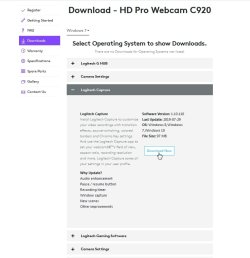
I went to the same website and found the same downloads.

Logitech C920 downloads
Download - HD Pro Webcam C920 – Logitech Support + Download
Logitech C920 downloads.jpg

However, when I plugged my Logitech C920S webcam into my Windows 7 computer I found I didn't need that. It searched using Windows Update and found drivers.

1 Driver install.jpg

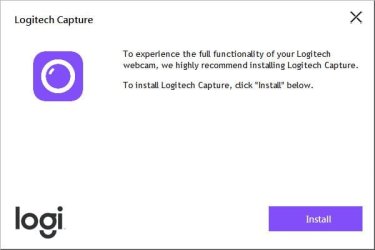
To my surprise once that was done a dialog automatically popped up and asked if I wanted to install Logitech Capture. I did although I don't know whether I needed it. In any event it might have installed a new driver than Windows Update.

2. Logitech capture.jpg

I tested the Logitech C920S webcam by doing the following:
  1. Download and install the Zoom client
  2. Use browser to go to link for Zoom Test Meeting
The purpose of the Zoom Test Meeting is to test the following:
  1. Webcam
  2. Speakers
  3. Microphone
Zoom Desktop Client
Download Center for Zoom Apps and Plugins | Zoom

Zoom test meeting
Join a Test Meeting | Zoom
 

My Computers

System One System Two

  • Computer type
    PC/Desktop
    Computer Manufacturer/Model Number
    Custom build
    OS
    Windows 7 Home Premium 64-bits
    CPU
    AMD FX-8350
    Motherboard
    Gigabyte GA-990FXA-UD3 (AM3+)
    Memory
    GSKILL Ripjaw-X PC3 12800 8GB (2x4GB)
    Graphics Card(s)
    ASUS ROG STRIX GTX 1060 6GB
    Sound Card
    Integrated
    Monitor(s) Displays
    Asus VE228H (21.5-in)
    Screen Resolution
    1920x1080 60Hz
    Hard Drives
    SAMSUNG 870 EVO 2.5 Inch SATA SSD (1TB)
    SAMSUNG 870 EVO 2.5 Inch SATA SSD (1TB)
    SAMSUNG 870 EVO 2.5 Inch SATA SSD (1TB)
    PSU
    Corsair RM750x (750 watts)
    Case
    Corsair Carbide Series 200R
    Cooling
    Corsair Hydro Series H60 (CWCH60)
    Keyboard
    Logitech Elite
    Mouse
    Logitech M510 Wireless Mouse
    Internet Speed
    Comcast Gigabit Extra (1200Mbps down / 35Mbps up)
    Antivirus
    Malwarebytes
    Browser
    Firefox, Edge, Chrome
    Other Info
    ASUS DRW-24B1ST DVD-RW (24X) optical drive
    Seagate Expansion Desk (5TB) external SATA/USB HDD
    Comcast XB8 Internet Gateway
  • Computer type
    PC/Desktop
    System Manufacturer/Model Number
    Custom
    OS
    Windows 7 Pro (64-bit)
    CPU
    AMD Phenom II 960T X4
    Motherboard
    ASUS M4N82 Deluxe
    Memory
    Corsair XMS2 DDR2-800 8GB (4x2GB)
    Graphics Card(s)
    ASUS ENGTX560 DCII OC/2DI/1GD5 1GB
    Monitor(s) Displays
    Samsung 930B 19-inch LCD
    Screen Resolution
    1280x1024
    Hard Drives
    Samsung SSD 870 EVO 1000 GB (Windows 10)
    Seagate ST1000DM003 1000 GB (Windows 7)
    PSU
    Antec TruePower (new) TP-650
    Case
    Antec Three Hundred
    Cooling
    AMD stock cooler from FX8350
    Mouse
    Logitech M100
    Internet Speed
    Xfinity Gigabit Extra 1200/35 Mbps
Thanks for the new tips.
Mr.Ed: Sorry, couldn't get the Zoom software to work. Not sure why, I tried joining up etc - my bad, maybe.
I used F22's tip about 'webcam testing websites' and it seems that my video and sound both work OK on most of the linked sites that I tried.
Now I'd like test my setup in a real-world situation, before I try connecting to the hospital's 'Microsoft Teams' link on Tuesday next.
I'm wondering if I could maybe connect this desktop computer (that has the Logitech camera and Capture software) to a wireless laptop on my home LAN. I have several I could use, either another W7 unit, or one with W10. What software would I need to load on a laptop? Would the Capture app also work on a laptop with a built-in camera that's not a Logitech model?
 
Last edited:

My Computer

Computer type
PC/Desktop
Computer Manufacturer/Model Number
My build
OS
Win7 Ultimate SP1
CPU
Intel Core i5 9400 Coffee Lake 14nm
Motherboard
Asus Prime H310M-E R2.0 (LGA1151)
Memory
16G DDR4
Graphics Card(s)
NVidia GeForce GTX 960
Sound Card
Realtek High Definition Audio (mobo)
Monitor(s) Displays
Asus PA248 24" 16:10 format
Screen Resolution
1920x1200@59Hz
Hard Drives
1863GB Seagate ST2000DM
3726GB Seagate ST4000DM
1863GB Seagate ST2000DM
6TB Seagate
465GB NVMe Samsung SSD 970
PSU
750G2
Case
Tower
Cooling
Standard
Keyboard
USB
Mouse
USB
Internet Speed
920Mbs/480Mbs
Antivirus
Malwarebytes
Browser
Firefox
Mr.Ed: Sorry, couldn't get the Zoom software to work. Not sure why, I tried joining up etc - my bad, maybe.
I'm wondering if I could maybe connect this desktop computer (that has the Logitech camera and Capture software) to a wireless laptop on my home LAN. I have several I could use, either another W7 unit, or one with W10. What software would I need to load on a laptop? Would the Capture app also work on a laptop that has a built-in camera that's not a Logitech model?
The laptop should already have all drivers installed. If not the support website for the laptop should have the driver for the webcam. Note the Capture app is only for standalone Logitech webcams.

If you do use the Logitech C920 with a laptop that already had a webcam then you will probably have to select it because a web meeting may by default use the built-in webcam. In any case even if the laptop has a built-in webcam you will find the Logitech C920 works better than it. That is because most laptops have cheap webcams.

Sorry I should have explained how to use the Zoom Test Meeting. The Zoom app by itself does nothing. However, if you try to join a Zoom meeting it will be automatically launched. I am showing the steps below for testing the Logitech C920 with the Zoom Test Meeting. Note the webcam video did work during the test. I had the shutter closed so I wouldn't break this forum.
 

Attachments

  • ZTM.jpg
    ZTM.jpg
    675.1 KB · Views: 1

My Computers

System One System Two

  • Computer type
    PC/Desktop
    Computer Manufacturer/Model Number
    Custom build
    OS
    Windows 7 Home Premium 64-bits
    CPU
    AMD FX-8350
    Motherboard
    Gigabyte GA-990FXA-UD3 (AM3+)
    Memory
    GSKILL Ripjaw-X PC3 12800 8GB (2x4GB)
    Graphics Card(s)
    ASUS ROG STRIX GTX 1060 6GB
    Sound Card
    Integrated
    Monitor(s) Displays
    Asus VE228H (21.5-in)
    Screen Resolution
    1920x1080 60Hz
    Hard Drives
    SAMSUNG 870 EVO 2.5 Inch SATA SSD (1TB)
    SAMSUNG 870 EVO 2.5 Inch SATA SSD (1TB)
    SAMSUNG 870 EVO 2.5 Inch SATA SSD (1TB)
    PSU
    Corsair RM750x (750 watts)
    Case
    Corsair Carbide Series 200R
    Cooling
    Corsair Hydro Series H60 (CWCH60)
    Keyboard
    Logitech Elite
    Mouse
    Logitech M510 Wireless Mouse
    Internet Speed
    Comcast Gigabit Extra (1200Mbps down / 35Mbps up)
    Antivirus
    Malwarebytes
    Browser
    Firefox, Edge, Chrome
    Other Info
    ASUS DRW-24B1ST DVD-RW (24X) optical drive
    Seagate Expansion Desk (5TB) external SATA/USB HDD
    Comcast XB8 Internet Gateway
  • Computer type
    PC/Desktop
    System Manufacturer/Model Number
    Custom
    OS
    Windows 7 Pro (64-bit)
    CPU
    AMD Phenom II 960T X4
    Motherboard
    ASUS M4N82 Deluxe
    Memory
    Corsair XMS2 DDR2-800 8GB (4x2GB)
    Graphics Card(s)
    ASUS ENGTX560 DCII OC/2DI/1GD5 1GB
    Monitor(s) Displays
    Samsung 930B 19-inch LCD
    Screen Resolution
    1280x1024
    Hard Drives
    Samsung SSD 870 EVO 1000 GB (Windows 10)
    Seagate ST1000DM003 1000 GB (Windows 7)
    PSU
    Antec TruePower (new) TP-650
    Case
    Antec Three Hundred
    Cooling
    AMD stock cooler from FX8350
    Mouse
    Logitech M100
    Internet Speed
    Xfinity Gigabit Extra 1200/35 Mbps
Mr.Ed: Thanks, I finally got it to work.
 

My Computer

Computer type
PC/Desktop
Computer Manufacturer/Model Number
My build
OS
Win7 Ultimate SP1
CPU
Intel Core i5 9400 Coffee Lake 14nm
Motherboard
Asus Prime H310M-E R2.0 (LGA1151)
Memory
16G DDR4
Graphics Card(s)
NVidia GeForce GTX 960
Sound Card
Realtek High Definition Audio (mobo)
Monitor(s) Displays
Asus PA248 24" 16:10 format
Screen Resolution
1920x1200@59Hz
Hard Drives
1863GB Seagate ST2000DM
3726GB Seagate ST4000DM
1863GB Seagate ST2000DM
6TB Seagate
465GB NVMe Samsung SSD 970
PSU
750G2
Case
Tower
Cooling
Standard
Keyboard
USB
Mouse
USB
Internet Speed
920Mbs/480Mbs
Antivirus
Malwarebytes
Browser
Firefox
Back
Top