
My issue is that Windows will not correctly install or detect this joystick, and also the Logitech gaming software 5.10 will not recognise the joystick is plugged in (USB).
To ensure this is not a PC problem I have tried it on my laptop - on which the Logitech software detects it
just fine. But not on this desktop.
I have a hunch this is a USB problem, but need help.
I am using Windows 7 - which is fully updated.
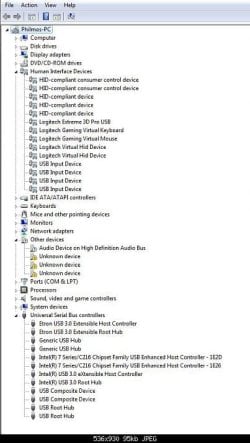
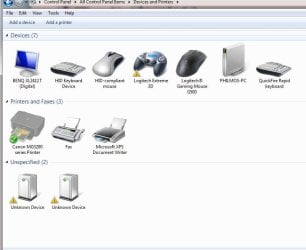
Attached is an image of device manager, where the joystick is recognised under HUMAN INTERFACE DEVICES, however when I look under Devices and Printers - the device has a yellow warning triangle next to it.
Any help would really be appreciated, please advise if I have to post any further information.
Thanks
To ensure this is not a PC problem I have tried it on my laptop - on which the Logitech software detects it
just fine. But not on this desktop.
I have a hunch this is a USB problem, but need help.
I am using Windows 7 - which is fully updated.
Attached is an image of device manager, where the joystick is recognised under HUMAN INTERFACE DEVICES, however when I look under Devices and Printers - the device has a yellow warning triangle next to it.
Any help would really be appreciated, please advise if I have to post any further information.
Thanks
Attachments
My Computer
At a glance
Windows 7 Ultimate x64Intel Core i5-3570k 3.40ghzCorsair Vengeance 8GBGigabyte GTX670 Windforce 3x 2048mb
- Computer type
- PC/Desktop
- Computer Manufacturer/Model Number
- Custom build - OC UK
- OS
- Windows 7 Ultimate x64
- CPU
- Intel Core i5-3570k 3.40ghz
- Motherboard
- Gigabyte Z77-D3H
- Memory
- Corsair Vengeance 8GB
- Graphics Card(s)
- Gigabyte GTX670 Windforce 3x 2048mb
- Sound Card
- Use Mobo
- Monitor(s) Displays
- Benq 2411T
- Screen Resolution
- 1920 x 1080
- Hard Drives
- Seagate Barracuda 7200RPM 1TB
- Internet Speed
- Fibre 40mbps
- Antivirus
- Windows
- Browser
- MS Explorer


