e-mu xmidi device not recognised in win7

neuronetv

New member
Local time
6:16 AM
Messages
4
I have windows 7 64bit and an E-Mu Xmidi 2x2 device, this one: http://www.creative.com/emu/products/product.aspx?pid=15187
The computer won't pick up the drivers for this device and I'm baffled. The problem is with this computer, I've tested the xmidi device on another xp machine (worked fine) and also another windows 7 machine 32bit (worked fine). During install of the driver - EmmP_PCDrv_US_1_01_05.exe - from creative.com, it asks me to connect the device. When I do nothing happens, there's no light on the xmidi device and no usual plug-in sound. In device manager I see an Emu xmidi 2x2 under 'other devices' and it has a yellow problem tag on it. I did a scan of my whole c drive for a driver, the scan found a usb composite device but said there was an error installing it, 'the system cannot find the file spefified'. I've tried uninstalling and re-installing, no joy.
The creative website said this was the right driver for windows, including windows 7 64 bit. I ran a microsoft usb fiti thing but that didn't work. If anyone can help that would be great....
 

My Computer My Computer

At a glance

win7 64 bit3.2g
Computer Manufacturer/Model Number
asus
OS
win7 64 bit
CPU
3.2g
Hi neuronetv,

To install this follow these steps:
  1. Go to Device Manager
  2. Find the MIDI Device
  3. Double click and Press 'Update Driver'
  4. Select - 'Install from location/CD' (Can't remember exactly wording)
  5. Navigate to the CD .exe file or wherever the driver file is.
  6. Press OK
  7. Let it install
  8. Restart your PC

Hope this helps,

MistUnleashed
 

My Computer My Computer

At a glance

Windows 7 Ultimate x64Intel Core i7 Socket 1156 LGACorsair Dominator 4GB DDR3Gainward GTX 460
Computer type
PC/Desktop
Computer Manufacturer/Model Number
Custom Build
OS
Windows 7 Ultimate x64
CPU
Intel Core i7 Socket 1156 LGA
Motherboard
Asus P7P55D-E LX
Memory
Corsair Dominator 4GB DDR3
Graphics Card(s)
Gainward GTX 460
Monitor(s) Displays
Acer V243HL
Screen Resolution
1920x1080
Hard Drives
Western Digital 1TB HDD
PSU
Antec TruePower 650W
Case
Antec 300
Cooling
Thermalrite CPU Cooler
Antivirus
Avast Anti-Virus
that doesn't work, I don't have the cd, there's no such thing as navigating to the exe file, and the location where the drivers are doesn't work. The device doesn't find a driver.
 

My Computer My Computer

At a glance

win7 64 bit3.2g
Computer Manufacturer/Model Number
asus
OS
win7 64 bit
CPU
3.2g
that doesn't work, I don't have the cd, there's no such thing as navigating to the exe file, and the location where the drivers are doesn't work. The device doesn't find a driver.

Okay, please explain to me screen by screen (or upload it) - what happens when you go to the exe file to install the driver.
 

My Computer My Computer

At a glance

Windows 7 Ultimate x64Intel Core i7 Socket 1156 LGACorsair Dominator 4GB DDR3Gainward GTX 460
Computer type
PC/Desktop
Computer Manufacturer/Model Number
Custom Build
OS
Windows 7 Ultimate x64
CPU
Intel Core i7 Socket 1156 LGA
Motherboard
Asus P7P55D-E LX
Memory
Corsair Dominator 4GB DDR3
Graphics Card(s)
Gainward GTX 460
Monitor(s) Displays
Acer V243HL
Screen Resolution
1920x1080
Hard Drives
Western Digital 1TB HDD
PSU
Antec TruePower 650W
Case
Antec 300
Cooling
Thermalrite CPU Cooler
Antivirus
Avast Anti-Virus
I run the exe file and during the install it stops and asks me to connect the device. I connect it and nothing happens. Normally when you connect a usb device to win7 it makes a sound and it becomes aware of a new device and installs the drivers. In my case when I connect it nothing happens. When I installed this device the same way on win 7 32 bit computer it recognised a new device when I connected it and also the light came on on the xmidi device. I've been on this all day and tbh I've got a feeling this is a faulty driver release by creative. It works on 32bit machines but not on my 64bit machine. I think this driver has got bits missing because when I ask the pc to browse for a driver file I selected C:\, it found a usn composite device but couldn't find the file needed to enable it.
 

My Computer My Computer

At a glance

win7 64 bit3.2g
Computer Manufacturer/Model Number
asus
OS
win7 64 bit
CPU
3.2g
Uh, I'm not expert but maybe what you would need to do is update the USB ports on your own machine?

Do you know your motherboards make and model, if you do head over to the manufacturer's page and head over to the support page and enter the make and model and see if there are new USB drivers or just anything that is new and that you haven't installed!

That is what I would suggest, if that fails then a real guru can come and have a look.

Cheers mate.
 

My Computer My Computer

At a glance

Windows 7 Home Premiumi5-3570k16 GB DDR3 G Skill SniperGIGABYTE GeForce GTX 970 GV-N970WF3OC-4GD
Computer type
PC/Desktop
Computer Manufacturer/Model Number
Custom build
OS
Windows 7 Home Premium
CPU
i5-3570k
Motherboard
ASUS Sabertooth z77
Memory
16 GB DDR3 G Skill Sniper
Graphics Card(s)
GIGABYTE GeForce GTX 970 GV-N970WF3OC-4GD
Monitor(s) Displays
ASUS ROG PG278Q
Screen Resolution
2560x1440@60Hz/120Hz/144Hz
Hard Drives
56GB KINGSTON SVP200S37A60G
512GB Crucial MX100
1863GB Seagate ST2000DM001-1CH164
2795GB Seagate ST3000DM001-9YN166
PSU
Corsair GS800
Case
Storm Trooper Stryker White
Keyboard
Logitech G910 Orion Spark
Mouse
Logitech G502
Antivirus
MSE
Browser
Firefox/Chrome
Other Info
Logitech G633
Logitech Mouse Matt
Don't know if i can help but will give it a try.

It's odd you don't hear the USB ding-dong on connection but the fact it appears under "Other" proves it is being detected.

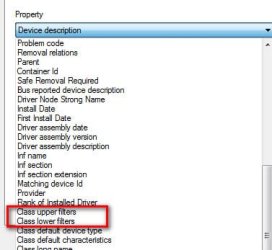
  • In Device Manager, right click any audio device under Sound category->Properties->Details tab
  • Click the pull-down menu, and carefully look through it to see if any Class upper filters or Class lower filters are defined (see pic below)
  • If either found, select it and report the file names displayed

Next
  • Unplug the device
  • Delete file C:\WINDOWS\inf\setupapi.dev.log
  • Plug in your device
  • After it appears in Other, you should find a new C:\WINDOWS\inf\setupapi.dev.log file was created
  • Upload it to your next post. Not sure of the upload rules here. You may need to zip it or just change the extension to .txt to upload)
 

Attachments

  • Filters.jpg
    Filters.jpg
    18.7 KB · Views: 10

My Computer My Computer

At a glance

Desk 1: Win 7 Pro x32; Desk 2: Windows 10 x64
Computer type
PC/Desktop
Computer Manufacturer/Model Number
Dell Optiplex 360 and Optiplex 755
OS
Desk 1: Win 7 Pro x32; Desk 2: Windows 10 x64
Hard Drives
500GB Crucial SSD in both Desktops
Other Info
Buffalo 6TB NAS, Raid 1

My Computer My Computer

At a glance

Windows 7 Home Premium 64 bit sp1Intel i5 3570 3.4Ghz Ivy Bridge SKT 1155 quad...G-Skill Rip Jaws 16Gb (8x2) DDR3 -1600 PC3 12...Gigabyte NVIDIA GT610 1Gb DDR3 810/1200 PCI-E...
Computer type
PC/Desktop
Computer Manufacturer/Model Number
Self built using existing case
OS
Windows 7 Home Premium 64 bit sp1
CPU
Intel i5 3570 3.4Ghz Ivy Bridge SKT 1155 quad core
Motherboard
Gigabyte Z77-HD3 SKT 1155 2xSata 3, 4x USB 3.0
Memory
G-Skill Rip Jaws 16Gb (8x2) DDR3 -1600 PC3 12800 CL 10 red
Graphics Card(s)
Gigabyte NVIDIA GT610 1Gb DDR3 810/1200 PCI-E 2.0 Silent
Sound Card
NVIDIA High Definition & Realtech High Definition Audio
Monitor(s) Displays
2 x Philips 226V4L 16:9 aspect ratio
Screen Resolution
1920 x 1080 HD
Hard Drives
Samsung 840 Pro 256gb SSD, SATA 3.
Hitachi Touro Portable 1tb, USB 3.0 HDD used for image b/ups.
PSU
Corsair VS450
Case
Codeng
Cooling
PSU fan & CPU fan
Keyboard
Logitech
Mouse
Logitech Wireless trackball M570
Internet Speed
Wireless 3G. 3mg down & 550kb up.
Antivirus
Bitdefender Internet Security 2020
Browser
Opera (Current Version) & Firefox
Other Info
MS Office 2013 Pro. Davis weather station software. MGE Nova 600 avr UPS.
Back
Top