Solved Logon Picture Frame?

curtranhome

New member
Member
Local time
7:40 AM
Messages
48
Location
Sacramento CA
I didnt do much looking around for this because I didnt know how to word it. But is there a way to change the logon picture frame for the user? Maybe a registry thing? I'm ok with editing system files if that's the case.

Thanks,
~Curt
 

My Computer

Computer type
PC/Desktop
Computer Manufacturer/Model Number
Custom Build
OS
Windows 8.1
CPU
Intel i7 4790K 4.0GHz
Motherboard
Asus Maximus VI Formula
Memory
32 GB
Graphics Card(s)
EVGA
Sound Card
On-Board Audio
Monitor(s) Displays
HP Pavilion 23xi
Screen Resolution
1920 x 1200
Hard Drives
1x 500GB SSD
1x 3TB HHDD
4x 1TB in 1+0 RAID
PSU
750W
Case
Antec
Cooling
4 Fans + Liquid Cooling System
Keyboard
Razer Black Widow Ultimate
Mouse
Logitech G700
Internet Speed
23 MB/s
Antivirus
Avast! Antivirus
Browser
Google Chrome
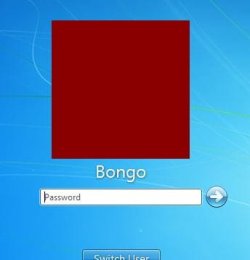
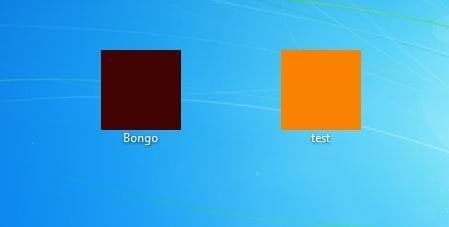
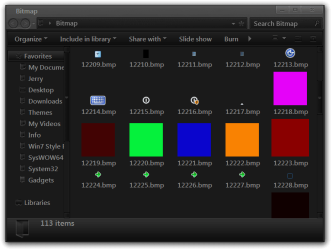
They are bitmaps in the authui.dll in C:\Windows\System32 and if you are using 64 bit they are in both C:\Windows\System32 and C:\Windows\SysWOW64

1 user
#12223

2 or more users
#12219 when pressed 12220
#12222 when pressed 12218

Jerry
3.JPG2.JPGBitmap.png
 

My Computer

Computer type
Laptop
Computer Manufacturer/Model Number
Sager NP9170
OS
Win 7 Pro x64 / Win 10 Pro
CPU
Intel(R) Core(TM) i7-3630QM CPU @ 2.40GHz
Motherboard
CLEVO P170EM
Memory
12 GB
Graphics Card(s)
(1) Intel(R) HD Graphics 4000 (2) NVIDIA GeForce GTX 675M
Sound Card
(1) Realtek High Definition Audio (2) Intel(R) Display Aud
Monitor(s) Displays
17.3
Screen Resolution
1920x1080
Hard Drives
(1) Samsung 860 EVO 500GB(OS) (1) Samsung 860 EVO 500GB(Data)
Keyboard
Backlite
Antivirus
MSE, Malwarebytes Pro
Browser
Firefox
Other Info
DESKTOP: Custom-built.
OS: Win 10 Pro x64.
CASE: Rosewill R5.
CPU: Intel I5 4670K CPU @ 3.40GHz.
CPU COOLER: Cool Master Hyper 212 EVO.
MOTHERBOARD: Asus Z87-A.
MEMORY: Kingston HyperX 2x4 GB.
GPU: Nvidia Geforce 650 TI.
PSU: Corsair TX750.
DRIVES: (1) Samsung 840 120 GB SSD (2) Western Digital blue 500 GB 7200 RPM.
Ok, thanks! If you don't mind me asking, how did you change your UI in the third screenshot?? That definitely looks pretty interesting to do :D
 

My Computer

Computer type
PC/Desktop
Computer Manufacturer/Model Number
Custom Build
OS
Windows 8.1
CPU
Intel i7 4790K 4.0GHz
Motherboard
Asus Maximus VI Formula
Memory
32 GB
Graphics Card(s)
EVGA
Sound Card
On-Board Audio
Monitor(s) Displays
HP Pavilion 23xi
Screen Resolution
1920 x 1200
Hard Drives
1x 500GB SSD
1x 3TB HHDD
4x 1TB in 1+0 RAID
PSU
750W
Case
Antec
Cooling
4 Fans + Liquid Cooling System
Keyboard
Razer Black Widow Ultimate
Mouse
Logitech G700
Internet Speed
23 MB/s
Antivirus
Avast! Antivirus
Browser
Google Chrome
Jerry, how exactly to change the frame then? I don't understand, your post just shows the location. what does this mean?

Bongo said:
1 user
#12223

2 or more users
#12219 when pressed 12220
#12222 when pressed 12218

thank you.. sorry for asking but i know nothing at this.. :(
 

My Computer

Computer type
Laptop
Computer Manufacturer/Model Number
Toshiba Satellite L510-P4019
OS
Windows 7 Ultimate x86/32bit Build 7600
CPU
Intel Pentium(R) Dual-Core CPU [email protected]
Motherboard
TOSHIBA Portable PC
Memory
5GB DDR3 of RAM, 3GB usable (2 sticks)
Graphics Card(s)
Mobile Intel(R) 4 Series Express Chipset Family
Sound Card
Microsoft High Audio Definitions
Screen Resolution
1366x768
Hard Drives
Toshiba MK3263GSX ATA Device 320GB, WD Ext. HDD My Passport 070A 250GB
Mouse
Toshiba U20 Blue LED Techonology USB Optical Mouse
Antivirus
Avast! Free Antivirus, Malwarebytes Anti-Malware
Browser
Mozilla Firefox, Safari
You're supposed to open the file in a dll editing program (I use Reshacker) then the delete/edit the folders with the numbers he mentioned.
 

My Computer

Computer type
PC/Desktop
Computer Manufacturer/Model Number
Custom Build
OS
Windows 8.1
CPU
Intel i7 4790K 4.0GHz
Motherboard
Asus Maximus VI Formula
Memory
32 GB
Graphics Card(s)
EVGA
Sound Card
On-Board Audio
Monitor(s) Displays
HP Pavilion 23xi
Screen Resolution
1920 x 1200
Hard Drives
1x 500GB SSD
1x 3TB HHDD
4x 1TB in 1+0 RAID
PSU
750W
Case
Antec
Cooling
4 Fans + Liquid Cooling System
Keyboard
Razer Black Widow Ultimate
Mouse
Logitech G700
Internet Speed
23 MB/s
Antivirus
Avast! Antivirus
Browser
Google Chrome
oh, alright... I get it! :)

thank you so much curtranhome :D i'll give it a try then, again thanks in advance..
 

My Computer

Computer type
Laptop
Computer Manufacturer/Model Number
Toshiba Satellite L510-P4019
OS
Windows 7 Ultimate x86/32bit Build 7600
CPU
Intel Pentium(R) Dual-Core CPU [email protected]
Motherboard
TOSHIBA Portable PC
Memory
5GB DDR3 of RAM, 3GB usable (2 sticks)
Graphics Card(s)
Mobile Intel(R) 4 Series Express Chipset Family
Sound Card
Microsoft High Audio Definitions
Screen Resolution
1366x768
Hard Drives
Toshiba MK3263GSX ATA Device 320GB, WD Ext. HDD My Passport 070A 250GB
Mouse
Toshiba U20 Blue LED Techonology USB Optical Mouse
Antivirus
Avast! Free Antivirus, Malwarebytes Anti-Malware
Browser
Mozilla Firefox, Safari
Ok, thanks! If you don't mind me asking, how did you change your UI in the third screenshot?? That definitely looks pretty interesting to do :D

You're welcome

The UI is a custom theme Tavaris by ~charleston2378 on deviantART and I have edited it and some .dlls.

You will need to do 1 of these 2 ways of Enabling custom themes for it to work.
http://www.sevenforums.com/tutorials/34579-enabling-custom-themes-windows-7-a.html
Or
http://www.sevenforums.com/tutorials/28377-theme-how-apply-custom-themes.html?filter
 

My Computer

Computer type
Laptop
Computer Manufacturer/Model Number
Sager NP9170
OS
Win 7 Pro x64 / Win 10 Pro
CPU
Intel(R) Core(TM) i7-3630QM CPU @ 2.40GHz
Motherboard
CLEVO P170EM
Memory
12 GB
Graphics Card(s)
(1) Intel(R) HD Graphics 4000 (2) NVIDIA GeForce GTX 675M
Sound Card
(1) Realtek High Definition Audio (2) Intel(R) Display Aud
Monitor(s) Displays
17.3
Screen Resolution
1920x1080
Hard Drives
(1) Samsung 860 EVO 500GB(OS) (1) Samsung 860 EVO 500GB(Data)
Keyboard
Backlite
Antivirus
MSE, Malwarebytes Pro
Browser
Firefox
Other Info
DESKTOP: Custom-built.
OS: Win 10 Pro x64.
CASE: Rosewill R5.
CPU: Intel I5 4670K CPU @ 3.40GHz.
CPU COOLER: Cool Master Hyper 212 EVO.
MOTHERBOARD: Asus Z87-A.
MEMORY: Kingston HyperX 2x4 GB.
GPU: Nvidia Geforce 650 TI.
PSU: Corsair TX750.
DRIVES: (1) Samsung 840 120 GB SSD (2) Western Digital blue 500 GB 7200 RPM.
Back
Top