Logon Screen - Fix Showing Only "Other User" and Last Logged On User

Logon Screen - Fix Showing Only "Other User" and Last Logged On User

How to Fix Windows 7 Logon Screen Showing Only "Other User" and Last Logged On User Icon

   Information
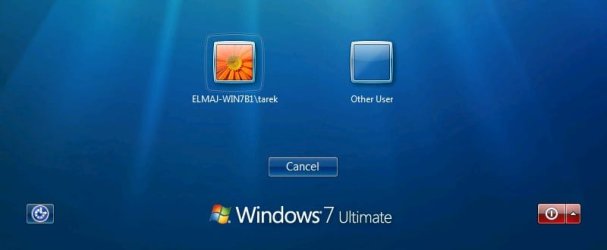
If your Windows 7 login, welcome, or switch user screen only displays the last user that was logged on and Other User icons instead of the icons of all users created on the computer, then this tutorial will show you how to fix this.

You must be logged in as an administrator to be able to do the steps in this tutorial.

   Warning
It is highly recommended that you create a restore point before doing this tutorial. This way if you make a mistake that leaves Windows 7 unbootable or messed up, you would be able to easily do a system restore and select the restore point to undo and fix the mistake.


EXAMPLE: Windows 7 Logon, Welcome, or Switch User Screen
NOTE: Image from here.
Example.jpg


Here's How:

   Note
Before getting started, if you have Windows set to automatically log on to a user account at startup, then do step 5 in Option One of the tutorial linked below to redo the settings to make sure that the correct user is selected and that the correct password is entered for the selected user.

How to Automatically Log On a User Account at Windows 7 Startup


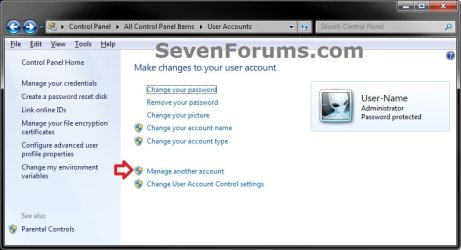
1. Open the Control Panel (icons view), click on the User Accounts icon, and click on the Manage another account link. (see screenshot below)
User-Accounts-1.jpg
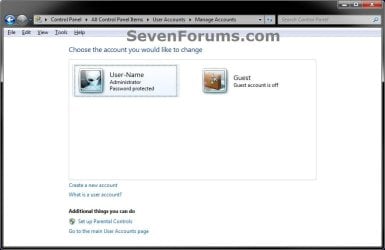
2. Make note of the user names for all user accounts that you have created in Windows 7 for the steps below. (see screenshot below)
NOTE: In addition to any name (ex: User-Name) of user accounts that you created, you will also have a Guest and the built-in Administrator (if enabled) accounts by default.
User-Accounts.jpg
3. In the Start Menu, type regedit in the search box and press Enter.

4. If prompted by UAC, then click on Yes.

5. In regedit, navigate to the location below. (see screenshot below step 6)

Code:
HKEY_LOCAL_MACHINE\SOFTWARE\Microsoft\Windows NT\CurrentVersion\ProfileList

6. If you have a .DEFAULT key in the left pane as a subkey under the ProfileList key, then right click on .DEFAULT, and click on Delete. (see screenshot below)
Default.jpg

A) Click on Yes to confirm to delete. (see screenshot below)
Delete.jpg
7. In the left pane under the ProfileList key, you will need to select and look at each S-1-5-xx subkey one at a time for the following items below.

   Warning
Please review each item listed below before deleting any S-1-5-xx subkey. You would only want to delete a S-1-5-xx subkey if you need to as outlined below.


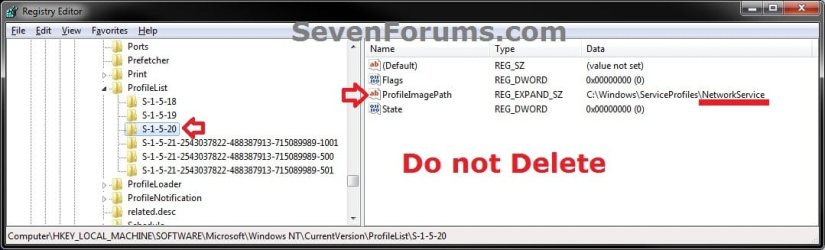
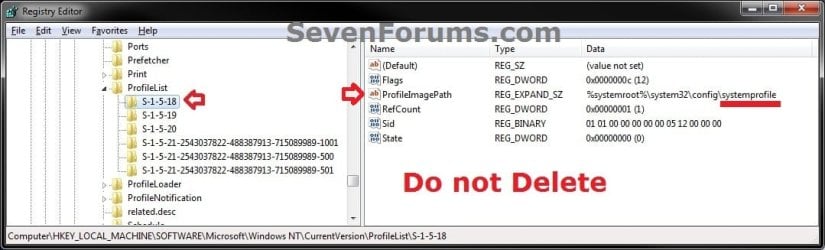
A) Do not delete S-1-5-xx subkeys in the left pane that have systemprofile, LocalService, and NetworkService names in the ProfileImagePath value in the right pane.
NOTE: These are system accounts used by Windows 7. (see screenshots below)
1.jpg
2.jpg
3.jpg
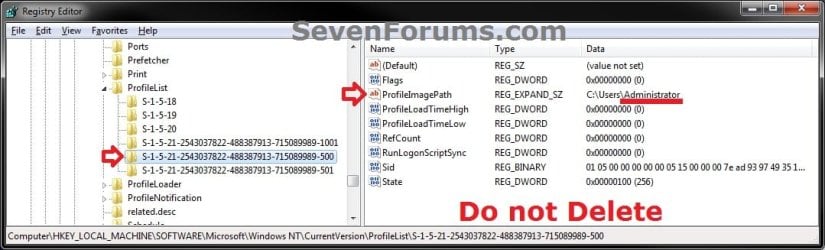
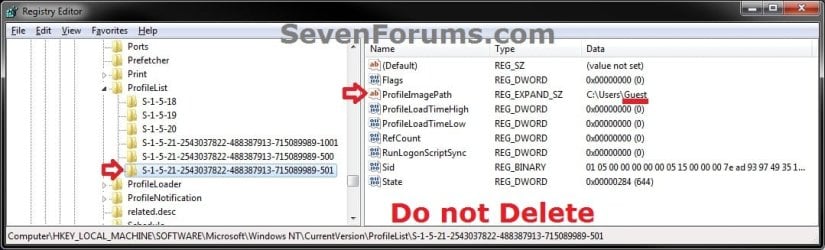
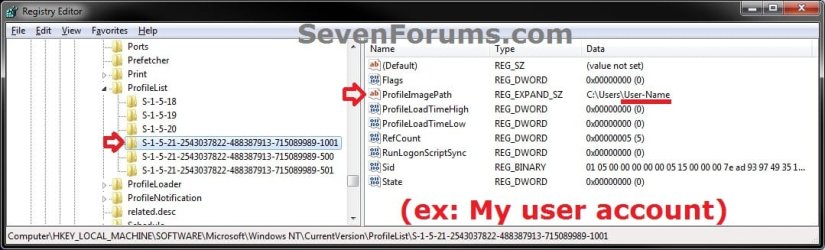
B) Do not delete S-1-5-xx subkeys in the left pane that have Guest, Administrator, or names of user accounts (ex: User-Name) in the ProfileImagePath value in the right pane from step 2 that you created in Windows 7. (see screenshots below)
4.jpg
5.jpg
6.jpg
C) If a selected S-1-5-xx subkey in the left pane has a user name in the ProfileImagePath value in the right pane that is not a user account that you have created in Windows 7 from step 2 or from step 7B, then right click on the S-1-5-xx subkey, click on Delete, and Yes to confirm.

D) If any selected S-1-5-xx subkey in the left pane does not have at least all 3 of the default Flags, ProfileImagePath, and State values in it's right pane, then right click on the S-1-5-xx subkey, click on Delete, and Yes to confirm. (see screenshot below)
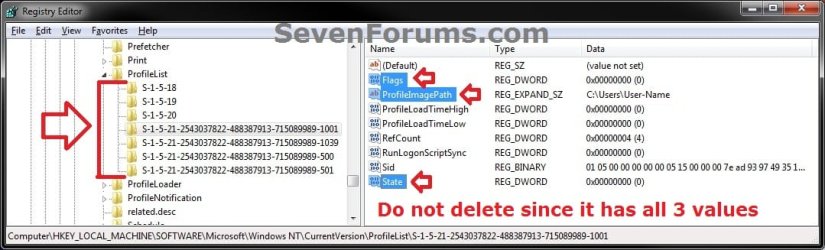
profiles.jpg
8. When finished, close regedit and User Accounts windows.

9. Log off or Switch User to test and see if the logon screen is now back to normal again with all user icons displayed.


That's it,
Shawn


Last edited:
Hi Brink

today I log to windows & I have The same prob again & I did The same solution

when i restart the prob appear again ، I want permanent solution
 

My Computer My Computer

At a glance

Windows 7 Ultimate x64
OS
Windows 7 Ultimate x64
click1,

I'm sorry to hear that. You might consider doing a repair install or clean install to start fresh to get rid of this corruption. :(
 

My Computer My Computer

At a glance

64-bit Windows 11 Pro for WorkstationsIntel i7-8700K OC'd to 5 GHz64 GB (4x16GB) G.SKILL TridentZ RGB DDR4 3600...ASUS ROG-STRIX-GTX1080TI-O11G-GAMING
Computer type
PC/Desktop
Computer Manufacturer/Model Number
Self built custom
OS
64-bit Windows 11 Pro for Workstations
CPU
Intel i7-8700K OC'd to 5 GHz
Motherboard
ASUS ROG Maximus XI Formula Z390
Memory
64 GB (4x16GB) G.SKILL TridentZ RGB DDR4 3600 MHz
Graphics Card(s)
ASUS ROG-STRIX-GTX1080TI-O11G-GAMING
Sound Card
Integrated
Monitor(s) Displays
2 x Samsung Odyssey G7 27"
Screen Resolution
2560x1440
Hard Drives
1TB Samsung 990 PRO M.2,
4TB Samsung 990 PRO PRO M.2,
TerraMaster F8 SSD Plus NAS
PSU
Seasonic Prime Titanium 850W
Case
Thermaltake Core P3
Cooling
Corsair Hydro H115i
Keyboard
Logitech wireless K800
Mouse
Logitech MX Master 4
Internet Speed
2 Gb/s Download and 100 Mb/s Upload
Antivirus
Malwarebyte Anti-Malware Premium
Browser
Google Chrome
Other Info
Logitech Z625 speaker system,
Logitech BRIO 4K Pro webcam,
HP Color LaserJet Pro MFP M477fdn,
APC SMART-UPS RT 1000 XL - SURT1000XLI,
Galaxy S23 Plus phone
Is It Better To Install New Windows 7 Or What ???
 

My Computer My Computer

At a glance

Windows 7 Ultimate x64
OS
Windows 7 Ultimate x64
You'll get the best results with a clean install. Of course that means reinstalling all of your programs and drivers afterwards as well.
 

My Computer My Computer

At a glance

64-bit Windows 11 Pro for WorkstationsIntel i7-8700K OC'd to 5 GHz64 GB (4x16GB) G.SKILL TridentZ RGB DDR4 3600...ASUS ROG-STRIX-GTX1080TI-O11G-GAMING
Computer type
PC/Desktop
Computer Manufacturer/Model Number
Self built custom
OS
64-bit Windows 11 Pro for Workstations
CPU
Intel i7-8700K OC'd to 5 GHz
Motherboard
ASUS ROG Maximus XI Formula Z390
Memory
64 GB (4x16GB) G.SKILL TridentZ RGB DDR4 3600 MHz
Graphics Card(s)
ASUS ROG-STRIX-GTX1080TI-O11G-GAMING
Sound Card
Integrated
Monitor(s) Displays
2 x Samsung Odyssey G7 27"
Screen Resolution
2560x1440
Hard Drives
1TB Samsung 990 PRO M.2,
4TB Samsung 990 PRO PRO M.2,
TerraMaster F8 SSD Plus NAS
PSU
Seasonic Prime Titanium 850W
Case
Thermaltake Core P3
Cooling
Corsair Hydro H115i
Keyboard
Logitech wireless K800
Mouse
Logitech MX Master 4
Internet Speed
2 Gb/s Download and 100 Mb/s Upload
Antivirus
Malwarebyte Anti-Malware Premium
Browser
Google Chrome
Other Info
Logitech Z625 speaker system,
Logitech BRIO 4K Pro webcam,
HP Color LaserJet Pro MFP M477fdn,
APC SMART-UPS RT 1000 XL - SURT1000XLI,
Galaxy S23 Plus phone
Solution

I just added all the users to the group "Users" not just the group "HomeUsers" this worked for me :)
 

My Computer My Computer

At a glance

win 7 32bit
OS
win 7 32bit
Thank you khushal for your reply that fixed my problem as well.
 

My Computer My Computer

At a glance

Windows 7 Ultimatei7-2600kCORSAIR Vengeance 8GB (2 x 4GB) CMZ8GX3M2A160...ASUS DC-UII 6950
Computer Manufacturer/Model Number
Home Built
OS
Windows 7 Ultimate
CPU
i7-2600k
Motherboard
ASUS P8Z68-V PRO
Memory
CORSAIR Vengeance 8GB (2 x 4GB) CMZ8GX3M2A1600C9B
Graphics Card(s)
ASUS DC-UII 6950
Hard Drives
Mushkin Enhanced Chronos 120GB SSD
PSU
Corsair 750W
Case
Corsair Graphite 600T
Cooling
Corsair H100
Near-duplicate regedit exists

I have followed your directions and I see that I have a near duplicate registry editor as far as the user name. One says "Users\Anne" the other says "Users\Anne.Home-PC". I'm not sure which one to delete as both have all three components: profile image path, state and flags. Please clarify. Thank you.
 

My Computer My Computer

At a glance

32 bit Windows 7
Computer type
PC/Desktop
OS
32 bit Windows 7
Hello Rmish, and welcome to Seven Forums.

Be sure to create a restore point before deleting either one. This way if it was the wrong one, you could easily do a system restore at boot with the restore point to undo the deletion.

You would want to delete the one that doesn't match your user account's name exactly.

Hope this helps for now, :)
Shawn
 

My Computer My Computer

At a glance

64-bit Windows 11 Pro for WorkstationsIntel i7-8700K OC'd to 5 GHz64 GB (4x16GB) G.SKILL TridentZ RGB DDR4 3600...ASUS ROG-STRIX-GTX1080TI-O11G-GAMING
Computer type
PC/Desktop
Computer Manufacturer/Model Number
Self built custom
OS
64-bit Windows 11 Pro for Workstations
CPU
Intel i7-8700K OC'd to 5 GHz
Motherboard
ASUS ROG Maximus XI Formula Z390
Memory
64 GB (4x16GB) G.SKILL TridentZ RGB DDR4 3600 MHz
Graphics Card(s)
ASUS ROG-STRIX-GTX1080TI-O11G-GAMING
Sound Card
Integrated
Monitor(s) Displays
2 x Samsung Odyssey G7 27"
Screen Resolution
2560x1440
Hard Drives
1TB Samsung 990 PRO M.2,
4TB Samsung 990 PRO PRO M.2,
TerraMaster F8 SSD Plus NAS
PSU
Seasonic Prime Titanium 850W
Case
Thermaltake Core P3
Cooling
Corsair Hydro H115i
Keyboard
Logitech wireless K800
Mouse
Logitech MX Master 4
Internet Speed
2 Gb/s Download and 100 Mb/s Upload
Antivirus
Malwarebyte Anti-Malware Premium
Browser
Google Chrome
Other Info
Logitech Z625 speaker system,
Logitech BRIO 4K Pro webcam,
HP Color LaserJet Pro MFP M477fdn,
APC SMART-UPS RT 1000 XL - SURT1000XLI,
Galaxy S23 Plus phone
I deleted the one that did not match her logon exactly. Restarted and still comes up only with the last user's account showing.
 

My Computer My Computer

At a glance

32 bit Windows 7
Computer type
PC/Desktop
OS
32 bit Windows 7
rmish,

If you have a restore point dated before this started, doing a system restore using it may be able to sort this for you.
 

My Computer My Computer

At a glance

64-bit Windows 11 Pro for WorkstationsIntel i7-8700K OC'd to 5 GHz64 GB (4x16GB) G.SKILL TridentZ RGB DDR4 3600...ASUS ROG-STRIX-GTX1080TI-O11G-GAMING
Computer type
PC/Desktop
Computer Manufacturer/Model Number
Self built custom
OS
64-bit Windows 11 Pro for Workstations
CPU
Intel i7-8700K OC'd to 5 GHz
Motherboard
ASUS ROG Maximus XI Formula Z390
Memory
64 GB (4x16GB) G.SKILL TridentZ RGB DDR4 3600 MHz
Graphics Card(s)
ASUS ROG-STRIX-GTX1080TI-O11G-GAMING
Sound Card
Integrated
Monitor(s) Displays
2 x Samsung Odyssey G7 27"
Screen Resolution
2560x1440
Hard Drives
1TB Samsung 990 PRO M.2,
4TB Samsung 990 PRO PRO M.2,
TerraMaster F8 SSD Plus NAS
PSU
Seasonic Prime Titanium 850W
Case
Thermaltake Core P3
Cooling
Corsair Hydro H115i
Keyboard
Logitech wireless K800
Mouse
Logitech MX Master 4
Internet Speed
2 Gb/s Download and 100 Mb/s Upload
Antivirus
Malwarebyte Anti-Malware Premium
Browser
Google Chrome
Other Info
Logitech Z625 speaker system,
Logitech BRIO 4K Pro webcam,
HP Color LaserJet Pro MFP M477fdn,
APC SMART-UPS RT 1000 XL - SURT1000XLI,
Galaxy S23 Plus phone
Domain

Hello! Thank you for this great tutorial. I have a medium sized home network and recently added a 2008 R2 server to it. After joining all the PCs to the domain, the login screen only shows the last used user account and "Other user" I tried this tutorial but there is no .DEFAULT key or any keys I was able to delete. how can I have the login user page show all (local) users ? Thank you
 

My Computer My Computer

At a glance

Windows 7 x64 | Windows Server 2008 R2 | Wind...
Computer type
PC/Desktop
Computer Manufacturer/Model Number
Custome Builds...All of them!
OS
Windows 7 x64 | Windows Server 2008 R2 | Windows XP
Hello ShadowChaos, and welcome to Seven Forums.

Double check to see if checking the Users must enter a user name and password to use this computer box may help if it's just an issue with it no longer having the correct account or password after joining the domain.

http://www.sevenforums.com/tutorials/377-log-automatically-startup.html

Hope this helps, :)
Shawn
 

My Computer My Computer

At a glance

64-bit Windows 11 Pro for WorkstationsIntel i7-8700K OC'd to 5 GHz64 GB (4x16GB) G.SKILL TridentZ RGB DDR4 3600...ASUS ROG-STRIX-GTX1080TI-O11G-GAMING
Computer type
PC/Desktop
Computer Manufacturer/Model Number
Self built custom
OS
64-bit Windows 11 Pro for Workstations
CPU
Intel i7-8700K OC'd to 5 GHz
Motherboard
ASUS ROG Maximus XI Formula Z390
Memory
64 GB (4x16GB) G.SKILL TridentZ RGB DDR4 3600 MHz
Graphics Card(s)
ASUS ROG-STRIX-GTX1080TI-O11G-GAMING
Sound Card
Integrated
Monitor(s) Displays
2 x Samsung Odyssey G7 27"
Screen Resolution
2560x1440
Hard Drives
1TB Samsung 990 PRO M.2,
4TB Samsung 990 PRO PRO M.2,
TerraMaster F8 SSD Plus NAS
PSU
Seasonic Prime Titanium 850W
Case
Thermaltake Core P3
Cooling
Corsair Hydro H115i
Keyboard
Logitech wireless K800
Mouse
Logitech MX Master 4
Internet Speed
2 Gb/s Download and 100 Mb/s Upload
Antivirus
Malwarebyte Anti-Malware Premium
Browser
Google Chrome
Other Info
Logitech Z625 speaker system,
Logitech BRIO 4K Pro webcam,
HP Color LaserJet Pro MFP M477fdn,
APC SMART-UPS RT 1000 XL - SURT1000XLI,
Galaxy S23 Plus phone
it would be helpful thank you :D
 

My Computer My Computer

At a glance

windows 7 64bit, windows 7 ultimate 64bitB9708gbintel R graphics Family
Computer type
Laptop
Computer Manufacturer/Model Number
Dell,N4050
OS
windows 7 64bit, windows 7 ultimate 64bit
CPU
B970
Motherboard
Dell inc
Memory
8gb
Graphics Card(s)
intel R graphics Family
Hard Drives
500gb, western digital
Antivirus
Microsoft Essentials
Browser
Google Chrome
YOUR DESCRIPTION IN NO.7 (C) IS AS FOLLOW

C) If a selected S-1-5-xx subkey in the left pane has a user name in the ProfileImagePath value in the right pane that is not a user account that you have created in Windows 7 from step 2 or from step 7B, then right click on the S-1-5-xx subkey, click on Delete, and Yes to confirm.

BUT, IN MY CASE, IT DOESN'T HAVE ANY USER NAME. IN FACT, ProfileImagePath IS NOT INCLUDED IN THE *RIGHT PANE. SO I DELETE THAT ONE. AND MY PROBLEM IS FIXED.

THANKS
 
Last edited:

My Computer My Computer

At a glance

Window 7 Home Premium 64bit
Computer type
Laptop
OS
Window 7 Home Premium 64bit
Hello Farokh, and welcome to Seven Forums.

The ProfileImagePath value would be in the right pane of the selected S-1-5-xx subkey instead.

If you had a user account (S-1-5-xx subkey) listed that didn't have ProfileImagePath in the right pane, then yes indeed you would want to delete that S-1-5-xx subkey.
 

My Computer My Computer

At a glance

64-bit Windows 11 Pro for WorkstationsIntel i7-8700K OC'd to 5 GHz64 GB (4x16GB) G.SKILL TridentZ RGB DDR4 3600...ASUS ROG-STRIX-GTX1080TI-O11G-GAMING
Computer type
PC/Desktop
Computer Manufacturer/Model Number
Self built custom
OS
64-bit Windows 11 Pro for Workstations
CPU
Intel i7-8700K OC'd to 5 GHz
Motherboard
ASUS ROG Maximus XI Formula Z390
Memory
64 GB (4x16GB) G.SKILL TridentZ RGB DDR4 3600 MHz
Graphics Card(s)
ASUS ROG-STRIX-GTX1080TI-O11G-GAMING
Sound Card
Integrated
Monitor(s) Displays
2 x Samsung Odyssey G7 27"
Screen Resolution
2560x1440
Hard Drives
1TB Samsung 990 PRO M.2,
4TB Samsung 990 PRO PRO M.2,
TerraMaster F8 SSD Plus NAS
PSU
Seasonic Prime Titanium 850W
Case
Thermaltake Core P3
Cooling
Corsair Hydro H115i
Keyboard
Logitech wireless K800
Mouse
Logitech MX Master 4
Internet Speed
2 Gb/s Download and 100 Mb/s Upload
Antivirus
Malwarebyte Anti-Malware Premium
Browser
Google Chrome
Other Info
Logitech Z625 speaker system,
Logitech BRIO 4K Pro webcam,
HP Color LaserJet Pro MFP M477fdn,
APC SMART-UPS RT 1000 XL - SURT1000XLI,
Galaxy S23 Plus phone
Hi Brink
yes, ProfileImagePath value is in the right pane. i corrected in my post.
tks
 

My Computer My Computer

At a glance

Window 7 Home Premium 64bit
Computer type
Laptop
OS
Window 7 Home Premium 64bit
I figured it was just a typo, but just wanted to clarify for others. :)
 

My Computer My Computer

At a glance

64-bit Windows 11 Pro for WorkstationsIntel i7-8700K OC'd to 5 GHz64 GB (4x16GB) G.SKILL TridentZ RGB DDR4 3600...ASUS ROG-STRIX-GTX1080TI-O11G-GAMING
Computer type
PC/Desktop
Computer Manufacturer/Model Number
Self built custom
OS
64-bit Windows 11 Pro for Workstations
CPU
Intel i7-8700K OC'd to 5 GHz
Motherboard
ASUS ROG Maximus XI Formula Z390
Memory
64 GB (4x16GB) G.SKILL TridentZ RGB DDR4 3600 MHz
Graphics Card(s)
ASUS ROG-STRIX-GTX1080TI-O11G-GAMING
Sound Card
Integrated
Monitor(s) Displays
2 x Samsung Odyssey G7 27"
Screen Resolution
2560x1440
Hard Drives
1TB Samsung 990 PRO M.2,
4TB Samsung 990 PRO PRO M.2,
TerraMaster F8 SSD Plus NAS
PSU
Seasonic Prime Titanium 850W
Case
Thermaltake Core P3
Cooling
Corsair Hydro H115i
Keyboard
Logitech wireless K800
Mouse
Logitech MX Master 4
Internet Speed
2 Gb/s Download and 100 Mb/s Upload
Antivirus
Malwarebyte Anti-Malware Premium
Browser
Google Chrome
Other Info
Logitech Z625 speaker system,
Logitech BRIO 4K Pro webcam,
HP Color LaserJet Pro MFP M477fdn,
APC SMART-UPS RT 1000 XL - SURT1000XLI,
Galaxy S23 Plus phone
Found a Fix!

Problem: My New Win7 PC had ‘Other User’ at the Logon Screen. I then had to click on it and type my login name.
Cause: I deleted a folder under c:\Users called HomeGroupUser$ because it looked weird and I wanted to explore what would happen. : )
Solution: I hit F8 during start up and selected Repair my computer. This did not fix it, but it came to a place where HomeGroupUser$ was presented as my first choice for Logon. That’s where I realized what had caused it.
First thing I did was to go to the Control Panel/ Homegroup and remove the Homegroup.
I also went to Regedit and searched for HomeGroupUser$ and deleted the 2 Folder Entries.
Then ran Netplwiz and highlighted My real Logon Name, UNCHECKED 'Users must enter a user name..', Hit Apply, then CHECKED 'Users must enter a user name..', and again, Hit Apply.


Now, to get the Icons to Show on the Logon Screen:

http://www.sevenforums.com/tutorials/61650-log-user-name-password.html

Under Control Panel/ Administrative tools/ Local security policy/ Local policies/ Security options/
Interactive logon: Do not display last user name.
This security setting determines whether the name of the last user to log on to the computer is displayed in the Windows logon screen.
If this policy is enabled, the name of the last user to successfully log on is not displayed in the Logon Screen.
If this policy is disabled, the name of the last user to log on is displayed.
Default: Disabled. I changed to ‘Enable’.
It Worked !! Logon screen is now normal.
 

My Computer My Computer

At a glance

Windows 7 Home Premium 32-bit
Computer type
PC/Desktop
OS
Windows 7 Home Premium 32-bit
Hello
Great article, unfourtunately, i still have the issue of only seeing the last logged on user and the other user option.
I have no .default to delete, and all the keys have the 3 fields present. So everything looks good, with nothing to delete and cause a fix :(

My machine is a server 2008 setup, joined to a domain if this makes a difference. I will look into another machine same OS, that has the logon screen working and see if their is a .default on this one. Maybe a restart would be good, but this is a production machine, so will have to wait.
 

My Computer My Computer

At a glance

Server 2008 R2
Computer type
PC/Desktop
OS
Server 2008 R2
Hello Giermo, and welcome to Seven Forums.

With it being joined to domain will make a difference. Unfortunately, I have no domain experience to say what it may be on the domain end. :(
 

My Computer My Computer

At a glance

64-bit Windows 11 Pro for WorkstationsIntel i7-8700K OC'd to 5 GHz64 GB (4x16GB) G.SKILL TridentZ RGB DDR4 3600...ASUS ROG-STRIX-GTX1080TI-O11G-GAMING
Computer type
PC/Desktop
Computer Manufacturer/Model Number
Self built custom
OS
64-bit Windows 11 Pro for Workstations
CPU
Intel i7-8700K OC'd to 5 GHz
Motherboard
ASUS ROG Maximus XI Formula Z390
Memory
64 GB (4x16GB) G.SKILL TridentZ RGB DDR4 3600 MHz
Graphics Card(s)
ASUS ROG-STRIX-GTX1080TI-O11G-GAMING
Sound Card
Integrated
Monitor(s) Displays
2 x Samsung Odyssey G7 27"
Screen Resolution
2560x1440
Hard Drives
1TB Samsung 990 PRO M.2,
4TB Samsung 990 PRO PRO M.2,
TerraMaster F8 SSD Plus NAS
PSU
Seasonic Prime Titanium 850W
Case
Thermaltake Core P3
Cooling
Corsair Hydro H115i
Keyboard
Logitech wireless K800
Mouse
Logitech MX Master 4
Internet Speed
2 Gb/s Download and 100 Mb/s Upload
Antivirus
Malwarebyte Anti-Malware Premium
Browser
Google Chrome
Other Info
Logitech Z625 speaker system,
Logitech BRIO 4K Pro webcam,
HP Color LaserJet Pro MFP M477fdn,
APC SMART-UPS RT 1000 XL - SURT1000XLI,
Galaxy S23 Plus phone
Back
Top