
Logon screen user picture size

FerchogtX

New member
Pro User
Local time
2:52 PM
Messages
640
Location
Mexico
Hi there people!!!!!!

I was wondering if there is a way in which you can change the size of the user picture in the logon screen... What I mean here... is that, no matter the picture you use for it, the logon screen shows it at a "fixed" size... but sometimes, it is shown in a little frame, while in other PC's, you can see it bigger... I don't know if it's matter of resolutions... I hope I'm getting understood...

Is there a way to control or change that?

Thanks in advance people.

See ya!!! :D
 

My Computer

Computer type
PC/Desktop
Computer Manufacturer/Model Number
Assembled Desktop PC
OS
Microsoft Windows 7 Home Premium SP1 64-bit Build 7600
CPU
AMD Athlon 64 X2 5200+ Dual Core CPU @ 2.7 Ghz (Brisbane)
Motherboard
PCChips A13G+ v3.0
Memory
2x2 GB DDR2 PC-5300 (667 Mhz) Kingston ValueRAM
Graphics Card(s)
XFX ATI Radeon HD 4350 GPU (512 MB + 512 MB HM)
Sound Card
Realtek High Definition Audio Driver ALC660 @ MCP61S
Monitor(s) Displays
HP S2031 20" LED HD Widescreen Display Monitor
Screen Resolution
1600 x 900 px
Hard Drives
Maxtor Diamond Max 10 (160 GB, 7200 RPM, SATA-II Hard Disk)
Western Digital Scorpion Blue (250 GB, 5400 RPM, SATA-II External Hard Disk - Personal Data)
Toshiba MQ01ABD050 (500 GB, 5400 RPM, SATA-II External Hard Disk - Software & ISOs)
PSU
Pixxo Transformer 850W 80+ Certification PSU
Case
Compaq 5BW353 Case
Cooling
Many solutions, see other info...
Keyboard
Green Leaf (Mitzu) Standard Keyboard
Mouse
Microsoft USB Lasser Pointing Device
Internet Speed
10 MB
Antivirus
Avast Antivirus Free
Browser
Firefox, Chrome, Internet Explorer
Other Info
Windows Experience Index Result: 3.8 of 7.9.

Cooling solutions:
- AVC @ 2000/5000 RPM Copper Heatpipes (For Athlon 64 X2 6000+ CPU used in an Athlon 64 X2 5200+)
- Rear Fan 80 mm @ 2700 RPM for heat extraction
- Manhatan Chipset Cooler @ 4700/7200 RPM (For nVidia Chipset in MoBo)
- Foxconn @ 2500 RPM (Old Pentium III heatsink fan) in XFX ATI Radeon HD 4350
Not without a funky res hack.
Which logon screen do you mean? There is the classic and the new one...

I did also notice that the user pic is a little larger if you're logged in and have locked the workstation.
 

My Computer

OS
Windows 7 Enterprise
CPU
Intel Pentium Dual E2200 @2.2GHz
Motherboard
Gigabyte II-G31
Memory
4GB
Graphics Card(s)
Palit GForce 9500GT 1GB
Sound Card
onBoard
Hard Drives
WesternDigital: 250GB + 1TB + 1TB + 2TB
PSU
450W
Case
CoolerMaster CM690
Cooling
Corsair H50
Mouse
Logitech MX518
Hi there people!!!!!!

I was wondering if there is a way in which you can change the size of the user picture in the logon screen... What I mean here... is that, no matter the picture you use for it, the logon screen shows it at a "fixed" size... but sometimes, it is shown in a little frame, while in other PC's, you can see it bigger... I don't know if it's matter of resolutions... I hope I'm getting understood...

Is there a way to control or change that?

Thanks in advance people.

See ya!!! :D


Does left clicking it do it for you on pictures?
 

My Computer

Computer Manufacturer/Model Number
HP M9077c
OS
Windows 7 Home Premium 64bit
CPU
Intel(R)Core(TM)2 quad [email protected] 2.39GHz
Motherboard
ASUSeK
Memory
6GB DDR2 6400
Graphics Card(s)
GeForce 8500/512MB
Sound Card
Realtek High Def Audio
Monitor(s) Displays
HP w2408 LCD 24" widescreen
Screen Resolution
1920x1200
Cooling
6 pack of Bud
Keyboard
MS wireless Inteli
Mouse
MS wireless Inteli
Not without a funky res hack.
Which logon screen do you mean? There is the classic and the new one...

I did also notice that the user pic is a little larger if you're logged in and have locked the workstation.
The new one... the default logon screen Windows 7 has... how is that funky res hack? how does windows determine in which resolutions to show the picture larger? for example... my desktop has a 1024x768 px view, the user pic in logon screen looks small... in my notebook, my res is 1366x768 px, and the user pic looks bigger...
Examples:
Like it looks in my laptop (Is an example... this pic comes from Brink's Tutorial of how to change the background...)
5895d1237182813-log-screen-change-log_on_screen.jpg

Here how I have it on my desktop (again just an example picture, I only have one user...me)
windows-7-logon-for-windows-xp.jpg


Does left clicking it do it for you on pictures?
Does nothing on it...

See ya!! :D
 

My Computer

Computer type
PC/Desktop
Computer Manufacturer/Model Number
Assembled Desktop PC
OS
Microsoft Windows 7 Home Premium SP1 64-bit Build 7600
CPU
AMD Athlon 64 X2 5200+ Dual Core CPU @ 2.7 Ghz (Brisbane)
Motherboard
PCChips A13G+ v3.0
Memory
2x2 GB DDR2 PC-5300 (667 Mhz) Kingston ValueRAM
Graphics Card(s)
XFX ATI Radeon HD 4350 GPU (512 MB + 512 MB HM)
Sound Card
Realtek High Definition Audio Driver ALC660 @ MCP61S
Monitor(s) Displays
HP S2031 20" LED HD Widescreen Display Monitor
Screen Resolution
1600 x 900 px
Hard Drives
Maxtor Diamond Max 10 (160 GB, 7200 RPM, SATA-II Hard Disk)
Western Digital Scorpion Blue (250 GB, 5400 RPM, SATA-II External Hard Disk - Personal Data)
Toshiba MQ01ABD050 (500 GB, 5400 RPM, SATA-II External Hard Disk - Software & ISOs)
PSU
Pixxo Transformer 850W 80+ Certification PSU
Case
Compaq 5BW353 Case
Cooling
Many solutions, see other info...
Keyboard
Green Leaf (Mitzu) Standard Keyboard
Mouse
Microsoft USB Lasser Pointing Device
Internet Speed
10 MB
Antivirus
Avast Antivirus Free
Browser
Firefox, Chrome, Internet Explorer
Other Info
Windows Experience Index Result: 3.8 of 7.9.

Cooling solutions:
- AVC @ 2000/5000 RPM Copper Heatpipes (For Athlon 64 X2 6000+ CPU used in an Athlon 64 X2 5200+)
- Rear Fan 80 mm @ 2700 RPM for heat extraction
- Manhatan Chipset Cooler @ 4700/7200 RPM (For nVidia Chipset in MoBo)
- Foxconn @ 2500 RPM (Old Pentium III heatsink fan) in XFX ATI Radeon HD 4350
There are several strings stored in the authui.dll file which determine the size of the image.

1. Only 1 user account on computer
2. More than 1 user account
3. Selected user
4. High DPI res screens

You can use Restorator to view the uifiles in the dll.

<if id = "atom(Picture)">
<if ElementZoomed = "true">
<ZoomableElement
width = "126rp"
height = "126rp"
/>
</if>
<ZoomableElement
width = "48rp"
height = "48rp"
accessible = "true"
accrole = "40"
accname = "resstr(11400)"
/>
</if>
<if class = "Link">
<button
font = "resstr(11801)" shadowintensity="75"
cursor = "hand"
contentalign="middlecenter"
/>
<if keyfocused = "true">
<button
contentalign="middlecenter|focusrect"
/>
</if>
<if mousefocused = "true">
<button
fontstyle = "underline"
/>
</if>
</if>
<if class = "SmallText">
<ZoomableElement
font = "resstr(11800)" shadowintensity="75"
contentalign = "topcenter | endellipsis"
/>
<if ElementZoomed = "true">
<ZoomableElement
cursor = "arrow"
font = "resstr(11800)" shadowintensity="75"
/>
</if>
</if>
<if class = "LargeText">
<ZoomableElement
font = "resstr(11800)" shadowintensity="75"
contentalign = "topcenter | endellipsis"
/>
<if ElementZoomed = "true">
<ZoomableElement
cursor = "arrow"
font = "resstr(11804)" shadowintensity="75"
/>
</if>
</if>
<RestrictedEdit
width = "225rp"
height = "25rp"
font = "resstr(11800)" shadowintensity="75"
margin = "rect(0rp, 3rp, 0rp, 3rp)"
padding = "rect(0rp, 1rp, 0rp, 0rp)"
borderthickness = "rect(4, 4, 4, 4)"
bordercolor="gray"
accessible = "true"
accrole = "42"
background="resbmp(11003, 7,-1,0,0,1,1)"
/>
<if mousefocused="true">
<RestrictedEdit
background="resbmp(11002, 7,-1,0,0,1,1)"
bordercolor="windowtext"
/>
</if>
<if keyfocused="true">
<RestrictedEdit
background="resbmp(11001, 7,-1,0,0,1,1)"
bordercolor="windowtext"
/>
</if>
<if enabled="false">
<RestrictedEdit
background="resbmp(11000, 7,-1,0,0,1,1)"
/>
</if>
 

My Computer

Computer Manufacturer/Model Number
Toshiba Satellite
OS
Windows 7 Premium 32Bit\64Bit
Thanks Lee, I forgot which one it was...

@FerchogtX, Your second pic, shows the list of local users. Sometimes, if there is only one user, it will still show the list.
Your first pic shows the selected user from that list, and displays the password prompt for it.
 

My Computer

OS
Windows 7 Enterprise
CPU
Intel Pentium Dual E2200 @2.2GHz
Motherboard
Gigabyte II-G31
Memory
4GB
Graphics Card(s)
Palit GForce 9500GT 1GB
Sound Card
onBoard
Hard Drives
WesternDigital: 250GB + 1TB + 1TB + 2TB
PSU
450W
Case
CoolerMaster CM690
Cooling
Corsair H50
Mouse
Logitech MX518
There are several strings stored in the authui.dll file which determine the size of the image.

1. Only 1 user account on computer
2. More than 1 user account
3. Selected user
4. High DPI res screens

OK... so, which criteria could be using a normal 15" CRT monitor that is currently at 1024 x 768 px 60 Hz? Has something to do that my user in desktop has no password but my laptop does?

I'll try what you point out :)

Thanks Lee, I forgot which one it was...

@FerchogtX, Your second pic, shows the list of local users. Sometimes, if there is only one user, it will still show the list.
Your first pic shows the selected user from that list, and displays the password prompt for it.
That means that my user name is still "listed" istead of automatically selected? As I stated before, in my desktop I have no password (I don't need it, no one likes to spy on my files XD) but my laptop has... Does that has something to do with this?

Thanks for you patince guys... maybe if I understand, I can see if it is necessary to do the hack to the file or not...

See ya!!!! :D
 

My Computer

Computer type
PC/Desktop
Computer Manufacturer/Model Number
Assembled Desktop PC
OS
Microsoft Windows 7 Home Premium SP1 64-bit Build 7600
CPU
AMD Athlon 64 X2 5200+ Dual Core CPU @ 2.7 Ghz (Brisbane)
Motherboard
PCChips A13G+ v3.0
Memory
2x2 GB DDR2 PC-5300 (667 Mhz) Kingston ValueRAM
Graphics Card(s)
XFX ATI Radeon HD 4350 GPU (512 MB + 512 MB HM)
Sound Card
Realtek High Definition Audio Driver ALC660 @ MCP61S
Monitor(s) Displays
HP S2031 20" LED HD Widescreen Display Monitor
Screen Resolution
1600 x 900 px
Hard Drives
Maxtor Diamond Max 10 (160 GB, 7200 RPM, SATA-II Hard Disk)
Western Digital Scorpion Blue (250 GB, 5400 RPM, SATA-II External Hard Disk - Personal Data)
Toshiba MQ01ABD050 (500 GB, 5400 RPM, SATA-II External Hard Disk - Software & ISOs)
PSU
Pixxo Transformer 850W 80+ Certification PSU
Case
Compaq 5BW353 Case
Cooling
Many solutions, see other info...
Keyboard
Green Leaf (Mitzu) Standard Keyboard
Mouse
Microsoft USB Lasser Pointing Device
Internet Speed
10 MB
Antivirus
Avast Antivirus Free
Browser
Firefox, Chrome, Internet Explorer
Other Info
Windows Experience Index Result: 3.8 of 7.9.

Cooling solutions:
- AVC @ 2000/5000 RPM Copper Heatpipes (For Athlon 64 X2 6000+ CPU used in an Athlon 64 X2 5200+)
- Rear Fan 80 mm @ 2700 RPM for heat extraction
- Manhatan Chipset Cooler @ 4700/7200 RPM (For nVidia Chipset in MoBo)
- Foxconn @ 2500 RPM (Old Pentium III heatsink fan) in XFX ATI Radeon HD 4350
That means that my user name is still "listed" istead of automatically selected? As I stated before, in my desktop I have no password (I don't need it, no one likes to spy on my files XD) but my laptop has... Does that has something to do with this
Yes. As far as I'm aware.

Selecting any user (without a password) from the list will log them in.
Selecting any user (with a password) will bring up the password prompt, that has the larger userpic.

Because your desktop user does not have a password the login screen cannot automatically select that user, and must list it instead.

So because your laptop user does have a password the login screen can select the default user, and it

Make sense? I hope I'm explaining it right...
 

My Computer

OS
Windows 7 Enterprise
CPU
Intel Pentium Dual E2200 @2.2GHz
Motherboard
Gigabyte II-G31
Memory
4GB
Graphics Card(s)
Palit GForce 9500GT 1GB
Sound Card
onBoard
Hard Drives
WesternDigital: 250GB + 1TB + 1TB + 2TB
PSU
450W
Case
CoolerMaster CM690
Cooling
Corsair H50
Mouse
Logitech MX518
That means that my user name is still "listed" istead of automatically selected? As I stated before, in my desktop I have no password (I don't need it, no one likes to spy on my files XD) but my laptop has... Does that has something to do with this
Yes. As far as I'm aware.

Selecting any user (without a password) from the list will log them in.
Selecting any user (with a password) will bring up the password prompt, that has the larger userpic.

Because your desktop user does not have a password the login screen cannot automatically select that user, and must list it instead.

So because your laptop user does have a password the login screen can select the default user, and it

Make sense? I hope I'm explaining it right...

Right then... I'll try adding a password and seing what happens XD I'll post which ever result I get.

See ya!! :D
 

My Computer

Computer type
PC/Desktop
Computer Manufacturer/Model Number
Assembled Desktop PC
OS
Microsoft Windows 7 Home Premium SP1 64-bit Build 7600
CPU
AMD Athlon 64 X2 5200+ Dual Core CPU @ 2.7 Ghz (Brisbane)
Motherboard
PCChips A13G+ v3.0
Memory
2x2 GB DDR2 PC-5300 (667 Mhz) Kingston ValueRAM
Graphics Card(s)
XFX ATI Radeon HD 4350 GPU (512 MB + 512 MB HM)
Sound Card
Realtek High Definition Audio Driver ALC660 @ MCP61S
Monitor(s) Displays
HP S2031 20" LED HD Widescreen Display Monitor
Screen Resolution
1600 x 900 px
Hard Drives
Maxtor Diamond Max 10 (160 GB, 7200 RPM, SATA-II Hard Disk)
Western Digital Scorpion Blue (250 GB, 5400 RPM, SATA-II External Hard Disk - Personal Data)
Toshiba MQ01ABD050 (500 GB, 5400 RPM, SATA-II External Hard Disk - Software & ISOs)
PSU
Pixxo Transformer 850W 80+ Certification PSU
Case
Compaq 5BW353 Case
Cooling
Many solutions, see other info...
Keyboard
Green Leaf (Mitzu) Standard Keyboard
Mouse
Microsoft USB Lasser Pointing Device
Internet Speed
10 MB
Antivirus
Avast Antivirus Free
Browser
Firefox, Chrome, Internet Explorer
Other Info
Windows Experience Index Result: 3.8 of 7.9.

Cooling solutions:
- AVC @ 2000/5000 RPM Copper Heatpipes (For Athlon 64 X2 6000+ CPU used in an Athlon 64 X2 5200+)
- Rear Fan 80 mm @ 2700 RPM for heat extraction
- Manhatan Chipset Cooler @ 4700/7200 RPM (For nVidia Chipset in MoBo)
- Foxconn @ 2500 RPM (Old Pentium III heatsink fan) in XFX ATI Radeon HD 4350
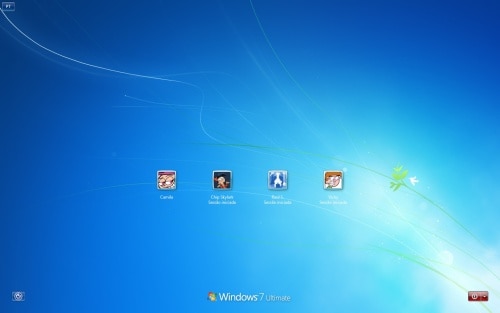
Just tested, as far as I put a password on my desktop, now the pic shows larger, just like my laptop... I wish I can post a screenie, but I?m unable to use imp pant when in logon screen nor locked workstation screen...

Now... the final question... is there any way to tell windows to always get the pic as selected user instead of listed?

See ya!! :D
 

My Computer

Computer type
PC/Desktop
Computer Manufacturer/Model Number
Assembled Desktop PC
OS
Microsoft Windows 7 Home Premium SP1 64-bit Build 7600
CPU
AMD Athlon 64 X2 5200+ Dual Core CPU @ 2.7 Ghz (Brisbane)
Motherboard
PCChips A13G+ v3.0
Memory
2x2 GB DDR2 PC-5300 (667 Mhz) Kingston ValueRAM
Graphics Card(s)
XFX ATI Radeon HD 4350 GPU (512 MB + 512 MB HM)
Sound Card
Realtek High Definition Audio Driver ALC660 @ MCP61S
Monitor(s) Displays
HP S2031 20" LED HD Widescreen Display Monitor
Screen Resolution
1600 x 900 px
Hard Drives
Maxtor Diamond Max 10 (160 GB, 7200 RPM, SATA-II Hard Disk)
Western Digital Scorpion Blue (250 GB, 5400 RPM, SATA-II External Hard Disk - Personal Data)
Toshiba MQ01ABD050 (500 GB, 5400 RPM, SATA-II External Hard Disk - Software & ISOs)
PSU
Pixxo Transformer 850W 80+ Certification PSU
Case
Compaq 5BW353 Case
Cooling
Many solutions, see other info...
Keyboard
Green Leaf (Mitzu) Standard Keyboard
Mouse
Microsoft USB Lasser Pointing Device
Internet Speed
10 MB
Antivirus
Avast Antivirus Free
Browser
Firefox, Chrome, Internet Explorer
Other Info
Windows Experience Index Result: 3.8 of 7.9.

Cooling solutions:
- AVC @ 2000/5000 RPM Copper Heatpipes (For Athlon 64 X2 6000+ CPU used in an Athlon 64 X2 5200+)
- Rear Fan 80 mm @ 2700 RPM for heat extraction
- Manhatan Chipset Cooler @ 4700/7200 RPM (For nVidia Chipset in MoBo)
- Foxconn @ 2500 RPM (Old Pentium III heatsink fan) in XFX ATI Radeon HD 4350
It should always go to selected user, if there is only one user with a password.
 

My Computer

OS
Windows 7 Enterprise
CPU
Intel Pentium Dual E2200 @2.2GHz
Motherboard
Gigabyte II-G31
Memory
4GB
Graphics Card(s)
Palit GForce 9500GT 1GB
Sound Card
onBoard
Hard Drives
WesternDigital: 250GB + 1TB + 1TB + 2TB
PSU
450W
Case
CoolerMaster CM690
Cooling
Corsair H50
Mouse
Logitech MX518
I was meaning when the user has no password... is that posible? XD sorry if I didn't state that clearly :D

See ya!! :D
 

My Computer

Computer type
PC/Desktop
Computer Manufacturer/Model Number
Assembled Desktop PC
OS
Microsoft Windows 7 Home Premium SP1 64-bit Build 7600
CPU
AMD Athlon 64 X2 5200+ Dual Core CPU @ 2.7 Ghz (Brisbane)
Motherboard
PCChips A13G+ v3.0
Memory
2x2 GB DDR2 PC-5300 (667 Mhz) Kingston ValueRAM
Graphics Card(s)
XFX ATI Radeon HD 4350 GPU (512 MB + 512 MB HM)
Sound Card
Realtek High Definition Audio Driver ALC660 @ MCP61S
Monitor(s) Displays
HP S2031 20" LED HD Widescreen Display Monitor
Screen Resolution
1600 x 900 px
Hard Drives
Maxtor Diamond Max 10 (160 GB, 7200 RPM, SATA-II Hard Disk)
Western Digital Scorpion Blue (250 GB, 5400 RPM, SATA-II External Hard Disk - Personal Data)
Toshiba MQ01ABD050 (500 GB, 5400 RPM, SATA-II External Hard Disk - Software & ISOs)
PSU
Pixxo Transformer 850W 80+ Certification PSU
Case
Compaq 5BW353 Case
Cooling
Many solutions, see other info...
Keyboard
Green Leaf (Mitzu) Standard Keyboard
Mouse
Microsoft USB Lasser Pointing Device
Internet Speed
10 MB
Antivirus
Avast Antivirus Free
Browser
Firefox, Chrome, Internet Explorer
Other Info
Windows Experience Index Result: 3.8 of 7.9.

Cooling solutions:
- AVC @ 2000/5000 RPM Copper Heatpipes (For Athlon 64 X2 6000+ CPU used in an Athlon 64 X2 5200+)
- Rear Fan 80 mm @ 2700 RPM for heat extraction
- Manhatan Chipset Cooler @ 4700/7200 RPM (For nVidia Chipset in MoBo)
- Foxconn @ 2500 RPM (Old Pentium III heatsink fan) in XFX ATI Radeon HD 4350
Uh, no. You It either goes to the list, or automatically logs in if you have it set to log in automatically.
 

My Computer

OS
Windows 7 Enterprise
CPU
Intel Pentium Dual E2200 @2.2GHz
Motherboard
Gigabyte II-G31
Memory
4GB
Graphics Card(s)
Palit GForce 9500GT 1GB
Sound Card
onBoard
Hard Drives
WesternDigital: 250GB + 1TB + 1TB + 2TB
PSU
450W
Case
CoolerMaster CM690
Cooling
Corsair H50
Mouse
Logitech MX518
That's it... now I know how does it work.

Thank a lot for you help guys :)

See ya!!!! :D
 

My Computer

Computer type
PC/Desktop
Computer Manufacturer/Model Number
Assembled Desktop PC
OS
Microsoft Windows 7 Home Premium SP1 64-bit Build 7600
CPU
AMD Athlon 64 X2 5200+ Dual Core CPU @ 2.7 Ghz (Brisbane)
Motherboard
PCChips A13G+ v3.0
Memory
2x2 GB DDR2 PC-5300 (667 Mhz) Kingston ValueRAM
Graphics Card(s)
XFX ATI Radeon HD 4350 GPU (512 MB + 512 MB HM)
Sound Card
Realtek High Definition Audio Driver ALC660 @ MCP61S
Monitor(s) Displays
HP S2031 20" LED HD Widescreen Display Monitor
Screen Resolution
1600 x 900 px
Hard Drives
Maxtor Diamond Max 10 (160 GB, 7200 RPM, SATA-II Hard Disk)
Western Digital Scorpion Blue (250 GB, 5400 RPM, SATA-II External Hard Disk - Personal Data)
Toshiba MQ01ABD050 (500 GB, 5400 RPM, SATA-II External Hard Disk - Software & ISOs)
PSU
Pixxo Transformer 850W 80+ Certification PSU
Case
Compaq 5BW353 Case
Cooling
Many solutions, see other info...
Keyboard
Green Leaf (Mitzu) Standard Keyboard
Mouse
Microsoft USB Lasser Pointing Device
Internet Speed
10 MB
Antivirus
Avast Antivirus Free
Browser
Firefox, Chrome, Internet Explorer
Other Info
Windows Experience Index Result: 3.8 of 7.9.

Cooling solutions:
- AVC @ 2000/5000 RPM Copper Heatpipes (For Athlon 64 X2 6000+ CPU used in an Athlon 64 X2 5200+)
- Rear Fan 80 mm @ 2700 RPM for heat extraction
- Manhatan Chipset Cooler @ 4700/7200 RPM (For nVidia Chipset in MoBo)
- Foxconn @ 2500 RPM (Old Pentium III heatsink fan) in XFX ATI Radeon HD 4350
Guys can you help me out on? i have a 1366 x 768 resolution on my computer, its seems normal when Im on my desktop but when i switch user and Im on my log on screen, the elements are realy big, the user picture is like 300 times the size (this started when i change my monitror) i really dont know what to do, I already did basics, like adjusting resolutions, auto tune the monitor (its a samsung SA100 so i needed to download the utility software the magictune to auto adjust it)
 

My Computer

OS
Windows 8 Ultimate 32bit
@VAKZ23

Welcome to Seven Forums.

This is an extremely old thread you would do much better to start a new thread. Also I noticed that you are using Windows 8 and this is a Windows 7 forum. You would be much better off posting in the Windows 8 Forums.

-WS
 

My Computer

Computer type
PC/Desktop
Computer Manufacturer/Model Number
Dell OP7010
OS
Windows 7 Enterprise (x64); Windows Server 2008 R2 (x64)
Memory
16GB
Monitor(s) Displays
4 Dell 24" LCD
Screen Resolution
1280x1024
Keyboard
Dell
Mouse
Dell Optical
Internet Speed
40meg
Back
Top