I have a HP 350 G1 and the startup is very slow.
From that the Background image is displayed until that the login form is displayed there is a wait for about 3 minutes.
How do I find out what the computer is doing during this wait?
My Computer
At a glance
Microsoft Windows 7 Ultimate 32-bit 7601 Mult...Intel(R) Core(TM)2 Duo CPU P8700 @ 2.53GHz, 2...4GBNVIDIA GeForce 9600M GS, 512 Mb
Computer type
PC/Desktop
Computer Manufacturer/Model Number
Dell Vostro 1720, HP 7300 elite mt
OS
Microsoft Windows 7 Ultimate 32-bit 7601 Multiprocessor Free Service Pack 1
CPU
Intel(R) Core(TM)2 Duo CPU P8700 @ 2.53GHz, 2 cores
Motherboard
Dell Inc. 0J056T
Memory
4GB
Graphics Card(s)
NVIDIA GeForce 9600M GS, 512 Mb
Sound Card
High Definition Audio Device
Screen Resolution
1440 x 900 x 59 hertz
Hard Drives
ST750LX003-1AC154 ATA Device 698,64 GB
Keyboard
Standard Keyboard - PS/2
Mouse
Microsoft Wireless Notebook Presenter Mouse 8000 (IntelliPoi
Hi,
The system you are referring to does not match your "My System Specs" Page. Would you mind providing the hardware of the computer so I can better assist you? Thanks,
Josh
My Computer
At a glance
Windows 7 Professional x64, Windows Vista Ult...Multiple, as I have many ComputersMany different amounts, as I have many ComputersMultiple, as I have many Computers
Computer type
PC/Desktop
OS
Windows 7 Professional x64, Windows Vista Ultimate x64, Ubuntu x64
CPU
Multiple, as I have many Computers
Motherboard
Multiple, as I have many Computers
Memory
Many different amounts, as I have many Computers
Graphics Card(s)
Multiple, as I have many Computers
Hard Drives
Multiple, as I have many Computers
PSU
Multiple, as I have many Computers
Case
Multiple, as I have many Computers
Other Info
Sorry about the info, but I have to more Computers/Parts than allowed to list. If I am requesting help, I will put full specs in the post.
Thanks for that file. Your drive is not one of the fastest out there, but it shouldn't hang like this. Have you tried defragmenting the drive?
Josh
My Computer
At a glance
Windows 7 Professional x64, Windows Vista Ult...Multiple, as I have many ComputersMany different amounts, as I have many ComputersMultiple, as I have many Computers
Computer type
PC/Desktop
OS
Windows 7 Professional x64, Windows Vista Ultimate x64, Ubuntu x64
CPU
Multiple, as I have many Computers
Motherboard
Multiple, as I have many Computers
Memory
Many different amounts, as I have many Computers
Graphics Card(s)
Multiple, as I have many Computers
Hard Drives
Multiple, as I have many Computers
PSU
Multiple, as I have many Computers
Case
Multiple, as I have many Computers
Other Info
Sorry about the info, but I have to more Computers/Parts than allowed to list. If I am requesting help, I will put full specs in the post.
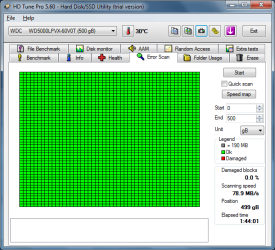
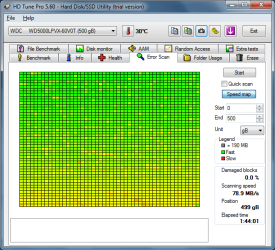
OK, so we know that isn't the issue. How about the HDD health? Try to use HDTune and run a Full Error Scan. Perhaps there are issues with the drive. (Bad sectors etc.)
Good Luck,
Josh
My Computer
At a glance
Windows 7 Professional x64, Windows Vista Ult...Multiple, as I have many ComputersMany different amounts, as I have many ComputersMultiple, as I have many Computers
Computer type
PC/Desktop
OS
Windows 7 Professional x64, Windows Vista Ultimate x64, Ubuntu x64
CPU
Multiple, as I have many Computers
Motherboard
Multiple, as I have many Computers
Memory
Many different amounts, as I have many Computers
Graphics Card(s)
Multiple, as I have many Computers
Hard Drives
Multiple, as I have many Computers
PSU
Multiple, as I have many Computers
Case
Multiple, as I have many Computers
Other Info
Sorry about the info, but I have to more Computers/Parts than allowed to list. If I am requesting help, I will put full specs in the post.
Hard drive appears to be OK, that is good news. The end seems to be slower, but it shouldn't really affect anything.
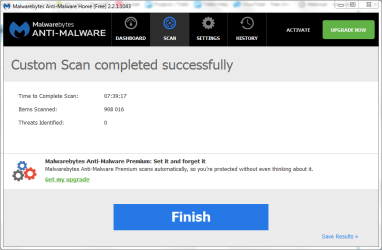
At this step, I would suggest a full scan with MalwareBytes, Go the Scan tab, select Custom Scan, Configure, and tick the option for RootKits.
Also, what is inside of:
Start --> search msconfig
Run it
Go to the Startup tab
Please screenshot the entries. Perhaps software is running on startup, that is malicious, or stupid (PUPs, toolbars, etc)
Regards,
Josh
My Computer
At a glance
Windows 7 Professional x64, Windows Vista Ult...Multiple, as I have many ComputersMany different amounts, as I have many ComputersMultiple, as I have many Computers
Computer type
PC/Desktop
OS
Windows 7 Professional x64, Windows Vista Ultimate x64, Ubuntu x64
CPU
Multiple, as I have many Computers
Motherboard
Multiple, as I have many Computers
Memory
Many different amounts, as I have many Computers
Graphics Card(s)
Multiple, as I have many Computers
Hard Drives
Multiple, as I have many Computers
PSU
Multiple, as I have many Computers
Case
Multiple, as I have many Computers
Other Info
Sorry about the info, but I have to more Computers/Parts than allowed to list. If I am requesting help, I will put full specs in the post.
Yes, but we make sure no malware is hiding anywhere on the PC.
Try to check for suspicious services.
Start --> services.msc
Look for ones with random characters in the name. Like: zhtuge or something like that.
Other than that, it's likely an OS issue, you may need to reinstall Windows.
My Computer
At a glance
Windows 7 Professional x64, Windows Vista Ult...Multiple, as I have many ComputersMany different amounts, as I have many ComputersMultiple, as I have many Computers
Computer type
PC/Desktop
OS
Windows 7 Professional x64, Windows Vista Ultimate x64, Ubuntu x64
CPU
Multiple, as I have many Computers
Motherboard
Multiple, as I have many Computers
Memory
Many different amounts, as I have many Computers
Graphics Card(s)
Multiple, as I have many Computers
Hard Drives
Multiple, as I have many Computers
PSU
Multiple, as I have many Computers
Case
Multiple, as I have many Computers
Other Info
Sorry about the info, but I have to more Computers/Parts than allowed to list. If I am requesting help, I will put full specs in the post.
My next suggestion is to reinstall your OS, something must be messed up. Your hardware all looks OK.
Josh
My Computer
At a glance
Windows 7 Professional x64, Windows Vista Ult...Multiple, as I have many ComputersMany different amounts, as I have many ComputersMultiple, as I have many Computers
Computer type
PC/Desktop
OS
Windows 7 Professional x64, Windows Vista Ultimate x64, Ubuntu x64
CPU
Multiple, as I have many Computers
Motherboard
Multiple, as I have many Computers
Memory
Many different amounts, as I have many Computers
Graphics Card(s)
Multiple, as I have many Computers
Hard Drives
Multiple, as I have many Computers
PSU
Multiple, as I have many Computers
Case
Multiple, as I have many Computers
Other Info
Sorry about the info, but I have to more Computers/Parts than allowed to list. If I am requesting help, I will put full specs in the post.
I would go for the Factory Reset option. MAKE SURE YOU BACK EVERY FILE UP YOU DON'T WANT TO LOSE!!!!!!!!!!!!!!!!!!!
I would also recommend uninstalling any included software you don't need, like McAfee, Norton, or other software included that you don't need. These preinstalled antiviruses usually need to be activated, which tries to force you to pay them. I would go for Microsoft Security Essentials, or Avast. both are free, and work just as well as the paid ones preinstalled.
If you have any questions, feel free to post, and I'd be happy to assist.
Good luck,
Josh
My Computer
At a glance
Windows 7 Professional x64, Windows Vista Ult...Multiple, as I have many ComputersMany different amounts, as I have many ComputersMultiple, as I have many Computers
Computer type
PC/Desktop
OS
Windows 7 Professional x64, Windows Vista Ultimate x64, Ubuntu x64
CPU
Multiple, as I have many Computers
Motherboard
Multiple, as I have many Computers
Memory
Many different amounts, as I have many Computers
Graphics Card(s)
Multiple, as I have many Computers
Hard Drives
Multiple, as I have many Computers
PSU
Multiple, as I have many Computers
Case
Multiple, as I have many Computers
Other Info
Sorry about the info, but I have to more Computers/Parts than allowed to list. If I am requesting help, I will put full specs in the post.