Looking for a strategy..

LeeRex

New member
Local time
11:02 AM
Messages
6
....every few months things seem to go wrong. Nothing big. Just a little problem here and a little problem there. Eventually, the little things become a big thing and so I am forced to deal with it. In the past, I have done one of two things: Run the upgrade from the install disk or erase everything and reinstall completely. So I wonder if this has ever been the right way to go. Do I deal with each small problem individually or just continue the way I have always done it. Both of my strategies are a real pain and time consuming. But I am not that savvy to deal with these obscure problems that I face. For me, stability only lasts a few months or so. Eventually, I am spending more time fixing things than doing anything useful. So I guess my question is: How do I create stability?
 

My Computer

Computer type
PC/Desktop
Computer Manufacturer/Model Number
Aurora r3 Dell
OS
Win 7 home 64 bit
Antivirus
avast
Browser
Firefox
Its called "BackUp"
You take an Image or a Clone of the good working system.
( I take one every 2 weeks )
When you then become unstuck it will take you 20 minutes to put your PC back to its last back up date.

Macrium Reflect
 

My Computer

Computer type
PC/Desktop
Computer Manufacturer/Model Number
Owner Builder
OS
Windows 7 Ultimate x64 SP1 OEM
CPU
Intel i7 3930K
Motherboard
Asus X79 Deluxe
Memory
Kingston Genesis KHX2133C11D3K4/32G
Graphics Card(s)
Asus RTX 2070 Ti Turbo fan series
Sound Card
Creative Sound Blaster ZXR
Monitor(s) Displays
Samsung U32J39 UHD
Screen Resolution
3840 x 2160
Hard Drives
Samsung 860 Pro 256 GB
OCZ Vertex 4 512GB
Western Digital Black 4TB
PSU
Corsair AX850
Case
Gigabyte
Cooling
Push - Pull 120 mm Noctua PWM, Scythe Big Shuriken 2 Rev. B
Keyboard
Logitech K800 Backlit
Mouse
Logitech MX2 Master
Internet Speed
NBN 25 Mbps
Antivirus
Kaspersky Internet Security
Browser
Mozilla FireFox
Other Info
TP-Link Archer VR600v
Sennheiser TR220 WiFi Head Phones.

My Computer

Computer type
PC/Desktop
Computer Manufacturer/Model Number
medionl/Aspire 6930G/acer x55a
OS
W7 home premium 32bit/W7HP 64bit/w10 tp insider ring
CPU
E5300 dual core
Motherboard
medion MS7366
Memory
3gb
Graphics Card(s)
Nvidia Geforce 7100 Nforce 630i
Monitor(s) Displays
avixc
Internet Speed
n (isp resticted to 72)
Antivirus
mse/pands
Browser
palemoon
Other Info
Belkin Fd7050 n USB using Railink RT2870 drivers, more upto date
MeOnMine, I have a bit of a problem with images. Cloning a perceived "good working system" means cloning all those little things that created the problem in the first place. When you finally reach a point when the little things become big things, you are simply copying all the accrued mistakes. In other words, a clone of a clone of a clone is simply a collection of imperfections compounded over each generation much as a copy of a copy of a copy of an audio tape disintegrates. Correct me if wrong
 

My Computer

Computer type
PC/Desktop
Computer Manufacturer/Model Number
Aurora r3 Dell
OS
Win 7 home 64 bit
Antivirus
avast
Browser
Firefox
One doesn't Clone or Backup a troubled system.
First you fix the problems. Then when things are as they should be you make your Clone or Backup.

If you system is having problems; this forum can help you with them.
Just start a thread with the problem you are having and this forum will do their best to help you.
 

My Computer

Computer type
PC/Desktop
Computer Manufacturer/Model Number
Home made Desktop
OS
Windows 10 Pro. 64/ version 1709 Windows 7 Pro/64
CPU
Intel i7-6800K @ 4.3
Motherboard
ASUS X-99 Deluxe II
Memory
Corsair Platinum 16 gig @2400
Graphics Card(s)
EVGA GTX 1070 OC
Monitor(s) Displays
Asus 27" LED LCD/VE278Q
Screen Resolution
1920-1080 or 1280-720 HDMI
Hard Drives
INTEL SSD 730-240 Gb Sata 3.0/
PSU
EVGA Platium 1200W
Case
Phanteks Luxe Tempered Glass 8 fans/ one radiator
Cooling
XSPC/ Water Cooled CPU
Keyboard
Das 4 Professional
Mouse
Logitech M705/MX Anywhere 2-S
Internet Speed
100 mbits
Antivirus
Microsoft Security Essentials/ Malwarebytes Premium 3.0/ SAS
Browser
I.E. 11 default/Firefox/ ISP Time Warner Cable/Spectrum
Other Info
LG BluRay Burner/
Sound system-KLipsch-THX/
Icy Dock ssd Hot Swap bays.
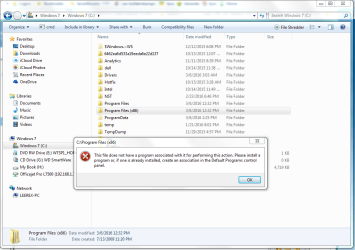
Bear, thanks....It's the tiny, unoticeable things that concerns me. If you can't see them at first then they become part of the clone and each generation inherits the previous one until the Big One shows up. So, here is my list of things that have recently shown up:

iTunes no longer recognizes my phone
see attachment (I posted this in another area of the forum as well)
Upgrading from the original disk has failed many times. I don't know why.
Restore fails consistently
Media Center, BSOD when I try to go full screen

Just a few examples of impending chaos. I wish I knew more about computers and how to head these things off. Guess I'm just frustrated that correcting all of these things takes so much time.
 

Attachments

  • explorer.PNG
    explorer.PNG
    54.9 KB · Views: 1

My Computer

Computer type
PC/Desktop
Computer Manufacturer/Model Number
Aurora r3 Dell
OS
Win 7 home 64 bit
Antivirus
avast
Browser
Firefox
First start with a System File Check.
Run it 3 times and re-boot after each time even if not asked.
 

My Computer

Computer type
PC/Desktop
Computer Manufacturer/Model Number
Owner Builder
OS
Windows 7 Ultimate x64 SP1 OEM
CPU
Intel i7 3930K
Motherboard
Asus X79 Deluxe
Memory
Kingston Genesis KHX2133C11D3K4/32G
Graphics Card(s)
Asus RTX 2070 Ti Turbo fan series
Sound Card
Creative Sound Blaster ZXR
Monitor(s) Displays
Samsung U32J39 UHD
Screen Resolution
3840 x 2160
Hard Drives
Samsung 860 Pro 256 GB
OCZ Vertex 4 512GB
Western Digital Black 4TB
PSU
Corsair AX850
Case
Gigabyte
Cooling
Push - Pull 120 mm Noctua PWM, Scythe Big Shuriken 2 Rev. B
Keyboard
Logitech K800 Backlit
Mouse
Logitech MX2 Master
Internet Speed
NBN 25 Mbps
Antivirus
Kaspersky Internet Security
Browser
Mozilla FireFox
Other Info
TP-Link Archer VR600v
Sennheiser TR220 WiFi Head Phones.
If you are having all these problem then you have hardware issues. I've been running the same install of Windows 7 since 2011.
Changed Photoshop versions 3 times. Lightroom versions 3 times. Installed and removed Office 2000 after installing Office 365, updated Office 365 twice. Multiple versions of Virtual Box and VMWare player along with having the MS virtual machine and XP to run older programs.

Something is wrong with your hardware.
 

My Computer

OS
7 x64
When he gets round to doing what i suggested, and following the Instructions for BSOD he might get some answers, and ill get it moved to the right sub-forum.

Roy
 

My Computer

Computer type
PC/Desktop
Computer Manufacturer/Model Number
medionl/Aspire 6930G/acer x55a
OS
W7 home premium 32bit/W7HP 64bit/w10 tp insider ring
CPU
E5300 dual core
Motherboard
medion MS7366
Memory
3gb
Graphics Card(s)
Nvidia Geforce 7100 Nforce 630i
Monitor(s) Displays
avixc
Internet Speed
n (isp resticted to 72)
Antivirus
mse/pands
Browser
palemoon
Other Info
Belkin Fd7050 n USB using Railink RT2870 drivers, more upto date
The poster mentioning backup is speaking words of gold on a platter of silver. When I decided to get serious about making backups much more often than before, I too started with a less than perfect software condition. After making two full OS images onto at least two usb external hard-drives, I then attempted to fix several of the little annoyances I had going on at that time. After fixing half of them [took a few days], I made another set of backups. In short, I've been making backups of improved software conditions, and sometimes, those conditions include a couple of new annoyances. Backup, backup, backup - best route.
 

My Computer

Computer type
PC/Desktop
Computer Manufacturer/Model Number
Antec desktop; Acer Aspire laptops
OS
Windows 7 Professional 64-bit
CPU
Desktop i5; Acers i5 & i7
Memory
desktop 16GB; 1 Acer 8GB & 1 Acer 16GB
Hard Drives
1TB split into 2 equal partitions [OS and data] usable by RJS
Internet Speed
AT&T DSL
Browser
FF, GChrome, msIE
Other Info
Windows 7 Firewall, Emsisoft AM/AV, MSE [scan-only], SpywareBlaster, Ruiware/BillP combine
as per instructions, I tried the sfc route...no luck. But really, I'm not expecting you kind folks to solve the problems I listed but rather suggest strategies that would keep all of this from happening in the first place. Backups seem to be the most popular answer. I'm not holding my breath that someone will develop self-healing software.
 

My Computer

Computer type
PC/Desktop
Computer Manufacturer/Model Number
Aurora r3 Dell
OS
Win 7 home 64 bit
Antivirus
avast
Browser
Firefox
The only self-healing software I ever heard of was Microsoft's Windows' NTFS self-healing function which I turned on via Ultimate Windows Tweaker 2. Does anybody know how does this NTFS self-healing work?
 

My Computer

Computer type
PC/Desktop
Computer Manufacturer/Model Number
Antec desktop; Acer Aspire laptops
OS
Windows 7 Professional 64-bit
CPU
Desktop i5; Acers i5 & i7
Memory
desktop 16GB; 1 Acer 8GB & 1 Acer 16GB
Hard Drives
1TB split into 2 equal partitions [OS and data] usable by RJS
Internet Speed
AT&T DSL
Browser
FF, GChrome, msIE
Other Info
Windows 7 Firewall, Emsisoft AM/AV, MSE [scan-only], SpywareBlaster, Ruiware/BillP combine
Did your check disk fix any bad sectors? I would definitely back up all the folders and files in case the drive fails. Sometimes you just need to reinstall with a clean install, then do an image, then put files and programs back. But the checks suggested earlier in this thread might get things fixed, or give you a diagnosis.

My hard drive is failing and after one clone with errors, I decided to reinstall on a new drive, rather than fix.
 

My Computer

Computer type
Laptop
Computer Manufacturer/Model Number
Sony Vaio VPCCW2S1E
OS
W7 HP 64 bit
CPU
Core i3 1st gen
Memory
8gb
Graphics Card(s)
Nvidia 330M
Internet Speed
8 mbps
Browser
Firefox
Back
Top