
Losing Navigation Bars (black borders) WLM 2011

xcapepod

New member
Local time
5:21 PM
Messages
1
New here. I have a Windows 7 machine that upgraded to WLM 2011 not too long ago. However, since that upgrade, after using WLM for just a few minutes, top and side navigation bars disappear and just become black (see attached). Launching a new e-mail also shows black top and bottom borders. Shutting down and restarting WLM restores everything until you start moving around in WLM again.

Has anyone seen this behavior before and have an idea what might correct it? It never occurred before the upgrade to WLM 2011 and it doesn't occur anywhere else. The machine and installation is a vanilla Dell PC with OEM Win7 Home Premium, nothing fancy.

Thanks.
 

Attachments
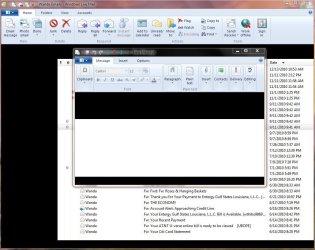
  • Capture.JPG
    Capture.JPG
    107.7 KB · Views: 27

My Computer

OS
Windows 7 Home Premium
You could try a repair install via Programs and Features>>Windows Live Essentials. If you choose "repair" it will repair all downloaded components of Essentials, including Mail. I believe the repair should be done anyway since the Junk Mail Filtering won't work properly until the repair is run.
 

My Computer

Computer type
PC/Desktop
Computer Manufacturer/Model Number
OQO 2+
OS
Windows 8 Pro w/MC 32-bit
CPU
Intel Atom 1.86 GHz
Motherboard
OQO 2+
Memory
2 GB
Graphics Card(s)
Intel GMA 500
Sound Card
IDT
Monitor(s) Displays
LCD
Screen Resolution
800 x 480 (portable) 1280 x 1024 (docked)
Hard Drives
64 GB SSD
PSU
9 Ah Battery (portable) or OQO Brick (docked)
Case
Shirt Pocket Sized
Cooling
Tiny Fan
Keyboard
Slide out (portable) DiNovo Edge (docked)
Mouse
Eraser head (portable) Logitech Bluetooth (docked)
Internet Speed
WWAN or 802.11G (portable) T1 (docked)
Browser
IE 10
Other Info
DVD-RW OQO Docking Station
Since I was forced to use the WLM_2011 (the last version was better!), I have exactly this error.

Repair, uninstall and reinstall resolves nothing.

The error is random in time, and it happens when you open the dialog box to send or forward an email.

I note that the more windows are open, the more chances of this happening.

In one day, I get to restart the wlm 10 times! It takes patience!

I can send to any expert microsoft, all diagnosis' tracks, they might need to resolve this error.

Cheers
Jorge

ps: I have windows 7 home premium (sp1), Nvidia, and HP Q6600.
 

My Computer

OS
Windows 7 Home Premium 32bit

My Computer

Computer type
PC/Desktop
Computer Manufacturer/Model Number
OQO 2+
OS
Windows 8 Pro w/MC 32-bit
CPU
Intel Atom 1.86 GHz
Motherboard
OQO 2+
Memory
2 GB
Graphics Card(s)
Intel GMA 500
Sound Card
IDT
Monitor(s) Displays
LCD
Screen Resolution
800 x 480 (portable) 1280 x 1024 (docked)
Hard Drives
64 GB SSD
PSU
9 Ah Battery (portable) or OQO Brick (docked)
Case
Shirt Pocket Sized
Cooling
Tiny Fan
Keyboard
Slide out (portable) DiNovo Edge (docked)
Mouse
Eraser head (portable) Logitech Bluetooth (docked)
Internet Speed
WWAN or 802.11G (portable) T1 (docked)
Browser
IE 10
Other Info
DVD-RW OQO Docking Station
Thanks for your tip and Firedog !!


Finally, I think I have solved this issue.
I did update the drive NVidia GeForce 8500 GT, with version 280.26, released on 11 Aug 2011. Since then, I had no more black bars.

thanks
Jorge
 

My Computer

OS
Windows 7 Home Premium 32bit
Back
Top