
Loss of Pinned Folders in Jumplist

ajmelv

New member
Local time
9:37 PM
Messages
1
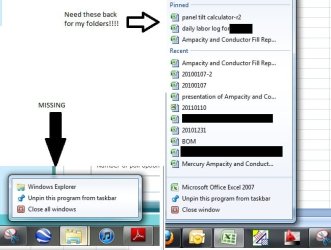
Until a week ago I was able to pin folders to my taskbar similar to any of the other programs that I can pin things to. Though I did not receive an error or select anything knowingly I now can only go to my windows explorer and anything that I drag into the folder tab remains missing. When I right-click on the explorer tab it only gives me the option to either go to windows explorer or unpin windows explorer and does not display my pinned items or my recent items. This is only for explorer and my other pinned programs (like excel) still work as before. Please help!
 

Attachments
  • PinImage.jpg
    PinImage.jpg
    41.4 KB · Views: 26

My Computer My Computer

At a glance

Windows 7 Enterprise 64 bit
OS
Windows 7 Enterprise 64 bit
Fail

Looks like Win7 SP1 is a fail concerning this issue -- just happened to me today. :cry:
 

My Computer My Computer

At a glance

Windows 7 Home Premium x643.0ghz Intel QX96502 x 2gb 800mhz OCZ Reaper HPC CL42 x XFX 8800 GTS 512 (G92) SLI
Computer Manufacturer/Model Number
Puget Custom Computers
OS
Windows 7 Home Premium x64
CPU
3.0ghz Intel QX9650
Motherboard
Asus P5N-T Deluxe (780i)
Memory
2 x 2gb 800mhz OCZ Reaper HPC CL4
Graphics Card(s)
2 x XFX 8800 GTS 512 (G92) SLI
Sound Card
Creative X-Fi XtremeGamer
Monitor(s) Displays
Samsung SyncMaster 245BW
Screen Resolution
1920x1200
Hard Drives
2 x 1tb Hitachi DeskStar 7K1000 SATAII
PSU
Seasonic 700w Modular
Case
Antec P182
Cooling
Koolance drop-in kit (cpu & gpus)
Keyboard
Keys-U-See (yellow)
Mouse
MS Laser 6000
Internet Speed
Fast
Other Info
Not really
Lost my pinned items (for Word) too.

Drat, happened to me now. Lost my pinned items on Word.

It had trouble opening one of my pinned Word docs and prompted me if I wanted to delete the shortcut, I said No as it was just on a network drive, so it would work later on... thereafter it lost my pinned items.

Documents scattered across many drives, all conveniently 'bookmarked', now I'll have to find them again and pin them again...

Resetting this is not a "solution", I lost this information and I'd want it back.

Is there any way to backup the pinned items? Then I'll just write a script to back it up for me in case this happens again....
 

My Computer My Computer

At a glance

Windows 71.66 Ghz Intel Atom N2801 GB (upgrading to 2GB)
Computer Manufacturer/Model Number
Asus EEE PC 1000HE
OS
Windows 7
CPU
1.66 Ghz Intel Atom N280
Motherboard
Asus
Memory
1 GB (upgrading to 2GB)
Hard Drives
140 GB
ST9160310AS ATA
Back
Top