lost access to my secondary hard drive

eldinv

New member
Guru
Local time
2:07 AM
Messages
560
Location
New Hampshire
for some reason last nite when i was done using my computer i left it on, and came back to it this morning. i couldnt engage it from sleep for some reason. when i held a button on my keyboard, i saw the hard drive light come on and stay on, same for the computer activity. since it didnt start...

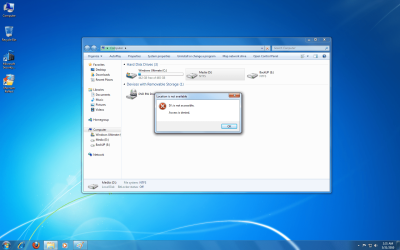
i simply restarted, it got to the starting windows flash screen and after that went blank..so i did a hard shut down. then started it and it ran the check disk thing, it looked like it went ok. it started up but then the d and e drive did not want to open.. i shut down the pc, unplug the sata plug from both the mother board and switch it. also unplug the back of the hard drive and reconnect, still nothing.

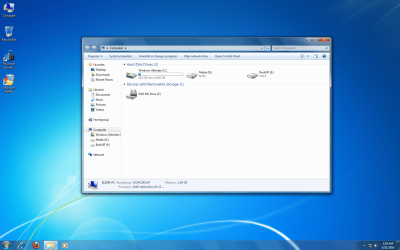
i put some screenys of what it looks like. dont know what happen. its not an old drive and its not brand new.

if you can think of something let me know please, and thanks in advance.

ev.
 

Attachments
  • my computer.png
    my computer.png
    329.4 KB · Views: 58
  • acess denied.png
    acess denied.png
    339.5 KB · Views: 88

My Computers My Computers

  • At a glance

    WIN10AMD Ryzen 5 3600 6-Core Processor 3.59 GHz16.0 GB
    Computer type
    PC/Desktop
    Computer Manufacturer/Model Number
    PowerSpec G164
    OS
    WIN10
    CPU
    AMD Ryzen 5 3600 6-Core Processor 3.59 GHz
    Memory
    16.0 GB
    Internet Speed
    VERY FAST>>>!!!
  • Antivirus
    ESET Security Premium
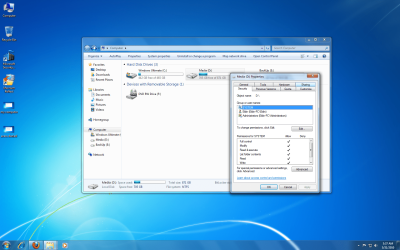
Right click on the drive, click properties. On the security tab "To change permissions click Edit", click on edit button. Click on System to display it's permissions below, see that Allow has everything checked except for special permission. A Guy
 

My Computer My Computer

At a glance

Windows 10 Home x64INTEL Core i5-750 Quad-Core 3.37GHzHyperX Fury Black Series 8GB (2 x 4GB) 1866MhzEVGA GeForce GTX 750 Superclocked 1GB 128-Bit...
Computer type
PC/Desktop
OS
Windows 10 Home x64
CPU
INTEL Core i5-750 Quad-Core 3.37GHz
Motherboard
ASUS P7P55D
Memory
HyperX Fury Black Series 8GB (2 x 4GB) 1866Mhz
Graphics Card(s)
EVGA GeForce GTX 750 Superclocked 1GB 128-Bit GDDR5
Monitor(s) Displays
LG 32MA68HY 32" IPS
Screen Resolution
1920 x 1080
Hard Drives
Samsung 840 Evo 120GB, SEAGATE 500GB Barracuda® 7200.12, SATA 3 Gb/s, 7200 RPM, 16MB cache
PSU
ANTEC TruePower New TP-550, 80 PLUS, 550W
Case
ANTEC Three Hundred Illusion
Cooling
COOLER MASTER Hyper 212 Plus, 4 x 120mm 1 x 140mm Noctua's
Internet Speed
85 + Mbps
Antivirus
Avast
Browser
Vivaldi
Does the disk available in Disk managment.?
You can check it by going to Run>type "diskmgmt.msc"(without the quotes).
see if the disk accessible from there. Furthermore you can try several other solution

right click on the disk>change drive letter/path>add your desired letter


feel free to ask:)
 

My Computer My Computer

At a glance

window's 7core 2 quad2gb corsairati hd4850
OS
window's 7
CPU
core 2 quad
Motherboard
gigabyte
Memory
2gb corsair
Graphics Card(s)
ati hd4850
Monitor(s) Displays
lg
Screen Resolution
1600 X 900
Case
power logic
Other Info
none of the spec above is accurate
i can change the drive letter, no problem then the autoplayer opens and it says denied when i try to access the drive..on the third partion shown in the screen shot "backup, i formated that drive since there was nothing really in there but a system image, after formated gave it same name and drive letter, bingo it work. i can access. i dont want to do that to my d drive cause that has over 200gb worth of stuff.

any other solutions?
 

My Computers My Computers

  • At a glance

    WIN10AMD Ryzen 5 3600 6-Core Processor 3.59 GHz16.0 GB
    Computer type
    PC/Desktop
    Computer Manufacturer/Model Number
    PowerSpec G164
    OS
    WIN10
    CPU
    AMD Ryzen 5 3600 6-Core Processor 3.59 GHz
    Memory
    16.0 GB
    Internet Speed
    VERY FAST>>>!!!
  • Antivirus
    ESET Security Premium
Right click on the drive, click properties. On the security tab "To change permissions click Edit", click on edit button. Click on System to display it's permissions below, see that Allow has everything checked except for special permission. A Guy


i did this, but had to add my name cause it only had system and adminstrator, which i am. but maybe its talking about hidden adminstrator.

so i hit add, check all the boxes except special permission, apply and ok, got a series of error messages about my video files. but then i was able to see the drive and its contents and play the media files.

how did this all of a sudden get blocked. very strange. it was working fine two days ago and then blocked me out. lol
 

Attachments

  • security permissions.png
    security permissions.png
    356.8 KB · Views: 42

My Computers My Computers

  • At a glance

    WIN10AMD Ryzen 5 3600 6-Core Processor 3.59 GHz16.0 GB
    Computer type
    PC/Desktop
    Computer Manufacturer/Model Number
    PowerSpec G164
    OS
    WIN10
    CPU
    AMD Ryzen 5 3600 6-Core Processor 3.59 GHz
    Memory
    16.0 GB
    Internet Speed
    VERY FAST>>>!!!
  • Antivirus
    ESET Security Premium
do you have any new software installed or recent hardware change? Just asking :)
 

My Computer My Computer

At a glance

window's 7core 2 quad2gb corsairati hd4850
OS
window's 7
CPU
core 2 quad
Motherboard
gigabyte
Memory
2gb corsair
Graphics Card(s)
ati hd4850
Monitor(s) Displays
lg
Screen Resolution
1600 X 900
Case
power logic
Other Info
none of the spec above is accurate
do you have any new software installed or recent hardware change? Just asking


pokerstars and winrar x64 edition.

kinda horrible cause last time i messed with the security it was a huge problem, well actually i had encrypted the files in a previous OS and never decrypted them or saved or certification keys. so all that stuff was gone

:cry::cry::cry:
 

My Computers My Computers

  • At a glance

    WIN10AMD Ryzen 5 3600 6-Core Processor 3.59 GHz16.0 GB
    Computer type
    PC/Desktop
    Computer Manufacturer/Model Number
    PowerSpec G164
    OS
    WIN10
    CPU
    AMD Ryzen 5 3600 6-Core Processor 3.59 GHz
    Memory
    16.0 GB
    Internet Speed
    VERY FAST>>>!!!
  • Antivirus
    ESET Security Premium
that might be cause. That's why it's essential to create restore point and create backup image before modifying anything or install something new to you pc :)
 

My Computer My Computer

At a glance

window's 7core 2 quad2gb corsairati hd4850
OS
window's 7
CPU
core 2 quad
Motherboard
gigabyte
Memory
2gb corsair
Graphics Card(s)
ati hd4850
Monitor(s) Displays
lg
Screen Resolution
1600 X 900
Case
power logic
Other Info
none of the spec above is accurate
that might be cause. That's why it's essential to create restore point and create backup image before modifying anything or install something new to you pc :)


create a backup or restore after installing a program, really. never heard of that so, im going to install aim, should i create a system image on my backup
 

My Computers My Computers

  • At a glance

    WIN10AMD Ryzen 5 3600 6-Core Processor 3.59 GHz16.0 GB
    Computer type
    PC/Desktop
    Computer Manufacturer/Model Number
    PowerSpec G164
    OS
    WIN10
    CPU
    AMD Ryzen 5 3600 6-Core Processor 3.59 GHz
    Memory
    16.0 GB
    Internet Speed
    VERY FAST>>>!!!
  • Antivirus
    ESET Security Premium
So you have it sorted now? Great :)

The idea is make a restore point (restore actually works quite well in Windows 7 as opposed to the hit or miss in XP) BEFORE you add programs, as insurance. Make backups before anything big, just in case. You can always manage your system restore points in CCleaner if you get too many. I use Quick Restore Maker v 2b Customizable, and pin it to my start menu.

Quick Restore Maker v 2b Customizable

A Guy
 

My Computer My Computer

At a glance

Windows 10 Home x64INTEL Core i5-750 Quad-Core 3.37GHzHyperX Fury Black Series 8GB (2 x 4GB) 1866MhzEVGA GeForce GTX 750 Superclocked 1GB 128-Bit...
Computer type
PC/Desktop
OS
Windows 10 Home x64
CPU
INTEL Core i5-750 Quad-Core 3.37GHz
Motherboard
ASUS P7P55D
Memory
HyperX Fury Black Series 8GB (2 x 4GB) 1866Mhz
Graphics Card(s)
EVGA GeForce GTX 750 Superclocked 1GB 128-Bit GDDR5
Monitor(s) Displays
LG 32MA68HY 32" IPS
Screen Resolution
1920 x 1080
Hard Drives
Samsung 840 Evo 120GB, SEAGATE 500GB Barracuda® 7200.12, SATA 3 Gb/s, 7200 RPM, 16MB cache
PSU
ANTEC TruePower New TP-550, 80 PLUS, 550W
Case
ANTEC Three Hundred Illusion
Cooling
COOLER MASTER Hyper 212 Plus, 4 x 120mm 1 x 140mm Noctua's
Internet Speed
85 + Mbps
Antivirus
Avast
Browser
Vivaldi

My Computer My Computer

At a glance

window's 7core 2 quad2gb corsairati hd4850
OS
window's 7
CPU
core 2 quad
Motherboard
gigabyte
Memory
2gb corsair
Graphics Card(s)
ati hd4850
Monitor(s) Displays
lg
Screen Resolution
1600 X 900
Case
power logic
Other Info
none of the spec above is accurate
Hello eldinv.


Have a look at the tutorial at the link below for a very easy way to create restore points when ever needed at every system restart or manually see " 4 A " in the tutorial.


System Restore Point : Create at System Startup
 

My Computer My Computer

At a glance

W 7 64-bit UltimateIntel Q9550 Yorkfield8GB Dominator 8500C5DATI : XFX 5870
Computer Manufacturer/Model Number
* BFK Customs *
OS
W 7 64-bit Ultimate
CPU
Intel Q9550 Yorkfield
Motherboard
ASUS P5Q Pro
Memory
8GB Dominator 8500C5D
Graphics Card(s)
ATI : XFX 5870
Sound Card
Realtek HD Audio 7-1
Monitor(s) Displays
1x 47" LCD HDMI & 3x 26" LCD HDMI
Screen Resolution
1920x1080P & 1920x1200
Hard Drives
1x 80GB Intel X25-M G2 SSD : 1x 500GB & 1x 640GB WD Caviar Black(s)
PSU
Corsair 620HX
Case
Cooler Master RC-690
Cooling
Tuniq Tower 120, 2x 140mm and 3x 120mm case fans
Keyboard
Microsoft 500
Mouse
Razer Diamondback 3G
Internet Speed
14 Mb/s
Other Info
1x Koutech 3Gb/s SATA HDD Hot Swap Rack
lol. i was only kidding and yes i know how to make a backup and a restore point, i was only kidding when i said i was going to install AIM and should i do a back or restore point.

that was a silly suggest i think, after several years i never heard of such a thing as to make a backup before installing such a program. i might take that advice when installing a program like VMWare that makes several changes to your computer.

anyhow thanks for help,

eldin
 

My Computers My Computers

  • At a glance

    WIN10AMD Ryzen 5 3600 6-Core Processor 3.59 GHz16.0 GB
    Computer type
    PC/Desktop
    Computer Manufacturer/Model Number
    PowerSpec G164
    OS
    WIN10
    CPU
    AMD Ryzen 5 3600 6-Core Processor 3.59 GHz
    Memory
    16.0 GB
    Internet Speed
    VERY FAST>>>!!!
  • Antivirus
    ESET Security Premium
Set a System Restore point before you make ANY changes to your setup.

Run Chkdsk /r on each separate drive, then backup a SysImage and your data and run HD maker's full diagnostics/repair CD scan: Hard Drive Diagnostics Tools and Utilities (Storage) - TACKtech Corp.

Any kind of backup is never a bad suggestion. You might have lost more than a System Image there quite easily with no restore point or image/data backup to external.
 
lol. i was only kidding and yes i know how to make a backup and a restore point, i was only kidding when i said i was going to install AIM and should i do a back or restore point.

that was a silly suggest i think, after several years i never heard of such a thing as to make a backup before installing such a program. i might take that advice when installing a program like VMWare that makes several changes to your computer.

anyhow thanks for help,

eldin

very much welcome :)
 

My Computer My Computer

At a glance

window's 7core 2 quad2gb corsairati hd4850
OS
window's 7
CPU
core 2 quad
Motherboard
gigabyte
Memory
2gb corsair
Graphics Card(s)
ati hd4850
Monitor(s) Displays
lg
Screen Resolution
1600 X 900
Case
power logic
Other Info
none of the spec above is accurate
Back
Top