Lost Administrator Access to install Adobe Reader

danfleck1

New member
Local time
2:15 AM
Messages
5
Adobe told me it needed to install updates. So while installing updates it uninstalled the old Adobe. While installing the new one I get an Adobe 1303 error telling me I need admin access(see pic)

I have admin access as this is my computer and I am logged in as I have always logged in. I also tried right clicking on the program to install and selected "Run as administrator" I get the same error.

I do not know if this is an Adobe error or Windows.

Any advice/info would be great!
 

Attachments

  • Error1303 Adobe.png
    Error1303 Adobe.png
    9.2 KB · Views: 20

My Computer

Computer Manufacturer/Model Number
Gateway DX-4200
OS
Windows 7 Ultimate 64-bit
CPU
AMD Phenom X4 9100e Quad-Core
Memory
8GB
Graphics Card(s)
ATI Raedon HD 3200
Monitor(s) Displays
Gateway 19" HD
Adobe told me it needed to install updates. So while installing updates it uninstalled the old Adobe. While installing the new one I get an Adobe 1303 error telling me I need admin access(see pic)

I have admin access as this is my computer and I am logged in as I have always logged in. I also tried right clicking on the program to install and selected "Run as administrator" I get the same error.

I do not know if this is an Adobe error or Windows.

Any advice/info would be great!

Hi DanFleck1, Welcome to SF,

You might follow this article from Adobe "Error 1303: Installer has insufficient privileges" or "Error 1304: Error writing to file" when you install Acrobat 6, 7, 8 or 3D (Windows) follow the portion for Windows Vista that should work for Windows 7 as well

Hope this helps,
Captain
 

My Computer

Computer Manufacturer/Model Number
Samsung NP550P5C-S02IN
OS
Windows 7 Ultimate - 64-bit | Windows 8 Pro - 64-bit
CPU
Intel® Core™ i7 Processor 3,610QM (2.30Hz, 6MB L3 Cach
Memory
8 GB
Graphics Card(s)
NVIDIA® GeForce® GT 650M 2GB Graphics, Optimus™ techno
Sound Card
SoundAlive™ JBL 3 Speakers (With sub-Woofer)
Monitor(s) Displays
39.62cm (15.6) SuperBright 300nit HD+ LED Display
Screen Resolution
1,600 x 900, Anti-Reflective
Hard Drives
1TB S-ATA II Hard Drive (5,400RPM)
Captain....I saw that article before posting this thread...I didn't try it though.

I just tried it. Followed the instructions and I am still getting the same error.
 

My Computer

Computer Manufacturer/Model Number
Gateway DX-4200
OS
Windows 7 Ultimate 64-bit
CPU
AMD Phenom X4 9100e Quad-Core
Memory
8GB
Graphics Card(s)
ATI Raedon HD 3200
Monitor(s) Displays
Gateway 19" HD
Try running the installer as administrator, or take ownership of the file, then run it...
 

My Computer

Computer type
PC/Desktop
Computer Manufacturer/Model Number
LENOVO K450 @3.0GHZ
OS
64-bit Windows 8.1 Pro
CPU
Core(TM) i5 CPU 4330 Haswell @ 3.20GHz
Motherboard
LENOVO
Memory
12.00 GB
Graphics Card(s)
Intel(R) HD Graphics
Sound Card
Intel HD integtrated
Monitor(s) Displays
HP 25' ISP Monitor
Screen Resolution
1900/1020
Hard Drives
(1) ST1000DM003-1CH162 (2) Generic STORAGE DEVICE USB Device (3) Generic STORAGE DEVICE USB Device
Internet Speed
100mb down/10mb up
I took ownership by changing the registry lines.

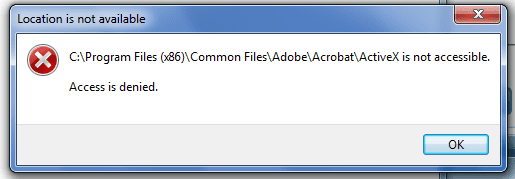
I still get the same error. If I go to the file that I cannot access I get access denied. See pic.

I tried taking ownership of that file as well. Still cannot access it.

I also closed all my folders and reopened them. I guess I'll try restarting the computer to see if that does anything.
 

Attachments

  • ErrorAdobe.png
    ErrorAdobe.png
    7.9 KB · Views: 7
Last edited:

My Computer

Computer Manufacturer/Model Number
Gateway DX-4200
OS
Windows 7 Ultimate 64-bit
CPU
AMD Phenom X4 9100e Quad-Core
Memory
8GB
Graphics Card(s)
ATI Raedon HD 3200
Monitor(s) Displays
Gateway 19" HD
Ok then next step would be to Login under Build-in Administrator Account install the application from there make sure you install it for All Users.

Hope this helps,
Captain
 

My Computer

Computer Manufacturer/Model Number
Samsung NP550P5C-S02IN
OS
Windows 7 Ultimate - 64-bit | Windows 8 Pro - 64-bit
CPU
Intel® Core™ i7 Processor 3,610QM (2.30Hz, 6MB L3 Cach
Memory
8 GB
Graphics Card(s)
NVIDIA® GeForce® GT 650M 2GB Graphics, Optimus™ techno
Sound Card
SoundAlive™ JBL 3 Speakers (With sub-Woofer)
Monitor(s) Displays
39.62cm (15.6) SuperBright 300nit HD+ LED Display
Screen Resolution
1,600 x 900, Anti-Reflective
Hard Drives
1TB S-ATA II Hard Drive (5,400RPM)
Currently logged in on the hidden administrator access. Still cannot install. Getting the same error code. I'm beginning to think there might be a problem with the Adobe Installer?
 

My Computer

Computer Manufacturer/Model Number
Gateway DX-4200
OS
Windows 7 Ultimate 64-bit
CPU
AMD Phenom X4 9100e Quad-Core
Memory
8GB
Graphics Card(s)
ATI Raedon HD 3200
Monitor(s) Displays
Gateway 19" HD
Did you try the Command Prompt step in Build-in Administrator account
  1. Select Start > All Programs > Accessories.
  2. Right-click on Command Prompt and select Run As Administrator. A Command Prompt window will open.
  3. In the Command Prompt window, type the following commands exactly as they appear below, including all spaces and quotation marks, and press Enter at the end of each line:

    icacls "c:\ProgramData" /T /C /grant administrators:F

    exit
 

My Computer

Computer Manufacturer/Model Number
Samsung NP550P5C-S02IN
OS
Windows 7 Ultimate - 64-bit | Windows 8 Pro - 64-bit
CPU
Intel® Core™ i7 Processor 3,610QM (2.30Hz, 6MB L3 Cach
Memory
8 GB
Graphics Card(s)
NVIDIA® GeForce® GT 650M 2GB Graphics, Optimus™ techno
Sound Card
SoundAlive™ JBL 3 Speakers (With sub-Woofer)
Monitor(s) Displays
39.62cm (15.6) SuperBright 300nit HD+ LED Display
Screen Resolution
1,600 x 900, Anti-Reflective
Hard Drives
1TB S-ATA II Hard Drive (5,400RPM)
I restarted my computer again. Logged as the Administrator and installed the file. I don't know why it worked this time.

Thank you everyone for your help! I know I will continue to follow the seven forums for help!
 

My Computer

Computer Manufacturer/Model Number
Gateway DX-4200
OS
Windows 7 Ultimate 64-bit
CPU
AMD Phenom X4 9100e Quad-Core
Memory
8GB
Graphics Card(s)
ATI Raedon HD 3200
Monitor(s) Displays
Gateway 19" HD
I restarted my computer again. Logged as the Administrator and installed the file. I don't know why it worked this time.

Thank you everyone for your help! I know I will continue to follow the seven forums for help!

Your Most Welcome :D
Glad that you got it working
 

My Computer

Computer Manufacturer/Model Number
Samsung NP550P5C-S02IN
OS
Windows 7 Ultimate - 64-bit | Windows 8 Pro - 64-bit
CPU
Intel® Core™ i7 Processor 3,610QM (2.30Hz, 6MB L3 Cach
Memory
8 GB
Graphics Card(s)
NVIDIA® GeForce® GT 650M 2GB Graphics, Optimus™ techno
Sound Card
SoundAlive™ JBL 3 Speakers (With sub-Woofer)
Monitor(s) Displays
39.62cm (15.6) SuperBright 300nit HD+ LED Display
Screen Resolution
1,600 x 900, Anti-Reflective
Hard Drives
1TB S-ATA II Hard Drive (5,400RPM)
Another mystery of Win7 solved ?????
 

Attachments

  • What_The_.JPG
    What_The_.JPG
    29.5 KB · Views: 4

My Computer

Computer type
PC/Desktop
Computer Manufacturer/Model Number
Built them myself, Science Experiments !
OS
Win7 Enterprise, Win7 x86 (Ult 7600), Win7 x64 Ult 7600, TechNet RTM on AMD x64 (2.8Ghz)
CPU
AMD fx8350 4ghz, AMD-32 2400mhz, AMD-64 3200mhz, AMDx64 2.8G
Motherboard
SIS 755, ECS-K8M890M-M (Ult 7600), GigaByte & others
Memory
2gb, 4gb on the Ult 7600, 4gb on Technet RTM, 32gb on FX8350
Graphics Card(s)
Draw my own Graphics, several nVidia cards
Sound Card
on motherboard
Monitor(s) Displays
19" flat scr, 28" I-Inc widescr,22" Emprex Widescr, 23" Acer
Screen Resolution
1280 x 1024, 1440 x 900, 1920 x 1080
Hard Drives
6 pata Ide HD's & 2 Sata HD's
added 80gb external on Ult 7600 computer,
numerous extra 1tb, 2TB, 3Tb SATA HD's
A collection of ext HD Docks w/ HDs
PSU
430w, 550w, 600w, 700, 800, etc
Case
All Generic Full Towers
Cooling
Open Air & a few fans, some w/ colored LEDs
Keyboard
Compaq & Dell recycled from GoodWill
Mouse
Made in China Optical Wired Mouse
Internet Speed
Fast Cable InterNet
Antivirus
AVG Free on 24 different Desktops, NO Problems!
Browser
IE 8 is preferred, but use FireFox sometimes
Other Info
Linksys Routers, switches, & Hubs
Too Many USB Flash Drives to count, Biggest is 64GB !
Eight computers in my home network.
Sixteen computers at my business network.
Linked via TeamViewer !
Lots of old used spare computer parts everywhere!
I've just upgraded to the new version without any problems. I always download and save the program to disk first prior to running it.

Follow this link Adobe Reader 9.3.0 and when prompted, select Save. When you have saved the file, you can then run it from there.
 

My Computer

Computer type
PC/Desktop
Computer Manufacturer/Model Number
Dwarf Dwf/11/2012 r09/2013
OS
Windows 8.1 Pro RTM x64
CPU
Intel Core-i5-3570K 4-core @ 3.4GHz (Ivy Bridge) (OC 4.4GHz)
Motherboard
ASRock Z77 Extreme4-M
Memory
4 x 4GB DDR3-1600 Corsair Vengeance CMZ8GX3M2A1600C9B (16GB)
Graphics Card(s)
MSI GeForce GTX770 Gaming OC 2GB
Sound Card
Realtek High Definition on board solution (ALC 898)
Monitor(s) Displays
ViewSonic VA1912w Widescreen (VGA)
Screen Resolution
1440x900
Hard Drives
OCZ Agility 3 SSD 120GB SATA III x2 (RAID 0)
Samsung HD501LJ 500GB SATA II x2
Hitachi HDS721010CLA332 1TB SATA II
Iomega 1.5TB Ext USB 2.0
WD 2.0TB Ext USB 3.0
PSU
XFX Pro Series 850W Semi-Modular
Case
Gigabyte IF233
Cooling
1 x 120mm Front Inlet 1 x 120mm Rear Exhaust
Keyboard
Microsoft Comfort Curve Keyboard 3000 (USB)
Mouse
Microsoft Comfort Mouse 3000 for Business (USB)
Internet Speed
NetGear DG834Gv3 ADSL Modem/Router (Ethernet) ~4.0 Mb/s (O2)
Antivirus
Avast! 8.0.1497
Browser
IE 11
Other Info
Optical Drive: HL-DT-ST BD-RE BH10LS30 SATA Bluray
Lexmark S305 Printer/Scanner/Copier (USB)
WEI Score: 8.1/8.1/8.5/8.5/8.25
Asus Eee PC 1011PX Netbook (Windows 7 x86 Starter)
Back
Top