My question was,
'how do I add specific locations to the Move To menu?'
The answer I found was,
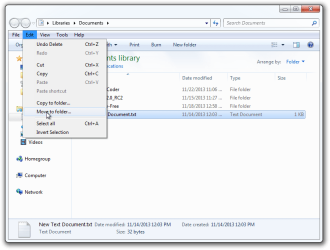
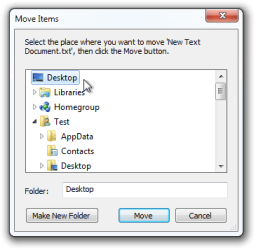
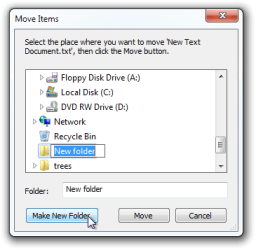
'In explorer select a file or folder, click on edit, select move to folder and choose create new folder.'
Doing that I do not see 'move to folder' in the edit menu.
So, my question is,
is that the right answer, and if it is, how do get that command back on the edit menu?
'how do I add specific locations to the Move To menu?'
The answer I found was,
'In explorer select a file or folder, click on edit, select move to folder and choose create new folder.'
Doing that I do not see 'move to folder' in the edit menu.
So, my question is,
is that the right answer, and if it is, how do get that command back on the edit menu?
My Computer
- Computer Manufacturer/Model Number
- gateway dx4200-09
- OS
- Win 7, 64 bit
- CPU
- AMD Phenom X4 9100e quad core
- Motherboard
- no idea
- Memory
- 4GB
- Graphics Card(s)
- ATI radeon HD 3200 integrated graphics
- Sound Card
- on board
- Monitor(s) Displays
- yes
- Hard Drives
- 640 GB
- PSU
- no idea
- Case
- yes
- Cooling
- fans