lost drivers

longshanks

New member
Member
VIP
Local time
2:38 PM
Messages
156
Morning. I am having problems with drivers, I can't get me PC to recognise my phone. now every time
I turn my computer on I get this. ( see attachment) can anyone help.
 

Attachments

  • Capture desktop.JPG
    Capture desktop.JPG
    44.8 KB · Views: 2

My Computer

OS
windows 7
Motherboard
asus
Memory
2gb
Monitor(s) Displays
acer
Hard Drives
seagate
It looks like that DLL is either missing or corrupt. If that DLL is required to make your phone work with your PC, then you may have to reinstall the drivers for the phone, or else reinstall the software package that came with your phone.

What happens when you plug the phone into the PC? Does it give you an error message?
 

My Computer

Computer type
PC/Desktop
Computer Manufacturer/Model Number
Mellon Labs (custom build)
OS
Win 7 Pro x64/Win 10 Pro x64 dual boot
CPU
AMD FX 8350 Vishera @ 4200
Motherboard
ASUS M5A97 R2.0
Memory
16 GB Mushkin Blackline DDR3-2400 @ 1866 (9-10-10-10-31)
Graphics Card(s)
XFX Radeon R9 280 Double D Black Edition
Sound Card
Realtek HD Audio on MB. Sounds great.
Monitor(s) Displays
Acer 24", Acer 22"
Screen Resolution
3840 x 1080
Hard Drives
1 x Mushkin Chronos 120 GB SSD (Win 10)
1 x Samsung 850 EVO 250 GB SSD (Win 7)
1 x WD 1TB SATA Blue
1 x WD 1TB SATA Green
PSU
Corsair TX-750
Case
CoolerMaster HAF 912+
Cooling
Coolermaster Seidon 240M Liquid AIO. 6 case fans
Keyboard
Logitech G710+
Mouse
Logitech G500s
Internet Speed
Much better since I got fiber, but still way overpriced.
Antivirus
MSE, Malware Bytes for scanning
Browser
Firefox
Other Info
Corsair VOID USB headphones.

A Mellon Labs X-1 - LCD Smartie driven system status display.

Brought to you by the letter E
Looks to me that those are two separate problems. As to the message in this post, the directory path in that error message is telling. "Conduit" is a search engine hijack. Looks like your antivirus removed the startup file from disk but not the entry in the registry that references it and tells Windows to start it.

Download Autoruns. When you start it look in lower left corner of window and wait till it's done scanning. Click Ctrl-F and search for the word Conduit. Uncheck the box to remove it from registry startup.
 

My Computer

Computer type
PC/Desktop
Computer Manufacturer/Model Number
Dell Optiplex 360 and Optiplex 755
OS
Desk 1: Win 7 Pro x32; Desk 2: Windows 10 x64
Hard Drives
500GB Crucial SSD in both Desktops
Other Info
Buffalo 6TB NAS, Raid 1
lost drivers »

Hi when I am using Keis I plug my phone in and it say's connecting. After about 10 min's it says' it can't connect to this device. I have tried it on my laptop and get the same results.
I have run autoruns but I don't understand it I don't want to tick /untick boxes if I don't' know what I am doing. can you be a bit clearer, (for a dummy).
 

My Computer

OS
windows 7
Motherboard
asus
Memory
2gb
Monitor(s) Displays
acer
Hard Drives
seagate
You can read more about Autoruns on its website. Its information lists everything that gets started (or just loaded) on your computer when you boot Windows and login. Each item represents a registry entry. Unchecking a box removes the item from the registry (but Autoruns remembers the entry). If you click to re-check the box, Autrons restores the resgistry entry.

Once you're satisfied it fixes the problem and everything works you can right click select Delete to remove the entry from the registry and from Autoruns (or leave it remain unchecked, is up to you)

/* EDit */
I have a Samsung phone as well.IMO Kies is a PAIN in the $$$ :) I use MyPhoneExplorer (freeware) you install on your PC and download the app to your phone. Check it out. Might work for your needs too.
/* EDIT 2 */
I know this type of problem is common. So i guessed if I just googled Conduit Autoruns I could find you other examples. Sure enough, there's plenty. You can read someone else's experience http://deletemalware.blogspot.com/2013/11/remove-backgroundcontainerdll-error.html
 
Last edited:

My Computer

Computer type
PC/Desktop
Computer Manufacturer/Model Number
Dell Optiplex 360 and Optiplex 755
OS
Desk 1: Win 7 Pro x32; Desk 2: Windows 10 x64
Hard Drives
500GB Crucial SSD in both Desktops
Other Info
Buffalo 6TB NAS, Raid 1
Morning to you all .firstly I have solved the phone problem I reset it back to the factory settings now it works great.
so thanks for that .i think maybe computer geeks right they where two different problems. the other thing with the dll message it is still there every time I turn on my computer.
I downloaded autorun and ran it got the log but as I said I don't understand it. and I cant' fathom out how to send it to you. I have clicked the paperclip, gone into browse chose the image ,click download .but nothing comes to this box.
I need help. Please.
 

My Computer

OS
windows 7
Motherboard
asus
Memory
2gb
Monitor(s) Displays
acer
Hard Drives
seagate
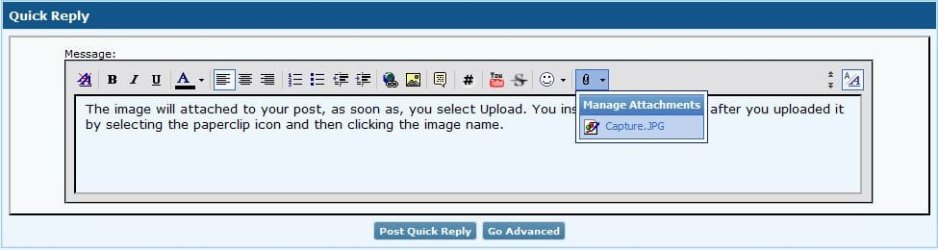
The image will attached to your post, as soon as, you select Upload. You insert the image inline, after you uploaded it by selecting the paperclip icon and then clicking the image name.

Capture.JPG
 

My Computer

Computer type
Laptop
Morning Blue Robot. I still can't send you the outorun log. what am I doing wrong.

I am on this page, I go down to manage attachments. Click browse go to my pictures. select Atorun.

the selection comes up in browse box. I click upload. message say' uploading please wait.

then nothing. I come back to this page and there is no attachment. HELP.???
 

My Computer

OS
windows 7
Motherboard
asus
Memory
2gb
Monitor(s) Displays
acer
Hard Drives
seagate
cap.jpg

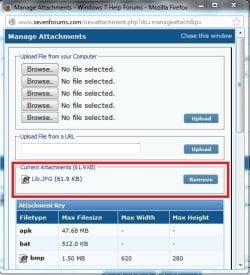
Can you get to the same point as me in the above image?
 

My Computer

Computer type
Laptop
Longsharks

  1. Run Autoruns and let it complete the scan
  2. Click the binoculars icon at top left of the window to open the Find box. Type in Conduit then click the Find Next button
  3. When it finds the entry, look under the image path column. It will say "File not found" for the entry. Uncheck the box for the entry
  4. Press F3 function key to "Find next" any next instance of Conduit again. Are the more Conduit entries? If so, repeat the process above and uncheck the box
  5. Reboot your machine. All should be good
  6. once you're confident, you can re-run Autoruns, find the entries again then right click and select to Delete them
  7. You're done :)
 

My Computer

Computer type
PC/Desktop
Computer Manufacturer/Model Number
Dell Optiplex 360 and Optiplex 755
OS
Desk 1: Win 7 Pro x32; Desk 2: Windows 10 x64
Hard Drives
500GB Crucial SSD in both Desktops
Other Info
Buffalo 6TB NAS, Raid 1
no I get the box up ,and click browse. Then select the image I want to send you then click upload, it then say's wait file uploading. then goes' off. where you are showing a box with remove on and a attachment I don't' get that.
 

My Computer

OS
windows 7
Motherboard
asus
Memory
2gb
Monitor(s) Displays
acer
Hard Drives
seagate
You can search the BackgroundContainer.dll on google dl it and than place it where it should be, try that if not clear the registry with CCleaner or some other software, uninstall the program and than install it again.
 

My Computer

Computer type
PC/Desktop
OS
Windows 7 Ultimate 32bit
no I get the box up ,and click browse. Then select the image I want to send you then click upload, it then say's wait file uploading. then goes' off. where you are showing a box with remove on and a attachment I don't' get that.

Can you just upload a Autoruns log file instead? Start Autoruns, and then it should be a simple File > Save. Place the log file (.ARN) into a zipped folder, and then upload to the forum.

Have you followed Geek's suggestion?
 

My Computer

Computer type
Laptop
lost drivers »

NO I get to the page that say's browse I select a image then click download , then a message say's
wait file loading. Then it goes' off . I go back to my post and there is no attachment .
 

My Computer

OS
windows 7
Motherboard
asus
Memory
2gb
Monitor(s) Displays
acer
Hard Drives
seagate
I went on autorun.as the geek suggested but but got this. after I had typed conduit in the find next box. ( cannot find string conduit).
 

My Computer

OS
windows 7
Motherboard
asus
Memory
2gb
Monitor(s) Displays
acer
Hard Drives
seagate
Upload the file to Skydrive or Dropbox, and make sure the file is uploaded to the Public folder of your account. Post the URL to the file in your next post.
 

My Computer

Computer type
Laptop
NO I get to the page that say's browse select a file to send and click download, then it goes' off I go back to my post and there is nothing there.
 

My Computer

OS
windows 7
Motherboard
asus
Memory
2gb
Monitor(s) Displays
acer
Hard Drives
seagate
Back
Top
