
lost Flags in Outlook 2003

hxl7

New member
Member
Local time
11:14 AM
Messages
47
For the first time in 7+ years, something bizarre happened to my Flag Status column. Here is how it has always looked until today:
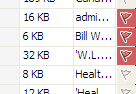
22.png

Somehow, someway, I did something unknowingly and now my flags all look like this:
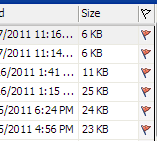
11.png

Does anyone know what I might have done and more importantly, how I can get the old look back?

It is a real problem since sorting the column does not sort the colors correctly.

Thank you so much for any insights. -Bill
 

My Computer

Computer Manufacturer/Model Number
cool tech, quiet elite
OS
win 7 64 ultimate
CPU
Intel i& 950 3.06GHz
Motherboard
Asus P6TD Deluxe
Memory
12GB PC3 12800
Graphics Card(s)
ATI Radeon HD 4850
Sound Card
-
Monitor(s) Displays
HP w2207
Hard Drives
2 WD Quiet 640GB 7200
Case
Antec P183
Cooling
Noctua NH-U12P SE 1366
Just found a video about use of flags in Outlook 2003. I looks to be quite comprehensive, so you might find what you did to change the appearance:

YouTube - Microsoft Outlook 2003 - Message Flags

P.S. I tried to insert the YouTube video itself, but failed miserably! So I included the link instead. :D
 

My Computer

Computer type
PC/Desktop
Computer Manufacturer/Model Number
Packard Bell
OS
Windows 7 Home Premium 64bit
CPU
Intel(R) Core(TM) i3-2120 CPU @ 3.30GHz
Motherboard
Packard Bell IPISB-AG
Memory
3.00 GB
Graphics Card(s)
(1) Intel(R) HD Graphics (2) VNC Mirror Driver
Sound Card
Realtek High Definition Audio
Monitor(s) Displays
AIO LCD
Screen Resolution
1920 x 1080
Hard Drives
WDC WD10EADX-22TDHB0 ATA Device
Fixed hard disk media
4 partitions
931.51 GB
Keyboard
Wireless
Mouse
Wireless
Antivirus
Microsoft Security Essentials
Browser
IE; Firefox
Other Info
Also:
Samsung N220 Plus Netbook - Windows 7 Home
HP laptop
iPad 5
Irene, Thanks so much for your response. Alas, no clues found in the video. -Bill
 

My Computer

Computer Manufacturer/Model Number
cool tech, quiet elite
OS
win 7 64 ultimate
CPU
Intel i& 950 3.06GHz
Motherboard
Asus P6TD Deluxe
Memory
12GB PC3 12800
Graphics Card(s)
ATI Radeon HD 4850
Sound Card
-
Monitor(s) Displays
HP w2207
Hard Drives
2 WD Quiet 640GB 7200
Case
Antec P183
Cooling
Noctua NH-U12P SE 1366
Irene, Thanks so much for your response. Alas, no clues found in the video. -Bill
Perhaps you could clarify things a little please.
Is the problematic difference the full red background to the red flag?
 

My Computer

Computer type
PC/Desktop
Computer Manufacturer/Model Number
Packard Bell
OS
Windows 7 Home Premium 64bit
CPU
Intel(R) Core(TM) i3-2120 CPU @ 3.30GHz
Motherboard
Packard Bell IPISB-AG
Memory
3.00 GB
Graphics Card(s)
(1) Intel(R) HD Graphics (2) VNC Mirror Driver
Sound Card
Realtek High Definition Audio
Monitor(s) Displays
AIO LCD
Screen Resolution
1920 x 1080
Hard Drives
WDC WD10EADX-22TDHB0 ATA Device
Fixed hard disk media
4 partitions
931.51 GB
Keyboard
Wireless
Mouse
Wireless
Antivirus
Microsoft Security Essentials
Browser
IE; Firefox
Other Info
Also:
Samsung N220 Plus Netbook - Windows 7 Home
HP laptop
iPad 5

My Computer

Computer type
PC/Desktop
Computer Manufacturer/Model Number
Custom Built
OS
Windows 7 Enterprise x64
CPU
i7-5820K
Motherboard
Asus X99 A
Memory
16GB DDR4
Graphics Card(s)
ASUS 2GB Nvidia 960GTX OC'd
Monitor(s) Displays
24"
Screen Resolution
1920x1080
Hard Drives
Samsung 1TB 840 SSD
Western Digital 1TB Black Drive
Seagate 2TB NAS Drive
PSU
Antec Earthwatts 650w
Case
Antec DF-85
Wow !!! ... Absolutely amazing ! That link contained the answer. Apparently this issue concerns "Quick Flags" -- Anyone can see for themselves, if interested. Checking the Quick Flags box produces the old, familiar colored flags (with the colored background). Unchecking Quick Flags, removes those original flags and produces the other version which (for me) is very undesirable. They are harder to set and do not behave the same way as the originals.

The only mystery left is how that operation happened without my knowing it in the first place. I presume it was some keyboard combination that I unfortunately and accidentally performed unknowingly. Aaarrrggghhhh!

Thank you so much all for your assistance. VERY much appreciated!
 

My Computer

Computer Manufacturer/Model Number
cool tech, quiet elite
OS
win 7 64 ultimate
CPU
Intel i& 950 3.06GHz
Motherboard
Asus P6TD Deluxe
Memory
12GB PC3 12800
Graphics Card(s)
ATI Radeon HD 4850
Sound Card
-
Monitor(s) Displays
HP w2207
Hard Drives
2 WD Quiet 640GB 7200
Case
Antec P183
Cooling
Noctua NH-U12P SE 1366
Back
Top