Lost Java association in Control Panel

glennc

New member
Power User
VIP
Local time
4:51 PM
Messages
1,024
Hello,
After reading about the Java problems, I tried the disable javascript in Firefox 18, updated to 7 Release 11, checked around and found Java 1.6XXX and Java 6 XX stuff. I couldn't uninstall them so I deleted the folders and uninstalled JRE 7 R11 and reinstalled it.
First I should have mentioned that I require javascript on numerous sites. I am running NoScript and only allow on regularly needed sites and temporarily on sites I may visit. I don't know how effective this is.
In the Control Panel, the Java icon shows an empty folder an says it has no association. Is there a way to get it back? Also I've found that in Java/bin/javacpl.exe is the control application for JRE and set it according to another threads suggestion of High Security and not storing any temp files on my computer.
Is it safe? Thanks for any assistance and opinions on these problems.
Glenn
 

My Computer

Computer type
PC/Desktop
Computer Manufacturer/Model Number
Self-Built
OS
Windows 7 Ultimate
CPU
AMD Phenom-II X4 965
Motherboard
Gigabyte GA-MA785GM-US2H
Memory
8192 MB DDR2-SDRAM
Graphics Card(s)
ATI Radeon HD 4200
Sound Card
ATI Radeon HD 4200 High Definition Audo
Monitor(s) Displays
LG Electronics W1943
Screen Resolution
1360 X 768
Hard Drives
C: 500 GB Caviar Black SATA
E: 500 GB Caviar Black SATA
PSU
Ultra LSP 750
Case
Ultra XBlaster
Cooling
2 Fans, CPU Fan, PS Fan
Keyboard
Acer
Mouse
Logitech
Internet Speed
6 MB
Java and JavaScript are two separate things. Java is a programming language that has to be downloaded and installed. JavaScript is a browser based scripting language that is automatically provided by probably every browser out there. JavaScript is not experiencing any vulnerabilities and doesn't need to be disabled. Java is getting all the attention and should be uninstalled. This article gives a pretty good summation of the differences and what is being recommended.

Should I disable Java, and if so, how?

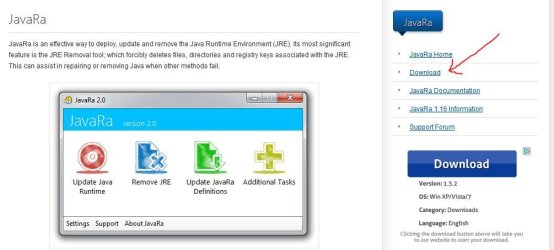
If you're having difficulties removing all traces of Java you could try a free uninstall utility called JavaRa. There are several "download" buttons on the JavaRa homepage so make sure you select the right one (screenshot provided.)

javara.JPG

Hopefully JavaRa will remove the control panel icon. If it doesn't, you could try reinstalling the latest version of Java and see if the control panel icon is functional again. Your choice if you want to keep Java installed or not. I think most security experts are recommending that it not be installed.

java.com: Java + You
 

My Computer

Computer type
Laptop
Computer Manufacturer/Model Number
Sony Vaio VPCEB47GM Laptop
OS
Win 7 Pro 64-bit
CPU
Intel i5 2.4 Ghz
Memory
8GB DDR3
Graphics Card(s)
Intel HD 3000
Sound Card
IDT High Definition
Monitor(s) Displays
15.6 WGXA Anti-Glare LED
Screen Resolution
1280x800
Hard Drives
640Gb 7200rpm
Antivirus
MSE
Browser
Opera (primary) with IE9 backup
Hello marsmimar,
Thanks for the explanation and it's information. I managed to delete the Java with Revo Unistaller, but unfortunately the Control Panel still shows the folder and Java Name. Will try out the other program tomorrow. Much appreciated!
Glenn
 

My Computer

Computer type
PC/Desktop
Computer Manufacturer/Model Number
Self-Built
OS
Windows 7 Ultimate
CPU
AMD Phenom-II X4 965
Motherboard
Gigabyte GA-MA785GM-US2H
Memory
8192 MB DDR2-SDRAM
Graphics Card(s)
ATI Radeon HD 4200
Sound Card
ATI Radeon HD 4200 High Definition Audo
Monitor(s) Displays
LG Electronics W1943
Screen Resolution
1360 X 768
Hard Drives
C: 500 GB Caviar Black SATA
E: 500 GB Caviar Black SATA
PSU
Ultra LSP 750
Case
Ultra XBlaster
Cooling
2 Fans, CPU Fan, PS Fan
Keyboard
Acer
Mouse
Logitech
Internet Speed
6 MB
Also if you use Microsoft fix it tool for uninstalling programs you could pick the program that did not come out of programs and features and it will uninstall it for you. That is what I did for a client who could not totally remove the java from her system
 

My Computer

Computer type
PC/Desktop
Computer Manufacturer/Model Number
Dell Computers
OS
Windows 7 Pro 32/64 bit and Windows 10 Pro 32 Bit/64bit
Memory
4gigs
Graphics Card(s)
AMD Radeon HD and Nvidia
Monitor(s) Displays
Samsung 24". INC 19". Dell 22 ". Dell 17" & 19"
Also if you use Microsoft fix it tool for uninstalling programs you could pick the program that did not come out of programs and features and it will uninstall it for you. That is what I did for a client who could not totally remove the java from her system

Hello robinb9,
I am still stuck with the folder icon saying Java in my control panel. I used the JavaRa after the Revo Unistaller and it said it removed 437 more entries!!!! I am unfamiliar withthe Microsoft fix it tool. Will look into it, thanks!
Glenn
 

My Computer

Computer type
PC/Desktop
Computer Manufacturer/Model Number
Self-Built
OS
Windows 7 Ultimate
CPU
AMD Phenom-II X4 965
Motherboard
Gigabyte GA-MA785GM-US2H
Memory
8192 MB DDR2-SDRAM
Graphics Card(s)
ATI Radeon HD 4200
Sound Card
ATI Radeon HD 4200 High Definition Audo
Monitor(s) Displays
LG Electronics W1943
Screen Resolution
1360 X 768
Hard Drives
C: 500 GB Caviar Black SATA
E: 500 GB Caviar Black SATA
PSU
Ultra LSP 750
Case
Ultra XBlaster
Cooling
2 Fans, CPU Fan, PS Fan
Keyboard
Acer
Mouse
Logitech
Internet Speed
6 MB

My Computer

Computer type
Laptop
Computer Manufacturer/Model Number
Sony Vaio VPCEB47GM Laptop
OS
Win 7 Pro 64-bit
CPU
Intel i5 2.4 Ghz
Memory
8GB DDR3
Graphics Card(s)
Intel HD 3000
Sound Card
IDT High Definition
Monitor(s) Displays
15.6 WGXA Anti-Glare LED
Screen Resolution
1280x800
Hard Drives
640Gb 7200rpm
Antivirus
MSE
Browser
Opera (primary) with IE9 backup
Finally located something from Java that may help.

After uninstalling Java, how do I remove its icon in control panel?

   Warning
Make sure you backup the registry. You can export and save a copy of the registry, create a new restore point, or have a current system image.

Howdy marsmimar,
Can't find anything like described above in the registry as I previously uninstalled Java. I will try reinstalling Java 7 Release 11 and then redo you suggested technique. Thanks again.
Glenn
 

My Computer

Computer type
PC/Desktop
Computer Manufacturer/Model Number
Self-Built
OS
Windows 7 Ultimate
CPU
AMD Phenom-II X4 965
Motherboard
Gigabyte GA-MA785GM-US2H
Memory
8192 MB DDR2-SDRAM
Graphics Card(s)
ATI Radeon HD 4200
Sound Card
ATI Radeon HD 4200 High Definition Audo
Monitor(s) Displays
LG Electronics W1943
Screen Resolution
1360 X 768
Hard Drives
C: 500 GB Caviar Black SATA
E: 500 GB Caviar Black SATA
PSU
Ultra LSP 750
Case
Ultra XBlaster
Cooling
2 Fans, CPU Fan, PS Fan
Keyboard
Acer
Mouse
Logitech
Internet Speed
6 MB
Well now I have a no icon icon and Java in the Control Panel. Regedit couldn't find any entries after I reinstalled it, got correct icon and then remove Java 7 Release 11. Still stuck. Thanks for any advice!
Glenn
 

My Computer

Computer type
PC/Desktop
Computer Manufacturer/Model Number
Self-Built
OS
Windows 7 Ultimate
CPU
AMD Phenom-II X4 965
Motherboard
Gigabyte GA-MA785GM-US2H
Memory
8192 MB DDR2-SDRAM
Graphics Card(s)
ATI Radeon HD 4200
Sound Card
ATI Radeon HD 4200 High Definition Audo
Monitor(s) Displays
LG Electronics W1943
Screen Resolution
1360 X 768
Hard Drives
C: 500 GB Caviar Black SATA
E: 500 GB Caviar Black SATA
PSU
Ultra LSP 750
Case
Ultra XBlaster
Cooling
2 Fans, CPU Fan, PS Fan
Keyboard
Acer
Mouse
Logitech
Internet Speed
6 MB
win7 control Panel:
I lost Java icon in the Control Panel for no good reason.
I use Java and I noticed this rather quickly after using Malwarebytes, Hitmanpro nd RougeKiller.
Something removed the icon in the Control Panel and removed Java program form the start menu.
I reloaded Java programs and the Icon is back in the Control Panel and Start Menu
I ran the above programs again without incident.

So basically, no problems just commenting,
Joe
 

My Computer

Computer Manufacturer/Model Number
HP
OS
Windows 7 Home Premium 64bit
CPU
AMD A8-3800
Motherboard
?
Memory
8 GB
Graphics Card(s)
Radeon HD Graphics 2.40 Ghz
Monitor(s) Displays
Samsung Digial, NEC analog
Hard Drives
1 x 2TB
Joaa if you are going to have Java on your computer make sure it is updated to the newest. Also check often for updates because in the last few months there have been many.
 

My Computer

Computer type
PC/Desktop
Computer Manufacturer/Model Number
Home made Desktop
OS
Windows 10 Pro. 64/ version 1709 Windows 7 Pro/64
CPU
Intel i7-6800K @ 4.3
Motherboard
ASUS X-99 Deluxe II
Memory
Corsair Platinum 16 gig @2400
Graphics Card(s)
EVGA GTX 1070 OC
Monitor(s) Displays
Asus 27" LED LCD/VE278Q
Screen Resolution
1920-1080 or 1280-720 HDMI
Hard Drives
INTEL SSD 730-240 Gb Sata 3.0/
PSU
EVGA Platium 1200W
Case
Phanteks Luxe Tempered Glass 8 fans/ one radiator
Cooling
XSPC/ Water Cooled CPU
Keyboard
Das 4 Professional
Mouse
Logitech M705/MX Anywhere 2-S
Internet Speed
100 mbits
Antivirus
Microsoft Security Essentials/ Malwarebytes Premium 3.0/ SAS
Browser
I.E. 11 default/Firefox/ ISP Time Warner Cable/Spectrum
Other Info
LG BluRay Burner/
Sound system-KLipsch-THX/
Icy Dock ssd Hot Swap bays.
Under the heading of "just commenting" - I'll add:

The Java applet in the control panel will be the one for the 32bit version of Java (unless a 64bit version of Java is installed - then the applet will be from the 64bit installation). 64bit versions of Java do not check for updates and there is no tab named Update on the 64bit Java control panel applet.

There is no way (that I know of) to start the 32bit version of the Java control panel applet with elevated privileges using Start menu > Control Panel > Java... and yet one needs the applet to run with elevated privileges in order to change/save the frequency that Java checks for updates. The work around is to use Windows (file) Explorer to get to the file named javacpl.exe - right click on that file and select "Run as administrator" from the context menu.
 

My Computer

Computer type
Laptop
Computer Manufacturer/Model Number
Employer provided Dell Latitude
OS
W7 Pro SP1 64bit
CPU
i7
Memory
8GB
Graphics Card(s)
Intel HD Graphics
Hard Drives
crappy SSD
Antivirus
Employer mandated Symantec Endpoint Protection
Browser
Pale Moon 64bit, IE11 64bit & Chrome 64bit
yes up to date
I had to because last version got wrecked.
 

My Computer

Computer Manufacturer/Model Number
HP
OS
Windows 7 Home Premium 64bit
CPU
AMD A8-3800
Motherboard
?
Memory
8 GB
Graphics Card(s)
Radeon HD Graphics 2.40 Ghz
Monitor(s) Displays
Samsung Digial, NEC analog
Hard Drives
1 x 2TB
Back
Top