Solved Lost MS Outlook .pst file - need help

theaudioanalyst

New member
Power User
Local time
10:17 AM
Messages
91
Okay, I really screwed up. I was trying to print ten emails into a pdf and Outlook said it printed them. I checked documents and I found my email.pst and got totally flippin' confused. Renamed it as a pdf and it wouldn't view and in stupidity deleted it. That is eight plus years of data lost.

Please help me recover this. I have already checked help and that was no help. I ran Ease recovery software and it cant find it. Any suggestions and yes I do know better, it should have been backed up.

Please help
 

My Computer My Computer

Computer Manufacturer/Model Number
gigabyte
OS
windows 7
CPU
Intel
Motherboard
gigbyte
Memory
corsair
Graphics Card(s)
nvidia
Sound Card
HD
Monitor(s) Displays
Samsung
Hard Drives
seagate
Eight years of messages and everything else, it might be too big to recycling Bin but that's in any case the first place to check.

Have you been using POP3, IMAP or Exchange mail?

Kari
 

My Computer My Computer

Computer type
Laptop
Computer Manufacturer/Model Number
HP ENVY 17-1150eg
OS
Windows 10 Pro x64 EN-GB
CPU
1.6 GHz Intel Core i7-720QM Processor
Memory
6 GB
Graphics Card(s)
ATI Mobility Radeon HD 5850 Graphics
Sound Card
Beats sound system with integrated subwoofer
Monitor(s) Displays
17" laptop display, 22" LED and 32" Full HD TV through HDMI
Screen Resolution
1600*900 (1), 1920*1080 (2&3)
Hard Drives
Internal: 2 x 500 GB SATA Hard Disk Drive 7200 rpm
External: 2TB for backups, 3TB USB3 network drive for media
Cooling
As Envy runs a bit warm, I have it on a Cooler Master pad
Keyboard
Logitech diNovo Media Desktop Laser (bluetooth)
Mouse
Logitech Performance Mouse MX
Internet Speed
50/10 Mbps VDSL
Antivirus
Windows Defender 4.3.9431.0
Browser
Maxthon 3.5.2., IE11
Office 2010

I am using Office 2010 MS Outlook. Not in the recycling bin.
 

My Computer My Computer

Computer Manufacturer/Model Number
gigabyte
OS
windows 7
CPU
Intel
Motherboard
gigbyte
Memory
corsair
Graphics Card(s)
nvidia
Sound Card
HD
Monitor(s) Displays
Samsung
Hard Drives
seagate
No, I meant what email protocol the accounts you have in Outlook are using. POP3, IMAP and Exchange are so called email protocols, you can set up an email account in Outlook using any of them.

http://help.outlook.com/en-us/140/gg312147.aspx

Depending on which protocol your email accounts are using we can most probably save a lot of your messages, even if we could no longer find the deleted PST file. IMAP for instance saves all messages on server until you have manually deleted them or the inbox is full. In most cases this means that all email messages are still on server since the creation of that account.

Kari
 

My Computer My Computer

Computer type
Laptop
Computer Manufacturer/Model Number
HP ENVY 17-1150eg
OS
Windows 10 Pro x64 EN-GB
CPU
1.6 GHz Intel Core i7-720QM Processor
Memory
6 GB
Graphics Card(s)
ATI Mobility Radeon HD 5850 Graphics
Sound Card
Beats sound system with integrated subwoofer
Monitor(s) Displays
17" laptop display, 22" LED and 32" Full HD TV through HDMI
Screen Resolution
1600*900 (1), 1920*1080 (2&3)
Hard Drives
Internal: 2 x 500 GB SATA Hard Disk Drive 7200 rpm
External: 2TB for backups, 3TB USB3 network drive for media
Cooling
As Envy runs a bit warm, I have it on a Cooler Master pad
Keyboard
Logitech diNovo Media Desktop Laser (bluetooth)
Mouse
Logitech Performance Mouse MX
Internet Speed
50/10 Mbps VDSL
Antivirus
Windows Defender 4.3.9431.0
Browser
Maxthon 3.5.2., IE11
Email is POP3
 

My Computer My Computer

Computer Manufacturer/Model Number
gigabyte
OS
windows 7
CPU
Intel
Motherboard
gigbyte
Memory
corsair
Graphics Card(s)
nvidia
Sound Card
HD
Monitor(s) Displays
Samsung
Hard Drives
seagate
I believe the location of Outlook .PST file is as below.
Outlook 2010 on Windows Vista or Windows 7
C:\Users\%username%\Documents\Outlook Files
If you renamed the extension to .PDF then the file recovery software you use should be looking for "filename.pdf" not "filename.pst" Your file recovery needs to scan only the folders it should expect to find the file, not your entire hard Drive. If you do recover the file, rename it back to filename.pst.

Pandora Recovery is a free download, easy to use and works very well. Have tried several and this seems to be the best.
Good Luck
JohnnyA
 

My Computer My Computer

Computer Manufacturer/Model Number
Toshiba C650
OS
Windows Home Premium 64bit
CPU
T61-- 2.0ghz
Motherboard
Toshiba
Memory
4 GB
Graphics Card(s)
On board
Sound Card
On board
Monitor(s) Displays
15.6"
Hard Drives
500 GB
OK.

Did you check the Recycling Bin? If the PST (or now PDF) was not there, I recommend downloading Pandora Recovery. If you can still access your email in Outlook, you can read your emails normally but depending on your own settings it might be you can only recover last 14 days (default Outlook setting).

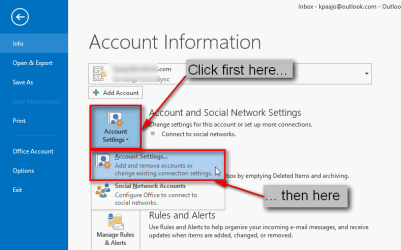
You can check the setting by clicking File and then following the logical steps shown in following screenshots:

2013-05-02_223850.png

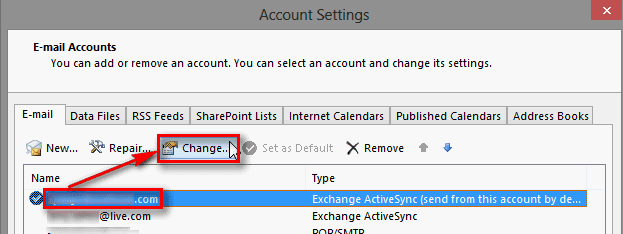
Select your account, click Change:

2013-05-02_224019.png

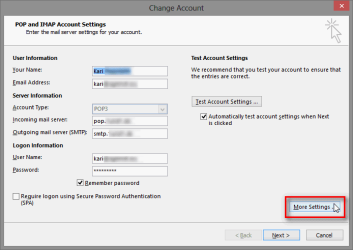
Click More settings:

2013-05-02_224213.png

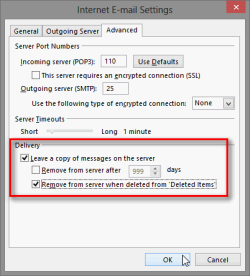
2013-05-02_224349.png

If you have not altered the default settings then all messages over 14 days old are deleted from server. If the Remove from server after X days is not selected and if the mailbox on server is not full, then we can recover all your messages from the date this setting was changed.

Kari
 

My Computer My Computer

Computer type
Laptop
Computer Manufacturer/Model Number
HP ENVY 17-1150eg
OS
Windows 10 Pro x64 EN-GB
CPU
1.6 GHz Intel Core i7-720QM Processor
Memory
6 GB
Graphics Card(s)
ATI Mobility Radeon HD 5850 Graphics
Sound Card
Beats sound system with integrated subwoofer
Monitor(s) Displays
17" laptop display, 22" LED and 32" Full HD TV through HDMI
Screen Resolution
1600*900 (1), 1920*1080 (2&3)
Hard Drives
Internal: 2 x 500 GB SATA Hard Disk Drive 7200 rpm
External: 2TB for backups, 3TB USB3 network drive for media
Cooling
As Envy runs a bit warm, I have it on a Cooler Master pad
Keyboard
Logitech diNovo Media Desktop Laser (bluetooth)
Mouse
Logitech Performance Mouse MX
Internet Speed
50/10 Mbps VDSL
Antivirus
Windows Defender 4.3.9431.0
Browser
Maxthon 3.5.2., IE11
To everyone who helped - THANKS! This is for you and hopefully will help others if this happens to them!
1. I downloaded Pandora - tried to be careful and only download Pandora
a. Pandora's download installed a toolbar into IE 10 and Google Chrome
b. I ignored that and tried Pandora and Pandora could not / did not find my email file(s)
c. I reset IE 10 and after several iterations got the new malicious toolbar out of IE 10.
d. I tried to do the same in Google Chrome and that did not work. I uninstalled Google Chrome and that did remove it.
e. I have REVO Uninstaller Pro but it could not find the toolbar. First time that has not worked.
2. I downloaded and eventually purchased EASEUS Data Recovery Wizard.
a. They had sent me emails with sale prices but when push came to shove it was $80.00 with
no help from them - I even talked to their chat - no help.
b. I ran EASE Data Recovery Wizard and it found 8 versions of the .pst file that were intact.
c. JIC, I restored all of them.
d. BTW, the discovery process takes over 8 hours and I have a 3.6 GHz processor and 32 Gig
3. The .pst files were all damaged someway.
4. To fix this, choose the most likely one and run "SCANPST" - that will take some time also.
5. Start outlook and point it at the new .pst file - this may take some different approaches so be prepared to try various ways to get this to work. Moving, renaming, and so forth and so on. MS Outlook wants to dearly keep not finding it.
6. ZoneAlarm as usual was getting in the way preventing success. Be prepared by uninstalling it and running their clean utility - that must be requested from Zone Alarm. Be prepared because remnants are destructive (in my experience).
7. Then once MS Outlook comes up, introduce the .pst file and it will be added as old. Find your contacts and they are available but MS Outlook prefers a new empty Contact file for some reason. I had to add access to one of my email addressed and MS Outlook found the rest so all is good

 

My Computer My Computer

Computer Manufacturer/Model Number
gigabyte
OS
windows 7
CPU
Intel
Motherboard
gigbyte
Memory
corsair
Graphics Card(s)
nvidia
Sound Card
HD
Monitor(s) Displays
Samsung
Hard Drives
seagate
Okay I am leaving this open for a few more days so that people will hopefully see the fix. Thanks all for your help!
 

My Computer My Computer

Computer Manufacturer/Model Number
gigabyte
OS
windows 7
CPU
Intel
Motherboard
gigbyte
Memory
corsair
Graphics Card(s)
nvidia
Sound Card
HD
Monitor(s) Displays
Samsung
Hard Drives
seagate
It will remain open until mods delete it. As there is no reason for that, I guess this thread will stay alive :).
 

My Computer My Computer

Computer type
Laptop
Computer Manufacturer/Model Number
HP ENVY 17-1150eg
OS
Windows 10 Pro x64 EN-GB
CPU
1.6 GHz Intel Core i7-720QM Processor
Memory
6 GB
Graphics Card(s)
ATI Mobility Radeon HD 5850 Graphics
Sound Card
Beats sound system with integrated subwoofer
Monitor(s) Displays
17" laptop display, 22" LED and 32" Full HD TV through HDMI
Screen Resolution
1600*900 (1), 1920*1080 (2&3)
Hard Drives
Internal: 2 x 500 GB SATA Hard Disk Drive 7200 rpm
External: 2TB for backups, 3TB USB3 network drive for media
Cooling
As Envy runs a bit warm, I have it on a Cooler Master pad
Keyboard
Logitech diNovo Media Desktop Laser (bluetooth)
Mouse
Logitech Performance Mouse MX
Internet Speed
50/10 Mbps VDSL
Antivirus
Windows Defender 4.3.9431.0
Browser
Maxthon 3.5.2., IE11
Again, all, many, many thanks
 

My Computer My Computer

Computer Manufacturer/Model Number
gigabyte
OS
windows 7
CPU
Intel
Motherboard
gigbyte
Memory
corsair
Graphics Card(s)
nvidia
Sound Card
HD
Monitor(s) Displays
Samsung
Hard Drives
seagate
Back
Top