
Ivan8ias
New member
Everything was working fine until we had a power failure this morning and now this Windows7 computer can't find anyone on the network. I tried resetting the router, Internet access is fine. This computer shows up on another laptop but when I go to Users, my name is not there, just public. I did the usual advanced sharing checks, etc. But what I find unusual is why doesn't my name show up under Users???
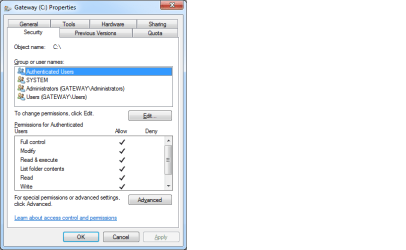
In the attached picture, my name Ivan, doesn't appear under user names. It used to. How do I get it back?
Thank you for your help.
In the attached picture, my name Ivan, doesn't appear under user names. It used to. How do I get it back?
Thank you for your help.
Attachments
Last edited:
My Computer
At a glance
Windows 7 Home Premium 64-bit
- Computer type
- Laptop
- Computer Manufacturer/Model Number
- Gateway
- OS
- Windows 7 Home Premium 64-bit
- Antivirus
- Bitdefender
- Browser
- IE 11 and Firefox

