

I have just uninstalled two programs "MediaInfo" and "MediaTab" with RevoUninstaller... (on a test rig)
- rebooted the PC
For interest sake I searched the registry for MediaTab and found the download path to MediaTab in ..
... there are also
23 full names of download files (some files no longer exist)
5 installed apps/programs (still operational apps/programs)
3 installation/download EXE files on an external HDD
13 items with value prefix SIGN.MEDIA=XXXXX ... all refering to portable Revouninstaller I keep on an external HD
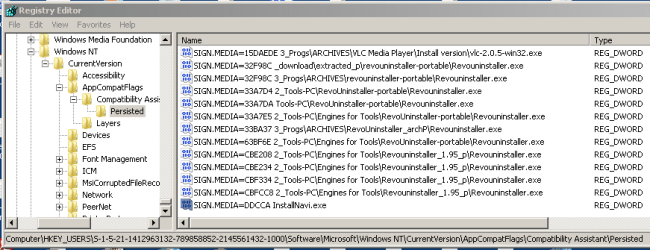
- rebooted PC to see if the list in the "Persisted" key is cleaned up.
- Apparantly not!
Can I delete the obsolete names/items manually. None of the EXE files are captured by CCleaner?
- rebooted the PC
For interest sake I searched the registry for MediaTab and found the download path to MediaTab in ..
Code:
HKEY_USERS\S-1-5-21-1412963132-789858852-2145561432-1000\Software\Microsoft\Windows NT\CurrentVersion\AppCompatFlags\Compatibility Assistant\Persisted23 full names of download files (some files no longer exist)
5 installed apps/programs (still operational apps/programs)
3 installation/download EXE files on an external HDD
13 items with value prefix SIGN.MEDIA=XXXXX ... all refering to portable Revouninstaller I keep on an external HD
- rebooted PC to see if the list in the "Persisted" key is cleaned up.
- Apparantly not!
Can I delete the obsolete names/items manually. None of the EXE files are captured by CCleaner?
My Computer
At a glance
XP Pro (x86) | 7 HP (x86) & (x64) | 7 Pro (x64)
- Computer type
- PC/Desktop
- Computer Manufacturer/Model Number
- Toshiba, Lenovo (laptops) + 4 rigs
- OS
- XP Pro (x86) | 7 HP (x86) & (x64) | 7 Pro (x64)


