LOW Computer Memory- ONLY 90MB or less Free Memory? Soo much lag?

GiCOMMANDO

New member
Local time
8:28 PM
Messages
13
Hello, i have a Windows 7 64bit OS and i am running a Laptop.
Ever since i had this virus (Win32 malware gen) which kept coming up with a notifications of the virus on avast every 2-5 minutes my computer was running slow and when i deleted the virus, by dragging it in to the recycle bin and erasing it, my computer was still running slow?

(MY COMPUTER ALWAYS HAS UNDER 100MB FREE MEMORY WHEN I RUN 1 GAME OR APPLICATION)

MY LAPTOP SPECS;
System manufacturer- EMachines
System Model- eME443
RAM- 2 GB DDR3 memory
Processor- AMD Dual-Core Processor E-350
Graphics card- AMD Radeon HD 6310


I've tried so many things to fix this problem, I have tried;
-Deleting the cache of all my browsers
-Cleaning and defragging my registry with "Clean My PC- Registry Cleaner"
-Deleting the 'appdata' cache
-Installing new drivers
-Searching for viruses with avast
-Doing a Memory/RAM test with "MemTest"

(By the way I currently haven't been getting virus notifications, so i don't think the problem is a virus)

(one time i got a BSOD, which on the top of the BSOD it said something about 'PAGEING ERROR)


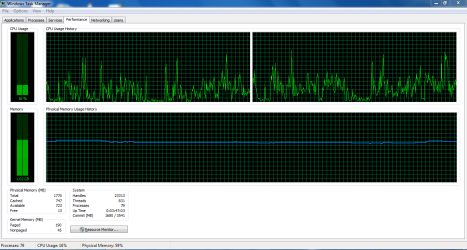
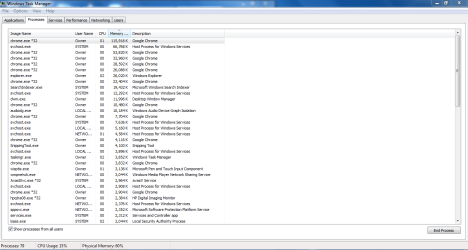
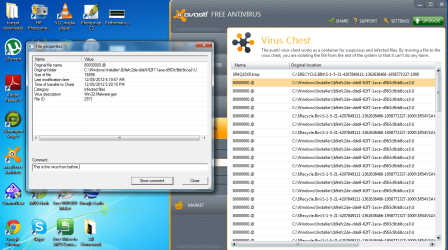
I attached Images of;
-My Task Managers 'Processes' tab
-My Task Managers 'Processes- All users' tab
-My Task Managers 'performance' tab
-My Avast virus report of the virus I had before
-SFC Verify log details

IMPORTANT NOTES

-I've done eset's virus scan and nothing came up, i've,so i dont think i have a virus any more.

-Oh yes and i did a defrag, and did a disk check but no errors were found?

-Yeah it probably is a problem with my window critical system files...
When i did the 'SFC /SCANNOW' command it didn't work, it went to 41% then it stayed like that for 5-10 minutes, and it said " Windows Resource Protection could not perform the requested operation."

But when i did 'SFC /VERIFYONLY' command it worked and i got the sfcdetails.txt in the attachments.


Could you please review the attachment and tell me how i fix the windows files?
Thanks ! :D

:cry:SO COULD ANY ONE HELP PLEASE WITH THIS LAG PROBLEM:cry:
 

Attachments

  • Performance.PNG
    Performance.PNG
    24.6 KB · Views: 12
  • Processes.PNG
    Processes.PNG
    32.7 KB · Views: 8
  • Processes_from_all_users.PNG
    Processes_from_all_users.PNG
    37.7 KB · Views: 7
  • Virus Information.PNG
    Virus Information.PNG
    113.6 KB · Views: 9
  • sfcdetails.txt
    sfcdetails.txt
    222.1 KB · Views: 0

My Computer My Computer

At a glance

Windows 7 Home Premium 64bitAMD E-350 dual-core Processor 1.6 GHz2 GB RAMAMD Radeon HD 6310
Computer Manufacturer/Model Number
Emachines
OS
Windows 7 Home Premium 64bit
CPU
AMD E-350 dual-core Processor 1.6 GHz
Memory
2 GB RAM
Graphics Card(s)
AMD Radeon HD 6310
Internet Speed
18 Kb/s
I would recommend a wipe and clean install because:

1. Dragging and dropping malware into recycle bin is no way to remove an infection
Despite your ESET scans, I think there is a strong possibility you have remnants of this infection in your system.

2. You used a registry cleaner to clean what? These do more harm than good if you aren't knowledgeable in this area.

3. You have some BSOD problems - malware remnants?

4. System corruptions that SFC cannot fix.

I also recommend running this:

1. Download and save this tool to your desktop:
http://go.microsoft.com/fwlink/?linkid=52012

2. Run the tool, and then click 'Copy' - ignore any errors if they appear

3. Use CTRL+V to paste the unedited results of the validation tool here in your next reply

More detail : http://www.sevenforums.com/windows-...ne-activation-issue-posting-instructions.html

Regards,
Golden
 

My Computer My Computer

At a glance

Windows 10 Pro x64 ; Xubuntu x64Intel i7 860 @ 2.80 GHz O/C'ed to 4.0GHz16GB Corsair Vengance DDR3 @ 661 MHz Dual Cha...EVGA NVidia GTX 560 1024MB
Computer type
PC/Desktop
Computer Manufacturer/Model Number
Golden Mk. I.4
OS
Windows 10 Pro x64 ; Xubuntu x64
CPU
Intel i7 860 @ 2.80 GHz O/C'ed to 4.0GHz
Motherboard
Gigabyte P55A-UD3R Rev.1. Award BIOS F13
Memory
16GB Corsair Vengance DDR3 @ 661 MHz Dual Channel (9-9-9-24)
Graphics Card(s)
EVGA NVidia GTX 560 1024MB
Sound Card
Realtek Integrated
Monitor(s) Displays
Dual Samsung SyncMaster 2494HS
Screen Resolution
1920*1080 and 1920*1080
Hard Drives
1*Samsung 840 EVO 120GB SSD;
1*OCZ Vertex 2 60GB SSD;
2*Samsung F3 SpinPoint 1TB in RAID0;
1*Samsung F1 SpinPoint 1TB;
2*Western Digital 1TB External USB 3.0
1*Western Digital 500GB External USB 3.0
1*Seagate 500GB External USB 2.0
PSU
Thermaltake ToughPower QFan 750W
Case
Thermaltake Element S VK60001W2Z
Cooling
Corsair H60 Water Cooling, 2*230mm and 2*80mm case fans
Keyboard
Logitech G110
Mouse
Logitech MX518
Validation Tool Results

Code:
Diagnostic Report (1.9.0027.0):
-----------------------------------------
Windows Validation Data-->

Validation Code: 0
Cached Online Validation Code: 0x0
Windows Product Key: *****-*****-WJ2H8-R6B6D-7QJB7
Windows Product Key Hash: ckKNc+BBPDWmo1LUlOkraNjlQ34=
Windows Product ID: 00359-OEM-8992687-00006
Windows Product ID Type: 2
Windows License Type: OEM SLP
Windows OS version: 6.1.7601.2.00010300.1.0.003
ID: {405476EA-59A5-4673-B5C6-E0CFA583F476}(1)
Is Admin: Yes
TestCab: 0x0
LegitcheckControl ActiveX: Registered, 1.9.42.0
Signed By: Microsoft
Product Name: Windows 7 Home Premium
Architecture: 0x00000009
Build lab: 7601.win7sp1_gdr.120503-2030
TTS Error: 
Validation Diagnostic: 
Resolution Status: N/A

Vista WgaER Data-->
ThreatID(s): N/A, hr = 0x80070002
Version: N/A, hr = 0x80070002

Windows XP Notifications Data-->
Cached Result: N/A, hr = 0x80070002
File Exists: No
Version: N/A, hr = 0x80070002
WgaTray.exe Signed By: N/A, hr = 0x80070002
WgaLogon.dll Signed By: N/A, hr = 0x80070002

OGA Notifications Data-->
Cached Result: N/A, hr = 0x80070002
Version: N/A, hr = 0x80070002
OGAExec.exe Signed By: N/A, hr = 0x80070002
OGAAddin.dll Signed By: N/A, hr = 0x80070002

OGA Data-->
Office Status: 100 Genuine
Microsoft Office Enterprise 2007 - 100 Genuine
OGA Version: N/A, 0x80070002
Signed By: N/A, hr = 0x80070002
Office Diagnostics: 025D1FF3-364-80041010_025D1FF3-229-80041010_025D1FF3-230-1_025D1FF3-517-80040154_025D1FF3-237-80040154_025D1FF3-238-2_025D1FF3-244-80070002_025D1FF3-258-3_E2AD56EA-765-d003_E2AD56EA-766-0_E2AD56EA-134-80004005

Browser Data-->
Proxy settings: N/A
User Agent: Mozilla/4.0 (compatible; MSIE 8.0; Win32)
Default Browser: C:\Program Files (x86)\Google\Chrome\Application\chrome.exe
Download signed ActiveX controls: Prompt
Download unsigned ActiveX controls: Disabled
Run ActiveX controls and plug-ins: Allowed
Initialize and script ActiveX controls not marked as safe: Disabled
Allow scripting of Internet Explorer Webbrowser control: Disabled
Active scripting: Allowed
Script ActiveX controls marked as safe for scripting: Allowed

File Scan Data-->

Other data-->
Office Details: <GenuineResults><MachineData><UGUID>{405476EA-59A5-4673-B5C6-E0CFA583F476}</UGUID><Version>1.9.0027.0</Version><OS>6.1.7601.2.00010300.1.0.003</OS><Architecture>x64</Architecture><PKey>*****-*****-*****-*****-7QJB7</PKey><PID>00359-OEM-8992687-00006</PID><PIDType>2</PIDType><SID>S-1-5-21-4207849111-1362638466-1958771327</SID><SYSTEM><Manufacturer>eMachines</Manufacturer><Model>eME443</Model></SYSTEM><BIOS><Manufacturer>eMachines</Manufacturer><Version>V1.01</Version><SMBIOSVersion major="2" minor="7"/><Date>20110421000000.000000+000</Date></BIOS><HWID>7D033E07018400FC</HWID><UserLCID>0C09</UserLCID><SystemLCID>0409</SystemLCID><TimeZone>AUS Eastern Standard Time(GMT+10:00)</TimeZone><iJoin>0</iJoin><SBID><stat>3</stat><msppid></msppid><name></name><model></model></SBID><OEM><OEMID>ACRSYS</OEMID><OEMTableID>ACRPRDCT</OEMTableID></OEM><GANotification/></MachineData><Software><Office><Result>100</Result><Products><Product GUID="{90120000-0030-0000-0000-0000000FF1CE}"><LegitResult>100</LegitResult><Name>Microsoft Office Enterprise 2007</Name><Ver>12</Ver><Val>40B5D5BB7138586</Val><Hash>sZ/9qE9RF2w5dsFMhg3uQxDAtuw=</Hash><Pid>89388-707-1259783-65355</Pid><PidType>14</PidType></Product></Products><Applications><App Id="15" Version="12" Result="100"/><App Id="16" Version="12" Result="100"/><App Id="18" Version="12" Result="100"/><App Id="19" Version="12" Result="100"/><App Id="1A" Version="12" Result="100"/><App Id="1B" Version="12" Result="100"/><App Id="44" Version="12" Result="100"/><App Id="A1" Version="12" Result="100"/><App Id="BA" Version="12" Result="100"/></Applications></Office></Software></GenuineResults>  

Spsys.log Content: 0x80070002

Licensing Data-->
Software licensing service version: 6.1.7601.17514

Name: Windows(R) 7, HomePremium edition
Description: Windows Operating System - Windows(R) 7, OEM_SLP channel
Activation ID: d2c04e90-c3dd-4260-b0f3-f845f5d27d64
Application ID: 55c92734-d682-4d71-983e-d6ec3f16059f
Extended PID: 00359-00178-926-800006-02-1033-7601.0000-1342011
Installation ID: 015861558804408651935882902806000616142074020154746380
Processor Certificate URL: http://go.microsoft.com/fwlink/?LinkID=88338
Machine Certificate URL: http://go.microsoft.com/fwlink/?LinkID=88339
Use License URL: http://go.microsoft.com/fwlink/?LinkID=88341
Product Key Certificate URL: http://go.microsoft.com/fwlink/?LinkID=88340
Partial Product Key: 7QJB7
License Status: Licensed
Remaining Windows rearm count: 2
Trusted time: 5/10/2012 3:04:27 PM

Windows Activation Technologies-->
HrOffline: 0x00000000
HrOnline: 0x80072EE7
HealthStatus: 0x0000000000000000
Event Time Stamp: 8:29:2012 09:18
ActiveX: Registered, Version: 7.1.7600.16395
Admin Service: Registered, Version: 7.1.7600.16395
HealthStatus Bitmask Output:


HWID Data-->
HWID Hash Current: OgAAAAIAAgABAAEAAQACAAAABQABAAEAJJSAhB7NO4xU+YqZDmDEiLeSXFqYVMS2KNNyir5BrCr8CA==

OEM Activation 1.0 Data-->
N/A

OEM Activation 2.0 Data-->
BIOS valid for OA 2.0: yes
Windows marker version: 0x20001
OEMID and OEMTableID Consistent: yes
BIOS Information: 
  ACPI Table Name	OEMID Value	OEMTableID Value
  APIC			ACRSYS		ACRPRDCT
  FACP			ACRSYS		ACRPRDCT
  HPET			ACRSYS		ACRPRDCT
  BOOT			ACRSYS		ACRPRDCT
  MCFG			ACRSYS		ACRPRDCT
  SLIC			ACRSYS		ACRPRDCT
  SSDT			AMD   		POWERNOW
  SSDT			AMD   		POWERNOW
-And also I forgot to tell you that I sometimes get BSOD when my computer lags more than normal and becomes unresponsive, and in the BSOD it said on the top
" Kernel data inpage error" .

- And it was the only method i had left to delete the virus, by dragging it into recycle bin then erasing it. I did that because the avast security couldn't delete all it did was block it. And at that time i did'nt know about ESET.
 

My Computer My Computer

At a glance

Windows 7 Home Premium 64bitAMD E-350 dual-core Processor 1.6 GHz2 GB RAMAMD Radeon HD 6310
Computer Manufacturer/Model Number
Emachines
OS
Windows 7 Home Premium 64bit
CPU
AMD E-350 dual-core Processor 1.6 GHz
Memory
2 GB RAM
Graphics Card(s)
AMD Radeon HD 6310
Internet Speed
18 Kb/s
I would still perform the fresh install. Consider 32 bit as you only have 2GB RAM.
 

My Computer My Computer

At a glance

Windows 10 Pro x64 ; Xubuntu x64Intel i7 860 @ 2.80 GHz O/C'ed to 4.0GHz16GB Corsair Vengance DDR3 @ 661 MHz Dual Cha...EVGA NVidia GTX 560 1024MB
Computer type
PC/Desktop
Computer Manufacturer/Model Number
Golden Mk. I.4
OS
Windows 10 Pro x64 ; Xubuntu x64
CPU
Intel i7 860 @ 2.80 GHz O/C'ed to 4.0GHz
Motherboard
Gigabyte P55A-UD3R Rev.1. Award BIOS F13
Memory
16GB Corsair Vengance DDR3 @ 661 MHz Dual Channel (9-9-9-24)
Graphics Card(s)
EVGA NVidia GTX 560 1024MB
Sound Card
Realtek Integrated
Monitor(s) Displays
Dual Samsung SyncMaster 2494HS
Screen Resolution
1920*1080 and 1920*1080
Hard Drives
1*Samsung 840 EVO 120GB SSD;
1*OCZ Vertex 2 60GB SSD;
2*Samsung F3 SpinPoint 1TB in RAID0;
1*Samsung F1 SpinPoint 1TB;
2*Western Digital 1TB External USB 3.0
1*Western Digital 500GB External USB 3.0
1*Seagate 500GB External USB 2.0
PSU
Thermaltake ToughPower QFan 750W
Case
Thermaltake Element S VK60001W2Z
Cooling
Corsair H60 Water Cooling, 2*230mm and 2*80mm case fans
Keyboard
Logitech G110
Mouse
Logitech MX518
-But i have a factory laptop, it didn't come with a windows Installation CD
-And is their another recommended way i could do it but keep my files and programs

-but if i get the 32 bit most of my applications wont work form the previous 64 bit
 

My Computer My Computer

At a glance

Windows 7 Home Premium 64bitAMD E-350 dual-core Processor 1.6 GHz2 GB RAMAMD Radeon HD 6310
Computer Manufacturer/Model Number
Emachines
OS
Windows 7 Home Premium 64bit
CPU
AMD E-350 dual-core Processor 1.6 GHz
Memory
2 GB RAM
Graphics Card(s)
AMD Radeon HD 6310
Internet Speed
18 Kb/s
The only way to keep you installed programs is to fix the installation, as opposed to a clean install, but I'm not sure how successful that will be. You could spend days trying to sort that out, or you could spend a few hours doing a clean install and starting from a known clean base.

You can still perform a clean install without disks as long as you have a COA stiicker with the product key on it:
http://www.sevenforums.com/tutorials/219487-clean-reinstall-factory-oem-windows-7-a.html
 

My Computer My Computer

At a glance

Windows 10 Pro x64 ; Xubuntu x64Intel i7 860 @ 2.80 GHz O/C'ed to 4.0GHz16GB Corsair Vengance DDR3 @ 661 MHz Dual Cha...EVGA NVidia GTX 560 1024MB
Computer type
PC/Desktop
Computer Manufacturer/Model Number
Golden Mk. I.4
OS
Windows 10 Pro x64 ; Xubuntu x64
CPU
Intel i7 860 @ 2.80 GHz O/C'ed to 4.0GHz
Motherboard
Gigabyte P55A-UD3R Rev.1. Award BIOS F13
Memory
16GB Corsair Vengance DDR3 @ 661 MHz Dual Channel (9-9-9-24)
Graphics Card(s)
EVGA NVidia GTX 560 1024MB
Sound Card
Realtek Integrated
Monitor(s) Displays
Dual Samsung SyncMaster 2494HS
Screen Resolution
1920*1080 and 1920*1080
Hard Drives
1*Samsung 840 EVO 120GB SSD;
1*OCZ Vertex 2 60GB SSD;
2*Samsung F3 SpinPoint 1TB in RAID0;
1*Samsung F1 SpinPoint 1TB;
2*Western Digital 1TB External USB 3.0
1*Western Digital 500GB External USB 3.0
1*Seagate 500GB External USB 2.0
PSU
Thermaltake ToughPower QFan 750W
Case
Thermaltake Element S VK60001W2Z
Cooling
Corsair H60 Water Cooling, 2*230mm and 2*80mm case fans
Keyboard
Logitech G110
Mouse
Logitech MX518
Is it safe if I do the whole clean installation, then after when I've finished the installation ,and then will my programs, torrent downloads and games be included in in the Windows.old folder safely?

-Because the thing's i need to transfer are mainly torrent downloads and other stuff and all that is about 114GB and I also don't have a back-up drive.

-The stuff i need, that need to be in windows.old file are mainly setups for the games so if i install them after the clean install would they work?

Thanks for the support :)
 

My Computer My Computer

At a glance

Windows 7 Home Premium 64bitAMD E-350 dual-core Processor 1.6 GHz2 GB RAMAMD Radeon HD 6310
Computer Manufacturer/Model Number
Emachines
OS
Windows 7 Home Premium 64bit
CPU
AMD E-350 dual-core Processor 1.6 GHz
Memory
2 GB RAM
Graphics Card(s)
AMD Radeon HD 6310
Internet Speed
18 Kb/s
I'd personally won't trust the Win 7 installation to save my stuff in Windows.old folder.

If you have a big-enough drive I suggest to make two partitions in the current drive, one will remain C and the other will have another name (D usually). Move all stuff you want to save to the non-C partition.

Then when you install Windows 7 you format the former C partition and install Win 7 into it. (be sure to do this on the right partiton, if they have different sizes, it should be the first thing to tell who is who)

If you can still work with the old installation, I'd do it with EaseUs partition master home (which is free, if you need step-by-step guides for it, scroll down to "main features" and you'll see a list of such tutorials).


All "installed program" folders that you move around won't work in the new installation, (you will have to reinstall the program separately), but then you can simply place the relevant files (setting files and game saves, for example) in the new installation folder to get them back to what they were.

As a bit of advice, change antivirus. I have similar computer environment as yours and the free version of Avira keeps the whole thing free of nasties. Install a good antivirus just after you installed Win 7, BEFORE you install your other programs.
 

My Computer My Computer

At a glance

Win 7 Pro 64-bit 7601AMD Phenom 9650 QuadCore, revision DR-B35 GB yes I run 2x 2GB and 1x 1GB, different b...NVIDIA GeForce 9800 GT 512 Mb, unknown manufa...
Computer type
PC/Desktop
Computer Manufacturer/Model Number
custom built
OS
Win 7 Pro 64-bit 7601
CPU
AMD Phenom 9650 QuadCore, revision DR-B3
Motherboard
ASUS M4A78
Memory
5 GB yes I run 2x 2GB and 1x 1GB, different brand, spank me.
Graphics Card(s)
NVIDIA GeForce 9800 GT 512 Mb, unknown manufacturer.
Sound Card
Crappy Realtek Integrated Audio
Monitor(s) Displays
Fujitsu Siemens P19-3P
Screen Resolution
1280 x 1024 x 32 bits @ 60 Hz Oh yeah, 4:3 rocks!
Hard Drives
(1) MAXTOR S TM3320613AS SATA Disk Device (2) STM35004 18AS SATA Disk Device (3) TOSHIBA USB 2.5"-HDD
PSU
whatever, around 450w
Case
Scavenged from old company PC, 10+ years old
Cooling
CPU fan, GPU fan, case fan, nothing fancy
Keyboard
Microsoft, PS/2, white.
Mouse
Optical, logitec.
Internet Speed
effective max speeds: 70-ish kB/s down 30-ish kB/s up
Antivirus
Avira, free edition.
Browser
Firefox with FXChrome to make it look like Google Chrome :P
Other Info
Was discarded by previous owner due to "horrible performance".
Was running Win Xp from a IDE drive. Yeah. Was a pain.
SATA II drive and Win7 and it zips away! Yay!
-how do make partitions,my hard drive is 500 GB.

-Will it delete my all my stuff
 

My Computer My Computer

At a glance

Windows 7 Home Premium 64bitAMD E-350 dual-core Processor 1.6 GHz2 GB RAMAMD Radeon HD 6310
Computer Manufacturer/Model Number
Emachines
OS
Windows 7 Home Premium 64bit
CPU
AMD E-350 dual-core Processor 1.6 GHz
Memory
2 GB RAM
Graphics Card(s)
AMD Radeon HD 6310
Internet Speed
18 Kb/s
No. It won't delete anything. It just divides the space on your HDD in two different self-sufficient sections so you can reinstall win 7 in one section without touching what you placed in the other.

First you resize the only partition to make space for the new partition. Then you create a new partition that fills that space. Make sure they aren't the same size. This is very important for later. Also make sure the new partiton is big enough to hold the files you want to save.

Whwn resizing the system partition, it will likely ask for reboot since it works on the system partition, and it cannot work on that as long as Windows 7 is running. It will take a little while to do this, say 2 hours, and you should let it run until it finishes its job, then it should reboot automatically and you get to Windows 7 again.

After that is done, look in My Computer, now you have two "drives":
-C which is the old one with all files in it. Now it is now much smaller.
-D or some other letter that will be empty (and will have the space you just stole from C).

Copy the files you want to save in the "new drive" (which is the new partition you just created), and when everything is safely copied there, you can reinstall Win 7 on the old system partition. (don't do "cut-paste" nor waste time erasing files, the C partition will be erased by the installation anyway)

This tutorial guides you in the install steps you must follow to reach the screen where you choose the partition.
At step 7 of that tutorial you should see two entries, not exactly is in that image because your disk has already two partitions. To tell who is the partiton that had the old Win7 installation in it you need to look at the size. You will likely know how big was C and how big was the new partition. Theoretically, the old C partition will be the first in the list because it is the first partiton of the hard drive, but check sizes and you won't go wrong.

Select the old C partition and then select Next and proceed with your installation.

After you have done your installation, you can either merge the partitions and get back to one big C drive like when you started, or just resize them a bit and keep a "system and program" partition and a "dumb data" partition if you want to keep your stuff more tidy.

If you have any questions, please ask before trying, because any confusion may result in data loss as you screw up stuff. Should be simple enough to do if you follow what I said and the tutorials linked, though.
 
Last edited:

My Computer My Computer

At a glance

Win 7 Pro 64-bit 7601AMD Phenom 9650 QuadCore, revision DR-B35 GB yes I run 2x 2GB and 1x 1GB, different b...NVIDIA GeForce 9800 GT 512 Mb, unknown manufa...
Computer type
PC/Desktop
Computer Manufacturer/Model Number
custom built
OS
Win 7 Pro 64-bit 7601
CPU
AMD Phenom 9650 QuadCore, revision DR-B3
Motherboard
ASUS M4A78
Memory
5 GB yes I run 2x 2GB and 1x 1GB, different brand, spank me.
Graphics Card(s)
NVIDIA GeForce 9800 GT 512 Mb, unknown manufacturer.
Sound Card
Crappy Realtek Integrated Audio
Monitor(s) Displays
Fujitsu Siemens P19-3P
Screen Resolution
1280 x 1024 x 32 bits @ 60 Hz Oh yeah, 4:3 rocks!
Hard Drives
(1) MAXTOR S TM3320613AS SATA Disk Device (2) STM35004 18AS SATA Disk Device (3) TOSHIBA USB 2.5"-HDD
PSU
whatever, around 450w
Case
Scavenged from old company PC, 10+ years old
Cooling
CPU fan, GPU fan, case fan, nothing fancy
Keyboard
Microsoft, PS/2, white.
Mouse
Optical, logitec.
Internet Speed
effective max speeds: 70-ish kB/s down 30-ish kB/s up
Antivirus
Avira, free edition.
Browser
Firefox with FXChrome to make it look like Google Chrome :P
Other Info
Was discarded by previous owner due to "horrible performance".
Was running Win Xp from a IDE drive. Yeah. Was a pain.
SATA II drive and Win7 and it zips away! Yay!
Back
Top