Low Disk space in recovery D drive

iangrant76

New member
Local time
4:19 AM
Messages
5
I had this problem before and I can't remember how I fixed it. A little help please. D drive is only 15 GB and its constantly full.
 

My Computer My Computer

At a glance

Windows 7 home premium 64 bitIntel(R) Core(TM)2 Quad CPU Q8200 @2.33 GHz8 GBXFX Radeon HD 5770
Computer Manufacturer/Model Number
Dell
OS
Windows 7 home premium 64 bit
CPU
Intel(R) Core(TM)2 Quad CPU Q8200 @2.33 GHz
Memory
8 GB
Graphics Card(s)
XFX Radeon HD 5770
Delete/Move some data to other drive,so you'll increase the free space of that drive. :)
 

My Computer My Computer

At a glance

Windows 10 Pro x64Intel Core i5 4440 @Stock4 x 4GB HyperX Fury DDR3Gigabyte GTX 1050Ti O4G
Computer type
PC/Desktop
Computer Manufacturer/Model Number
Custom Build
OS
Windows 10 Pro x64
CPU
Intel Core i5 4440 @Stock
Motherboard
Gigabyte Z97 D3H
Memory
4 x 4GB HyperX Fury DDR3
Graphics Card(s)
Gigabyte GTX 1050Ti O4G
Sound Card
Integrated
Monitor(s) Displays
Dell P2417H
Screen Resolution
1920 x 1080
Hard Drives
Samsung EVO 850 120GB / Toshiba DT01ACA050 1TB 7200prm 32MB
PSU
Riotoro Onyx 750W
Case
NZXT H500 Black-Red
Cooling
Stock CPU + NZXT 120mm + 2x120mm red fans
Keyboard
Modecom Volcano Lanparty
Mouse
Asus ROG Gladius / DeepCool E-Pad Plus
Internet Speed
DOCSIS 50/3 Mbit
Browser
Google Chrome
Other Info
Asus K55VJ(i5 3210M, GT635M / 2GB, 8GB DDR3, 500GB HDD)
I deleted all the Temp files and the recycle bin and didn't even make a dent. I'm pretty sure it sthe drive where all the backup and restore data goes automaticly
 

My Computer My Computer

At a glance

Windows 7 home premium 64 bitIntel(R) Core(TM)2 Quad CPU Q8200 @2.33 GHz8 GBXFX Radeon HD 5770
Computer Manufacturer/Model Number
Dell
OS
Windows 7 home premium 64 bit
CPU
Intel(R) Core(TM)2 Quad CPU Q8200 @2.33 GHz
Memory
8 GB
Graphics Card(s)
XFX Radeon HD 5770
So move bigger files/folders to your another drive. Like Movies,Music...
 

My Computer My Computer

At a glance

Windows 10 Pro x64Intel Core i5 4440 @Stock4 x 4GB HyperX Fury DDR3Gigabyte GTX 1050Ti O4G
Computer type
PC/Desktop
Computer Manufacturer/Model Number
Custom Build
OS
Windows 10 Pro x64
CPU
Intel Core i5 4440 @Stock
Motherboard
Gigabyte Z97 D3H
Memory
4 x 4GB HyperX Fury DDR3
Graphics Card(s)
Gigabyte GTX 1050Ti O4G
Sound Card
Integrated
Monitor(s) Displays
Dell P2417H
Screen Resolution
1920 x 1080
Hard Drives
Samsung EVO 850 120GB / Toshiba DT01ACA050 1TB 7200prm 32MB
PSU
Riotoro Onyx 750W
Case
NZXT H500 Black-Red
Cooling
Stock CPU + NZXT 120mm + 2x120mm red fans
Keyboard
Modecom Volcano Lanparty
Mouse
Asus ROG Gladius / DeepCool E-Pad Plus
Internet Speed
DOCSIS 50/3 Mbit
Browser
Google Chrome
Other Info
Asus K55VJ(i5 3210M, GT635M / 2GB, 8GB DDR3, 500GB HDD)
I deleted all the Temp files and the recycle bin and didn't even make a dent. I'm pretty sure it sthe drive where all the backup and restore data goes automaticly


Is D:\ a factory partition or a partiton you made? We need more details to help. Also, posting a screenshot of Disk Management would be helpful, along with details of what data is on the drive (folders, etc.).

If you don't know what Disk Management is or how to post a screenshot, post back for instructions.

James
 

My Computer My Computer

At a glance

Win7U 64 RTMQ95508GB GskillASUS|EAH4850/HTDI/1GD3/A
OS
Win7U 64 RTM
CPU
Q9550
Motherboard
GA-EP45-UD3R
Memory
8GB Gskill
Graphics Card(s)
ASUS|EAH4850/HTDI/1GD3/A
Sound Card
xfi Plat
Monitor(s) Displays
Dell 2405fpw
Screen Resolution
1920x1200
Hard Drives
Seagate & WD sata Drives
PSU
Antec
Case
Antec
Keyboard
MS Natural Ergonomic 4000
Mouse
Logitech MX610 USB Cordless
Dug a little futher and found the prob. An old restore point that was 10 GB. I deleted it. Problem solved.
The drive is a factory set drive. Its rather small for what its intended for, only 15 GB for recovery restore points. Is there any way to increase the size of the drive?
 

My Computer My Computer

At a glance

Windows 7 home premium 64 bitIntel(R) Core(TM)2 Quad CPU Q8200 @2.33 GHz8 GBXFX Radeon HD 5770
Computer Manufacturer/Model Number
Dell
OS
Windows 7 home premium 64 bit
CPU
Intel(R) Core(TM)2 Quad CPU Q8200 @2.33 GHz
Memory
8 GB
Graphics Card(s)
XFX Radeon HD 5770

My Computer My Computer

At a glance

Windows 10 Pro x64Intel Core i5 4440 @Stock4 x 4GB HyperX Fury DDR3Gigabyte GTX 1050Ti O4G
Computer type
PC/Desktop
Computer Manufacturer/Model Number
Custom Build
OS
Windows 10 Pro x64
CPU
Intel Core i5 4440 @Stock
Motherboard
Gigabyte Z97 D3H
Memory
4 x 4GB HyperX Fury DDR3
Graphics Card(s)
Gigabyte GTX 1050Ti O4G
Sound Card
Integrated
Monitor(s) Displays
Dell P2417H
Screen Resolution
1920 x 1080
Hard Drives
Samsung EVO 850 120GB / Toshiba DT01ACA050 1TB 7200prm 32MB
PSU
Riotoro Onyx 750W
Case
NZXT H500 Black-Red
Cooling
Stock CPU + NZXT 120mm + 2x120mm red fans
Keyboard
Modecom Volcano Lanparty
Mouse
Asus ROG Gladius / DeepCool E-Pad Plus
Internet Speed
DOCSIS 50/3 Mbit
Browser
Google Chrome
Other Info
Asus K55VJ(i5 3210M, GT635M / 2GB, 8GB DDR3, 500GB HDD)
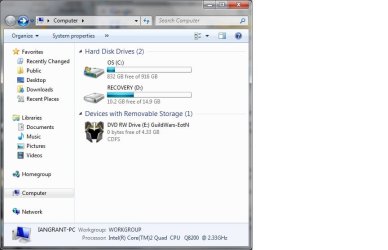
I think this is what you asked for.
 

Attachments

  • screenshot.jpg
    screenshot.jpg
    38.6 KB · Views: 660

My Computer My Computer

At a glance

Windows 7 home premium 64 bitIntel(R) Core(TM)2 Quad CPU Q8200 @2.33 GHz8 GBXFX Radeon HD 5770
Computer Manufacturer/Model Number
Dell
OS
Windows 7 home premium 64 bit
CPU
Intel(R) Core(TM)2 Quad CPU Q8200 @2.33 GHz
Memory
8 GB
Graphics Card(s)
XFX Radeon HD 5770
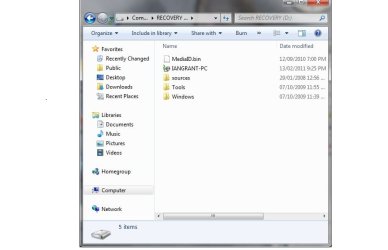
Here is whats in D drive.
 

Attachments

  • screen.jpg
    screen.jpg
    32.1 KB · Views: 605

My Computer My Computer

At a glance

Windows 7 home premium 64 bitIntel(R) Core(TM)2 Quad CPU Q8200 @2.33 GHz8 GBXFX Radeon HD 5770
Computer Manufacturer/Model Number
Dell
OS
Windows 7 home premium 64 bit
CPU
Intel(R) Core(TM)2 Quad CPU Q8200 @2.33 GHz
Memory
8 GB
Graphics Card(s)
XFX Radeon HD 5770
As I can see now it's ok. You got enought free space. :)
 

My Computer My Computer

At a glance

Windows 10 Pro x64Intel Core i5 4440 @Stock4 x 4GB HyperX Fury DDR3Gigabyte GTX 1050Ti O4G
Computer type
PC/Desktop
Computer Manufacturer/Model Number
Custom Build
OS
Windows 10 Pro x64
CPU
Intel Core i5 4440 @Stock
Motherboard
Gigabyte Z97 D3H
Memory
4 x 4GB HyperX Fury DDR3
Graphics Card(s)
Gigabyte GTX 1050Ti O4G
Sound Card
Integrated
Monitor(s) Displays
Dell P2417H
Screen Resolution
1920 x 1080
Hard Drives
Samsung EVO 850 120GB / Toshiba DT01ACA050 1TB 7200prm 32MB
PSU
Riotoro Onyx 750W
Case
NZXT H500 Black-Red
Cooling
Stock CPU + NZXT 120mm + 2x120mm red fans
Keyboard
Modecom Volcano Lanparty
Mouse
Asus ROG Gladius / DeepCool E-Pad Plus
Internet Speed
DOCSIS 50/3 Mbit
Browser
Google Chrome
Other Info
Asus K55VJ(i5 3210M, GT635M / 2GB, 8GB DDR3, 500GB HDD)
System restore is probably set to D: drive. You need to purge all those restore points - on D: drive, right click > Properties > Disk Cleanup > More Options tab, then click under System Restore option Cleanup > Delete.

Then check if System Restore is active for D: in Advanced System Properties -click Start orb > right click Computer and choose Properties > in left pane click Advanced system Settings > System Protection tab and make sure D is not checked, if it is uncheck it and click Apply.

Also, if you use windows backup, check the backup parameters to ensure the images are not saved to D:.

Its possible the recovery partition is trashed, hope you made recovery disks beforehand. In any case you can always order recovery disks from dell if things dont work out.
 

My Computer My Computer

At a glance

Windows 7 x64 pro/ Windows 7 x86 Pro/ XP SP3 x86
Computer Manufacturer/Model Number
Too many to describe...
OS
Windows 7 x64 pro/ Windows 7 x86 Pro/ XP SP3 x86
Good call, Bill2, per usual.

While in System Protection also make sure C is turned on and use Configure button to apportion more space so more Restore Points last longer - I set it to 15-20% as space allows.
 
Same Problem!!!

Hey, Have had this problem for better part of a year but have always ignored it...

Tried to follow the steps outlined but the "system restore" steps reach a dead end after i click on "disk cleanup". There is no tab for "more options"

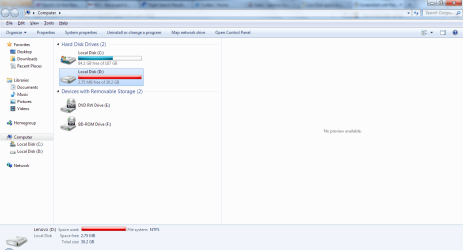
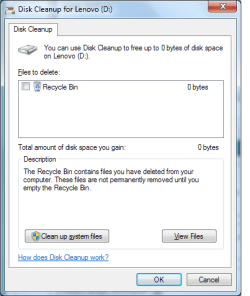
Have uploaded both screenshots of where i reach my dead-end and of the requested page before.
 

Attachments

  • Scrnshot.png
    Scrnshot.png
    44.1 KB · Views: 49
  • diskcleanup.png
    diskcleanup.png
    13.1 KB · Views: 29

My Computer My Computer

At a glance

Windows 7 64bitLenovo Y550
Computer Manufacturer/Model Number
Lenovo Win7 PC
OS
Windows 7 64bit
CPU
Lenovo Y550
Hey, Have had this problem for better part of a year but have always ignored it...

Tried to follow the steps outlined but the "system restore" steps reach a dead end after i click on "disk cleanup". There is no tab for "more options"

Have uploaded both screenshots of where i reach my dead-end and of the requested page before.

Hi jcasney. Welcome :).

You can also just turn System Restore off, as that will remove all existing restore points. You can then turn it back on:

http://www.sevenforums.com/tutorials/330-system-protection-turn-off.html

Read the warnings.
 

My Computer My Computer

At a glance

Win7U 64 RTMQ95508GB GskillASUS|EAH4850/HTDI/1GD3/A
OS
Win7U 64 RTM
CPU
Q9550
Motherboard
GA-EP45-UD3R
Memory
8GB Gskill
Graphics Card(s)
ASUS|EAH4850/HTDI/1GD3/A
Sound Card
xfi Plat
Monitor(s) Displays
Dell 2405fpw
Screen Resolution
1920x1200
Hard Drives
Seagate & WD sata Drives
PSU
Antec
Case
Antec
Keyboard
MS Natural Ergonomic 4000
Mouse
Logitech MX610 USB Cordless
I have the same problem as jcasney, but do not know how to turn off the system restore. how do you do that?
 

My Computer My Computer

At a glance

windows 7
OS
windows 7
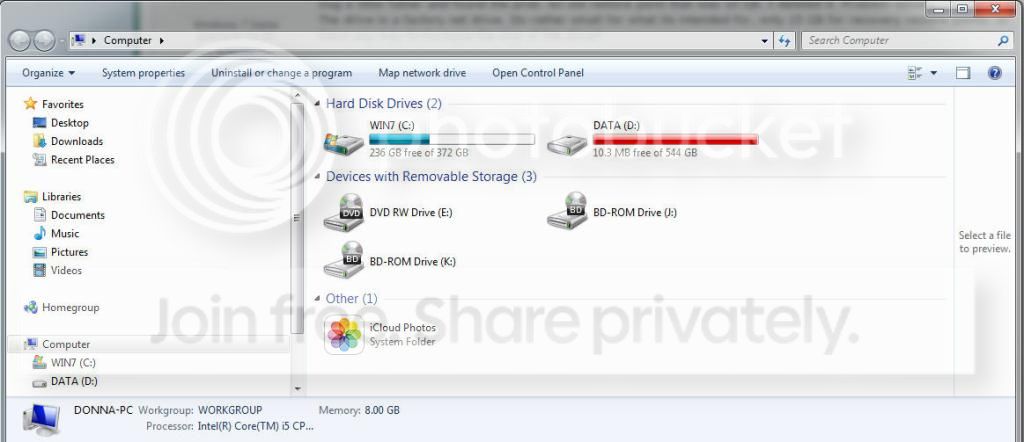
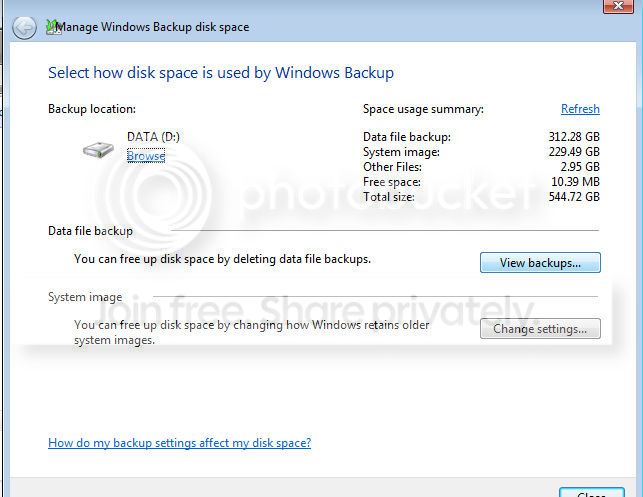
Hello All. I am including pictures of what I think I need to do to get space back on my D drive, and get rid of that pesky "drive full" message. I read all the posts here, but want to make sure I'm doing the right thing (which I really still am not sure of what to do) in fixing this issue.

Please let me know what steps to take to fix this once and for all!!

Thanks in Advance!
Image1_zps297ccilr.jpg


Image2_zpsb7m2tlrs.jpg
 

My Computer My Computer

At a glance

Windows 7 Home Premium / 64
Computer type
PC/Desktop
OS
Windows 7 Home Premium / 64
Antivirus
Windows Essentials
Browser
Google Chrome
Back
Top