Low disk space

bjclark

New member
Member
Local time
4:13 PM
Messages
51
Hi
I am using an HP Pavilion laptop. A window keeps opening that says "Low disk space. You are running out of disk space on HP tools (e). Click here to see if you can free space on this drive."

When I go to control panel>Backup and restore>Backup
and click on either Manage space or Change settings, nothing happens. I can't access either so I can't fix the Low disk space problem. Can someone help me? Please?
 

My Computer

Computer Manufacturer/Model Number
Dell Inspiron 545
OS
Windows 7
CPU
Pentium Dual-Core 2.70GHz
Memory
6.00 GB
So if you go into my computer or local disk is the disk actually almost full or is it just a false warning. And if it actually is full have you tried compressing disk or removing unwanted or used files?
 

My Computer

Computer type
PC/Desktop
Computer Manufacturer/Model Number
custom build
OS
Windows 7 pro 64bit
CPU
Intel Core i5-3470 Ivy Bridge Quad-Core 3.2GHz
Motherboard
ASRock Z75 Pro3 LGA 1155 Intel Z75 HDMI SATA 6Gb/s USB 3.0 A
Memory
G.SKILL Ripjaws Series 8GB SDRAM 1600 PC312800
Graphics Card(s)
Nivida Geforce 600
Monitor(s) Displays
Two dell 27" displays
Screen Resolution
1280x768
Hard Drives
256 GB 3.5" seagate
500 GB 2.5" WD
Internet Speed
25/5
Antivirus
Microsoft securtiy essentials, advanced system care 8
Browser
Chrome
Thanks for the reply. The disk is full, but I can't seem to remove files because can't get Manage space or
change settings to work.
 

My Computer

Computer Manufacturer/Model Number
Dell Inspiron 545
OS
Windows 7
CPU
Pentium Dual-Core 2.70GHz
Memory
6.00 GB
TreeSize Free - Quickly Scan Directory Sizes and Find Space Hogs

You can use Tree Size Free from the above link to see where drive space is being used.

You could run Windows built-in Disk Cleanup to try to recover some space.

You should probably check to see how much space you have devoted to System Restore points.
 

My Computer

Computer type
PC/Desktop
Computer Manufacturer/Model Number
Ignatz Special; 4 speed manual gearbox; factory air conditioning; one of one
OS
Windows 7 Home Premium SP1, 64-bit
CPU
Intel Skylake i5-6600K, not overclocked
Motherboard
AsRock Z170M Extreme 4, micro ATX
Memory
8 GB HyperX DDR4-2666 (2 x 4 GB)
Graphics Card(s)
none; graphics are integrated on CPU
Sound Card
onboard: Realtek ALC1150; external: USB Behringer UF0-202
Monitor(s) Displays
Dell S2340M 23 inch IPS
Screen Resolution
1600 x 900
Hard Drives
System: Crucial MX100 series SSD, 128 GB;
Data: Samsung Spinpoint 103SJ, 1 TB;
Backup: WD Caviar Green WD30EZRX-00D8PB0, 3 TB
PSU
Rosewill SilentNight 500 watt fanless, semi-modular
Case
Antec Solo II
Cooling
Noctua NH-U12S; Noctua F12 intake, Noctua S12A exhaust
Keyboard
Microsoft 200 6JH-00001 USB
Mouse
Dell or Microsoft optical wired; USB
Antivirus
Microsoft Security Essentials and Malwarebytes Premium
Browser
Pale Moon
Other Info
All fans PWM; speeds at idle: CPU circa 500 rpm; intake circa 600 rpm; exhaust circa 600 rpm; CPU temps 27 idle and 47 C load in a warm room (27 C/81 F) when running Intel Extreme Tuning Utility stress test.
Thanks for the reply. The disk is full, but I can't seem to remove files because can't get Manage space or
change settings to work.

That's interesting and definitely a weird one I haven't personally seen that one. Can you instead of going to backup just go into computer itself and click on local disk C: and from there remove files or even just compress files from local disk properties?
 

My Computer

Computer type
PC/Desktop
Computer Manufacturer/Model Number
custom build
OS
Windows 7 pro 64bit
CPU
Intel Core i5-3470 Ivy Bridge Quad-Core 3.2GHz
Motherboard
ASRock Z75 Pro3 LGA 1155 Intel Z75 HDMI SATA 6Gb/s USB 3.0 A
Memory
G.SKILL Ripjaws Series 8GB SDRAM 1600 PC312800
Graphics Card(s)
Nivida Geforce 600
Monitor(s) Displays
Two dell 27" displays
Screen Resolution
1280x768
Hard Drives
256 GB 3.5" seagate
500 GB 2.5" WD
Internet Speed
25/5
Antivirus
Microsoft securtiy essentials, advanced system care 8
Browser
Chrome
Hi ignatzatsonic
Thanks for the reply. I am a real novice so I have no idea what Tree Size Free is or does. I did run the Disk Cleanup and SFC /scannow but that didn't help. How can I check to see how much space is devoted to System Restore points?

Hi Sugarcake18
Thanks for the reply. I tried opening drive C but nothing about drive E is there.


I followed some suggestions that I found on Google and was able to delete one of my backups to open up some space.
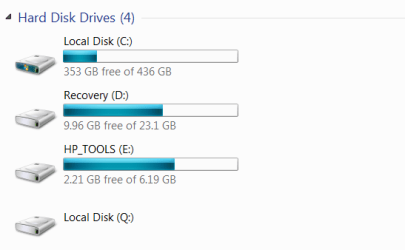
However, "Manage space" and "Change settings" in control panel>Backup and restore>Backup are still dead. Do you think that I may have reset something? ( I have a rampant case of overactive fingers). I have attached a picture of my computer disks. Disk E is the one with the problem.
 

Attachments

  • Disks.png
    Disks.png
    9 KB · Views: 10

My Computer

Computer Manufacturer/Model Number
Dell Inspiron 545
OS
Windows 7
CPU
Pentium Dual-Core 2.70GHz
Memory
6.00 GB
Hi Sugarcake18
Thanks for the reply. I tried opening drive C but nothing about drive E is there.

Then try right clicking on drive "E" to open it.

Is this a business computer? If so you might want your IT department to look at it. Of what use to you is HP Tools? If none or not much, you could consider deleting the partition entirely.

The easiest way to delete unneeded restore points is to use Ccleaner's tool to do this.
 

My Computer

Computer type
Laptop
Computer Manufacturer/Model Number
MSI GE72VR Apache Pro-416
OS
Windows 10x64 Build 1709
CPU
Intel i7 7700HQ Kaby Lake
Motherboard
Micro-Star Intl. MS-179B (U3C1)
Memory
16 GB DDR4 @2400
Graphics Card(s)
Nvidia Geforce GTX 1060
Screen Resolution
1920x1080 120Hz
Hard Drives
256 GB Nvme M.2 SSD

1TB HDD@7200
Cooling
Cooler Blast 4
Keyboard
Steel Series
Antivirus
Bit Defender Free
Browser
Edge
Hi indianacarnie
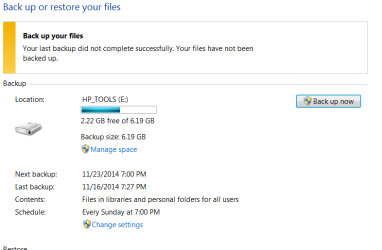
I can open the "E" drive, but that's not the problem. Once it is open, I can't manage files or change settings. Those two options don't work. They are in blue below.
 

Attachments

  • Disk 2.png
    Disk 2.png
    11.3 KB · Views: 0

My Computer

Computer Manufacturer/Model Number
Dell Inspiron 545
OS
Windows 7
CPU
Pentium Dual-Core 2.70GHz
Memory
6.00 GB
Back
Top