
Solved Windows show low disk space, win dir stat shows different space

cickozg

New member
Local time
7:57 PM
Messages
3
Hello to all.

I have a problem with my windows 7 pro laptop that shows only 7,49/100 GB free memmory. I tried to delete all shadow copies and previous versions. Also did chckdsk /f which give me 0 errors, tried to search in hidden and OS files, but there arent any big files, diskcleanup with system files cleaned about 1 gb.
Then I downloaded winDirStat which shoved me that I only have 43Gb of data on my c: drive. I don't have any ideas what could be done to increase free disk space. Please help
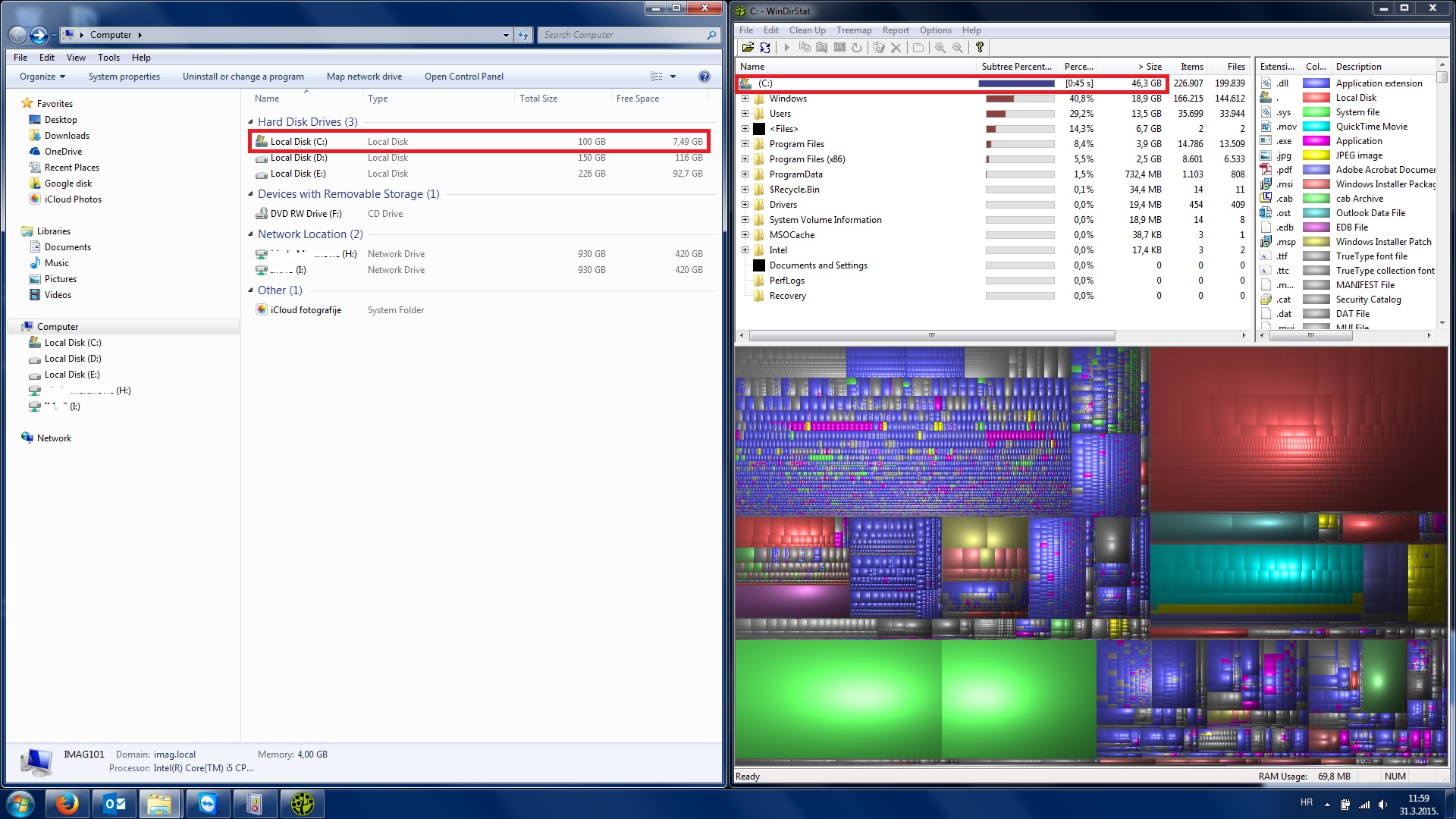
P1WRbOW.jpg
 

My Computer My Computer

Computer type
PC/Desktop
OS
Windows 7 Pro X64
In My Computer, click the Tools menu then on Folder Options then click the View tab and tick "Show hidden files and folders" then untick "Hide protected system files and folders", click Apply and OK.

Then, go into c:\ windows and delete all the files in blue which statr with a $ symbol. They are only folders that once contained Windows Updates you no longer need to keep. Then scroll down to the Software Distribution folder and to Download. Empty that folder.

Look in Control Panel>Power options and make sure Hibernation is turned off then in System, adjust the size of System Restore so it takes up only 4% of the disk space.

Restart the computer and see hwo much space you freed up.
 

My Computer My Computer

Computer type
PC/Desktop
OS
Windows 7 Ultimate 64 bit
CPU
Intel pentium 3
Motherboard
MSI
Memory
2GB RAM DDR 3
Graphics Card(s)
Intel HD Graphics
Sound Card
Realtek Audio
Monitor(s) Displays
zenware
Screen Resolution
1680x1050
Hard Drives
80 GB
Case
i-Max
Cooling
Cooler Master
Keyboard
A4TECH
Mouse
edvan
Antivirus
Avast Anti virus 2015
Browser
Google chrome
You can also try the Baidu PC Faster it has a great tool to find junk files and clean them i use that for months now and it is GREAT :D
 

My Computer My Computer

Computer type
PC/Desktop
Computer Manufacturer/Model Number
ASUS
OS
Windows 7 Ultimate x86
CPU
AMD Sempron(tm) Processor 3400+ 2.01Ghz
Motherboard
ASRock(limited edition)
Memory
2GB
Graphics Card(s)
Nvidia Gforce 630a
Monitor(s) Displays
Philips I9IEW
Screen Resolution
1366x768
Hard Drives
Western Digital 160GB
Keyboard
Gerius KB-06XE
Mouse
Genius XScroll
Internet Speed
2 Mb/s
Antivirus
NOD32
Browser
Pale Moon
In WinDirStat, under the Options menu, be sure "Show Unknown" is checked.
Then see if you can see the extra space.
 

My Computer My Computer

Computer type
PC/Desktop
Computer Manufacturer/Model Number
Home Built - Jan 2013
OS
Windows 7 64 Bit Home Premium SP1
CPU
i7-3820
Motherboard
Asus P9X79-PRO - Bios 4608
Memory
GSkill F3-14900CL9Q - 16GB
Graphics Card(s)
EVGA GeForce GTX660 - Driver 352.86
Sound Card
On board Realtek ALC898
Monitor(s) Displays
Acer S271HL
Screen Resolution
1920 x 1080
Hard Drives
#1- Samsung 840 Pro Series
#2- Western Digital WD1002FAEX Sata3 Black
#3- Western Digital WD1002FAEX Sata3 Black
PSU
Corsair CMPSU-850TX-V2 - 850 watt (by Seasonic)
Case
Corsair Obsidian 550D
Cooling
Standard 3 120mm case fans, Cooler Master Hyper 212 EVO
Keyboard
MS KC-0405
Mouse
Intellimouse 5-button
Internet Speed
56 Mbits/Sec (on a good day)
Antivirus
Avast & Malwarebytes
Browser
Firefox
Other Info
Asus DVD - DRW-24B1ST 24X
This is going to be my last post for the next ten days or so till I log in from Atlanta sometime after 13th April. (Till then I will be on high seas and I can't afford the internet charges on the cruise ship.:))

Try deleting the temporary folders and files as detailed below.

Close Internet explorer or any other browser you may be using.

Close all running programs.

To delete your Windows temporary files on Windows Vista, Windows 7, and Windows 8:
  1. Click on Start (For Windows 8, hit shortcut Windows key + R)
  2. Type %temp% in the search box, and then hit the Enter key.
  3. Select all the files/folders.
  4. Press Shift+ Delete key on your keyboard.
  5. When prompted if you are sure, choose Yes.
Some files currently in use may refuse to be deleted. Skip those.

See how much space you have regained.

Bye bye .
 

My Computer My Computer

OS
Windows 7 Home Premium 32 bit
Have a safe trip Jumanji
 

My Computer My Computer

Computer type
PC/Desktop
Computer Manufacturer/Model Number
Home Built - Jan 2013
OS
Windows 7 64 Bit Home Premium SP1
CPU
i7-3820
Motherboard
Asus P9X79-PRO - Bios 4608
Memory
GSkill F3-14900CL9Q - 16GB
Graphics Card(s)
EVGA GeForce GTX660 - Driver 352.86
Sound Card
On board Realtek ALC898
Monitor(s) Displays
Acer S271HL
Screen Resolution
1920 x 1080
Hard Drives
#1- Samsung 840 Pro Series
#2- Western Digital WD1002FAEX Sata3 Black
#3- Western Digital WD1002FAEX Sata3 Black
PSU
Corsair CMPSU-850TX-V2 - 850 watt (by Seasonic)
Case
Corsair Obsidian 550D
Cooling
Standard 3 120mm case fans, Cooler Master Hyper 212 EVO
Keyboard
MS KC-0405
Mouse
Intellimouse 5-button
Internet Speed
56 Mbits/Sec (on a good day)
Antivirus
Avast & Malwarebytes
Browser
Firefox
Other Info
Asus DVD - DRW-24B1ST 24X
In WinDirStat, under the Options menu, be sure "Show Unknown" is checked.
Then see if you can see the extra space.
I enabled show unknown and now it showed me unknown file 46GB of data, but I can't to open file location or see where those file(s) are located.

dXZKIDY.jpg
 

My Computer My Computer

Computer type
PC/Desktop
OS
Windows 7 Pro X64
That is a limitation in WinDirStat.

If you download and install Treesize Free, it will do a better job of showing what the unknown files are.

But most likely they are Volume Shadow Copy files (System Restore Points) which WinDirStat inexplicably does not know anything about.

To check Go to System Restore (Start > Computer > System Properties > System Protection > Configure) and look to see what it says under Disk Space Usage. If it is approx. the same size as the Unknown space then there you go.
Check the percentage slider. It should be 5% or less than 5GB on most systems.
If it is not, change it. You could also delete all restore points here and start off fresh by creating a new one.

If it is not System Restore than it will take further digging.
 

My Computer My Computer

Computer type
PC/Desktop
Computer Manufacturer/Model Number
Home Built - Jan 2013
OS
Windows 7 64 Bit Home Premium SP1
CPU
i7-3820
Motherboard
Asus P9X79-PRO - Bios 4608
Memory
GSkill F3-14900CL9Q - 16GB
Graphics Card(s)
EVGA GeForce GTX660 - Driver 352.86
Sound Card
On board Realtek ALC898
Monitor(s) Displays
Acer S271HL
Screen Resolution
1920 x 1080
Hard Drives
#1- Samsung 840 Pro Series
#2- Western Digital WD1002FAEX Sata3 Black
#3- Western Digital WD1002FAEX Sata3 Black
PSU
Corsair CMPSU-850TX-V2 - 850 watt (by Seasonic)
Case
Corsair Obsidian 550D
Cooling
Standard 3 120mm case fans, Cooler Master Hyper 212 EVO
Keyboard
MS KC-0405
Mouse
Intellimouse 5-button
Internet Speed
56 Mbits/Sec (on a good day)
Antivirus
Avast & Malwarebytes
Browser
Firefox
Other Info
Asus DVD - DRW-24B1ST 24X
Thank you very much, I found out that user had offline sync for network drive. I moved syncronisation to other drive and now he has his free space :)
 

My Computer My Computer

Computer type
PC/Desktop
OS
Windows 7 Pro X64
As mentioned, WinDirStat is showing incomplete information.
There are a number of folders in Windows, some of which consume considerable disk space, that by default even an elevated admin account does not have access to. WinDirStat runs under the users account and is unable to see the contents of these folders. If it cannot see the contents of these folders it is unable to account for the disk space they consumes. Windows Explorer has the same limitation.

Treesize Free uses a service that runs under a system account that does not have this limitation and can thus provide more accurate information. Note that with a complex file system such as NTFS the determination of a folders disk space is only an approximation. For a number of reasons this is unavoidable.
 

My Computer My Computer

Computer type
PC/Desktop
Computer Manufacturer/Model Number
HP
OS
Windows 7 Pro 64 bit
CPU
Xeon W3520
Memory
8 GB
Graphics Card(s)
Nvidia Geforce 210
Have a safe trip Jumanji

Thanks TVeb. Of course I have to watch my every step as I climb up and down any stairs and otherwise too, for one slip and I will break my already cracked spine with catastrophic results. So I am always careful. :)
 

My Computer My Computer

OS
Windows 7 Home Premium 32 bit
Yikes! I advise against cracking your spine!;)
 

My Computer My Computer

Computer type
PC/Desktop
Computer Manufacturer/Model Number
Home Built - Jan 2013
OS
Windows 7 64 Bit Home Premium SP1
CPU
i7-3820
Motherboard
Asus P9X79-PRO - Bios 4608
Memory
GSkill F3-14900CL9Q - 16GB
Graphics Card(s)
EVGA GeForce GTX660 - Driver 352.86
Sound Card
On board Realtek ALC898
Monitor(s) Displays
Acer S271HL
Screen Resolution
1920 x 1080
Hard Drives
#1- Samsung 840 Pro Series
#2- Western Digital WD1002FAEX Sata3 Black
#3- Western Digital WD1002FAEX Sata3 Black
PSU
Corsair CMPSU-850TX-V2 - 850 watt (by Seasonic)
Case
Corsair Obsidian 550D
Cooling
Standard 3 120mm case fans, Cooler Master Hyper 212 EVO
Keyboard
MS KC-0405
Mouse
Intellimouse 5-button
Internet Speed
56 Mbits/Sec (on a good day)
Antivirus
Avast & Malwarebytes
Browser
Firefox
Other Info
Asus DVD - DRW-24B1ST 24X
Back
Top