
Solved low memory

s00

New member
Member
VIP
Local time
8:58 AM
Messages
220
Location
SISTAN
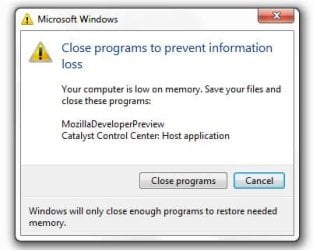
What is the meaning of the displayed error
11.JPG

my info sys is
12.JPG
 

My Computer My Computer

Computer Manufacturer/Model Number
dell 1558
OS
windows 7 home preminm x64
CPU
i7
Motherboard
dell
Memory
DDR3 4G
Graphics Card(s)
ATI HD 5470 1G
Monitor(s) Displays
15.6 LED
Hard Drives
Hitachi 500G
Hello SAEED,

That means that Windows is low on memory resources.

Double check to make sure that you have the page file enabled. It is recommended to have the page file set to be managed by the system. If you have it set to a custom size, then increase the size until you no longer get the low memory error.

Virtual Memory Paging File - Change

If your Windows drive is real low on free space, then that could also cause you to get a low memory error.

Hope this helps for now. :)
 

My Computer My Computer

Computer type
PC/Desktop
Computer Manufacturer/Model Number
Self built custom
OS
64-bit Windows 11 Pro for Workstations
CPU
Intel i7-8700K OC'd to 5 GHz
Motherboard
ASUS ROG Maximus XI Formula Z390
Memory
64 GB (4x16GB) G.SKILL TridentZ RGB DDR4 3600 MHz
Graphics Card(s)
ASUS ROG-STRIX-GTX1080TI-O11G-GAMING
Sound Card
Integrated
Monitor(s) Displays
2 x Samsung Odyssey G7 27"
Screen Resolution
2560x1440
Hard Drives
1TB Samsung 990 PRO M.2,
4TB Samsung 990 PRO PRO M.2,
TerraMaster F8 SSD Plus NAS
PSU
Seasonic Prime Titanium 850W
Case
Thermaltake Core P3
Cooling
Corsair Hydro H115i
Keyboard
Logitech wireless K800
Mouse
Logitech MX Master 4
Internet Speed
2 Gb/s Download and 100 Mb/s Upload
Antivirus
Malwarebyte Anti-Malware Premium
Browser
Google Chrome
Other Info
Logitech Z625 speaker system,
Logitech BRIO 4K Pro webcam,
HP Color LaserJet Pro MFP M477fdn,
APC SMART-UPS RT 1000 XL - SURT1000XLI,
Galaxy S23 Plus phone
thanks brink
Why should enable page file?
What operating system of the paging file?
 

My Computer My Computer

Computer Manufacturer/Model Number
dell 1558
OS
windows 7 home preminm x64
CPU
i7
Motherboard
dell
Memory
DDR3 4G
Graphics Card(s)
ATI HD 5470 1G
Monitor(s) Displays
15.6 LED
Hard Drives
Hitachi 500G
Some programs will require that the page file be enabled to run properly no matter how much RAM (memory) you have installed.

You would want to enable the page file for the currently running OS.

The tutorial link I posted above will give you more details on this to help.
 

My Computer My Computer

Computer type
PC/Desktop
Computer Manufacturer/Model Number
Self built custom
OS
64-bit Windows 11 Pro for Workstations
CPU
Intel i7-8700K OC'd to 5 GHz
Motherboard
ASUS ROG Maximus XI Formula Z390
Memory
64 GB (4x16GB) G.SKILL TridentZ RGB DDR4 3600 MHz
Graphics Card(s)
ASUS ROG-STRIX-GTX1080TI-O11G-GAMING
Sound Card
Integrated
Monitor(s) Displays
2 x Samsung Odyssey G7 27"
Screen Resolution
2560x1440
Hard Drives
1TB Samsung 990 PRO M.2,
4TB Samsung 990 PRO PRO M.2,
TerraMaster F8 SSD Plus NAS
PSU
Seasonic Prime Titanium 850W
Case
Thermaltake Core P3
Cooling
Corsair Hydro H115i
Keyboard
Logitech wireless K800
Mouse
Logitech MX Master 4
Internet Speed
2 Gb/s Download and 100 Mb/s Upload
Antivirus
Malwarebyte Anti-Malware Premium
Browser
Google Chrome
Other Info
Logitech Z625 speaker system,
Logitech BRIO 4K Pro webcam,
HP Color LaserJet Pro MFP M477fdn,
APC SMART-UPS RT 1000 XL - SURT1000XLI,
Galaxy S23 Plus phone
Why should enable page file?

Windows was designed to operate optimally with a pagefile and the default configuration is system managed. There is a lot of misinformation on the Internet, claiming that this is inefficient. This is incorrect. In most cases the default configuration is as close to optimum as to make no difference. I would recommend using the default configuration unless there is a specific need to do otherwise.

The error in question rarely has anything to do with a shortage of RAM but with the commit charge. This is a difficult concept to understand but all you really need to know is that it should be well below the commit limit. The commit limit is RAM size plus pagefile size minus a small overhead. Disabling the pagefile will seriously lower the commit limit, possibly to the point where it causes a problem, a problem which you have. This can occur even when there is considerable memory available.

In many cases setting pagefile configuration back to default settings will completely solve the problem.
Post a screenshot of Task Manager - Performance tab when the problem occurs if it does not.
 

My Computer My Computer

Computer type
PC/Desktop
Computer Manufacturer/Model Number
HP
OS
Windows 7 Pro 64 bit
CPU
Xeon W3520
Memory
8 GB
Graphics Card(s)
Nvidia Geforce 210
Back
Top