Low Physical Memory

Yoshimitsu739

New member
Local time
9:58 PM
Messages
6
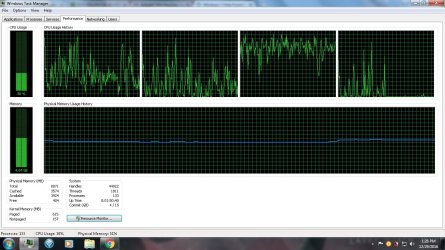
I recently booted up my laptop only to find out that the computer was slow and the free memory was really low. usually its at least at 1000
also its windows 7 professional 64bit OS

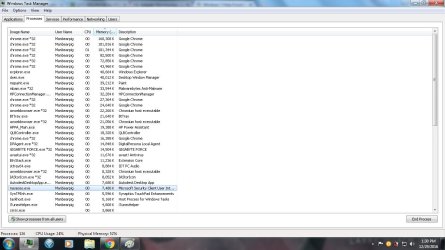
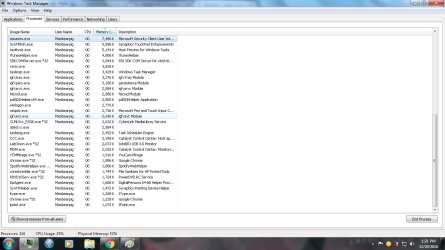
i have 8gb of RAM, two 4 gb. i did have to switch out one about a year ago, and it was working fine. i unplugged both and re-plugged them in. i used malware bytes, i ran the bios memory test as well. i hope someone can help. i also have these pictures that show the pocesses going on. im also curious on why there are so many chrome processes. i also checked on msconfig but i might of missed something. thanks for your help in advance.
 

Attachments
  • low memory.jpg
    low memory.jpg
    396.1 KB · Views: 5
  • process1.jpg
    process1.jpg
    239.9 KB · Views: 5
  • process2.jpg
    process2.jpg
    235.7 KB · Views: 2

My Computer

Computer type
PC/Desktop
Computer Manufacturer/Model Number
HP
OS
windows 7 professional 64 bit
CPU
intel core i5-3230M cpu @ 2.60GHZ
Memory
8 GB(7.88 usable)
You have so many Chrome process because that is just the way Chrome works.

Try using Firefox and see if it helps. Then reboot.
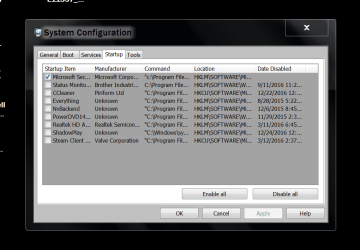
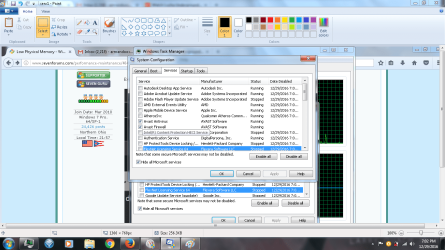
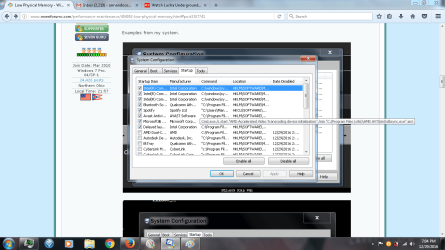
You could also check in msconfig/Startup and Non Microsoft Services and see what is running in the background that doesn't need to be.

You also have a lot of paged files (617)

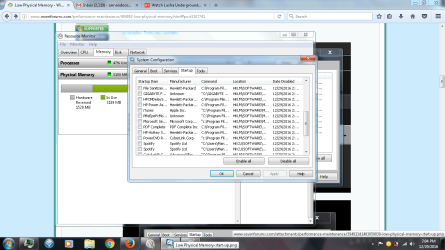
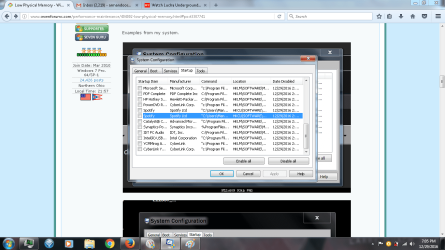
Examples from my system.

msconfig SERVECES.PNG

START UP.PNG


Jack
 

My Computer

Computer type
PC/Desktop
Computer Manufacturer/Model Number
Home made Desktop
OS
Windows 10 Pro. 64/ version 1709 Windows 7 Pro/64
CPU
Intel i7-6800K @ 4.3
Motherboard
ASUS X-99 Deluxe II
Memory
Corsair Platinum 16 gig @2400
Graphics Card(s)
EVGA GTX 1070 OC
Monitor(s) Displays
Asus 27" LED LCD/VE278Q
Screen Resolution
1920-1080 or 1280-720 HDMI
Hard Drives
INTEL SSD 730-240 Gb Sata 3.0/
PSU
EVGA Platium 1200W
Case
Phanteks Luxe Tempered Glass 8 fans/ one radiator
Cooling
XSPC/ Water Cooled CPU
Keyboard
Das 4 Professional
Mouse
Logitech M705/MX Anywhere 2-S
Internet Speed
100 mbits
Antivirus
Microsoft Security Essentials/ Malwarebytes Premium 3.0/ SAS
Browser
I.E. 11 default/Firefox/ ISP Time Warner Cable/Spectrum
Other Info
LG BluRay Burner/
Sound system-KLipsch-THX/
Icy Dock ssd Hot Swap bays.
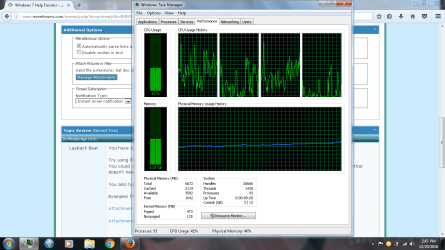
so i did try what you asked and it make it back to what it was \ but now my available memory changed. so in the bios it says that i have 8192 mb of ram and so before it was at 8072 and now its down to about 6600. also my free memory now falls below 100
 

Attachments

  • changed.png
    changed.png
    192.6 KB · Views: 7

My Computer

Computer type
PC/Desktop
Computer Manufacturer/Model Number
HP
OS
windows 7 professional 64 bit
CPU
intel core i5-3230M cpu @ 2.60GHZ
Memory
8 GB(7.88 usable)
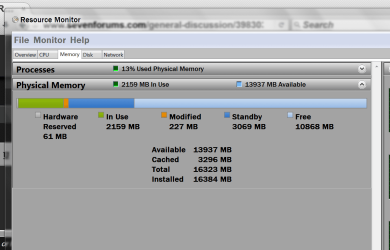
Please post a picture of Resource Monitor.


Example:

Resoruce monitor memory.PNG

Jack
 

My Computer

Computer type
PC/Desktop
Computer Manufacturer/Model Number
Home made Desktop
OS
Windows 10 Pro. 64/ version 1709 Windows 7 Pro/64
CPU
Intel i7-6800K @ 4.3
Motherboard
ASUS X-99 Deluxe II
Memory
Corsair Platinum 16 gig @2400
Graphics Card(s)
EVGA GTX 1070 OC
Monitor(s) Displays
Asus 27" LED LCD/VE278Q
Screen Resolution
1920-1080 or 1280-720 HDMI
Hard Drives
INTEL SSD 730-240 Gb Sata 3.0/
PSU
EVGA Platium 1200W
Case
Phanteks Luxe Tempered Glass 8 fans/ one radiator
Cooling
XSPC/ Water Cooled CPU
Keyboard
Das 4 Professional
Mouse
Logitech M705/MX Anywhere 2-S
Internet Speed
100 mbits
Antivirus
Microsoft Security Essentials/ Malwarebytes Premium 3.0/ SAS
Browser
I.E. 11 default/Firefox/ ISP Time Warner Cable/Spectrum
Other Info
LG BluRay Burner/
Sound system-KLipsch-THX/
Icy Dock ssd Hot Swap bays.
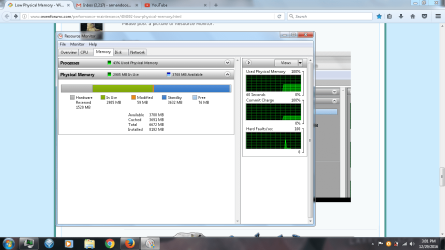
here you go i feel like it might be one file or exe that may be causing this, but idk.
 

Attachments

  • resource monitor.png
    resource monitor.png
    211.1 KB · Views: 5

My Computer

Computer type
PC/Desktop
Computer Manufacturer/Model Number
HP
OS
windows 7 professional 64 bit
CPU
intel core i5-3230M cpu @ 2.60GHZ
Memory
8 GB(7.88 usable)
Your ram usage doesn't look bad to me. The hardware reserve is high. We will get to that later.
My system is using 2283 of ram and I'm just online.

Reboot and take another snap shot like the one in post #5

Jack
 

My Computer

Computer type
PC/Desktop
Computer Manufacturer/Model Number
Home made Desktop
OS
Windows 10 Pro. 64/ version 1709 Windows 7 Pro/64
CPU
Intel i7-6800K @ 4.3
Motherboard
ASUS X-99 Deluxe II
Memory
Corsair Platinum 16 gig @2400
Graphics Card(s)
EVGA GTX 1070 OC
Monitor(s) Displays
Asus 27" LED LCD/VE278Q
Screen Resolution
1920-1080 or 1280-720 HDMI
Hard Drives
INTEL SSD 730-240 Gb Sata 3.0/
PSU
EVGA Platium 1200W
Case
Phanteks Luxe Tempered Glass 8 fans/ one radiator
Cooling
XSPC/ Water Cooled CPU
Keyboard
Das 4 Professional
Mouse
Logitech M705/MX Anywhere 2-S
Internet Speed
100 mbits
Antivirus
Microsoft Security Essentials/ Malwarebytes Premium 3.0/ SAS
Browser
I.E. 11 default/Firefox/ ISP Time Warner Cable/Spectrum
Other Info
LG BluRay Burner/
Sound system-KLipsch-THX/
Icy Dock ssd Hot Swap bays.
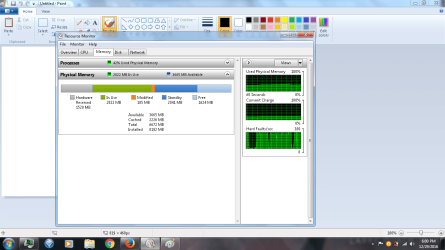
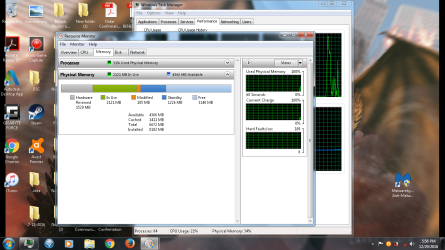
here you go. i did two screencaps. 1st one is about a minute after rebooting. the second is about another minute after taking the 1st screencap.
 

Attachments

  • resource3.png
    resource3.png
    205.1 KB · Views: 6
  • resource2.png
    resource2.png
    801.9 KB · Views: 5

My Computer

Computer type
PC/Desktop
Computer Manufacturer/Model Number
HP
OS
windows 7 professional 64 bit
CPU
intel core i5-3230M cpu @ 2.60GHZ
Memory
8 GB(7.88 usable)
I also need pictures like in my post #2

Jack
 

My Computer

Computer type
PC/Desktop
Computer Manufacturer/Model Number
Home made Desktop
OS
Windows 10 Pro. 64/ version 1709 Windows 7 Pro/64
CPU
Intel i7-6800K @ 4.3
Motherboard
ASUS X-99 Deluxe II
Memory
Corsair Platinum 16 gig @2400
Graphics Card(s)
EVGA GTX 1070 OC
Monitor(s) Displays
Asus 27" LED LCD/VE278Q
Screen Resolution
1920-1080 or 1280-720 HDMI
Hard Drives
INTEL SSD 730-240 Gb Sata 3.0/
PSU
EVGA Platium 1200W
Case
Phanteks Luxe Tempered Glass 8 fans/ one radiator
Cooling
XSPC/ Water Cooled CPU
Keyboard
Das 4 Professional
Mouse
Logitech M705/MX Anywhere 2-S
Internet Speed
100 mbits
Antivirus
Microsoft Security Essentials/ Malwarebytes Premium 3.0/ SAS
Browser
I.E. 11 default/Firefox/ ISP Time Warner Cable/Spectrum
Other Info
LG BluRay Burner/
Sound system-KLipsch-THX/
Icy Dock ssd Hot Swap bays.
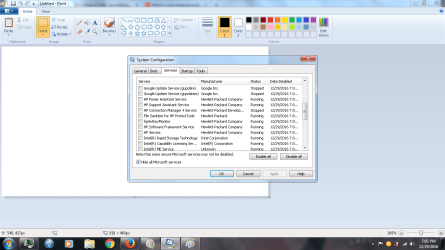
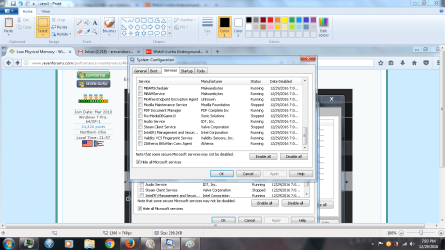
here are all the startups and services.
 

Attachments

  • serv1.png
    serv1.png
    250.6 KB · Views: 4
  • serv2.png
    serv2.png
    169.6 KB · Views: 3
  • serv3.png
    serv3.png
    299.2 KB · Views: 2
  • serv4.png
    serv4.png
    304.9 KB · Views: 2
  • startup1.png
    startup1.png
    299.6 KB · Views: 3
  • startup2.png
    startup2.png
    270.7 KB · Views: 2
  • startup3.png
    startup3.png
    300 KB · Views: 3

My Computer

Computer type
PC/Desktop
Computer Manufacturer/Model Number
HP
OS
windows 7 professional 64 bit
CPU
intel core i5-3230M cpu @ 2.60GHZ
Memory
8 GB(7.88 usable)
Well that shows that Startup and Services is not to bad.
You are using under 3 GB of ram which is fine. Don't worry about Standby ram it will very.

Now your hardware reserve is next.
Normally when hardware reserve is big the problem is caused by ram problems.
Wrong ram installed.
Ram installed incorrectly.
Mismatched ram modules.

The system in my (My System Specs) only has 61mb of hardware reserve. Your hardware reserve is 1520 mb.
That is about 25 times more than mine.


Please post a web site with the exact ram you are using.

I also noticed that you have Mc Afee and Avast installed.
It's not a good idea to have two anti virus programs installed at the same time.

I suggest removing McAfee using their own uninstaller that can be found online.

Jack
 

My Computer

Computer type
PC/Desktop
Computer Manufacturer/Model Number
Home made Desktop
OS
Windows 10 Pro. 64/ version 1709 Windows 7 Pro/64
CPU
Intel i7-6800K @ 4.3
Motherboard
ASUS X-99 Deluxe II
Memory
Corsair Platinum 16 gig @2400
Graphics Card(s)
EVGA GTX 1070 OC
Monitor(s) Displays
Asus 27" LED LCD/VE278Q
Screen Resolution
1920-1080 or 1280-720 HDMI
Hard Drives
INTEL SSD 730-240 Gb Sata 3.0/
PSU
EVGA Platium 1200W
Case
Phanteks Luxe Tempered Glass 8 fans/ one radiator
Cooling
XSPC/ Water Cooled CPU
Keyboard
Das 4 Professional
Mouse
Logitech M705/MX Anywhere 2-S
Internet Speed
100 mbits
Antivirus
Microsoft Security Essentials/ Malwarebytes Premium 3.0/ SAS
Browser
I.E. 11 default/Firefox/ ISP Time Warner Cable/Spectrum
Other Info
LG BluRay Burner/
Sound system-KLipsch-THX/
Icy Dock ssd Hot Swap bays.

My Computer

Computer type
PC/Desktop
Computer Manufacturer/Model Number
HP
OS
windows 7 professional 64 bit
CPU
intel core i5-3230M cpu @ 2.60GHZ
Memory
8 GB(7.88 usable)
Just as I thought.
You have mismatched ram modules.

You need to get a 2 module matched set.

Jack
 

My Computer

Computer type
PC/Desktop
Computer Manufacturer/Model Number
Home made Desktop
OS
Windows 10 Pro. 64/ version 1709 Windows 7 Pro/64
CPU
Intel i7-6800K @ 4.3
Motherboard
ASUS X-99 Deluxe II
Memory
Corsair Platinum 16 gig @2400
Graphics Card(s)
EVGA GTX 1070 OC
Monitor(s) Displays
Asus 27" LED LCD/VE278Q
Screen Resolution
1920-1080 or 1280-720 HDMI
Hard Drives
INTEL SSD 730-240 Gb Sata 3.0/
PSU
EVGA Platium 1200W
Case
Phanteks Luxe Tempered Glass 8 fans/ one radiator
Cooling
XSPC/ Water Cooled CPU
Keyboard
Das 4 Professional
Mouse
Logitech M705/MX Anywhere 2-S
Internet Speed
100 mbits
Antivirus
Microsoft Security Essentials/ Malwarebytes Premium 3.0/ SAS
Browser
I.E. 11 default/Firefox/ ISP Time Warner Cable/Spectrum
Other Info
LG BluRay Burner/
Sound system-KLipsch-THX/
Icy Dock ssd Hot Swap bays.
In theory any compatible RAM modules should work together but things don't always work that way in the real world. Any difference in specs, size, or even manufacturer can cause problems. OEM computers such as laptops tend to be more picky about the RAM modules that will work. The only real solution is to use matched modules.

I believe the installed RAM size comes from a simple identification of the RAM modules. This doesn't imply the memory is usable or even fully compatible, merely that it can be identified. The value for total memory comes from a test of what is actually usable. The difference is labeled as hardware reserved. It will never be zero is usually quite small in a 64 bit OS.

Don't be concerned about a low value for free memory. It should be low, zero being the optimum value. Windows was designed to work this way. The important number is available memory and you have quite a bit of that, and there will be more when the RAM problem is corrected.
 

My Computer

Computer type
PC/Desktop
Computer Manufacturer/Model Number
HP
OS
Windows 7 Pro 64 bit
CPU
Xeon W3520
Memory
8 GB
Graphics Card(s)
Nvidia Geforce 210
Back
Top