
MarkloisLinogao
New member
Ok so you might understand this last morning i was opening pc (windows 7) then i open windows explorer it took me some time to before it pops up, when i try opening task manager my memory usage is high .my computer has 4Gb Ram .but it really doesn't make sense please take a look on my task manager.since i don't run some programs in startup that doesn't really usefull.
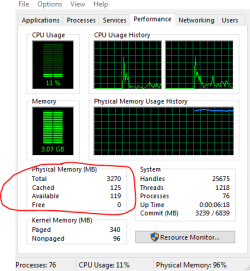

I don't think it's a virus/malware issue since I run frequent scans with Avast and Spybot and Malwarebytes and they aren't coming up with anything., i tried deleting the %temp% and some junk files with Ccleaner.
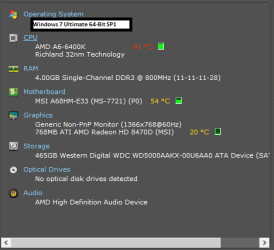
My PC Specs
Thanks
I don't think it's a virus/malware issue since I run frequent scans with Avast and Spybot and Malwarebytes and they aren't coming up with anything., i tried deleting the %temp% and some junk files with Ccleaner.
My PC Specs
Thanks
Last edited:
My Computer
At a glance
Windows 7 (x64)AMD A6-6400K APU4.00GB Single-Channel DDR3Generic Non-PnP Monitor (1366x768@60Hz) 768MB...
- Computer type
- PC/Desktop
- Computer Manufacturer/Model Number
- MSI
- OS
- Windows 7 (x64)
- CPU
- AMD A6-6400K APU
- Motherboard
- MSI A68HM-E33 (MS-7721) (P0)
- Memory
- 4.00GB Single-Channel DDR3
- Graphics Card(s)
- Generic Non-PnP Monitor (1366x768@60Hz) 768MB ATI AMD Radeon
- Hard Drives
- Local disk (C:) Local Disk (D:)
- Antivirus
- Kaspersky Internet security
- Browser
- Google chrome


