
Lubricating a stock intel fan

magmag

New member
Local time
10:43 PM
Messages
31
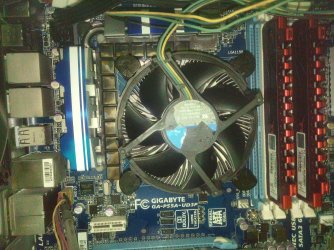
Sorry for my question about a kinda outdated cpu. I'm still running an old Intel Core i5 750 (Lynnfield) with stock parameters and stock heat sink. Everything is fine except that the fan is kinda heavy (it stops rotating immediately after I spin it) so I thought of lubricating it with few oil droplets (I got this oil with my hair cut machine). I tried removing the sticker - as shown in attached pic - but I found that there's no rubber to lift or something and lubricate under it (as I've seen on some youtube videos).

Is it the other side of the fan that has the stuff which needs lubricating? if so, that needs me to detach the fan from the heatsink in the first place. Is this possible or both are one unit?

In case of no possibility to do anything with this fan, I'm thinking about ordering from outside my country ARCTIC Freezer i11 CPU Cooler which looks huge as I've seen on youtube so I'm not really sure if buying this thing will work inside my Gigabyte Setto case and Gigabyte P55A-UD3P board.

Will appreciate your sincerer advice...
https://www.amazon.com/gp/product/B00HO9P05A/ref=ox_sc_act_title_2?ie=UTF8&psc=1&smid=ATVPDKIKX0DER
 

Attachments
  • IMG_20170422_212909 (002).jpg
    IMG_20170422_212909 (002).jpg
    1.9 MB · Views: 3

My Computer My Computer

Computer type
PC/Desktop
OS
Windows 7 Ultimate X64
You'd not want to lubricate the fan, It will act in the way you describe because the fan is rotated by a DC Motor, so resistance is normal and is good for functionality. If there was little or no resistance I'd recommend a new fan, rather than a repair on existing fan.

Honestly however I would say get the new cooler as stock fans are usually cheap and do a mediocre job anyways.
 

My Computer My Computer

Computer type
PC/Desktop
Computer Manufacturer/Model Number
Dell
OS
Windows 7 Home Premium 64bit
CPU
Intel Core 2 Duo
Motherboard
Awful
Memory
4GB
Graphics Card(s)
XFX Radeon HD5450
Hard Drives
Unknown 320GB
Antivirus
Kaspersky
Browser
Firefox
the fan is not meant to be lubricated. If you input your motherboard and case into pcpartpicker.com, the site is pretty good at showing you only compatible coolers. But your best bet is to get another stock i5 750 cooler and just put its fan onto your existing heatsink, that way you don't have to uninstall your heatsink. Though I'm not really sure you can easily separate the fan from the heatsink - you'd need to check on that.

https://www.amazon.com/Intel-Cooler-LGA1150-1155-E97378-001/dp/B00BQ1C4SS
 

My Computer My Computer

Computer type
PC/Desktop
Computer Manufacturer/Model Number
diy
OS
Win7 pro x64
CPU
stock i7 7700k
Motherboard
Gigabyte Z270N-WIFI mini-ITX
Memory
Corsair Vengeance LPX 16GB (2x8GB) DDR4 @ 3200MHz
Graphics Card(s)
integrated Intel HD 630
Sound Card
onboard Realtek ALC1220
Monitor(s) Displays
two vertically mounted samsung 55" 4k un55mu8000
Screen Resolution
1920x1280
Hard Drives
256GB Samsung EVO 960 M.2 pci-e NVMe SSD
PSU
SilverStone Nightjar ST45NF 450Watt Fanless
Case
No case. Motherboard is mounted directly onto power supply
Cooling
Evercool low profile 815EP with Panaflow 12L fan at 7v
Keyboard
Ortek MCK-86 mini
Mouse
Belkin 5-button USB
Internet Speed
spectrum 400mbps
magmag. The fan will stop almost immediately if you spin it by hand, as it uses permanent magnets inside to reduce heat & power usage.

The main reason for replacing a fan that still works is if it's very noisy, which indicates a dry bearing & generally speaking it cannot be successfully lubricated.

If your fan runs normally & is quiet, leave it alone.
 

My Computer My Computer

Computer type
PC/Desktop
Computer Manufacturer/Model Number
Self built using existing case
OS
Windows 7 Home Premium 64 bit sp1
CPU
Intel i5 3570 3.4Ghz Ivy Bridge SKT 1155 quad core
Motherboard
Gigabyte Z77-HD3 SKT 1155 2xSata 3, 4x USB 3.0
Memory
G-Skill Rip Jaws 16Gb (8x2) DDR3 -1600 PC3 12800 CL 10 red
Graphics Card(s)
Gigabyte NVIDIA GT610 1Gb DDR3 810/1200 PCI-E 2.0 Silent
Sound Card
NVIDIA High Definition & Realtech High Definition Audio
Monitor(s) Displays
2 x Philips 226V4L 16:9 aspect ratio
Screen Resolution
1920 x 1080 HD
Hard Drives
Samsung 840 Pro 256gb SSD, SATA 3.
Hitachi Touro Portable 1tb, USB 3.0 HDD used for image b/ups.
PSU
Corsair VS450
Case
Codeng
Cooling
PSU fan & CPU fan
Keyboard
Logitech
Mouse
Logitech Wireless trackball M570
Internet Speed
Wireless 3G. 3mg down & 550kb up.
Antivirus
Bitdefender Internet Security 2020
Browser
Opera (Current Version) & Firefox
Other Info
MS Office 2013 Pro. Davis weather station software. MGE Nova 600 avr UPS.
magmag. The fan will stop almost immediately if you spin it by hand, as it uses permanent magnets inside to reduce heat & power usage.

The main reason for replacing a fan that still works is if it's very noisy, which indicates a dry bearing & generally speaking it cannot be successfully lubricated.

If your fan runs normally & is quiet, leave it alone.
It's quite in normal days but on hot days, the fan is mostly changing between high and low speed rotation & it becomes noisy.

For the rotation of the fan, back in the days, when I blow dust from the fan, it used to rotate for a while after I stop the blower. Now the fan stops kinda immediately after finishing blowing air so I feel it has a dry bearing. I'm assuming that the oil has dried since I assembled my machine from mid 2010 (but it's not running for 24/7).
 

My Computer My Computer

Computer type
PC/Desktop
OS
Windows 7 Ultimate X64
The Processor Fan will rev up if the CPU thinks the Processor gets hotter than normal. I'd rather buy new fan than lubricate it because you will destroy that fan.
 

My Computer My Computer

Computer type
PC/Desktop
Computer Manufacturer/Model Number
ASUS X550ZE
OS
Windows 7 Home Premium 64-BIT
CPU
AMD A8 7200P
Motherboard
N/A
Memory
8GB 1600mhz
Graphics Card(s)
Radeon R5 (APU) + Radeon R5 M230 2GB Dual Graphics
Sound Card
Realtek ALC269 with SonicMaster
Monitor(s) Displays
Laptop Display
Screen Resolution
1920 x 1080 @60hz
Hard Drives
WDC WD50 00LPVX-80V0TT0 (500GB)
PSU
Laptop Charger
Mouse
ARMAGGEDON TEXTRON SCORPION 7
Internet Speed
100 mbps DOWN / 50 mbps UP
Antivirus
Windows Defender
Browser
Mozzila FireFox, Valve Steam in-game internet browser
I tried as you said, blowing the fan, to see where any difference could be.

I have a spare Foxconn Intel cpu fan that hasnt been used for nearly the past three years. So I tried blowing air over the blades to see where it would get me.

I must say that firstly I gave my puff a short throaty huff kind of blow - as you would to blow dust - and the fan blades rolled over only a few ticks then halted abruptly and swayed side to side momentarily before reaching a complete stand still.

After repeated efforts to get the thing to rotate on its own for a while, I then decided to blow a chesty lung of air, and it did indeed rotate at speed for a good 2 - 3 seconds, before the blades abruptly halted and swayed side to side as the fan came to a halt; you have to blow at the right place, like over the fan blades to the right side or to the left side, because otherwise, if you blow in the centre, then the fan doesnt move much and its rotational mechanism looks quite stiff also.

So my conclusion is that you are right, the fan blades on a cpu do rotate for a while if you put enough 'puff into your huff' (?), AND blow air across the blades from above in the right place, because if you blow merely 2 cm away from the right place, then the mechanism is full of inertia and abrupt in motion again.
 

My Computer My Computer

Computer type
PC/Desktop
OS
Windows 7 x64, Vista x64, 8.1 smartphone
CPU
Intel E8400 65W 64-bit
Motherboard
Gigabyte EP45-UD3LR
Memory
DDR2 2 x 2GB, 1GB x 2
Graphics Card(s)
XFX Radeon HD5750
Sound Card
AMD High Definition Audio; Realtek High Definition Audio
Monitor(s) Displays
iiyama prolite X2377HDS
Screen Resolution
1920 x 1080
Hard Drives
500GB 7200 rpm Seagate ST3500413AS 16MB, 500GB 5400 rpm Toshiba MQ02ABF050H 32MB, 200GB 7200 rpm Seagate ST3200820AS 8MB, 2TB 7200 rpm Western Digital WD20EZRX 64MB
PSU
Enermax Liberty Modular
Case
Antec P193 Midi Tower
Keyboard
Mionix ZIBAL 60
Mouse
Razer USB 2.0 Diamondback Mouse or Huion Graphics Tablet
Browser
Internet Explorer, Lunascape, Firefox, Opera, Avast Safezone
Back
Top