Solved Macrium cloned drive REALLY slow

see3po

New member
Local time
9:14 AM
Messages
6
I used Macrium v5 free to upgrade/clone a 250gb WD Caviar to a 500gb Seagate Momentus. The cloned drive is really slow -- slow to boot, slow to login, apps go into "Not Responding" a lot. I'm curious if someone knows the reason. It is quite unusable as it. I don't know if it'll get better with time as Windows somehow adjusts.

A little background, but probably not cause of the sluggishness. There are 4 partitions, from the factory -- HP Tools, Recovery, C:\, and something else (Win PE maybe?). First time I used it, I cloned as-is, which ended up with a large unused unpartitioned space. This is not what I wanted so I cloned it again, putting the "C:\" partition at the end and used Cloned property to specify Max space, ended up being 400+gb on the new partition. Both times the sluggishness is present. I have not changed BIOS or Windows settings, but Windows did install new driver for the new drive.

Any suggestions to narrow down the problem? Thanks
 

My Computer My Computer

Computer type
PC/Desktop
Computer Manufacturer/Model Number
HP Pavilion G72 laptop
OS
Win 7 Home premium 64 bit
CPU
Core i3 350M
Memory
4 gb
It would be helpful if you posted a picture of your Disk Management.
 

My Computer My Computer

Computer Manufacturer/Model Number
HP, Dell, Gateway, Toshiba - 4 laptops and 2 desktops
OS
Vista, Windows7, Mint Mate, Zorin, Windows 8
CPU
from 1.6GHz Duo to i7
Monitor(s) Displays
2x HP w2207
Hard Drives
5x HDD, 7x SSD, 12x Externals
Keyboard
with trackball - no mices
Mouse
Trackball mice
Internet Speed
DSL 6000
whs,I have not ignored your post. I took a image of the disk management window 2 days ago, but was looking for a place to host the images since the forum seems to be asking for a link. I used to use picassa but Google has changed it and I have not figured out how to link it instead of sharing an album. Was trying to find another hosting site. Any recommendations?

In the mean time, I'm wondering if something else is going on: laptop, SATA-USB bridge, the 500gb drive. I've tried the "Check error" in windows 7, took 2.5 days to finish the 500gb drive. I tried cloning on a Thinkpad W500 using the same SATA-USB bridge but different drive, only took 55 minutes to do a 52gb partition. At the same time, tried another drive (320gb WD Caviar blue that came out of the Thinkpad), it's just as slow on the HP laptop. So just a bunch of experiments and only thing in common is the HP G72. Maybe USB chipset? But why would it be slow when installed internally? Now the original drive in the HP seems to be really snow too. Virus? I'm using MS Essentials the virus definition is up-to-date. Don't know, hate to do a clean install since it's the wife's laptop and she'll have to reload all the programs and data and she won't be happy with that process...
 

My Computer My Computer

Computer type
PC/Desktop
Computer Manufacturer/Model Number
HP Pavilion G72 laptop
OS
Win 7 Home premium 64 bit
CPU
Core i3 350M
Memory
4 gb

My Computer My Computer

Computer type
PC/Desktop
Computer Manufacturer/Model Number
home built
OS
Multi-Boot W7_Pro_x64 W8.1_Pro_x64 W10_Pro_x64 +Linux_VMs +Chromium_VM
CPU
AMD Athlon II x4 620
Motherboard
Gigabyte GA-MA785G-UD3H
Memory
6GB GSkill DDR2 800
Graphics Card(s)
AMD 4670 GPU + AMD 4200 IGP
Sound Card
on board Realtek ALC889A
Monitor(s) Displays
RCA 40" LCD TV, Insignia 32" LCD TV, HP 15" LCD monitor
Screen Resolution
1680 x 1050
Hard Drives
OCZ Vertex 3 120GB,
Samsung F3 1TB (3),
Several others - WD, Seagate, Hitachi, ...
PSU
Corsair 500 W
Case
Rosewill mid tower
Cooling
CM 90mm rifle
Keyboard
Gyration wireless, Logitech wireless, Dell USB wired
Mouse
Gyration wireless, Logitech wireless, V7 USB wired
Internet Speed
Spectrum - 100Mbps D / 10Mbps U
Antivirus
Avast, MBAM3, EMET, WinPatrol
Browser
Pale Moon, Firefox, IE
Other Info
2 multi-boot PC's
Mainly HTPC/Office/Gen purpose (no gaming).
Trendnet USB KVM.
LG DVD burner/Blue Ray Player.
Tray system for removable SATA backup drives.

Not currently OCd, under-volted.
I use Hybrid sleep, rarely re-boot or shutdown.

Hauppauge HD-PVR, Avermedia PCIe TV Tuner, Hauppauge PCI TV Tuner.
Where is your Disk Management picture. That would really help.
 

My Computer My Computer

Computer Manufacturer/Model Number
HP, Dell, Gateway, Toshiba - 4 laptops and 2 desktops
OS
Vista, Windows7, Mint Mate, Zorin, Windows 8
CPU
from 1.6GHz Duo to i7
Monitor(s) Displays
2x HP w2207
Hard Drives
5x HDD, 7x SSD, 12x Externals
Keyboard
with trackball - no mices
Mouse
Trackball mice
Internet Speed
DSL 6000
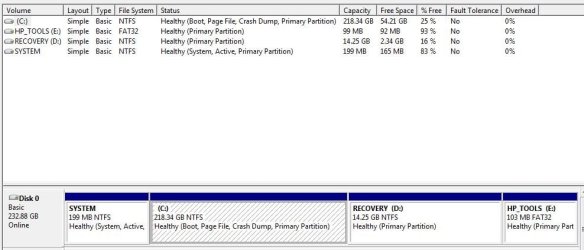
here disk management

Thanks for the instructions. I was using the image icon instead of paper clip.
Is sfc /scannow same as the "Check Now" under drive properties - "Error checking"?
 

Attachments

  • diskman.JPG
    diskman.JPG
    45.3 KB · Views: 22

My Computer My Computer

Computer type
PC/Desktop
Computer Manufacturer/Model Number
HP Pavilion G72 laptop
OS
Win 7 Home premium 64 bit
CPU
Core i3 350M
Memory
4 gb
Your disk setup is standard. It shows nothing unusual. The next step would be to look into Event Viewer and see whether there are any particular events that need attention.

sfc/ scannow checks for corrupted system files and check now under drive properties checks problems on the disk.
 

My Computer My Computer

Computer Manufacturer/Model Number
HP, Dell, Gateway, Toshiba - 4 laptops and 2 desktops
OS
Vista, Windows7, Mint Mate, Zorin, Windows 8
CPU
from 1.6GHz Duo to i7
Monitor(s) Displays
2x HP w2207
Hard Drives
5x HDD, 7x SSD, 12x Externals
Keyboard
with trackball - no mices
Mouse
Trackball mice
Internet Speed
DSL 6000
Anything from Event Viewer I should post?

Other than taking 2.5 days to finish, "check now" under drive properties did not show any errors, neither did sfc /scannow. I uninstalled a few programs, nothing major, and did a Disk Cleanup. In the process of doing a full Malwarebytes scan now; going to do a full MS Essentials next. The laptop seems responsive as far as mouse moving around, but sluggish in doing things like opening programs, installing, uninstalling, things like install windows just hang around for a long time and sometimes I cancel, but in fact it really did finish installing the window just didn't close.

I started to "End Process Tree" while doing the Malwarebytes scan before coming to work, don't think any of them helped much in scan speed, but that's just a feeling, not a controlled test at all. The number scanned items jump by about 7 every second or two and the file being scanned just shows when the number updates. I was expecting it to show every single file being scanned scrolling very quickly where I can't read it like on my old desktop.

I think I'm going to try msconfig and disable startup items too. I know people here don't recommend using registry cleaners, but anything I can do to declutter besides uninstalling unneeded programs? Is there some Windows system file that's grown over the years that can be cleaned up somehow?
 

My Computer My Computer

Computer type
PC/Desktop
Computer Manufacturer/Model Number
HP Pavilion G72 laptop
OS
Win 7 Home premium 64 bit
CPU
Core i3 350M
Memory
4 gb
I think I'm going to try msconfig and disable startup items too
That's a good idea.

I know people here don't recommend using registry cleaners, but anything I can do to declutter besides uninstalling unneeded programs
Cleaning the registry in Windows 7 is a useless exercise and can get you into more trouble.
 

My Computer My Computer

Computer Manufacturer/Model Number
HP, Dell, Gateway, Toshiba - 4 laptops and 2 desktops
OS
Vista, Windows7, Mint Mate, Zorin, Windows 8
CPU
from 1.6GHz Duo to i7
Monitor(s) Displays
2x HP w2207
Hard Drives
5x HDD, 7x SSD, 12x Externals
Keyboard
with trackball - no mices
Mouse
Trackball mice
Internet Speed
DSL 6000

My Computer My Computer

Computer type
PC/Desktop
Computer Manufacturer/Model Number
home built
OS
Multi-Boot W7_Pro_x64 W8.1_Pro_x64 W10_Pro_x64 +Linux_VMs +Chromium_VM
CPU
AMD Athlon II x4 620
Motherboard
Gigabyte GA-MA785G-UD3H
Memory
6GB GSkill DDR2 800
Graphics Card(s)
AMD 4670 GPU + AMD 4200 IGP
Sound Card
on board Realtek ALC889A
Monitor(s) Displays
RCA 40" LCD TV, Insignia 32" LCD TV, HP 15" LCD monitor
Screen Resolution
1680 x 1050
Hard Drives
OCZ Vertex 3 120GB,
Samsung F3 1TB (3),
Several others - WD, Seagate, Hitachi, ...
PSU
Corsair 500 W
Case
Rosewill mid tower
Cooling
CM 90mm rifle
Keyboard
Gyration wireless, Logitech wireless, Dell USB wired
Mouse
Gyration wireless, Logitech wireless, V7 USB wired
Internet Speed
Spectrum - 100Mbps D / 10Mbps U
Antivirus
Avast, MBAM3, EMET, WinPatrol
Browser
Pale Moon, Firefox, IE
Other Info
2 multi-boot PC's
Mainly HTPC/Office/Gen purpose (no gaming).
Trendnet USB KVM.
LG DVD burner/Blue Ray Player.
Tray system for removable SATA backup drives.

Not currently OCd, under-volted.
I use Hybrid sleep, rarely re-boot or shutdown.

Hauppauge HD-PVR, Avermedia PCIe TV Tuner, Hauppauge PCI TV Tuner.
It looks like your C (OS) partition is on the large side. I find ~50GB manageable to image on a regular basis. I'd move fairly static data off this partition and use imaging of this partition on a regular basis. You can backup fairly static data in other ways.
I would not recommend cloning as a regular efficient backup method.
 

My Computer My Computer

Computer type
PC/Desktop
Computer Manufacturer/Model Number
Own build
OS
Windows 7x64 Home Premium SP1
CPU
Intel i7 2600k
Motherboard
ASUS P8Z68 Deluxe
Memory
G.Skill Ripjaws (DDR3-1600) 2x4GB
Graphics Card(s)
Nvidia GeForce GTS 450; Intel HD Graphics 3000(GT2+)
Monitor(s) Displays
Dell Ultrasharp IPS panel U2311H, Samsung SyncMaster P2350
Screen Resolution
1920x1080
Hard Drives
Samsung 850 Pro SSD 256GB, Samsung SSD 840 120GB, Seagates 1TB Barracuda ST31000528AS x2
PSU
Seasonic M12II 520W
Case
Lian Li Lancool PC-K60
Cooling
Case: 1x120mm, 3x140mm CPU: Hyper 212+
Keyboard
Logitech MK520 (wireless)
Mouse
Logitech MK520
Internet Speed
6-7 Mbps
Antivirus
Norton Security Premium, Malwarebytes on 2 (MSE on 3rd PC)
Browser
FireFox
Other Info
Audio: Logitech Z523 2.1
So, what was the actual cause of the problem and what fixed it? This thread has been marked solved.
 

My Computer My Computer

Computer type
PC/Desktop
Computer Manufacturer/Model Number
Custom Build
OS
Win 7 Ultimate 64 bit
CPU
Intel i7-3930K
Motherboard
ASUS P9X79 WS
Memory
Kingston HyperX Genesis 32GB Kit (8x4GB Modules) 1600MHz DDR
Graphics Card(s)
MSI R7850 Twin Frozr 2GD5/OC Radeon HD 7850 2GB 256-bit GDDR
Sound Card
Asus Xonar Essence STX
Monitor(s) Displays
3x Asus VG248QE 24", Vizio 32" TV
Screen Resolution
1920 x 1080, ?
Hard Drives
Samsung 128GB 840 Pro SSD (1),
Samsung 4TB 850 EVO SSDs (4)
Samsung 4TB 850 EVO SSDs (16) external backup drives used in 2.5" hot swap bays in the computer.
PSU
Corsair HX750w
Case
Antec Two Hundred v2 (modified)
Cooling
Cooler Master GeminII S524 120mm (fan replaced with a 140mm)
Keyboard
Logitech G510s
Mouse
Logitech M525 (two in use)
Internet Speed
=< 32Mbps down, 8Mbps up
Antivirus
AVAST!, MBAM, SAS, Spybot S&D (all but MBAM free) Glary Util
Browser
IE11
Other Info
LSI 9211-8i HBA card (8 SATA III ports), 2.5" & 3.5" Hot Swap Bays, HooToo HT-CR001 PCI-E to USB 3.0 Internal Hub + 6 Slot Card Reader, and LG Model CH12LS28 BD-ROM Optical Drive. Also, ScanSnap S1500 ADF duplexing scanner, Canon 9000F flat bed scanner, Corsair SP2500 2.1 speakers, Samsung CLP 415nw laser color printer, Cyberpower PP2200SW UPS
There is no one particular cause that solved the problem, I did a bunch of cleanup and now it runs a lot smoother. The various links to tutorials other posters have suggested helped and led me to other tutorials: Disk Cleanup, using msconfig to limit startup, looking through and disabling services, uninstall unneeded programs, emptying recycling bin, Malwarebyte and AV scan. I'm not a frequent user of this computer so it was not kept to my "housekeeping standards." Over time junk just piled up.

Upon looking over the Event Viewer, I did see Bonjour has a bunch of errors constantly. Goggled it, seems like others have had same problem. Disabled in startup it for now, considering uninstalling, but I'm not familiar with Apple stuff I don't know if it's needed for the iPhone. If iTunes doesn't work wife's not going to be happy no matter how smoothly the computer runs. Looks like Bonjour is for Apple networking hardware stuff; don't know why Apple would install it since I'm betting not many PC users use Apple network hardware.
 

My Computer My Computer

Computer type
PC/Desktop
Computer Manufacturer/Model Number
HP Pavilion G72 laptop
OS
Win 7 Home premium 64 bit
CPU
Core i3 350M
Memory
4 gb
Thank you. I'm going to be doing the same thing as you—cloning the HHD in my notebook to another one only, in this case, the clone is going to a hybrid HDD—and just wanted to be ready for as many potential problems as possible. The OS install on the notebook is pretty new so, hopefully, I won't run into any "clean up" issues.
 

My Computer My Computer

Computer type
PC/Desktop
Computer Manufacturer/Model Number
Custom Build
OS
Win 7 Ultimate 64 bit
CPU
Intel i7-3930K
Motherboard
ASUS P9X79 WS
Memory
Kingston HyperX Genesis 32GB Kit (8x4GB Modules) 1600MHz DDR
Graphics Card(s)
MSI R7850 Twin Frozr 2GD5/OC Radeon HD 7850 2GB 256-bit GDDR
Sound Card
Asus Xonar Essence STX
Monitor(s) Displays
3x Asus VG248QE 24", Vizio 32" TV
Screen Resolution
1920 x 1080, ?
Hard Drives
Samsung 128GB 840 Pro SSD (1),
Samsung 4TB 850 EVO SSDs (4)
Samsung 4TB 850 EVO SSDs (16) external backup drives used in 2.5" hot swap bays in the computer.
PSU
Corsair HX750w
Case
Antec Two Hundred v2 (modified)
Cooling
Cooler Master GeminII S524 120mm (fan replaced with a 140mm)
Keyboard
Logitech G510s
Mouse
Logitech M525 (two in use)
Internet Speed
=< 32Mbps down, 8Mbps up
Antivirus
AVAST!, MBAM, SAS, Spybot S&D (all but MBAM free) Glary Util
Browser
IE11
Other Info
LSI 9211-8i HBA card (8 SATA III ports), 2.5" & 3.5" Hot Swap Bays, HooToo HT-CR001 PCI-E to USB 3.0 Internal Hub + 6 Slot Card Reader, and LG Model CH12LS28 BD-ROM Optical Drive. Also, ScanSnap S1500 ADF duplexing scanner, Canon 9000F flat bed scanner, Corsair SP2500 2.1 speakers, Samsung CLP 415nw laser color printer, Cyberpower PP2200SW UPS
Thank you. I'm going to be doing the same thing as you—cloning the HHD in my notebook to another one only, in this case, the clone is going to a hybrid HDD—and just wanted to be ready for as many potential problems as possible. The OS install on the notebook is pretty new so, hopefully, I won't run into any "clean up" issues.

Have you considered imaging the drive and restoring it instead?
 

My Computer My Computer

Computer type
PC/Desktop
Computer Manufacturer/Model Number
Home built (GeneO industries)/Model 4
OS
Windows 10 Pro. EFI boot partition, full EFI boot
CPU
i7 4770k 4.4GHz (44-44-43-43 turbo) @ 1.248V
Motherboard
ASUS Maximus VI Hero
Memory
16GB (8GBx2) @2200 MHz G.skill Sniper 10-11-10-30-1, 1.6V
Graphics Card(s)
MSI GTX 970 Gaming 4G
Sound Card
Onboard SupremeFX Audio
Monitor(s) Displays
NEC Spectraview 2490WUXi-SV
Screen Resolution
1920 x 1200
Hard Drives
Samsung 850 Pro 256GB (OS), Samsung 2x 128GB 840 Pro SSD in RAID0, 3x WD Blue 6Gb/s 1TB RAID0, WD 2TB Black external USB 3.0, 2TB WD20EARS Green external USB 3.0, 2x 500GB Seagate and 1 750 GB external USB, 1x 350GB external USB3
PSU
Seasonic X-850 (2012 KM3 model)
Case
Fractal Design Define R4
Cooling
NH-D14, NF-F12, NF-A15; NF-P14, NF-P12,NF-A14, S12A PWM
Keyboard
Cooler Master Storm Quickfire Rapid - Brown
Mouse
Logitech G602
Internet Speed
126.4 Mb/s down, 24.3 Mb/s up
Other Info
USB 3.0 x8 , SATA III x8, eSATA, USB 2.0 x6. Samsung DVD R/W drive.

WEI: CPU 7.8, Memory 7.9, Graphics 7.9, Disk 7.9
Thank you. I'm going to be doing the same thing as you—cloning the HHD in my notebook to another one only, in this case, the clone is going to a hybrid HDD—and just wanted to be ready for as many potential problems as possible. The OS install on the notebook is pretty new so, hopefully, I won't run into any "clean up" issues.

Have you considered imaging the drive and restoring it instead?

More work and time that way. Cloning the existing HDD to the new hybrid HDD is a single operation, after which I just have to physically swap drives. With imaging, I would have to make an image of the drive to a third drive, "restore it" to the new drive—two operations—before I could do the physical swap.
 

My Computer My Computer

Computer type
PC/Desktop
Computer Manufacturer/Model Number
Custom Build
OS
Win 7 Ultimate 64 bit
CPU
Intel i7-3930K
Motherboard
ASUS P9X79 WS
Memory
Kingston HyperX Genesis 32GB Kit (8x4GB Modules) 1600MHz DDR
Graphics Card(s)
MSI R7850 Twin Frozr 2GD5/OC Radeon HD 7850 2GB 256-bit GDDR
Sound Card
Asus Xonar Essence STX
Monitor(s) Displays
3x Asus VG248QE 24", Vizio 32" TV
Screen Resolution
1920 x 1080, ?
Hard Drives
Samsung 128GB 840 Pro SSD (1),
Samsung 4TB 850 EVO SSDs (4)
Samsung 4TB 850 EVO SSDs (16) external backup drives used in 2.5" hot swap bays in the computer.
PSU
Corsair HX750w
Case
Antec Two Hundred v2 (modified)
Cooling
Cooler Master GeminII S524 120mm (fan replaced with a 140mm)
Keyboard
Logitech G510s
Mouse
Logitech M525 (two in use)
Internet Speed
=< 32Mbps down, 8Mbps up
Antivirus
AVAST!, MBAM, SAS, Spybot S&D (all but MBAM free) Glary Util
Browser
IE11
Other Info
LSI 9211-8i HBA card (8 SATA III ports), 2.5" & 3.5" Hot Swap Bays, HooToo HT-CR001 PCI-E to USB 3.0 Internal Hub + 6 Slot Card Reader, and LG Model CH12LS28 BD-ROM Optical Drive. Also, ScanSnap S1500 ADF duplexing scanner, Canon 9000F flat bed scanner, Corsair SP2500 2.1 speakers, Samsung CLP 415nw laser color printer, Cyberpower PP2200SW UPS
Thank you. I'm going to be doing the same thing as you—cloning the HHD in my notebook to another one only, in this case, the clone is going to a hybrid HDD—and just wanted to be ready for as many potential problems as possible. The OS install on the notebook is pretty new so, hopefully, I won't run into any "clean up" issues.

Have you considered imaging the drive and restoring it instead?

More work and time that way. Cloning the existing HDD to the new hybrid HDD is a single operation, after which I just have to physically swap drives. With imaging, I would have to make an image of the drive to a third drive, "restore it" to the new drive—two operations—before I could do the physical swap.

Agreed. After I determined the difference between cloning and imaging, I opted for cloning with the knowledge that they are functionally equivalent for my purposes. With other scenarios, imaging might be a better option.
 

My Computer My Computer

Computer type
PC/Desktop
Computer Manufacturer/Model Number
HP Pavilion G72 laptop
OS
Win 7 Home premium 64 bit
CPU
Core i3 350M
Memory
4 gb
Thank you. I'm going to be doing the same thing as you—cloning the HHD in my notebook to another one only, in this case, the clone is going to a hybrid HDD—and just wanted to be ready for as many potential problems as possible. The OS install on the notebook is pretty new so, hopefully, I won't run into any "clean up" issues.

Have you considered imaging the drive and restoring it instead?

More work and time that way. Cloning the existing HDD to the new hybrid HDD is a single operation, after which I just have to physically swap drives. With imaging, I would have to make an image of the drive to a third drive, "restore it" to the new drive—two operations—before I could do the physical swap.
I guess you do what you are comfortable with. I have never bothered with cloning. There may be 2 operations with imaging but it is faster in the end and every image can restore your existing HDD or restore to a new HDD straight out of box.
 

My Computer My Computer

Computer type
PC/Desktop
Computer Manufacturer/Model Number
Own build
OS
Windows 7x64 Home Premium SP1
CPU
Intel i7 2600k
Motherboard
ASUS P8Z68 Deluxe
Memory
G.Skill Ripjaws (DDR3-1600) 2x4GB
Graphics Card(s)
Nvidia GeForce GTS 450; Intel HD Graphics 3000(GT2+)
Monitor(s) Displays
Dell Ultrasharp IPS panel U2311H, Samsung SyncMaster P2350
Screen Resolution
1920x1080
Hard Drives
Samsung 850 Pro SSD 256GB, Samsung SSD 840 120GB, Seagates 1TB Barracuda ST31000528AS x2
PSU
Seasonic M12II 520W
Case
Lian Li Lancool PC-K60
Cooling
Case: 1x120mm, 3x140mm CPU: Hyper 212+
Keyboard
Logitech MK520 (wireless)
Mouse
Logitech MK520
Internet Speed
6-7 Mbps
Antivirus
Norton Security Premium, Malwarebytes on 2 (MSE on 3rd PC)
Browser
FireFox
Other Info
Audio: Logitech Z523 2.1
Have you considered imaging the drive and restoring it instead?

More work and time that way. Cloning the existing HDD to the new hybrid HDD is a single operation, after which I just have to physically swap drives. With imaging, I would have to make an image of the drive to a third drive, "restore it" to the new drive—two operations—before I could do the physical swap.
I guess you do what you are comfortable with. I have never bothered with cloning. There may be 2 operations with imaging but it is faster in the end and every image can restore your existing HDD or restore to a new HDD straight out of box.

Actually, cloning is significantly faster, far simpler, and doesn't require a third drive (or extra space on the original drive, something that isn't always available), especially when transferring to a single drive. Transferring to multiple drives might be faster with imaging.
 

My Computer My Computer

Computer type
PC/Desktop
Computer Manufacturer/Model Number
Custom Build
OS
Win 7 Ultimate 64 bit
CPU
Intel i7-3930K
Motherboard
ASUS P9X79 WS
Memory
Kingston HyperX Genesis 32GB Kit (8x4GB Modules) 1600MHz DDR
Graphics Card(s)
MSI R7850 Twin Frozr 2GD5/OC Radeon HD 7850 2GB 256-bit GDDR
Sound Card
Asus Xonar Essence STX
Monitor(s) Displays
3x Asus VG248QE 24", Vizio 32" TV
Screen Resolution
1920 x 1080, ?
Hard Drives
Samsung 128GB 840 Pro SSD (1),
Samsung 4TB 850 EVO SSDs (4)
Samsung 4TB 850 EVO SSDs (16) external backup drives used in 2.5" hot swap bays in the computer.
PSU
Corsair HX750w
Case
Antec Two Hundred v2 (modified)
Cooling
Cooler Master GeminII S524 120mm (fan replaced with a 140mm)
Keyboard
Logitech G510s
Mouse
Logitech M525 (two in use)
Internet Speed
=< 32Mbps down, 8Mbps up
Antivirus
AVAST!, MBAM, SAS, Spybot S&D (all but MBAM free) Glary Util
Browser
IE11
Other Info
LSI 9211-8i HBA card (8 SATA III ports), 2.5" & 3.5" Hot Swap Bays, HooToo HT-CR001 PCI-E to USB 3.0 Internal Hub + 6 Slot Card Reader, and LG Model CH12LS28 BD-ROM Optical Drive. Also, ScanSnap S1500 ADF duplexing scanner, Canon 9000F flat bed scanner, Corsair SP2500 2.1 speakers, Samsung CLP 415nw laser color printer, Cyberpower PP2200SW UPS
I like cloning myself. D: is my cloned drive, if C: has a problem, just reboot and choose D: as the start up. Its a 30 second operation. The cloning process is a "smart" process. i.e. only clones the files that have changed since last clone. Not to be confused with incremental backup. If I do it once per week, it is a 4-7 minute process, without interrupting your current work. When C: might have a problem, I boot to D:, clone D: back to C: (assuming it was not a hardware problem) The more often I clone, the less amount of catchup I have to do. :p
 

My Computer My Computer

Computer type
PC/Desktop
Computer Manufacturer/Model Number
Self Build
OS
Windows 7 Professional X64 Service Pack 1
CPU
AMD Phenom II X4 955 3.20GHz
Motherboard
Gigabyte GA-MA790X-UD4P
Memory
8G
Graphics Card(s)
GX550 Ti
Sound Card
On board
Monitor(s) Displays
Asus VW246H & Syncmaster 2243swx
Screen Resolution
1920x1080 & 1920x1080
Hard Drives
M4-CT128 SSD2, Samsung 840 256GB, 1 WDC 1TB
PSU
Corsair TX750W-V2
Case
Antec
Cooling
2 120mm fan
Keyboard
Microsoft Wireless 3050
Mouse
Microsoft Wireless 5000
Internet Speed
72/6Mbs (Cable)
Other Info
Asus AC1900 router, 8 port Trendnet Switch - Logitech Webcam Pro 9000
Back
Top