Macrium Image Restoration -- A "D'oh" Question

Sesitos

New member
Local time
8:18 PM
Messages
19
Well. I've got a tiny little problem with html (etc) files not showing up with the proper (firefox) icon, and system restore has not worked remotely reliably on my machine for some time. And has not now.

So, one option is to restore (or whatever the correct verb is) the last Macrium Image I created (C (OS) Drive) - which (I believe) was created at a time before the silly icon problem surfaced. As I understand it, that should solve the problem.

However, as I contemplate restoring this image, it occurs to me for the first time that my C (OS)Drive will -- as a result of the "restore" be rolled back to that image, which means - does it not ? - that all data files which have been created and saved there in the interim will vanish into the aether.

So this is my "d'oh" question, part 1. Is the last paragraph, above, accurate?

If so, then "obviously" I should make backups of where I store files on my C drive; backup my firefox bookmarks; and backup my LiveMail emails and contacts - and save them to a different location. Prior to the "Macrium image restore", so that afterwards I can make everything hunkey-dorey again.

So this is my "d'oh" question, part 2. Is the last paragraph, above, accurate?

Sorry for asking what appears to be such a basic question, but this will be the first time I'm restoring a Macrium Image to my "working computer", and I approach it with a little trepidation. Trepidation both because (1) this is, after all, my "working computer" whose OS I am intending to wipe out and replace, and because (2) the exercise will be a pain in the ass more than generally might otherwise be the case, since the image was taken right after I installed Microsoft Word (Office XP 2002), but before the deluge of Word updates following that install were themselves installed. As such, once I get the saved image "restored", it will be a bit of work to get things back to normal again (and no doubt there are other intervening Windows updates in the mix as well . . .)

Thanks in advance for your comments/responses.
 

My Computer

Computer Manufacturer/Model Number
HP 6510-f
OS
Windows 7 Home Premium 64bit
CPU
AMD Athlon II x4 630 2.8 GH
Memory
4 gb
Sorry, but I am not sure what your question is. You are correct in that it will restore the image to the way the computer was at the time the image was taken. The procedure is quite simple and quick with Macrium. It is quite easy to restore your files and folders after the backup. Just make sure to back them up first. The only issue will be the programs you installed since the image was taken and yes the updates too. I hope these answered your questions.

BTW, In the future, to avoid these issues you should consider making frequent backups. I make a backup every day. I also backup to an internal hard drive and 2 external hard drives. You can never trust a hard drive. I learned the hard way. There is also a simple program that will backup all of your user folders. Microsoft Synctoy. I use that daily. User files, to me, are the most important. You can reinstall the OS and programs if necessary, but you can't replace many documents, family photos and the like. I hope this has helped. If not write back and I will try to answer your questions.
 

My Computers

System One System Two

  • Computer type
    PC/Desktop
    Computer Manufacturer/Model Number
    ALWAYS UNDER CONSTRUCTION
    OS
    Windows 11 Pro
    CPU
    Ryzen 9 5900X
    Motherboard
    Asus X570 Crosshair Viii Hero
    Memory
    32GB G Skill DDR4-3600
    Graphics Card(s)
    EVGA RTX 3080 FTW 3 Ultra
    Sound Card
    On Board/Sennheiser PC37X Headset
    Monitor(s) Displays
    3 X Asus 27"
    Screen Resolution
    2560x1440
    Hard Drives
    2 X 1 TB NVME drives
    PSU
    EVGA 850
    Case
    Phanteks Eclipse P400A
    Cooling
    EVGA 280 AIO
    Keyboard
    Logitech G510s/ Logitech G13
    Mouse
    Logitech G502
    Internet Speed
    24/1
    Antivirus
    ESET/MBAM Pro/SAS Pro
    Browser
    Chrome/ Firefox/ Edge
  • Computer type
    Laptop
    System Manufacturer/Model Number
    Dell 16 Plus
    OS
    Windows 11 Pro
    CPU
    Intel Ultra 9 288V
    Memory
    32 GB LPDDR5X 8533
    Monitor(s) Displays
    16" Mini-LED HDR600 Touch 90 Hz
    Screen Resolution
    2560X1600
    Hard Drives
    1 TB NVME
essenbe gave you good advice. :)

You could also try using the Windows Backup tool to save your data to another drive or partition before restoring the image. The most straightforward method would be to just copy it over manually, and is what I'd recommend. Make sure you get the folders for any saved games, documents, music, videos, email, etc. Then just copy it back in after the image has been restored and you've reinstalled any programs which have been installed since you made the image.

For that matter, restoring the image to a spare drive is probably the safest way to go. That way your current drive will be intact in case you need a "do-over".

I couldn't agree more with what essenbe told you about frequent backups. I have my data (all types) backed up to a separate drive every night and do a full C: image weekly on Sunday morning. If my drive croaked right now I would still have all my data and would only have to worry about any system changes made in the last three days. :geek:
 

My Computer

Computer Manufacturer/Model Number
Self
OS
Main - Windows 7 Pro SP1 64-Bit; 2nd - Windows Server 2008 R2
CPU
Main - Core i7 2600K; 2nd - Core i7 920
Motherboard
Main - Asus P8Z68-V Pro/Gen3; 2nd - Gigabyte GA-EX58-UDR3
Memory
Main - 16GB Corsair Vengeance; 2nd - 12GB Corsair Vengeance
Graphics Card(s)
Main - XFX Radeon 6870 1GB; 2nd - XFX Radeon 4870 1GB
Sound Card
Both: Onboard Realtek Azalia
Monitor(s) Displays
Main - Hann 25" + I-INC 25" + Acer 23"; 2nd - Upgrading Soon
Screen Resolution
Main - 1920x1080 (All Three Monitors); 2nd - Upgrading Soon
Hard Drives
Main - (1) Crucial M4 128GB (Boot)
Main - (1) Seagate 2TB 64MB Cache (Data)
Main - (1) Seagate 2TB 64MB Cache (Data Backup)
2nd - (1) Intel X25-M SSD 80GB (Boot)
2nd - (3) Seagate 1TB 32MB Cache (Data Backup)
2nd - (1) Seagate 320GB (Because)
PSU
Main - OCZ 600W Modular; 2nd - OCZ 600W
Case
Main - Thermaltake Element G; 2nd - NZXT something or other
Cooling
Main - Corsair H80; 2nd - Prolimatech Megahalems
Keyboard
Main - Razer Reclusa; 2nd - Old MS Keyboard
Mouse
Main - Logitech MX Revolution; 2nd - Old MS Mouse
Internet Speed
20Mbps Time-Warner Cable
  • Like
Reactions: JMH
Thanks for the vote of confidence profdlp. I just happen to be a fanatic about backups. I always clone my OS to another hard drive frequently- just in case. I've lost everything before and learned the 'error of my ways'. I just didn't tell him I use 3 different backup programs to do backups.
 

My Computers

System One System Two

  • Computer type
    PC/Desktop
    Computer Manufacturer/Model Number
    ALWAYS UNDER CONSTRUCTION
    OS
    Windows 11 Pro
    CPU
    Ryzen 9 5900X
    Motherboard
    Asus X570 Crosshair Viii Hero
    Memory
    32GB G Skill DDR4-3600
    Graphics Card(s)
    EVGA RTX 3080 FTW 3 Ultra
    Sound Card
    On Board/Sennheiser PC37X Headset
    Monitor(s) Displays
    3 X Asus 27"
    Screen Resolution
    2560x1440
    Hard Drives
    2 X 1 TB NVME drives
    PSU
    EVGA 850
    Case
    Phanteks Eclipse P400A
    Cooling
    EVGA 280 AIO
    Keyboard
    Logitech G510s/ Logitech G13
    Mouse
    Logitech G502
    Internet Speed
    24/1
    Antivirus
    ESET/MBAM Pro/SAS Pro
    Browser
    Chrome/ Firefox/ Edge
  • Computer type
    Laptop
    System Manufacturer/Model Number
    Dell 16 Plus
    OS
    Windows 11 Pro
    CPU
    Intel Ultra 9 288V
    Memory
    32 GB LPDDR5X 8533
    Monitor(s) Displays
    16" Mini-LED HDR600 Touch 90 Hz
    Screen Resolution
    2560X1600
    Hard Drives
    1 TB NVME

My Computer

Computer Manufacturer/Model Number
Self
OS
Main - Windows 7 Pro SP1 64-Bit; 2nd - Windows Server 2008 R2
CPU
Main - Core i7 2600K; 2nd - Core i7 920
Motherboard
Main - Asus P8Z68-V Pro/Gen3; 2nd - Gigabyte GA-EX58-UDR3
Memory
Main - 16GB Corsair Vengeance; 2nd - 12GB Corsair Vengeance
Graphics Card(s)
Main - XFX Radeon 6870 1GB; 2nd - XFX Radeon 4870 1GB
Sound Card
Both: Onboard Realtek Azalia
Monitor(s) Displays
Main - Hann 25" + I-INC 25" + Acer 23"; 2nd - Upgrading Soon
Screen Resolution
Main - 1920x1080 (All Three Monitors); 2nd - Upgrading Soon
Hard Drives
Main - (1) Crucial M4 128GB (Boot)
Main - (1) Seagate 2TB 64MB Cache (Data)
Main - (1) Seagate 2TB 64MB Cache (Data Backup)
2nd - (1) Intel X25-M SSD 80GB (Boot)
2nd - (3) Seagate 1TB 32MB Cache (Data Backup)
2nd - (1) Seagate 320GB (Because)
PSU
Main - OCZ 600W Modular; 2nd - OCZ 600W
Case
Main - Thermaltake Element G; 2nd - NZXT something or other
Cooling
Main - Corsair H80; 2nd - Prolimatech Megahalems
Keyboard
Main - Razer Reclusa; 2nd - Old MS Keyboard
Mouse
Main - Logitech MX Revolution; 2nd - Old MS Mouse
Internet Speed
20Mbps Time-Warner Cable
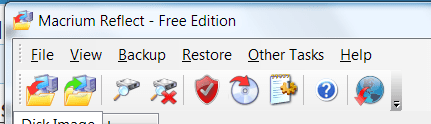
One thing you can do is make a new image then after you restore your old image you can mount that new image and copy any files from it back to your system. This way in case you missed something you need you can still get it back. Click on the 3rd Icon from left and it will let you mount the image and it will show up under a new drive letter. The 4th Icon will unmount it.

Image.PNG

Jim :geek:
 

My Computer

Computer type
PC/Desktop
Computer Manufacturer/Model Number
Home Built
OS
Windows 8.1 Pro w/Media Center 64bit, Windows 7 HP 64bit
CPU
Phenom II X6 1100T
Motherboard
ASUS M5A99X EVO
Memory
Crucial Balistic 8gb DDR3-1866 CL9
Graphics Card(s)
MSI R6850 Cyclone IGD5 PE
Sound Card
On Board
Monitor(s) Displays
ASUS VE258Q 25" LED with DVI-HDMI-DisplayPort
Screen Resolution
1920 x 1080
Hard Drives
Two WD Cavier Black 2TB Sata III, WD My Book Essential 2TB USB 3.0
PSU
Seasonic X650 80 Plus GOLD Modular
Case
Corsair 400R
Cooling
Antec Kuhler H2O 620, Two 120mm and four 140mm
Keyboard
Logitech K120
Mouse
Logitech Marble Mouse USB, Logitech Precision Game Pad
Internet Speed
15MB
Antivirus
Norton IS 2013, Malwarebytes Pro Beta 2
Browser
IE-11, FF-27
Other Info
APC UPS ES 750, Netgear WNR3500L Gigabit & Wireless N Router with SamKnows Test Program, Motorola SB6120 Gigabit Cable Modem. Brother HL-2170W Laser Printer, Epson V300 Scanner
One thing you can do is make a new image then after you restore your old image you can mount that new image and copy any files from it back to your system. This way in case you missed something you need you can still get it back. Click on the 3rd Icon from left and it will let you mount the image and it will show up under a new drive letter. The 4th Icon will unmount it.

View attachment 156443

Jim :geek:
Good info. I use the program but didn't know that. +1
 

My Computers

System One System Two

  • Computer type
    PC/Desktop
    Computer Manufacturer/Model Number
    ALWAYS UNDER CONSTRUCTION
    OS
    Windows 11 Pro
    CPU
    Ryzen 9 5900X
    Motherboard
    Asus X570 Crosshair Viii Hero
    Memory
    32GB G Skill DDR4-3600
    Graphics Card(s)
    EVGA RTX 3080 FTW 3 Ultra
    Sound Card
    On Board/Sennheiser PC37X Headset
    Monitor(s) Displays
    3 X Asus 27"
    Screen Resolution
    2560x1440
    Hard Drives
    2 X 1 TB NVME drives
    PSU
    EVGA 850
    Case
    Phanteks Eclipse P400A
    Cooling
    EVGA 280 AIO
    Keyboard
    Logitech G510s/ Logitech G13
    Mouse
    Logitech G502
    Internet Speed
    24/1
    Antivirus
    ESET/MBAM Pro/SAS Pro
    Browser
    Chrome/ Firefox/ Edge
  • Computer type
    Laptop
    System Manufacturer/Model Number
    Dell 16 Plus
    OS
    Windows 11 Pro
    CPU
    Intel Ultra 9 288V
    Memory
    32 GB LPDDR5X 8533
    Monitor(s) Displays
    16" Mini-LED HDR600 Touch 90 Hz
    Screen Resolution
    2560X1600
    Hard Drives
    1 TB NVME
You guys and this forum are awesome. Thanks so much for clarifying things, alleviating my apprehensions, and in providing such on-point and helpful advice, tips and links. And so quick as well. Reps all-round. Thanks!
 

My Computer

Computer Manufacturer/Model Number
HP 6510-f
OS
Windows 7 Home Premium 64bit
CPU
AMD Athlon II x4 630 2.8 GH
Memory
4 gb
This is the best forum on the internet. If you need other help, someone here is always willing to assist. And Thanks.
 

My Computers

System One System Two

  • Computer type
    PC/Desktop
    Computer Manufacturer/Model Number
    ALWAYS UNDER CONSTRUCTION
    OS
    Windows 11 Pro
    CPU
    Ryzen 9 5900X
    Motherboard
    Asus X570 Crosshair Viii Hero
    Memory
    32GB G Skill DDR4-3600
    Graphics Card(s)
    EVGA RTX 3080 FTW 3 Ultra
    Sound Card
    On Board/Sennheiser PC37X Headset
    Monitor(s) Displays
    3 X Asus 27"
    Screen Resolution
    2560x1440
    Hard Drives
    2 X 1 TB NVME drives
    PSU
    EVGA 850
    Case
    Phanteks Eclipse P400A
    Cooling
    EVGA 280 AIO
    Keyboard
    Logitech G510s/ Logitech G13
    Mouse
    Logitech G502
    Internet Speed
    24/1
    Antivirus
    ESET/MBAM Pro/SAS Pro
    Browser
    Chrome/ Firefox/ Edge
  • Computer type
    Laptop
    System Manufacturer/Model Number
    Dell 16 Plus
    OS
    Windows 11 Pro
    CPU
    Intel Ultra 9 288V
    Memory
    32 GB LPDDR5X 8533
    Monitor(s) Displays
    16" Mini-LED HDR600 Touch 90 Hz
    Screen Resolution
    2560X1600
    Hard Drives
    1 TB NVME
However, as I contemplate restoring this image, it occurs to me for the first time that my C (OS)Drive will -- as a result of the "restore" be rolled back to that image, which means - does it not ? - that all data files which have been created and saved there in the interim will vanish into the aether.

So this is my "d'oh" question, part 1. Is the last paragraph, above, accurate?

If so, then "obviously" I should make backups of where I store files on my C drive; backup my firefox bookmarks; and backup my LiveMail emails and contacts - and save them to a different location. Prior to the "Macrium image restore", so that afterwards I can make everything hunkey-dorey again.

So this is my "d'oh" question, part 2. Is the last paragraph, above, accurate?

You are correct on all counts.

That is one of the shortcomings of imaging when you keep data on the same drive as the OS.

When you restore the OS, you also restore older data files, even when you have newer files and newer versions of old files.

All the more reason to keep data on a separate partition and to use something other than imaging to back up data files. There are many programs, free and otherwise, that can be used to back up data only WITHOUT making an image. I run such a program daily--takes less than 1 minute. I make images of my OS separately every month or so.
 

My Computer

Computer type
PC/Desktop
Computer Manufacturer/Model Number
Ignatz Special; 4 speed manual gearbox; factory air conditioning; one of one
OS
Windows 7 Home Premium SP1, 64-bit
CPU
Intel Skylake i5-6600K, not overclocked
Motherboard
AsRock Z170M Extreme 4, micro ATX
Memory
8 GB HyperX DDR4-2666 (2 x 4 GB)
Graphics Card(s)
none; graphics are integrated on CPU
Sound Card
onboard: Realtek ALC1150; external: USB Behringer UF0-202
Monitor(s) Displays
Dell S2340M 23 inch IPS
Screen Resolution
1600 x 900
Hard Drives
System: Crucial MX100 series SSD, 128 GB;
Data: Samsung Spinpoint 103SJ, 1 TB;
Backup: WD Caviar Green WD30EZRX-00D8PB0, 3 TB
PSU
Rosewill SilentNight 500 watt fanless, semi-modular
Case
Antec Solo II
Cooling
Noctua NH-U12S; Noctua F12 intake, Noctua S12A exhaust
Keyboard
Microsoft 200 6JH-00001 USB
Mouse
Dell or Microsoft optical wired; USB
Antivirus
Microsoft Security Essentials and Malwarebytes Premium
Browser
Pale Moon
Other Info
All fans PWM; speeds at idle: CPU circa 500 rpm; intake circa 600 rpm; exhaust circa 600 rpm; CPU temps 27 idle and 47 C load in a warm room (27 C/81 F) when running Intel Extreme Tuning Utility stress test.
  • Like
Reactions: JMH
Back
Top