Solved Macrium oddities...!

paulobao

New member
Member
VIP
Local time
3:37 PM
Messages
197
Hi,
Me again but I need to report this guessing someone have an explanation and could help solve this!
I started using free Macrium for imaging today :-). I've made some experiments with imaging and restoring with great sucess! So, what have I so odd to report? Here what:
I made 2 Macrium_PE bootable rescue media
a- one using a usb flash as the media
b- one using a dvd as the media.

With option "a" I can use my usb3 port and see the external usb3 disc!
With option "b" I cannot use my usb3 port only usb2!

So I opened both "Drives/Usb" folders in the usb flash and in the dvd and I've found that the folder is empty when the media is dvd and that the folder have the usb drives when the media is usb flash!
I've tried (burned) several dvds and the result is allways empty USB folders!

Anyone with the same report?

Cheers,
paulo
 

My Computer

Computer Manufacturer/Model Number
Toshiba Tecra R840
OS
Windows 7 Professional 64 bit
CPU
I7 2640M
Memory
8 GB
Graphics Card(s)
AMD Radeo HD 6450M
Monitor(s) Displays
HD+ 14 inch
Hard Drives
HDD 500GB 7200 rpm
How did you make bootable usb?
How did you make bootable dvd?

Please describe what you did
 

My Computer

Computer type
Laptop
Computer Manufacturer/Model Number
ACER ASPIRE 5742G
OS
Microsoft Windows 7 Home Premium 64-bits 7601 Multiprocessor Free Service Pack 1
CPU
Intel(R) Core(TM) i3 CPU M 370 @ 2.40GHz
Motherboard
Acer Aspire 5742G
Memory
4,00 GB
Graphics Card(s)
ATI Mobility Radeon HD 5400 Series
Sound Card
(1) AMD High Definition Audio Device (2) Realtek High Defi
Screen Resolution
1366 x 768 x 32 bits (4294967296 colors) @ 60 Hz
Hard Drives
WDC WD5000BEVT-22ZAT0
Hi,

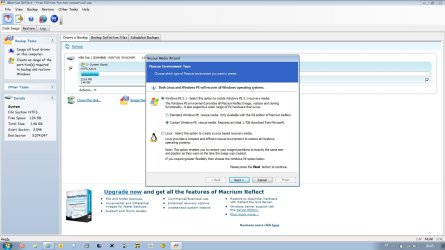
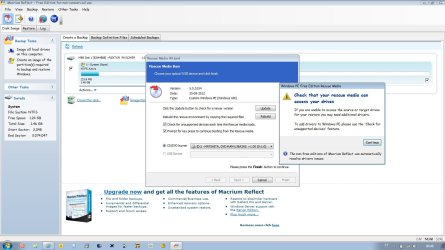
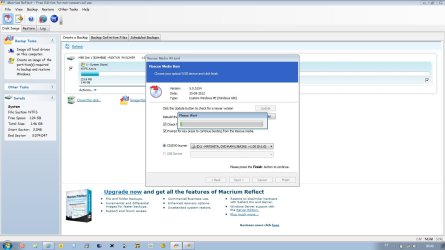
Please see pics (for the dvd)!
Same for the USB flash!

I have the WAIK installed in my ssd! (do not need to download it)

paulo
 

Attachments

  • 1.jpg
    1.jpg
    301.6 KB · Views: 17
  • 2.jpg
    2.jpg
    313.1 KB · Views: 12
  • 3.jpg
    3.jpg
    272.4 KB · Views: 8

My Computer

Computer Manufacturer/Model Number
Toshiba Tecra R840
OS
Windows 7 Professional 64 bit
CPU
I7 2640M
Memory
8 GB
Graphics Card(s)
AMD Radeo HD 6450M
Monitor(s) Displays
HD+ 14 inch
Hard Drives
HDD 500GB 7200 rpm
Magic ISO:
->tools->make ISO from CD/DVD (now you have a copy of CD as an ISO file)
open that ISO in "MAGIC ISO" program (file->open)
drag the missing folders/files into the ISO. You told me it was "Drives/Usb"
->tools->Burn CD/DVD with ISO
Now it should be fine I hope.
Very strange btw. Please post results
 

My Computer

Computer type
Laptop
Computer Manufacturer/Model Number
ACER ASPIRE 5742G
OS
Microsoft Windows 7 Home Premium 64-bits 7601 Multiprocessor Free Service Pack 1
CPU
Intel(R) Core(TM) i3 CPU M 370 @ 2.40GHz
Motherboard
Acer Aspire 5742G
Memory
4,00 GB
Graphics Card(s)
ATI Mobility Radeon HD 5400 Series
Sound Card
(1) AMD High Definition Audio Device (2) Realtek High Defi
Screen Resolution
1366 x 768 x 32 bits (4294967296 colors) @ 60 Hz
Hard Drives
WDC WD5000BEVT-22ZAT0
Hi,
Thanks for the info! I will skip it anyway because I found this:

Even if I can see the USB3.0 external hdd when it is pluged via usb3.0 port I cannot restore to it! No problems with image backup to this hdd connected via usb 3.0 though!!!!

- I made a test partition in my USB3.0 external drive;
- put some folders in that test partition
- made an image of my test partition
- deleted all the folders in my test partition.

Boot via USB flash (the one with the usb3.0 drives)

- I can see my usb3.0 external drive and the test partition
- try to restore but it is impossible!

Unpluged the USB3.0 drive from the usb3.0 port and pluged it to a USB2.0 port

- I can see my usb3.0 external drive and the test partition
- I restore the test partition with 100% sucess!!

Same test using the CD instead the usb flash.

- I only can see the USB3.0 external hdd when it is connected via usb2.0
- when connected via usb2.0, 100% sucess for the restore process!

So, and as a conclusion:

- I will make the images to the USB3.0 external hdd with it connected via USB3.0 port (much quicker..11 min for 70 GB)
- I will restore the images from the USB3.0 external hdd with it connected via USB2.0 port (because is the only way to achieve a restore)

Cheers,
paulo
 

My Computer

Computer Manufacturer/Model Number
Toshiba Tecra R840
OS
Windows 7 Professional 64 bit
CPU
I7 2640M
Memory
8 GB
Graphics Card(s)
AMD Radeo HD 6450M
Monitor(s) Displays
HD+ 14 inch
Hard Drives
HDD 500GB 7200 rpm
- I can see my usb3.0 external drive and the test partition
- try to restore but it is impossible!

=>Did you scan for "unsupported devices" when booting into macrium from usb 3.0 drive?
Did it say something like "usb driver not loaded"?
If so press "scan" and search root=C:\
-------------
macrium in windows can backup to and restore from all devices as long as win7 can see them itself. So also usb3.0
 

My Computer

Computer type
Laptop
Computer Manufacturer/Model Number
ACER ASPIRE 5742G
OS
Microsoft Windows 7 Home Premium 64-bits 7601 Multiprocessor Free Service Pack 1
CPU
Intel(R) Core(TM) i3 CPU M 370 @ 2.40GHz
Motherboard
Acer Aspire 5742G
Memory
4,00 GB
Graphics Card(s)
ATI Mobility Radeon HD 5400 Series
Sound Card
(1) AMD High Definition Audio Device (2) Realtek High Defi
Screen Resolution
1366 x 768 x 32 bits (4294967296 colors) @ 60 Hz
Hard Drives
WDC WD5000BEVT-22ZAT0

My Computer

Computer type
Laptop
Computer Manufacturer/Model Number
ACER ASPIRE 5742G
OS
Microsoft Windows 7 Home Premium 64-bits 7601 Multiprocessor Free Service Pack 1
CPU
Intel(R) Core(TM) i3 CPU M 370 @ 2.40GHz
Motherboard
Acer Aspire 5742G
Memory
4,00 GB
Graphics Card(s)
ATI Mobility Radeon HD 5400 Series
Sound Card
(1) AMD High Definition Audio Device (2) Realtek High Defi
Screen Resolution
1366 x 768 x 32 bits (4294967296 colors) @ 60 Hz
Hard Drives
WDC WD5000BEVT-22ZAT0
Hi,

I didn't see step 4 the first time I created the rescue media. Only 1,2,3 and 5! I mean, that is a one time run (I have the waik installed in my laptop and after the first installation, now I only see screen 1 and 5 when I create a new rescue media!)

And when I press scan for unsupported devices the result is "there'are no unsupported devices"!


paulo
 
Last edited:

My Computer

Computer Manufacturer/Model Number
Toshiba Tecra R840
OS
Windows 7 Professional 64 bit
CPU
I7 2640M
Memory
8 GB
Graphics Card(s)
AMD Radeo HD 6450M
Monitor(s) Displays
HD+ 14 inch
Hard Drives
HDD 500GB 7200 rpm
Hi,

afterall....I did not check all options :o.

Since this was an experiment, and I used an external USB3 hdd pluged via usb3 port, what I did was to create a test partition in that hdd and then create an image of that test partition! After that I tried to restore it to the same test partition! And yes, that's did not work!

But if I try to restore an image of my C disk (my entire system) using the image stored in the external usb3 hdd, pluged via usb3 port, it works :). And that it what really matters! So, no problem creating a full system image and restore it using the usb3 port :D.

paulo
 

My Computer

Computer Manufacturer/Model Number
Toshiba Tecra R840
OS
Windows 7 Professional 64 bit
CPU
I7 2640M
Memory
8 GB
Graphics Card(s)
AMD Radeo HD 6450M
Monitor(s) Displays
HD+ 14 inch
Hard Drives
HDD 500GB 7200 rpm

My Computer

Computer type
PC/Desktop
Computer Manufacturer/Model Number
Custom
OS
Win7 Pro 32-bit, Win8 Pro 32-bit
CPU
AMD Phenom II X6 1090T
Motherboard
Gigabyte
Memory
4GB ddr3 1300
Graphics Card(s)
AMD HD 4290 onboard
Sound Card
Builtin Realtek HD Audio
Monitor(s) Displays
Samsung 24" widescreen, LG 23" widescreen
Screen Resolution
1920x1200/1920x1080
Hard Drives
Kingston 256GB SSD
Keyboard
Logitech Illuminated Keyboard
Mouse
Logitech M705 wireless mouse
Antivirus
Norton Av 2013
Browser
IE v10
Magic ISO:
->tools->make ISO from CD/DVD (now you have a copy of CD as an ISO file)
open that ISO in "MAGIC ISO" program (file->open)
drag the missing folders/files into the ISO. You told me it was "Drives/Usb"
->tools->Burn CD/DVD with ISO

I did that too! The only thing is that after draging the missing folders you should save it again as an .iso file! Only after that I could burn it to the CD.
And yes, all files are there :)
The problem is that I made that in a old XP laptop (I did not want to install MagicIso in the new laptop). So, when I went to the new Win7 laptop and tried to boot from the CD (burned in the XP machine) I had no sucess! Only a normal win7 booting (and yes the boot priority is set to CD/DVD).
I guess that I need install MagicISO in the new laptop , right?

cheers,
paulo
 

My Computer

Computer Manufacturer/Model Number
Toshiba Tecra R840
OS
Windows 7 Professional 64 bit
CPU
I7 2640M
Memory
8 GB
Graphics Card(s)
AMD Radeo HD 6450M
Monitor(s) Displays
HD+ 14 inch
Hard Drives
HDD 500GB 7200 rpm
Hi,

problem solved :).
After installing MagicISO in the win7-64bit laptop and follow kaktussoft instructions...urrah! Now I can boot with the CD and see all my USB3.0 external hdd (connected via USB3.0 port).

Thanks kaktussoft for the precious help!
And thankfully I had that usbflash with the drives!

Cheers,
paulo
 

My Computer

Computer Manufacturer/Model Number
Toshiba Tecra R840
OS
Windows 7 Professional 64 bit
CPU
I7 2640M
Memory
8 GB
Graphics Card(s)
AMD Radeo HD 6450M
Monitor(s) Displays
HD+ 14 inch
Hard Drives
HDD 500GB 7200 rpm
Hi,

afterall....I did not check all options :o.

Since this was an experiment, and I used an external USB3 hdd pluged via usb3 port, what I did was to create a test partition in that hdd and then create an image of that test partition! After that I tried to restore it to the same test partition! And yes, that's did not work!

But if I try to restore an image of my C disk (my entire system) using the image stored in the external usb3 hdd, pluged via usb3 port, it works :). And that it what really matters! So, no problem creating a full system image and restore it using the usb3 port :D.

paulo

So after boot from rescue CD:
  • restore from image on usb3 to test partition doesn't work. image was on usb3 as well
  • restore from image on usb3 to internal harddisk works.
Correct?
Was the image you tried to restore located on "test partition"?
What was the error message anyway?

It supports usb3.0 out of the box since version 5 of macrium reflect
windows.png
WinPE 3.1 rescue environmentIncludes the latest version of the Microsoft Windows Preinstallation Environment offering support for more devices along with USB 3.0 support.

source: Feature List - Macrium Software
 

My Computer

Computer type
Laptop
Computer Manufacturer/Model Number
ACER ASPIRE 5742G
OS
Microsoft Windows 7 Home Premium 64-bits 7601 Multiprocessor Free Service Pack 1
CPU
Intel(R) Core(TM) i3 CPU M 370 @ 2.40GHz
Motherboard
Acer Aspire 5742G
Memory
4,00 GB
Graphics Card(s)
ATI Mobility Radeon HD 5400 Series
Sound Card
(1) AMD High Definition Audio Device (2) Realtek High Defi
Screen Resolution
1366 x 768 x 32 bits (4294967296 colors) @ 60 Hz
Hard Drives
WDC WD5000BEVT-22ZAT0
  • Like
Reactions: Arc
Hi,

problem solved :).
After installing MagicISO in the win7-64bit laptop and follow kaktussoft instructions...urrah! Now I can boot with the CD and see all my USB3.0 external hdd (connected via USB3.0 port).

Thanks kaktussoft for the precious help!
And thankfully I had that usbflash with the drives!

Cheers,
paulo
Glad it works now. Are you using macrium version 5? If so it should have worked with all those tricks
 

My Computer

Computer type
Laptop
Computer Manufacturer/Model Number
ACER ASPIRE 5742G
OS
Microsoft Windows 7 Home Premium 64-bits 7601 Multiprocessor Free Service Pack 1
CPU
Intel(R) Core(TM) i3 CPU M 370 @ 2.40GHz
Motherboard
Acer Aspire 5742G
Memory
4,00 GB
Graphics Card(s)
ATI Mobility Radeon HD 5400 Series
Sound Card
(1) AMD High Definition Audio Device (2) Realtek High Defi
Screen Resolution
1366 x 768 x 32 bits (4294967296 colors) @ 60 Hz
Hard Drives
WDC WD5000BEVT-22ZAT0
Hi,

I didn't see step 4 the first time I created the rescue media. Only 1,2,3 and 5! I mean, that is a one time run (I have the waik installed in my laptop and after the first installation, now I only see screen 1 and 5 when I create a new rescue media!)

And when I press scan for unsupported devices the result is "there'are no unsupported devices"!


paulo
In free version I don't have step 4 as well. And no extra drivers are added to rescue CD. But I need one the network card driver if I want to restore from network (which I don't want). I can install driver after installing from rescue CD and press "scan". It loads it from my win7 partition. But what if that partition has been totally corrupt?!

That's why step 4 is for! But I don't see it either. Did you see step 4 when creating usb flash rescue stuff? You have some drivers there you told me
 

My Computer

Computer type
Laptop
Computer Manufacturer/Model Number
ACER ASPIRE 5742G
OS
Microsoft Windows 7 Home Premium 64-bits 7601 Multiprocessor Free Service Pack 1
CPU
Intel(R) Core(TM) i3 CPU M 370 @ 2.40GHz
Motherboard
Acer Aspire 5742G
Memory
4,00 GB
Graphics Card(s)
ATI Mobility Radeon HD 5400 Series
Sound Card
(1) AMD High Definition Audio Device (2) Realtek High Defi
Screen Resolution
1366 x 768 x 32 bits (4294967296 colors) @ 60 Hz
Hard Drives
WDC WD5000BEVT-22ZAT0
Magic ISO:
->tools->make ISO from CD/DVD (now you have a copy of CD as an ISO file)
open that ISO in "MAGIC ISO" program (file->open)
drag the missing folders/files into the ISO. You told me it was "Drives/Usb"
->tools->Burn CD/DVD with ISO

I did that too! The only thing is that after draging the missing folders you should save it again as an .iso file! Only after that I could burn it to the CD.
And yes, all files are there :)
The problem is that I made that in a old XP laptop (I did not want to install MagicIso in the new laptop). So, when I went to the new Win7 laptop and tried to boot from the CD (burned in the XP machine) I had no sucess! Only a normal win7 booting (and yes the boot priority is set to CD/DVD).
I guess that I need install MagicISO in the new laptop , right?

cheers,
paulo
Not right! It should work. Can't new laptop boot from it? Maybe a faulty CD. Maybe laser not quite right.
 

My Computer

Computer type
Laptop
Computer Manufacturer/Model Number
ACER ASPIRE 5742G
OS
Microsoft Windows 7 Home Premium 64-bits 7601 Multiprocessor Free Service Pack 1
CPU
Intel(R) Core(TM) i3 CPU M 370 @ 2.40GHz
Motherboard
Acer Aspire 5742G
Memory
4,00 GB
Graphics Card(s)
ATI Mobility Radeon HD 5400 Series
Sound Card
(1) AMD High Definition Audio Device (2) Realtek High Defi
Screen Resolution
1366 x 768 x 32 bits (4294967296 colors) @ 60 Hz
Hard Drives
WDC WD5000BEVT-22ZAT0
Hi,

sorry the delay!

Yes, with that MagicISO trick everything is ok (at the end I bought a license for it!).
No, the new win7 64bit laptop couls not boot from the CD created in the XP laptop with MagicISO.

For some reason, I was abble to make that unique usb flash rescue with all the drives (USB3 and network) installed in the Drives folder! Now, if I try do replicate that in another USB flash I can't (I mean the resulting USB and Network folders inside the Drive folder are empty!!!). So, another oddity! Why could I make it few days ago and I can't anymore?

No, the image was not in the TEST partition but in another partition in the same USB3.0 external hdd! And even if I see both partitions, when I dig to the image and try to restore it...I can't! But if I go to another image (my backup folder, in the same USB3.0 external HDD, where I save Images of my laptop) and the try to restore it, I can do that! I realy can restore my laptop with an image backed up in that USB3.0 external hdd! But I can't restore a partition located in the external USB3.0 hdd with an image located in another partition of the same usb3.0 hdd!

Why? I don't know since I'm no expert in this stuff! Anyway it was just a test and I think I will never needed to restore a partition of an external portable hdd because....I have only one partition! (that "TEST" one was created only for the experiment!).
So, in the real world (that is what really matters) , now I have the ability to:
- create images of my laptop ssd to an USB3.0 external hdd connected via a USB3.0 port
- restore using images stored in an USB3.0 external hdd connected via a USB3.0 port.

Maybe the non free versions have not those odd things!

Cheers,
paulo
 

My Computer

Computer Manufacturer/Model Number
Toshiba Tecra R840
OS
Windows 7 Professional 64 bit
CPU
I7 2640M
Memory
8 GB
Graphics Card(s)
AMD Radeo HD 6450M
Monitor(s) Displays
HD+ 14 inch
Hard Drives
HDD 500GB 7200 rpm
Hi,

I didn't see step 4 the first time I created the rescue media. Only 1,2,3 and 5! I mean, that is a one time run (I have the waik installed in my laptop and after the first installation, now I only see screen 1 and 5 when I create a new rescue media!)

And when I press scan for unsupported devices the result is "there'are no unsupported devices"!


paulo
Did you ever see step 4? you must have otherwise drivers are not in drivers subfolder. How the heck did you achieve that?!!
 

My Computer

Computer type
Laptop
Computer Manufacturer/Model Number
ACER ASPIRE 5742G
OS
Microsoft Windows 7 Home Premium 64-bits 7601 Multiprocessor Free Service Pack 1
CPU
Intel(R) Core(TM) i3 CPU M 370 @ 2.40GHz
Motherboard
Acer Aspire 5742G
Memory
4,00 GB
Graphics Card(s)
ATI Mobility Radeon HD 5400 Series
Sound Card
(1) AMD High Definition Audio Device (2) Realtek High Defi
Screen Resolution
1366 x 768 x 32 bits (4294967296 colors) @ 60 Hz
Hard Drives
WDC WD5000BEVT-22ZAT0
Hi,

sorry the delay!

Yes, with that MagicISO trick everything is ok (at the end I bought a license for it!).
No, the new win7 64bit laptop couls not boot from the CD created in the XP laptop with MagicISO.

For some reason, I was abble to make that unique usb flash rescue with all the drives (USB3 and network) installed in the Drives folder! Now, if I try do replicate that in another USB flash I can't (I mean the resulting USB and Network folders inside the Drive folder are empty!!!). So, another oddity! Why could I make it few days ago and I can't anymore?

No, the image was not in the TEST partition but in another partition in the same USB3.0 external hdd! And even if I see both partitions, when I dig to the image and try to restore it...I can't! But if I go to another image (my backup folder, in the same USB3.0 external HDD, where I save Images of my laptop) and the try to restore it, I can do that! I realy can restore my laptop with an image backed up in that USB3.0 external hdd! But I can't restore a partition located in the external USB3.0 hdd with an image located in another partition of the same usb3.0 hdd!

Why? I don't know since I'm no expert in this stuff! Anyway it was just a test and I think I will never needed to restore a partition of an external portable hdd because....I have only one partition! (that "TEST" one was created only for the experiment!).
So, in the real world (that is what really matters) , now I have the ability to:
- create images of my laptop ssd to an USB3.0 external hdd connected via a USB3.0 port
- restore using images stored in an USB3.0 external hdd connected via a USB3.0 port.

Maybe the non free versions have not those odd things!

Cheers,
paulo
Maybe the test image is corrupt!?
What error message did you get when it failed?
 

My Computer

Computer type
Laptop
Computer Manufacturer/Model Number
ACER ASPIRE 5742G
OS
Microsoft Windows 7 Home Premium 64-bits 7601 Multiprocessor Free Service Pack 1
CPU
Intel(R) Core(TM) i3 CPU M 370 @ 2.40GHz
Motherboard
Acer Aspire 5742G
Memory
4,00 GB
Graphics Card(s)
ATI Mobility Radeon HD 5400 Series
Sound Card
(1) AMD High Definition Audio Device (2) Realtek High Defi
Screen Resolution
1366 x 768 x 32 bits (4294967296 colors) @ 60 Hz
Hard Drives
WDC WD5000BEVT-22ZAT0
"How the heck did you achieve that?!! ".
I which I know !!!
I can assure you that if I try to make a Macrium_PE Rescue Media in a USB flash or in a CD/DVD I will not see step4 and the drivers subfolders are empty :-(

"Maybe the test image is corrupt!?
What error message did you get when it failed? "

No error message, simply you can´t! You click in the image then if you try to restore it, the only possible destination is C (the ssd)!
 

My Computer

Computer Manufacturer/Model Number
Toshiba Tecra R840
OS
Windows 7 Professional 64 bit
CPU
I7 2640M
Memory
8 GB
Graphics Card(s)
AMD Radeo HD 6450M
Monitor(s) Displays
HD+ 14 inch
Hard Drives
HDD 500GB 7200 rpm
Back
Top