Solved Macrium perhaps not what I'm looking for...or is it?

Duncs

New member
Local time
7:56 AM
Messages
29
Location
UK
When I read the posts about Macrium Reflect, I thought it was the answer to my prayers. What I wanted was a way to backup my C: drive, and use that backup to restore my system to this state when required.

I was looking to install Windows 7, then install all the basic applications / drivers that I need, so that if I have to restore the system I can hit the ground running, without having to root out CD's, download drivers, install updates etc.

But, and unless I have misread the comments about it, Reflect is not "Backup Software". So, from this, can I take this to mean that I cannot create the situation I've listed above? Or, as I say, am I missing something?

Duncs
 

My Computer My Computer

At a glance

Windows 7 32bit
Computer type
PC/Desktop
Computer Manufacturer/Model Number
Mesh
OS
Windows 7 32bit
Motherboard
Asus
Hard Drives
1 x 1Tb SATA;
1 x 500Gb;
1 x 350Gb;
1 x 1Tb Western Digital, NAS drive;
Antivirus
BullGuard
Browser
IE9
It's fine for what you want to do. I would make a couple of images on a couple of different drives as insurance if you want to keep the same image as your restore image for a long time. In fact I know a guy on another forum who restores the Macrium image to a HD in a docking station. Then he puts the drive in a drawer. If his system fails, he pops the backup HD in and boots. No boot CD restore. It's already been done. But he's a docking station aficionado. He does everything with them.
 

My Computer My Computer

At a glance

Windows 7 32 bitAMD 5200+ dual core2 GBNVidia GeForce 6150SE 128 MB
Computer Manufacturer/Model Number
HP Media Center
OS
Windows 7 32 bit
CPU
AMD 5200+ dual core
Memory
2 GB
Graphics Card(s)
NVidia GeForce 6150SE 128 MB
Monitor(s) Displays
CRT
Screen Resolution
1280x1024
Hard Drives
500 GB Sata internal :

SIIG USB 3.0 docking stations w/WD Caviar Black 6 Gb/s drives
Keyboard
PS/2
Mouse
PS/2 Wheel Mouse
Other Info
SIIG USB 3.0 PCIexpress card.

My Computers My Computers

  • At a glance

    7 X64i5 84002x8gb 3200mhz
    Computer type
    PC/Desktop
    OS
    7 X64
    CPU
    i5 8400
    Motherboard
    gigabyte b365m ds3h
    Memory
    2x8gb 3200mhz
    Hard Drives
    various
    PSU
    pure power 11 400w cm
    Case
    Coolermaster
    Cooling
    cryorig m9i
  • At a glance

    7x64g54008gb ddr4 2400
    Computer type
    PC/Desktop
    OS
    7x64
    CPU
    g5400
    Motherboard
    ga b365m ds3h
    Memory
    8gb ddr4 2400
    PSU
    xfx pro 450w
I don't know why anyone would say Macrium Reflect isn't backup software unless it's because it doesn't do so automatically and continuously. Otherwise, it will do exactly what you want. It works best when your C: drive or partition only has the OS and program files on it and it isn't used for data storage as well although it still will work if everything is on drive or partition.

I have Win 7 and my program files on my C: drive, a 128GB SSD (I'm using only 56 GB). I make an image of the C: drive once a week and just before making any changes to the system, such as adding a new program or running an update. With the SSD, it takes me only a hair less than 10 minutes to make the image and verify it. I don't even have to babysit the process; I just start it and skip to my loo, snag a snack or drink, whatever. I have restored my C: drive several times and find it is more reliable than using System Restore (in fact, I have disabled System Restore).

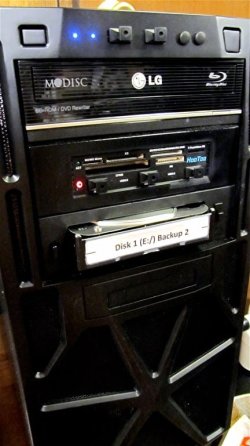
While one can use an image to backup data (and most people prefer to), I prefer to clone my data drive (imaging and cloning each have their own pros and cons) since I have a 3.5" hot swap bay I plug the backup HDD into. I can access the backed up data easily and, if a data HDD suffers a fatality, I can just disconnect the deceased HDD and plug in a back up HDD (I always make two clones for each data drive) and keep chugging along until I get and install a replacement drive.
 

My Computer My Computer

At a glance

Win 7 Ultimate 64 bitIntel i7-3930KKingston HyperX Genesis 32GB Kit (8x4GB Modul...MSI R7850 Twin Frozr 2GD5/OC Radeon HD 7850 2...
Computer type
PC/Desktop
Computer Manufacturer/Model Number
Custom Build
OS
Win 7 Ultimate 64 bit
CPU
Intel i7-3930K
Motherboard
ASUS P9X79 WS
Memory
Kingston HyperX Genesis 32GB Kit (8x4GB Modules) 1600MHz DDR
Graphics Card(s)
MSI R7850 Twin Frozr 2GD5/OC Radeon HD 7850 2GB 256-bit GDDR
Sound Card
Asus Xonar Essence STX
Monitor(s) Displays
3x Asus VG248QE 24", Vizio 32" TV
Screen Resolution
1920 x 1080, ?
Hard Drives
Samsung 128GB 840 Pro SSD (1),
Samsung 4TB 850 EVO SSDs (4)
Samsung 4TB 850 EVO SSDs (16) external backup drives used in 2.5" hot swap bays in the computer.
PSU
Corsair HX750w
Case
Antec Two Hundred v2 (modified)
Cooling
Cooler Master GeminII S524 120mm (fan replaced with a 140mm)
Keyboard
Logitech G510s
Mouse
Logitech M525 (two in use)
Internet Speed
=< 32Mbps down, 8Mbps up
Antivirus
AVAST!, MBAM, SAS, Spybot S&D (all but MBAM free) Glary Util
Browser
IE11
Other Info
LSI 9211-8i HBA card (8 SATA III ports), 2.5" & 3.5" Hot Swap Bays, HooToo HT-CR001 PCI-E to USB 3.0 Internal Hub + 6 Slot Card Reader, and LG Model CH12LS28 BD-ROM Optical Drive. Also, ScanSnap S1500 ADF duplexing scanner, Canon 9000F flat bed scanner, Corsair SP2500 2.1 speakers, Samsung CLP 415nw laser color printer, Cyberpower PP2200SW UPS

My Computer My Computer

At a glance

Windows 7 32 bitAMD 5200+ dual core2 GBNVidia GeForce 6150SE 128 MB
Computer Manufacturer/Model Number
HP Media Center
OS
Windows 7 32 bit
CPU
AMD 5200+ dual core
Memory
2 GB
Graphics Card(s)
NVidia GeForce 6150SE 128 MB
Monitor(s) Displays
CRT
Screen Resolution
1280x1024
Hard Drives
500 GB Sata internal :

SIIG USB 3.0 docking stations w/WD Caviar Black 6 Gb/s drives
Keyboard
PS/2
Mouse
PS/2 Wheel Mouse
Other Info
SIIG USB 3.0 PCIexpress card.
It looks as though I've misunderstood the comments I've read.

I'll have a go at creating an image. I'm looking at possibly creating a system restore partition on the C: drive, as well as an image on a DVD and then an additional drive...can't be too careful! ;)

Thanks for the help.

Duncs
 

My Computer My Computer

At a glance

Windows 7 32bit
Computer type
PC/Desktop
Computer Manufacturer/Model Number
Mesh
OS
Windows 7 32bit
Motherboard
Asus
Hard Drives
1 x 1Tb SATA;
1 x 500Gb;
1 x 350Gb;
1 x 1Tb Western Digital, NAS drive;
Antivirus
BullGuard
Browser
IE9
I use free Macrium since several years and never had a situation where I could not recover my system. I also use it to transfer systems to new disks - e.g. SSDs.

Here is a tutorial that might help you get started. And download the WinPE ISO from my Skydrive and burn it to CD. That will save you a couple of hours creating it yourself. You need the WinPE CD to get the recovery process started. You can also use it to make images - in case that you do not want to install Macrium on your system (which I would recommend though).
 

My Computer My Computer

At a glance

Vista, Windows7, Mint Mate, Zorin, Windows 8from 1.6GHz Duo to i7
Computer Manufacturer/Model Number
HP, Dell, Gateway, Toshiba - 4 laptops and 2 desktops
OS
Vista, Windows7, Mint Mate, Zorin, Windows 8
CPU
from 1.6GHz Duo to i7
Monitor(s) Displays
2x HP w2207
Hard Drives
5x HDD, 7x SSD, 12x Externals
Keyboard
with trackball - no mices
Mouse
Trackball mice
Internet Speed
DSL 6000
If you are going to keep this image as standard for a length of time, almost like a slipstream setup, then I'd recommend a couple of external drives. The docking station internal drive setup is a money saver now that drive prices have come back down to earth. The bare HD usually outperforms externals and is much cheaper so that the docking station pays for itself.

You can get a plastic stack of drawers in Walmart for about $10 to store 1/2 dozen bare drives in. It's very cool. I had USB 3.0 docking stations for both my desktop machines. Plus you can leave a drive in the dock as a data drive. Not to mention an SSD for fast video muxing, if you're into video conversion stuff.
 

My Computer My Computer

At a glance

Windows 7 32 bitAMD 5200+ dual core2 GBNVidia GeForce 6150SE 128 MB
Computer Manufacturer/Model Number
HP Media Center
OS
Windows 7 32 bit
CPU
AMD 5200+ dual core
Memory
2 GB
Graphics Card(s)
NVidia GeForce 6150SE 128 MB
Monitor(s) Displays
CRT
Screen Resolution
1280x1024
Hard Drives
500 GB Sata internal :

SIIG USB 3.0 docking stations w/WD Caviar Black 6 Gb/s drives
Keyboard
PS/2
Mouse
PS/2 Wheel Mouse
Other Info
SIIG USB 3.0 PCIexpress card.
It looks as though I've misunderstood the comments I've read.

I'll have a go at creating an image. I'm looking at possibly creating a system restore partition on the C: drive, as well as an image on a DVD and then an additional drive...can't be too careful! ;)

Thanks for the help.

Duncs
1. You can create a partition on the same physical drive as your C partition. But that defeats the purpose of images. What do you do when that physical drive fails.

2. Macrium images on DVDs are possible but not recommended. Because of the image size you need a lot of DVDs which is messy and the recovery from DVDs is painful. The best is to use an external USB attached disk.
 

My Computer My Computer

At a glance

Vista, Windows7, Mint Mate, Zorin, Windows 8from 1.6GHz Duo to i7
Computer Manufacturer/Model Number
HP, Dell, Gateway, Toshiba - 4 laptops and 2 desktops
OS
Vista, Windows7, Mint Mate, Zorin, Windows 8
CPU
from 1.6GHz Duo to i7
Monitor(s) Displays
2x HP w2207
Hard Drives
5x HDD, 7x SSD, 12x Externals
Keyboard
with trackball - no mices
Mouse
Trackball mice
Internet Speed
DSL 6000
...In fact I know a guy on another forum who restores the Macrium image to a HD in a docking station. Then he puts the drive in a drawer. If his system fails, he pops the backup HD in and boots. No boot CD restore. It's already been done. But he's a docking station aficionado. He does everything with them.

I had to laugh at that because that is pretty much what I do, especially the parts in bold. I prefer restoring my system back to the installed drive, either using a restoration CD, a USB stick (I recently made some for my two machines) or Macrium Reflect's ability to restore internally (I have the Pro version) during boot up.

Where I do use the two docks I have installed in my desktop machine (one 3.5" and one 2.5") is to backup my data drives.

HDD in Swap Bay.2.JPG

When imaging my boot drive I save it to a folder on my main data drive and it gets backed up when I backup the data drive. I clone the data drive to a drive plugged into the dock, then, when finished, I take the backup drive out of the dock and literally put it in a drawer.

Backup Drive Storage.01.2.JPG

If the data drive should die, I can stick one of the backup drives into the dock and use it until I get and install a replacement data drive.

The only possible problem with leaving a drive in a dock is cooling. Docks like mine have no means of cooling the HDD. Fortunately, my drives, when in the docks, run only 1°C over the ones inside the computer. There are docks, however, that do have provisions for cooling. Servers use them.
 

My Computer My Computer

At a glance

Win 7 Ultimate 64 bitIntel i7-3930KKingston HyperX Genesis 32GB Kit (8x4GB Modul...MSI R7850 Twin Frozr 2GD5/OC Radeon HD 7850 2...
Computer type
PC/Desktop
Computer Manufacturer/Model Number
Custom Build
OS
Win 7 Ultimate 64 bit
CPU
Intel i7-3930K
Motherboard
ASUS P9X79 WS
Memory
Kingston HyperX Genesis 32GB Kit (8x4GB Modules) 1600MHz DDR
Graphics Card(s)
MSI R7850 Twin Frozr 2GD5/OC Radeon HD 7850 2GB 256-bit GDDR
Sound Card
Asus Xonar Essence STX
Monitor(s) Displays
3x Asus VG248QE 24", Vizio 32" TV
Screen Resolution
1920 x 1080, ?
Hard Drives
Samsung 128GB 840 Pro SSD (1),
Samsung 4TB 850 EVO SSDs (4)
Samsung 4TB 850 EVO SSDs (16) external backup drives used in 2.5" hot swap bays in the computer.
PSU
Corsair HX750w
Case
Antec Two Hundred v2 (modified)
Cooling
Cooler Master GeminII S524 120mm (fan replaced with a 140mm)
Keyboard
Logitech G510s
Mouse
Logitech M525 (two in use)
Internet Speed
=< 32Mbps down, 8Mbps up
Antivirus
AVAST!, MBAM, SAS, Spybot S&D (all but MBAM free) Glary Util
Browser
IE11
Other Info
LSI 9211-8i HBA card (8 SATA III ports), 2.5" & 3.5" Hot Swap Bays, HooToo HT-CR001 PCI-E to USB 3.0 Internal Hub + 6 Slot Card Reader, and LG Model CH12LS28 BD-ROM Optical Drive. Also, ScanSnap S1500 ADF duplexing scanner, Canon 9000F flat bed scanner, Corsair SP2500 2.1 speakers, Samsung CLP 415nw laser color printer, Cyberpower PP2200SW UPS
You can get a plastic stack of drawers in Walmart for about $10 to store 1/2 dozen bare drives in. It's very cool. I had USB 3.0 docking stations for both my desktop machines. Plus you can leave a drive in the dock as a data drive. Not to mention an SSD for fast video muxing, if you're into video conversion stuff.
MA, you happen to have a link for such a docking station - sounds interesting but I have not seen one yet.
 

My Computer My Computer

At a glance

Vista, Windows7, Mint Mate, Zorin, Windows 8from 1.6GHz Duo to i7
Computer Manufacturer/Model Number
HP, Dell, Gateway, Toshiba - 4 laptops and 2 desktops
OS
Vista, Windows7, Mint Mate, Zorin, Windows 8
CPU
from 1.6GHz Duo to i7
Monitor(s) Displays
2x HP w2207
Hard Drives
5x HDD, 7x SSD, 12x Externals
Keyboard
with trackball - no mices
Mouse
Trackball mice
Internet Speed
DSL 6000
You can get a plastic stack of drawers in Walmart for about $10 to store 1/2 dozen bare drives in. It's very cool. I had USB 3.0 docking stations for both my desktop machines. Plus you can leave a drive in the dock as a data drive. Not to mention an SSD for fast video muxing, if you're into video conversion stuff.
MA, you happen to have a link for such a docking station - sounds interesting but I have not seen one yet.

The USB 3.0 docks I had were SIIG that worked with both 3.5" and 2.5" drives. They were expensive as USB 3.0 was new when I got them. Around $50 ea. Now I'm told it's perfected such that the $20 and under docks work fine. The SSD I used was a Kingston that was probably going extinct. I got a good deal on Egg. I think it was a 90 GB SSD for about $70.

edit: the USB 3.0 did not max out the sequential read/write speeds of the SSD. But the drive still got great random read/write. So for muxing video with source and destination on the SSD, it kicked ass.
 

My Computer My Computer

At a glance

Windows 7 32 bitAMD 5200+ dual core2 GBNVidia GeForce 6150SE 128 MB
Computer Manufacturer/Model Number
HP Media Center
OS
Windows 7 32 bit
CPU
AMD 5200+ dual core
Memory
2 GB
Graphics Card(s)
NVidia GeForce 6150SE 128 MB
Monitor(s) Displays
CRT
Screen Resolution
1280x1024
Hard Drives
500 GB Sata internal :

SIIG USB 3.0 docking stations w/WD Caviar Black 6 Gb/s drives
Keyboard
PS/2
Mouse
PS/2 Wheel Mouse
Other Info
SIIG USB 3.0 PCIexpress card.
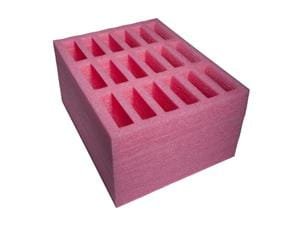
Did you have that pink foam rubber thing specially made?

What gives with the gloves? I do very little imaging compared to you lot, not for myself anyway. I do a lot of testing of those kind of programs, however.

...In fact I know a guy on another forum who restores the Macrium image to a HD in a docking station. Then he puts the drive in a drawer. If his system fails, he pops the backup HD in and boots. No boot CD restore. It's already been done. But he's a docking station aficionado. He does everything with them.

I had to laugh at that because that is pretty much what I do, especially the parts in bold. I prefer restoring my system back to the installed drive, either using a restoration CD, a USB stick (I recently made some for my two machines) or Macrium Reflect's ability to restore internally (I have the Pro version) during boot up.

Where I do use the two docks I have installed in my desktop machine (one 3.5" and one 2.5") is to backup my data drives.

View attachment 291594

When imaging my boot drive I save it to a folder on my main data drive and it gets backed up when I backup the data drive. I clone the data drive to a drive plugged into the dock, then, when finished, I take the backup drive out of the dock and literally put it in a drawer.

View attachment 291593

If the data drive should die, I can stick one of the backup drives into the dock and use it until I get and install a replacement data drive.

The only possible problem with leaving a drive in a dock is cooling. Docks like mine have no means of cooling the HDD. Fortunately, my drives, when in the docks, run only 1°C over the ones inside the computer. There are docks, however, that do have provisions for cooling. Servers use them.
 

My Computers My Computers

  • At a glance

    7 X64i5 84002x8gb 3200mhz
    Computer type
    PC/Desktop
    OS
    7 X64
    CPU
    i5 8400
    Motherboard
    gigabyte b365m ds3h
    Memory
    2x8gb 3200mhz
    Hard Drives
    various
    PSU
    pure power 11 400w cm
    Case
    Coolermaster
    Cooling
    cryorig m9i
  • At a glance

    7x64g54008gb ddr4 2400
    Computer type
    PC/Desktop
    OS
    7x64
    CPU
    g5400
    Motherboard
    ga b365m ds3h
    Memory
    8gb ddr4 2400
    PSU
    xfx pro 450w
Did you have that pink foam rubber thing specially made?

What gives with the gloves? I do very little imaging compared to you lot, not for myself anyway. I do a lot of testing of those kind of programs, however.

No, I bought it. They are designed to fit in standard filing cabinet drawers. It wasn't cheap, either, but it's made of anti-static foam so I don't have to store the HDDs in the anti-static sleeves; that makes handling far more convenient, easpeially since I also don't have to juggle them HDDs to see find the one I want. The 18 holer like what I have can be bought here and a 24 holer here (sounds like I'm referring to super outhouses). I originally ordered the 18 holer but the company I bought it from (the HenFruit company was out at the time) ran out after I had made the order. They offered to let me have the 24 holer for the same price as the 18 holer or I could cancel the order. Needless to say, I was all over the 24 holer offer like stink on skunk. It was too big for the drawer I was going to put it in but a minute with a hand saw fixed that minor detail.

The black thingies in some of the holes are spacers I made from some additional anti-static foam I bought so I can conveniently store 2.5" HDDs as well as 3.5".

The anti-static gloves are because I'm such a shocking person. All seriousness aside, I have a huge problem with static electricity in my house because of the vinyl floor tiles and the dry climate I live in; winters are especially bad. I can literally turn on some of my CFLs very briefly by touching a pull chain for the light switches. In fact, I have killed the electronics in a couple of CFLs while installing them. I've learned to be very religious about grounding myself before touching anything. I also pick up something metallic, such a key or a coin, and grounding myself through it to reduce the bite of the zap (I HATE! getting zapped). Even with the anti-static gloves, I first touch a pull chain that's close to my computer, then the computer case itself—I generally wear just one glove—before inserting or removing a HDD from a swap bay with the gloved hand.
 

My Computer My Computer

At a glance

Win 7 Ultimate 64 bitIntel i7-3930KKingston HyperX Genesis 32GB Kit (8x4GB Modul...MSI R7850 Twin Frozr 2GD5/OC Radeon HD 7850 2...
Computer type
PC/Desktop
Computer Manufacturer/Model Number
Custom Build
OS
Win 7 Ultimate 64 bit
CPU
Intel i7-3930K
Motherboard
ASUS P9X79 WS
Memory
Kingston HyperX Genesis 32GB Kit (8x4GB Modules) 1600MHz DDR
Graphics Card(s)
MSI R7850 Twin Frozr 2GD5/OC Radeon HD 7850 2GB 256-bit GDDR
Sound Card
Asus Xonar Essence STX
Monitor(s) Displays
3x Asus VG248QE 24", Vizio 32" TV
Screen Resolution
1920 x 1080, ?
Hard Drives
Samsung 128GB 840 Pro SSD (1),
Samsung 4TB 850 EVO SSDs (4)
Samsung 4TB 850 EVO SSDs (16) external backup drives used in 2.5" hot swap bays in the computer.
PSU
Corsair HX750w
Case
Antec Two Hundred v2 (modified)
Cooling
Cooler Master GeminII S524 120mm (fan replaced with a 140mm)
Keyboard
Logitech G510s
Mouse
Logitech M525 (two in use)
Internet Speed
=< 32Mbps down, 8Mbps up
Antivirus
AVAST!, MBAM, SAS, Spybot S&D (all but MBAM free) Glary Util
Browser
IE11
Other Info
LSI 9211-8i HBA card (8 SATA III ports), 2.5" & 3.5" Hot Swap Bays, HooToo HT-CR001 PCI-E to USB 3.0 Internal Hub + 6 Slot Card Reader, and LG Model CH12LS28 BD-ROM Optical Drive. Also, ScanSnap S1500 ADF duplexing scanner, Canon 9000F flat bed scanner, Corsair SP2500 2.1 speakers, Samsung CLP 415nw laser color printer, Cyberpower PP2200SW UPS
You can get a plastic stack of drawers in Walmart for about $10 to store 1/2 dozen bare drives in. It's very cool. I had USB 3.0 docking stations for both my desktop machines. Plus you can leave a drive in the dock as a data drive. Not to mention an SSD for fast video muxing, if you're into video conversion stuff.
MA, you happen to have a link for such a docking station - sounds interesting but I have not seen one yet.

The USB 3.0 docks I had were SIIG that worked with both 3.5" and 2.5" drives. They were expensive as USB 3.0 was new when I got them. Around $50 ea. Now I'm told it's perfected such that the $20 and under docks work fine. The SSD I used was a Kingston that was probably going extinct. I got a good deal on Egg. I think it was a 90 GB SSD for about $70.

edit: the USB 3.0 did not max out the sequential read/write speeds of the SSD. But the drive still got great random read/write. So for muxing video with source and destination on the SSD, it kicked ass.
Thanks for the info. Will study the matter on the Egg.
 

My Computer My Computer

At a glance

Vista, Windows7, Mint Mate, Zorin, Windows 8from 1.6GHz Duo to i7
Computer Manufacturer/Model Number
HP, Dell, Gateway, Toshiba - 4 laptops and 2 desktops
OS
Vista, Windows7, Mint Mate, Zorin, Windows 8
CPU
from 1.6GHz Duo to i7
Monitor(s) Displays
2x HP w2207
Hard Drives
5x HDD, 7x SSD, 12x Externals
Keyboard
with trackball - no mices
Mouse
Trackball mice
Internet Speed
DSL 6000
Even faster than USB 3.0 external docks are some of the ones that connect via e-SATA, depending on if they run at SATA 2.0 or SATA 3.0 speeds. I have an older one that uses either USB 2.0 or e-SATA. On USB 2.0, it is as fast as a dead dog but on e-SATA, it sails along at a pretty fair clip. I haven't actually measured the speed but the dock on e-SATA is clearly much faster than USB but appears to be slower than my internal docks.

What I like about my internal docks is they use no electronics so each one is essentially a pass-through directly to a SATA 3.0 port on my HBA card and I don't have to horse around with cables and separate PSUs.
 

My Computer My Computer

At a glance

Win 7 Ultimate 64 bitIntel i7-3930KKingston HyperX Genesis 32GB Kit (8x4GB Modul...MSI R7850 Twin Frozr 2GD5/OC Radeon HD 7850 2...
Computer type
PC/Desktop
Computer Manufacturer/Model Number
Custom Build
OS
Win 7 Ultimate 64 bit
CPU
Intel i7-3930K
Motherboard
ASUS P9X79 WS
Memory
Kingston HyperX Genesis 32GB Kit (8x4GB Modules) 1600MHz DDR
Graphics Card(s)
MSI R7850 Twin Frozr 2GD5/OC Radeon HD 7850 2GB 256-bit GDDR
Sound Card
Asus Xonar Essence STX
Monitor(s) Displays
3x Asus VG248QE 24", Vizio 32" TV
Screen Resolution
1920 x 1080, ?
Hard Drives
Samsung 128GB 840 Pro SSD (1),
Samsung 4TB 850 EVO SSDs (4)
Samsung 4TB 850 EVO SSDs (16) external backup drives used in 2.5" hot swap bays in the computer.
PSU
Corsair HX750w
Case
Antec Two Hundred v2 (modified)
Cooling
Cooler Master GeminII S524 120mm (fan replaced with a 140mm)
Keyboard
Logitech G510s
Mouse
Logitech M525 (two in use)
Internet Speed
=< 32Mbps down, 8Mbps up
Antivirus
AVAST!, MBAM, SAS, Spybot S&D (all but MBAM free) Glary Util
Browser
IE11
Other Info
LSI 9211-8i HBA card (8 SATA III ports), 2.5" & 3.5" Hot Swap Bays, HooToo HT-CR001 PCI-E to USB 3.0 Internal Hub + 6 Slot Card Reader, and LG Model CH12LS28 BD-ROM Optical Drive. Also, ScanSnap S1500 ADF duplexing scanner, Canon 9000F flat bed scanner, Corsair SP2500 2.1 speakers, Samsung CLP 415nw laser color printer, Cyberpower PP2200SW UPS
I haven't seen those before. I have only got 3 drives so not much point. They look attractive in pink, though.

Pretty expensive for a bit of foam.

17-984-017-02.jpg
 

My Computers My Computers

  • At a glance

    7 X64i5 84002x8gb 3200mhz
    Computer type
    PC/Desktop
    OS
    7 X64
    CPU
    i5 8400
    Motherboard
    gigabyte b365m ds3h
    Memory
    2x8gb 3200mhz
    Hard Drives
    various
    PSU
    pure power 11 400w cm
    Case
    Coolermaster
    Cooling
    cryorig m9i
  • At a glance

    7x64g54008gb ddr4 2400
    Computer type
    PC/Desktop
    OS
    7x64
    CPU
    g5400
    Motherboard
    ga b365m ds3h
    Memory
    8gb ddr4 2400
    PSU
    xfx pro 450w
Even faster than USB 3.0 external docks are some of the ones that connect via e-SATA, depending on if they run at SATA 2.0 or SATA 3.0 speeds. I have an older one that uses either USB 2.0 or e-SATA. On USB 2.0, it is as fast as a dead dog but on e-SATA, it sails along at a pretty fair clip. I haven't actually measured the speed but the dock on e-SATA is clearly much faster than USB but appears to be slower than my internal docks.

What I like about my internal docks is they use no electronics so each one is essentially a pass-through directly to a SATA 3.0 port on my HBA card and I don't have to horse around with cables and separate PSUs.
That is my experience too. Despite the better specs of USB3, my tests show that eSata is faster - e.g. for making an image which is 30GBs. And the comparison was done on the same PC, a Dell XPS 8300 with i7, 8GB of RAM, system on a Crucial M$ and an external 7200RPM HDD.
 

My Computer My Computer

At a glance

Vista, Windows7, Mint Mate, Zorin, Windows 8from 1.6GHz Duo to i7
Computer Manufacturer/Model Number
HP, Dell, Gateway, Toshiba - 4 laptops and 2 desktops
OS
Vista, Windows7, Mint Mate, Zorin, Windows 8
CPU
from 1.6GHz Duo to i7
Monitor(s) Displays
2x HP w2207
Hard Drives
5x HDD, 7x SSD, 12x Externals
Keyboard
with trackball - no mices
Mouse
Trackball mice
Internet Speed
DSL 6000
...Pretty expensive for a bit of foam.

View attachment 291614

True that! Still, for my needs, I felt the price was worth it.

I suspect a lot of hand labor goes into making them (they are made of several laminated layers) and I know for a fact that anti-static foam isn't cheap. In fact, there is a rather negative review on one of them carping about the price. Not only did the reviewer not purchase the "egg crate" (my term for lack of a better, more concise term), I suspect his free alternatives (which, for most people, aren't going to be as easy to obtain as he claims) aren't anti-static since new drives are normally shipped in an anti-static sleeve, negating the need for anti-static foam. I wanted anti-static foam so I wouldn't have to horse with anti-static sleeves. These "egg crates" are definitely a niche product.
 

My Computer My Computer

At a glance

Win 7 Ultimate 64 bitIntel i7-3930KKingston HyperX Genesis 32GB Kit (8x4GB Modul...MSI R7850 Twin Frozr 2GD5/OC Radeon HD 7850 2...
Computer type
PC/Desktop
Computer Manufacturer/Model Number
Custom Build
OS
Win 7 Ultimate 64 bit
CPU
Intel i7-3930K
Motherboard
ASUS P9X79 WS
Memory
Kingston HyperX Genesis 32GB Kit (8x4GB Modules) 1600MHz DDR
Graphics Card(s)
MSI R7850 Twin Frozr 2GD5/OC Radeon HD 7850 2GB 256-bit GDDR
Sound Card
Asus Xonar Essence STX
Monitor(s) Displays
3x Asus VG248QE 24", Vizio 32" TV
Screen Resolution
1920 x 1080, ?
Hard Drives
Samsung 128GB 840 Pro SSD (1),
Samsung 4TB 850 EVO SSDs (4)
Samsung 4TB 850 EVO SSDs (16) external backup drives used in 2.5" hot swap bays in the computer.
PSU
Corsair HX750w
Case
Antec Two Hundred v2 (modified)
Cooling
Cooler Master GeminII S524 120mm (fan replaced with a 140mm)
Keyboard
Logitech G510s
Mouse
Logitech M525 (two in use)
Internet Speed
=< 32Mbps down, 8Mbps up
Antivirus
AVAST!, MBAM, SAS, Spybot S&D (all but MBAM free) Glary Util
Browser
IE11
Other Info
LSI 9211-8i HBA card (8 SATA III ports), 2.5" & 3.5" Hot Swap Bays, HooToo HT-CR001 PCI-E to USB 3.0 Internal Hub + 6 Slot Card Reader, and LG Model CH12LS28 BD-ROM Optical Drive. Also, ScanSnap S1500 ADF duplexing scanner, Canon 9000F flat bed scanner, Corsair SP2500 2.1 speakers, Samsung CLP 415nw laser color printer, Cyberpower PP2200SW UPS
Even faster than USB 3.0 external docks are some of the ones that connect via e-SATA, depending on if they run at SATA 2.0 or SATA 3.0 speeds. I have an older one that uses either USB 2.0 or e-SATA. On USB 2.0, it is as fast as a dead dog but on e-SATA, it sails along at a pretty fair clip. I haven't actually measured the speed but the dock on e-SATA is clearly much faster than USB but appears to be slower than my internal docks.

What I like about my internal docks is they use no electronics so each one is essentially a pass-through directly to a SATA 3.0 port on my HBA card and I don't have to horse around with cables and separate PSUs.


Ask a rule of thumb benchmark I like to copy a file of some size. Like maybe a GB or 2. Also use Crystal Disk Mark. The SIIG claim 5 Gb/s max rating. CDM sequential read/write typically around 120+ MB/s if the internal in the dock is Sata III. For instance WD Caviar Black 1 TB. I guess the throughput isn't all that much higher in reality as I seem to remember the SSD only doing a bit better than that on sequential. But of course the random access was phenomenal.

Strangely enough when I plugged my Seagate 500 GB external USB 2.0 drive into the SIIG while waiting for the USB 3.0 docks to arrive, I got about a 15% increase in sequential throughput. Instead of large single file copies at about 24 MB/s they came in consistently at about 32 MB/s. Weird. But I'll take it.

This Laptop has one USB 3.0 port but I haven't copied a large file. Only USB 3.0 thing I have to plug into it is a USB 3.0 key drive from AData. So I can't really compare. :)
 

My Computer My Computer

At a glance

Windows 7 32 bitAMD 5200+ dual core2 GBNVidia GeForce 6150SE 128 MB
Computer Manufacturer/Model Number
HP Media Center
OS
Windows 7 32 bit
CPU
AMD 5200+ dual core
Memory
2 GB
Graphics Card(s)
NVidia GeForce 6150SE 128 MB
Monitor(s) Displays
CRT
Screen Resolution
1280x1024
Hard Drives
500 GB Sata internal :

SIIG USB 3.0 docking stations w/WD Caviar Black 6 Gb/s drives
Keyboard
PS/2
Mouse
PS/2 Wheel Mouse
Other Info
SIIG USB 3.0 PCIexpress card.
Back
Top