Solved Macrium Reflect Backup Aborted Error Code 0x8004230f

XP VM User

New member
Member
VIP
Local time
7:04 PM
Messages
279
Hi Everyone!

Thanks for all your advice in these prior questions:
http://www.sevenforums.com/backup-restore/360297-macrium-reflect-how-do-i-use-3.html

As per Forum rules, I made a new Question for this one.

I ran the Macrium Reflect today.

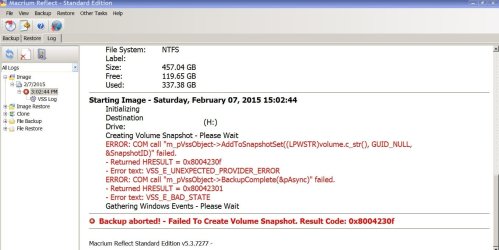
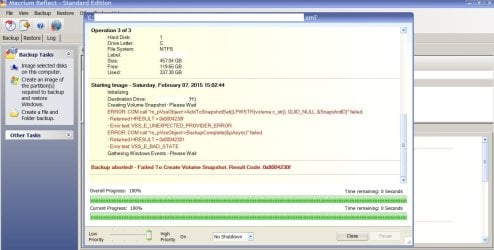
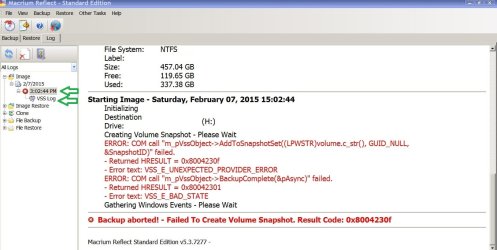
I got the following error message in Screenshot 1:
W7 Macrium Backup aborted Error 2 PS17453.jpg

Typed it out for easy copying and pasting if anyone wants to research it other than what I attempted:

Backup Aborted Failed to Create Volume Snapshot Result Code ox8004230f

And the Copying process stopped with lots of other Red errors as you can see in the above Screenshot.

I stop here for those who only want 10 lines..

============ ==================== ===================

For those (like me) who want to give the whole story..... Here are the steps I followed screenshot by screenshot....

And ONE more Question (Yes I know one question per thread, but maybe this question (SEE BOLDFACE BELOW) will determine what the error was caused by??

No, I'm not discouraged.....expected trouble and prepared for the worst, so its better than having tried to copy

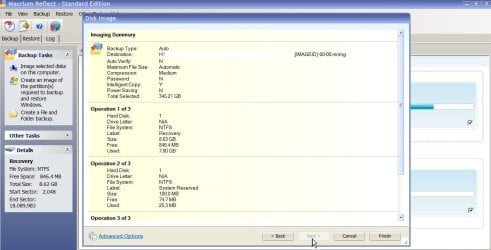
Step 1. Defining the Backups ( already posted several times in above Forum screenshots 2-4 about the prior steps, so I'm just proceeding with the new ones I had not done here.....

Screenshots 1---and 2
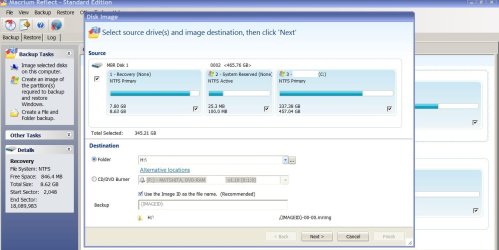
W7 Macrium Step By Step Backup 1 PS17418.jpg

W7 Macrium Step By Step Backup 2 PS17421.jpg


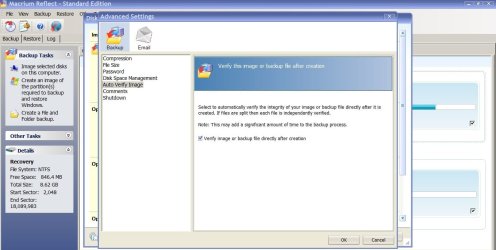
Step 2 "Choosing advanced items"

Screenshots 3 & 4

W7 Macrium Step By Step Backup 3 PS17425.jpg


W7 Macrium Step By Step Backup 4 PS17435.jpg


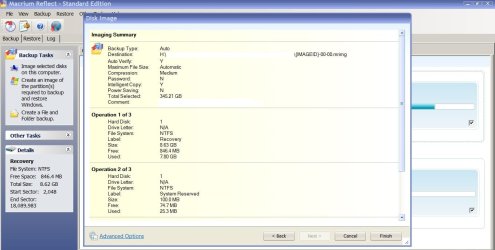
Step 3

Screenshots 5 & 6

W7 Macrium Step By Step Backup 5 PS17436.jpg

W7 Macrium Step By Step Backup 6 PS17439.jpg


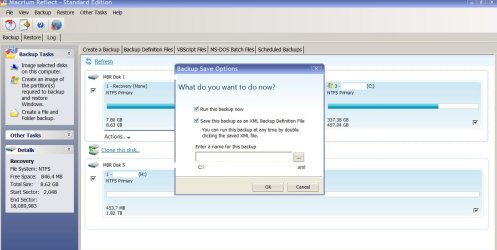
"Finish"

Screenshots 7 & 8

W7 Macrium Step By Step Backup 7 PS17442.jpg

W7 Macrium Step By Step Backup 8 PS17451.jpg


Step 4

Here is the aborted back up error message again for convenience

Screenshot 9

W7 Macrium Backup aborted Error 2 PS17453.jpg

Now that I typed more, you can see the small box before the Error message in Screenshots 10 & 11 below

Screenshots 10 & 11

W7 Macrium Backup aborted Error 1 PS17452.jpg


W7 Macrium Backup aborted Error 2 PS17453.jpg

W7 Macrium Backup aborted Error 3 Logs PS17455.jpg

says to check History Logs

Screenshot 12
W7 Macrium History Logs 1 PS17455.jpg


I did.

I checked the Log here: (first green arrow in above screenshot12 )

Got same errors in Screenshot 1


I opened up the VSS LOG too (second green arrow in above screenshot 12)

I can't "cut and paste" it won't let me

So I can't white out identifying features I don't want to post about the computer name, etc on live open Internet.

I took 6 more photos of each page of the VSS Log

ONLY if someone needs to see it will I try to go over it line by line and white out stuff

(makes it harder to follow I know) and I don't know which numbers are personal private for the computer and which numbers are generated by the Macrium program itself )

So I can white those out everywhere...... but I dont' know have no idea how long that will take me
so hoping you all can figure this out without the VSS log in front of you

I can say it seems to be related to the fact the computer does not know how to make "shadow copies" (exact words are here:

Volume Shadow Copy Service error: Error creating the Shadow Copy Providor COM class with CLSID (790f2886-9889-4c99-8ef-531add05d044) (9x80070424, The specified service does not exist as an installed service.

Thanks to all who read this far... did it by photos mostly, as a picture is worth 1000 of my words, right?
Talking/writing more: I did do some research.... on Macrium knowledge base... this link:

VSS fails due to modification by 3rd party software (Backup, Clone Disk, VSS)

Says I have "ShadowProtect from Storage Craft" on computer.

NO I DO NOT.

What I DID have and no one can "find" is a fully operating Norton Ghost v 15.... Maybe the left over pieces of whatever virus or whatever caused its removal (I DID NOT REMOVE IT) left pieces scattered and is causing this to occur....

NO I DO NOT have Acronis on this computer (I am familiar with it and use it only on Windows XP SP 2 due to SP 3 failure---so long story short, only Acronis on one of the XP Drives functions to make a 100% clone, not a backup---for various failure reasons SO NO ACRONIS on the WIndows 7 x64 computer).

I also investigated the VSS Log Shadow Volume problem in this Macrium knolwedge base:

How to troubleshoot Microsoft Volume Shadow copy Service errors (VSS)

While I do have some computer knowledge, the fixes here are beyond my comprehension or fear of making something far worse happen (as you know from my prior posts).

The error code does NOT match the one I have exactly (does it have to?) It has about 5 "f" letters at the end and I only have one "f" Hex code on the Error message.

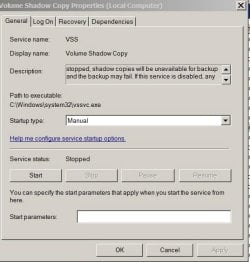
Additionally (yes there is more) I checked the "easy" one and computer is set to Manual

I DID NOT DO IT

BUT I've had many many other 3rd party programmers on remote sticking their fingers into the computer to help install these other programs so its unknown from memory if (as I did watch them do things) if anyone set it from "automatic" to "manual"..

Almost impossible to know the other programs (of 100 or so here) which might be effected by doing that switch back and cause other problems down the road using them....

Here is a Screenshot of the setting for VSS if it is indeed what is causing the problem

Screenshot 13
W7 Macrium Backup Error K B VSS Auto Manual PS17467.jpg

Of course I have no one to tell me..... When I turn it back to "automatic"

Question: How long do I run the computer to make certain that there are sufficient images built up in the "shadow" VSS volume before I attempt to copy again?

Question: What happens if something else occurs and I get BSOD or worse??

I HAVE NOT MADE successfully a copy due to this setting being wrong and I could lose it all again if I don't know what is going to be effected by changing the setting from Manual back to "automatic"????

Questions and I worry about the "unknown" again... Sorry all!

============ ================ ===================

Good Luck everyone figuring this out!

Extra Question: I have 362 GB used in Drive C.

I have 7.80 GB in the System Reserved and 25 MB in the middle partition. YET Macrium said to me its going to "copy" 345.21 GB to my External Hard Drive!

Why the loss of c. 17 GB? What's going on here (does it relate to the above error or is it another surprise error waiting to happen when the program tries to verify the 345.21 GB and finds it will NOT match up with the 362 GB used up in Drive C!

Thanks

XP VM User (sorry got stuck with this name on first visit here)
 
Last edited:

My Computer

Computer type
Laptop
Computer Manufacturer/Model Number
SONY VAIO VPCS111FM
OS
Windows7 Professional 64bit
CPU
Intel(R) Core (TM) i5 CPU M 430 @2.27 Ghz
Memory
8.0 GB
Hard Drives
Seagate 500GB Momentus
Cooling
Internal fan
Mouse
Logitech bluetooth trackball
Browser
Pale Moon Browser for x64
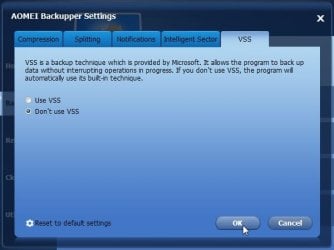
Try a different imaging program which does not rely on vss. Some of them have their own snapshot drivers as an alternative.

Click Settings>VSS>Don't use vss >OK

no-vss.jpg
 

My Computers

System One System Two

  • Computer type
    PC/Desktop
    OS
    7 X64
    CPU
    i5 8400
    Motherboard
    gigabyte b365m ds3h
    Memory
    2x8gb 3200mhz
    Hard Drives
    various
    PSU
    pure power 11 400w cm
    Case
    Coolermaster
    Cooling
    cryorig m9i
  • Computer type
    PC/Desktop
    OS
    7x64
    CPU
    g5400
    Motherboard
    ga b365m ds3h
    Memory
    8gb ddr4 2400
    PSU
    xfx pro 450w
Back to square one I guess

Hi SIW2:

Try a different imaging program which does not rely on vss. Some of them have their own snapshot drivers as an alternative.

Click Settings>VSS>Don't use vss >OK

View attachment 349033

I had a long discussion with everyone here.... see :
http://www.sevenforums.com/backup-restore/357684-need-new-backup-storage-program.html


The consensus was that Macrium was the best, followed by AOMEI---- I had difficulty getting a download of Macrium without spyware/bloatware/adware/ PUP's so that forced me to buy the program... So I already spent $44.95 in that direction...

Now I have to start all over again trying to find an AOEMI download site that is not powered by CNET or other downloaders that will give my "unsaved" computer programs that I can mess up the computer even worse with trying to remove them, i.e. toolbars and resetting everything back to normal..

Sigh..... (not to mention any thing else that AOEMI has to offer in way of error messages as I concentrated on Macrium, was not read to go to AOEMI until I somehow get at least ONE good current backup somewhere in the world!!

Thanks again SIW2, will look into it now (maybe post a new question on AOEMI where I can find that one---but I'll look first before posting.... so getting ahead of myself there.....
 

My Computer

Computer type
Laptop
Computer Manufacturer/Model Number
SONY VAIO VPCS111FM
OS
Windows7 Professional 64bit
CPU
Intel(R) Core (TM) i5 CPU M 430 @2.27 Ghz
Memory
8.0 GB
Hard Drives
Seagate 500GB Momentus
Cooling
Internal fan
Mouse
Logitech bluetooth trackball
Browser
Pale Moon Browser for x64

My Computer

Computer type
PC/Desktop
Computer Manufacturer/Model Number
home built
OS
Multi-Boot W7_Pro_x64 W8.1_Pro_x64 W10_Pro_x64 +Linux_VMs +Chromium_VM
CPU
AMD Athlon II x4 620
Motherboard
Gigabyte GA-MA785G-UD3H
Memory
6GB GSkill DDR2 800
Graphics Card(s)
AMD 4670 GPU + AMD 4200 IGP
Sound Card
on board Realtek ALC889A
Monitor(s) Displays
RCA 40" LCD TV, Insignia 32" LCD TV, HP 15" LCD monitor
Screen Resolution
1680 x 1050
Hard Drives
OCZ Vertex 3 120GB,
Samsung F3 1TB (3),
Several others - WD, Seagate, Hitachi, ...
PSU
Corsair 500 W
Case
Rosewill mid tower
Cooling
CM 90mm rifle
Keyboard
Gyration wireless, Logitech wireless, Dell USB wired
Mouse
Gyration wireless, Logitech wireless, V7 USB wired
Internet Speed
Spectrum - 100Mbps D / 10Mbps U
Antivirus
Avast, MBAM3, EMET, WinPatrol
Browser
Pale Moon, Firefox, IE
Other Info
2 multi-boot PC's
Mainly HTPC/Office/Gen purpose (no gaming).
Trendnet USB KVM.
LG DVD burner/Blue Ray Player.
Tray system for removable SATA backup drives.

Not currently OCd, under-volted.
I use Hybrid sleep, rarely re-boot or shutdown.

Hauppauge HD-PVR, Avermedia PCIe TV Tuner, Hauppauge PCI TV Tuner.
I would do scannow and other fixes---but

Hi DavidE!

Thanks for your reply!


The Scannow instructions warn me (and I am aware of this)

Be aware that if you have modified your system files as in theming explorer/system files, running sfc /scannow will revert the system files such as explorer.exe back to it's default state. Make the appropriate backups of your system files that you have modified for theming if you wish to save them before running sfc /scannow.

I always get these warnings..... I am way behind (after a year without a current saved Hard Drive) doing lots of maintenance activities on this computer!

Will look at the other items, but again, if any of them warn about having a "good" "current" backup before proceeding, that usually stops me cold......

That is why I need a current backup!

Need it now!

Thanks!
 
Last edited:

My Computer

Computer type
Laptop
Computer Manufacturer/Model Number
SONY VAIO VPCS111FM
OS
Windows7 Professional 64bit
CPU
Intel(R) Core (TM) i5 CPU M 430 @2.27 Ghz
Memory
8.0 GB
Hard Drives
Seagate 500GB Momentus
Cooling
Internal fan
Mouse
Logitech bluetooth trackball
Browser
Pale Moon Browser for x64
I had difficulty getting a download of Macrium without spyware/bloatware/adware/ PUP's so that forced me to buy the program

You should have read my earlier post on your other thread- I provided a macrium link for you -direct.
 

My Computers

System One System Two

  • Computer type
    PC/Desktop
    OS
    7 X64
    CPU
    i5 8400
    Motherboard
    gigabyte b365m ds3h
    Memory
    2x8gb 3200mhz
    Hard Drives
    various
    PSU
    pure power 11 400w cm
    Case
    Coolermaster
    Cooling
    cryorig m9i
  • Computer type
    PC/Desktop
    OS
    7x64
    CPU
    g5400
    Motherboard
    ga b365m ds3h
    Memory
    8gb ddr4 2400
    PSU
    xfx pro 450w
The Scannow instructions warn me (and I am aware of this)

Be aware that if you have modified your system files as in theming explorer/system files, running sfc /scannow will revert the system files such as explorer.exe back to it's default state. Make the appropriate backups of your system files that you have modified for theming if you wish to save them before running sfc /scannow.
I always get these warnings..... I am way behind (after a year without a current saved Hard Drive) doing lots of maintenance activities on this computer!

Will look at the other items, but again, if any of them warn about having a "good" "current" backup before proceeding, that usually stops me cold......

That is why I need a current backup!

Need it now!

Thanks!

I would run a SFC to find and fix issues and then re-apply my "tweaks" for theming/explorer, etc."
For me a CLEAN SYSTEM is more important than losing some of my customizations that "i might lose" ...
I can always re-apply my tweaks, may take me some time, but that's better than having a corrupt system...

You waited a year to ask how to get a current backup, and now you're afraid to do anything ...

Do you have any tech friends, neighbors, local PC shop, school courses, etc. that can help you ?

If you're in my neighborhood a pizza and six pack will get you backed up and going :party: :p

FOR ME the 2 most important things are
- Keep "current" backups (i wouldn't wait a year...)
- Keep my real-time security updated and working.
 

My Computer

Computer type
PC/Desktop
Computer Manufacturer/Model Number
home built
OS
Multi-Boot W7_Pro_x64 W8.1_Pro_x64 W10_Pro_x64 +Linux_VMs +Chromium_VM
CPU
AMD Athlon II x4 620
Motherboard
Gigabyte GA-MA785G-UD3H
Memory
6GB GSkill DDR2 800
Graphics Card(s)
AMD 4670 GPU + AMD 4200 IGP
Sound Card
on board Realtek ALC889A
Monitor(s) Displays
RCA 40" LCD TV, Insignia 32" LCD TV, HP 15" LCD monitor
Screen Resolution
1680 x 1050
Hard Drives
OCZ Vertex 3 120GB,
Samsung F3 1TB (3),
Several others - WD, Seagate, Hitachi, ...
PSU
Corsair 500 W
Case
Rosewill mid tower
Cooling
CM 90mm rifle
Keyboard
Gyration wireless, Logitech wireless, Dell USB wired
Mouse
Gyration wireless, Logitech wireless, V7 USB wired
Internet Speed
Spectrum - 100Mbps D / 10Mbps U
Antivirus
Avast, MBAM3, EMET, WinPatrol
Browser
Pale Moon, Firefox, IE
Other Info
2 multi-boot PC's
Mainly HTPC/Office/Gen purpose (no gaming).
Trendnet USB KVM.
LG DVD burner/Blue Ray Player.
Tray system for removable SATA backup drives.

Not currently OCd, under-volted.
I use Hybrid sleep, rarely re-boot or shutdown.

Hauppauge HD-PVR, Avermedia PCIe TV Tuner, Hauppauge PCI TV Tuner.
It is not a Macrium problem. As you have seen, it is your VSS service that is defunct. Run the two commands below in an elevated command prompt and post the result here: (right click > Select All > right click > paste here)

vssadmin list providers

vssadmin list writers
 

My Computer

Computer Manufacturer/Model Number
HP, Dell, Gateway, Toshiba - 4 laptops and 2 desktops
OS
Vista, Windows7, Mint Mate, Zorin, Windows 8
CPU
from 1.6GHz Duo to i7
Monitor(s) Displays
2x HP w2207
Hard Drives
5x HDD, 7x SSD, 12x Externals
Keyboard
with trackball - no mices
Mouse
Trackball mice
Internet Speed
DSL 6000
Thanks for replying again with further help

Hi DavidE!

Thanks again for replying to my post (I have not contacted Macrium Support yet as working through your other suggestions one by one and others here----)

You posted: (with my quick responses to keep it short):

I would run a SFC to find and fix issues and then re-apply my "tweaks" for theming/explorer, etc."
For me a CLEAN SYSTEM is more important than losing some of my customizations that "i might lose" ...
I can always re-apply my tweaks, may take me some time, but that's better than having a corrupt system...

I must apologize to all the computer knowledgeable people here (as you will see below)

I'm a "computer user" not a IT person or computer "fixer".... so this is somewhat new to me..
When I needed help I had phone assistance/remote assistance from paid companies.... now that my licenses have expired--- old programs and my usual set of help in person is not allowed anymore to help, I'm suddenly cast adrift...

I agree, CLEAN SYSTEM is better---------- but but but.... I had lots of people sticking fingers in system and I have almost NO idea what they did to "fix" it so everything so far, runs as it should and computer programs from different third party people co-inhabit the computer...

So when they say they will "reset" to factory standards, I have no idea what was done, and its not just "saving" a file.. I know from watching, some of these fixes were lines of code in the Reg Edit box, or check boxes in hidden "advanced--more advanced" screens I saw within each company's private programs.....
Re-setting to "factory" may disrupt those...

OF COURSE! If I had current license (read in that sentence If I could pay a lot of money today) I'd just pick up the phone later on month later or so when the program "fails" to work because I did a SCANNOW or anything else here..... and just ask them to "fix" it...

Without that.. I'm back to resorting to see if there are online communities and writing to them and looking in data bases and knowledge bases and figuring out myself what changed and how to set everything back the way it was...............

(WHICH of course you know!! may be that someone there turns off the VSS system to make their product "work" with others, setting me right back where I am again in trouble, and not knowing who what or why it was done..

Fortunately----I read the material... Fortunately I see there is a "manual" "automatic" box simple enough to change it... and change it back when I need to if it disturbs some other program.. '

But no knowledge base about VSS or anything tells me how long I have to run the computer on "automatic" to create enough shadow copies for the Macrium to work, or enough to truly save everything....

see my Post #1 bold Question about difference in data from what Windows Properties shows me and what Macrium will be copying! 17 GB vanishes? why?? What is it??"

[You waited a year to ask how to get a current backup, and now you're afraid to do anything ...

Yes sorry, I'm a USER at work... and others "IT" Professionals fix stuff for us....

They USED TO (clear on the words USED TO???) for FREE fix any home computer desktop by phone, laptop bring it in----but edict from "Microsoft" central which owns their licenses prohibited them from simply copying or fixing using their licensed disks to repair our home errors.... so that is now forbidden... and after my 2 years of SONY guarantee ran out my relative's laptop is on its own (sort of like the older XP systems we both have)....

SO being LAZY and never needing to know HOW to fix (but I always asked questions , questions are good shows interest in what they were doing for free) so I learned alot over decades, but never actually had to "type" in a SCANNOW or other things by myself.. I always just watched and took notes so I'm aware of these things... but how to bring 1980's computer knowledge into the 2015 in one year?? that explains a lot.....

[Do you have any tech friends, neighbors, local PC shop, school courses, etc. that can help you ?

Along with changes in lifestyle, etc all neighbors moved south for less SNOW!! anyone who would or could help, I was in fact the "go to person" as I worked with computers .. (I keep telling everyone I'm a USER! a Programmer! BUT not a IT "fixer") They all bring problems to me and I can usually fix their minor (not even mystery to me) problems so there---I'm the guy around here who no one else to turn to....) (of course Local PC shop (s) know I help as I say to them when I can't help anymore to take it to a shop and of course they say XP VM USER tried this and tried that but it did not fix the problem!!! so they know someone was trying....) So I'm not on their 100% we will willingly help you after you chased away lots of business for us (people around here---don't know where you are----will do anything to save 10 cents!!-)


[If you're in my neighborhood a pizza and six pack will get you backed up and going :party: :p

Thanks! See above.... for why I have no one else to turn to and many neighbors are "fresh off the boat" to use new TV show title-----can't even speak English.... so how am I going to ask them as I'm certain they are computer savvy, but in their languages not English!

[FOR ME the 2 most important things are
- Keep "current" backups (i wouldn't wait a year...)
- Keep my real-time security updated and working.

You see I kept working...... I would show you a diary... every few days I'd try this or that... read up on another downloaded LONG LONG (you think I type a lot?? You should try reading Microsoft and SONY etc Knowledge base articles!!!) and before you know it a year flew by.. then I saw an article in paper and got very worried.....about spending more money just to save data, so have to rush now, yes after slowly going by and letting a whole year pass since Last March (was my last save)..

Thought I'd send this out first...

I'll try whs' two Command Prompts (again going for the easy stuff) Depending upon what they say I'll make decision to either post them or just send to him...

PLEASE DavidE, and others do not take this conversation as a turn off....

I appreciate all you do, but again I can't ask others I was using as a fake "Crutch" to see me through any computer problems all these years... (and never developed out of work friendships...no idea where any of the IT even live as if I could just drop on by ..... looks suspiciously like I'm just being friendly for their computer skills, nothing else....)

Thanks again !
 

My Computer

Computer type
Laptop
Computer Manufacturer/Model Number
SONY VAIO VPCS111FM
OS
Windows7 Professional 64bit
CPU
Intel(R) Core (TM) i5 CPU M 430 @2.27 Ghz
Memory
8.0 GB
Hard Drives
Seagate 500GB Momentus
Cooling
Internal fan
Mouse
Logitech bluetooth trackball
Browser
Pale Moon Browser for x64
Reply to Post #8

Thanks whs!

Simple request.... sorry if result is more than 10 lines long.... I understand only parts of it...

First command::vssadmin list providers

Results:
Microsoft Windows [Version 6.1.7601]
Copyright (c) 2009 Microsoft Corporation. All rights reserved.

C:\Windows\system32>vssadmin list providers
vssadmin 1.1 - Volume Shadow Copy Service administrative command-line tool
(C) Copyright 2001-2005 Microsoft Corp.

Provider name: 'Symantec Software VSS Provider'
Provider type: Software
Provider Id: {262b716e-bb23-41b5-aaef-e2c15e767167}
Version: 1.0

Provider name: 'Microsoft Software Shadow Copy provider 1.0'
Provider type: System
---------------------------------------------------------

Second command: vssadmin list writers

Results:
Microsoft Windows [Version 6.1.7601]
Copyright (c) 2009 Microsoft Corporation. All rights reserved.

C:\Windows\system32>vssadmin list writers
vssadmin 1.1 - Volume Shadow Copy Service administrative command-line tool
(C) Copyright 2001-2005 Microsoft Corp.

Waiting for responses.
These may be delayed if a shadow copy is being prepared.

Writer name: 'Task Scheduler Writer'
Writer Id: {d61d61c8-d73a-4eee-8cdd-f6f9786b7124}
Writer Instance Id: {1bddd48e-5052-49db-9b07-b96f96727e6b}
State: [1] Stable
Last error: No error

Writer name: 'VSS Metadata Store Writer'
Writer Id: {75dfb225-e2e4-4d39-9ac9-ffaff65ddf06}
Writer Instance Id: {088e7a7d-09a8-4cc6-a609-ad90e75ddc93}
State: [1] Stable
Last error: No error

Writer name: 'Performance Counters Writer'
Writer Id: {0bada1de-01a9-4625-8278-69e735f39dd2}
Writer Instance Id: {f0086dda-9efc-47c5-8eb6-a944c3d09381}
State: [1] Stable
Last error: No error

Writer name: 'System Writer'
Writer Id: {e8132975-6f93-4464-a53e-1050253ae220}
Writer Instance Id: {84ec42f5-7b11-4344-af88-35a31e71076f}
State: [1] Stable
Last error: No error

Writer name: 'MSSearch Service Writer'
Writer Id: {cd3f2362-8bef-46c7-9181-d62844cdc0b2}
Writer Instance Id: {4af5d272-a7f2-43db-bede-9ab4c8ffcf25}
State: [1] Stable
Last error: No error

Writer name: 'SqlServerWriter'
Writer Id: {a65faa63-5ea8-4ebc-9dbd-a0c4db26912a}
Writer Instance Id: {33a0def1-75d1-40ef-b0c4-59c7b052a602}
State: [1] Stable
Last error: No error

Writer name: 'ASR Writer'
Writer Id: {be000cbe-11fe-4426-9c58-531aa6355fc4}
Writer Instance Id: {e1fef9a4-3b20-48a0-8ac5-24ca028fef19}
State: [1] Stable
Last error: No error

Writer name: 'Registry Writer'
Writer Id: {afbab4a2-367d-4d15-a586-71dbb18f8485}
Writer Instance Id: {134dbd4d-68c4-4e61-aa56-7bdabee10062}
State: [1] Stable
Last error: No error

Writer name: 'BITS Writer'
Writer Id: {4969d978-be47-48b0-b100-f328f07ac1e0}
Writer Instance Id: {51204f17-8875-4b4a-b9f6-4e5a21fdfe6a}
State: [1] Stable
Last error: No error

Writer name: 'Shadow Copy Optimization Writer'
Writer Id: {4dc3bdd4-ab48-4d07-adb0-3bee2926fd7f}
Writer Instance Id: {5ac38a64-4cd7-46fa-be3a-d1e7e1a64a12}
State: [1] Stable
Last error: No error

Writer name: 'WMI Writer'
Writer Id: {a6ad56c2-b509-4e6c-bb19-49d8f43532f0}
Writer Instance Id: {250d92a5-3384-4a1c-8918-27a9e8d77251}
State: [1] Stable
Last error: No error

Writer name: 'COM+ REGDB Writer'
Writer Id: {542da469-d3e1-473c-9f4f-7847f01fc64f}
Writer Instance Id: {24188558-a5e4-4c22-918b-703abb65d6ab}
State: [1] Stable
Last error: No error

C:\Windows\system32>
 

My Computer

Computer type
Laptop
Computer Manufacturer/Model Number
SONY VAIO VPCS111FM
OS
Windows7 Professional 64bit
CPU
Intel(R) Core (TM) i5 CPU M 430 @2.27 Ghz
Memory
8.0 GB
Hard Drives
Seagate 500GB Momentus
Cooling
Internal fan
Mouse
Logitech bluetooth trackball
Browser
Pale Moon Browser for x64
Your problem is that Norton grabbed your VSS service. This is how the provider should look.

Provider name: 'Microsoft Software Shadow Copy provider 1.0'
Provider type: System
Provider Id: {b5946137-7b9f-4925-af80-51abd60b20d5}
Version: 1.0.0.7
 

My Computer

Computer Manufacturer/Model Number
HP, Dell, Gateway, Toshiba - 4 laptops and 2 desktops
OS
Vista, Windows7, Mint Mate, Zorin, Windows 8
CPU
from 1.6GHz Duo to i7
Monitor(s) Displays
2x HP w2207
Hard Drives
5x HDD, 7x SSD, 12x Externals
Keyboard
with trackball - no mices
Mouse
Trackball mice
Internet Speed
DSL 6000
If its a Norton problem?

Hi whs!

Thanks for the analysis!

Your problem is that Norton grabbed your VSS service.

Now what?

Here we come in conflict with Norton help.... I no longer am able to get free or paid help for any Norton Ghost product... its legacy only by their "forum" community of helpers.

I mysteriously LOST the Norton Ghost v15

I did not do it!

Occurred 1 year ago (no VIRUS no ADware other than sweetpacks ever on here) so what did it???

1 year ago the icon on my desktop VANISHED! I stuck a generic folder in its location to remind me where it was and sticky note on it to "fix me please". That was 1 year ago. Searching entire computer for "any Synmantic" product shows only my Anti Virus ones.... No Download for Norton Ghost v14 or 15 (the only 2 I had on this laptop ever)... No evidence it was ever in the add/remove programs listing.....

So what happened to it?

I used to get notifications when the backup copy was certain number of days old, I noticed one day it was not doing that and thats when I noticed Icon was gone leaving a blank spot on desktop....

I checked again, my list of 205 programs installed, no Norton Ghost.

I assume (hopefully I don't have to uninstall Norton AV programs or Internet Security, etc) as they should not be using the VSS, correct? Only a backup program like Norton Ghost would have utilized it???

If the Norton Ghost vanished (no humor in that there!) I know that pieces of the program might be left over in registry etc hidden file places and SCANNOW fixes such things .... but until I have a good copy of what everyone did to install 205 programs (I did very little of it), I have no idea what changes or tweaks anyone did to make them work

(and knowing HOW LONG I usually write.... does anyone want me to communicate about 205 potentially disrupted programs if everything goes back to "factory settings" again? or if I replace all Reg Edit with the original set??? If that is even advisable without a backup or safety in case I mess it up...

Just listing the options that came to mind when you mentioned it might be something related to Norton Symantic....

Thanks again whs!
 

My Computer

Computer type
Laptop
Computer Manufacturer/Model Number
SONY VAIO VPCS111FM
OS
Windows7 Professional 64bit
CPU
Intel(R) Core (TM) i5 CPU M 430 @2.27 Ghz
Memory
8.0 GB
Hard Drives
Seagate 500GB Momentus
Cooling
Internal fan
Mouse
Logitech bluetooth trackball
Browser
Pale Moon Browser for x64
You could reregister the VSS .dlls. But I am not certain which ones are on your system. This is one possible list. Check in the system32 folder whether they all apply to your system. The first one, the ole32 should be there for sure. But what about all the others.

cd /d %windir%\system32
net stop vss
net stop swprv
regsvr32 /s ole32.dll
regsvr32 /s oleaut32.dll
regsvr32 /s vss_ps.dll
vssvc /register
regsvr32 /s /i swprv.dll
regsvr32 /s /i eventcls.dll
regsvr32 /s es.dll
regsvr32 /s stdprov.dll
regsvr32 /s vssui.dll
regsvr32 /s msxml.dll
regsvr32 /s msxml3.dll
regsvr32 /s msxml4.dll
vssvc /register
net start swprv
net start vss
 

My Computer

Computer Manufacturer/Model Number
HP, Dell, Gateway, Toshiba - 4 laptops and 2 desktops
OS
Vista, Windows7, Mint Mate, Zorin, Windows 8
CPU
from 1.6GHz Duo to i7
Monitor(s) Displays
2x HP w2207
Hard Drives
5x HDD, 7x SSD, 12x Externals
Keyboard
with trackball - no mices
Mouse
Trackball mice
Internet Speed
DSL 6000
questions

Hi whs!

A quick easy question!

How do I view to check the VSS.dlls (dynamic link library? or s? Libraries, more than one?)

Is the first line: cd /d %windir%\system32
a command for the command prompt window??

if so cd/ d I have only a C Drive, no D partition....

Thanks!
 

My Computer

Computer type
Laptop
Computer Manufacturer/Model Number
SONY VAIO VPCS111FM
OS
Windows7 Professional 64bit
CPU
Intel(R) Core (TM) i5 CPU M 430 @2.27 Ghz
Memory
8.0 GB
Hard Drives
Seagate 500GB Momentus
Cooling
Internal fan
Mouse
Logitech bluetooth trackball
Browser
Pale Moon Browser for x64
No, only the .dlls. This was a full set of commands if you want to reset them.

Go to C:\Windows]\system32 and check there - one by one.
 

My Computer

Computer Manufacturer/Model Number
HP, Dell, Gateway, Toshiba - 4 laptops and 2 desktops
OS
Vista, Windows7, Mint Mate, Zorin, Windows 8
CPU
from 1.6GHz Duo to i7
Monitor(s) Displays
2x HP w2207
Hard Drives
5x HDD, 7x SSD, 12x Externals
Keyboard
with trackball - no mices
Mouse
Trackball mice
Internet Speed
DSL 6000
Thanks for Post #15

Hi whs:

Someday I'll learn how to write "computer books" and all my spaces and tabs vanished below...so it does not look like a computer file tree anymore......

Until then, Guess this is my shorthand for posting a lot of useless photos here.......
so I think I did the right thing when you posted

Go to C:\Windows]\system32 and check there - one by one.

I went to "computer"


+ Windows
+ System32
+Vss
+ Writers
+ 2 sub folders= + Application = This Folder is Empty
+ System has just three 2009!! Items from SAFARI (yes PC Laptop runs lots of Apple items......so not unexpected, just why so OLD??? computer is 2010 birth date!!)

Did I do it right?

Now what? Run the commands line by line on Command Prompt?

Any side effects I should know about ?

Hate doing it without someone who knows what I"m doing right nearby as I'll make a mistake, everyone else knows I did it, but I don't and I won't know how it messes up computer or program when I try try try (and remember, all who know me say PLEASE don't try anything without KNOWING what you are doing!) and I try to fix the problem on my own knowledge, so its a problem doing this.....for me..

* * * * * * * * * * * * * * * * * * * * * * * * * * * * * * * * *

(If you need to read more to know "why")

Nothing against what you told me to do, I just need to know what possible errors could occur and how to stop the command prompt without crashing the computer if it should get in a loop (See I know the terms, I've done a scrolling loop there where computer gets jammed as the command prompt does something over and over...... and it scrolls upward endlessly its like pull the plug on desktop is only way to stop it and gain control of computer...

So this tiny, "toy" like laptop is to me scary.. do I just pull plug? It has its own battery supply! Do I turn over a RUNNING laptop to remove the battery---I always think its a stupid design.... how does someone stop a runaway loop otherwise??? Without damaging the spinning HDD by turning it over to get at battery compartment????

(I know about the power button---hold in until turns off----its how I turn off computer every time as it breaks often) (But not trying to fix those problems UNTIL I get a survivable backup or TWO OR THREE all copied so I at least have a BADLY working computer copy of everything that I can test out and make sure its recoverable again like Norton Ghost copies...

Thanks for reading long post whs!
 
Last edited:

My Computer

Computer type
Laptop
Computer Manufacturer/Model Number
SONY VAIO VPCS111FM
OS
Windows7 Professional 64bit
CPU
Intel(R) Core (TM) i5 CPU M 430 @2.27 Ghz
Memory
8.0 GB
Hard Drives
Seagate 500GB Momentus
Cooling
Internal fan
Mouse
Logitech bluetooth trackball
Browser
Pale Moon Browser for x64
Nah, you did not do it right. But that's OK. I think we first should fix the provider problem. That is all messed up because you had previously Ghost installed. This Macrium page describes how to do it. But be careful manipulating the registry. I would first backup the registry with Erunt.. Then you can restore it when you mess it up.
 

My Computer

Computer Manufacturer/Model Number
HP, Dell, Gateway, Toshiba - 4 laptops and 2 desktops
OS
Vista, Windows7, Mint Mate, Zorin, Windows 8
CPU
from 1.6GHz Duo to i7
Monitor(s) Displays
2x HP w2207
Hard Drives
5x HDD, 7x SSD, 12x Externals
Keyboard
with trackball - no mices
Mouse
Trackball mice
Internet Speed
DSL 6000
Sigh...........

Hi whs!

Am I the complaining squeaky wheel?
I appreciate the links you provided below............


Nah, you did not do it right. But that's OK. I think we first should fix the provider problem. That is all messed up because you had previously Ghost installed. This Macrium page describes how to do it. But be careful manipulating the registry. I would first backup the registry with Erunt.. Then you can restore it when you mess it up.


I don't mean to complain, but I guess my tone of writing sounds like it.....

I did include the Macrium link about the error code (with one f) in my original post (the very long one buried in all the text) as Post #1.

I'll keep it short (ask for more details and I'll provide)

Macrium posting has its main objective to fix something called "Shadow Protect" 3rd party software (not Norton Ghost) I've had long bad history of using the "wrong" fix for something similar and it ends up going WRONG.
That is why very brightly your Windows Seven Forum rule says don't hijack another person's similar problem do a new thread----so I need the (non-existent as I looked) "how to fix a Norton Symantic GHOST VSS problem", not something similar---I know it COULD work!
But
NOT if I'm the one doing it, got it???

And at bottom of the Macrium site page there are the "dangerous" to me click on this [VSSfix 64bit] automated program and it will FIX EVERYTHING.. I've learned that when I use them... it means trip down to the computer store to have them fix what I should not have "one button fixed" myself..
SO
unless lots of people here have had positive experiences with those (just the x64 one) programs from Macrium... I'll stay far far away

And other posted link for ERUNT sounds good (don't I have something like that in Norton Utilities? I'll go take a look, but responding to your link meanwhile) Maybe I've forgotten where it is but fast look on my desktop and Start/All Programs DOES NOT show Norton Utilities! on this laptop... I have it on everything I use..."just in case".... Its gone too! Just like Norton Ghost! I think its gone... what is happening???
(That one I still have the installer for the older version---but its too old, they won't connect to website I know its from 2010 version too old 5 years!)

You know I'm going to have to take it slow.
Start a new thread here....
Make sure the downloader installer is "virus free" using those tools others posted here or have them check it for me as I need to find where I saved that link on computer about "virus.com" tester?? I can't remember the name how can I find it on my computer or the web.... have to re-read all of the other postings (don't you do it I can do that--thanks) to find the tester for downloads if they have adware/spyware on them...

and above all---does ERUNT work? Check the reviews...

(I believe in you whs! But I always check, even people in person know I will do that so its not a matter of trust, I always check as why not?? before disaster strikes)

Thanks....

P.S. (yes there is more) ERUNT raised the question of "permissions" I've not mentioned it, but in GHOST I get warnings about permissions all the time as I NEVER get them right and the person I taught who runs this laptop a lot more than I do (except when under repair like now), knows about them from me so they make the same errors as I do...

Anyway... the Ghost backup always STOPS to ask for "permission" of copying permission DENIED objects.. sometimes its so bad the whole process stop and I have to go in to repair the permission of a particular file (I have NO idea why or what I'm doing, I just follow Norton's steps, and its done)----- Some programs I have must store items in a certain way so that they cannot be copied or cloned or disk imaged and they stop the copying process---

BUT I have not raised that issue as so far I can't even get Macrium to work on here to make "one" copy after the year long absence of copied backups!

One step at a time

Sorry If I Talk too much!!! (write too long)

Thanks again whs!
 

My Computer

Computer type
Laptop
Computer Manufacturer/Model Number
SONY VAIO VPCS111FM
OS
Windows7 Professional 64bit
CPU
Intel(R) Core (TM) i5 CPU M 430 @2.27 Ghz
Memory
8.0 GB
Hard Drives
Seagate 500GB Momentus
Cooling
Internal fan
Mouse
Logitech bluetooth trackball
Browser
Pale Moon Browser for x64
Yes I need a new thread before completing this one

Hi whs:

While trying stuff (that should be "stuff" as of course do I KNOW?? what I'm doing here... no!)

I crashed computer/ it did CHKDSK and of course erased & poorly restored 10,0000''s of files... (NO PHOTOS! it scrolls too fast, how do I tell you what happens if print screen button does not work in DOS mode??)

I could not restart browsers....

I knew what to do...

I sort of fixed stuff using "Recurva" restore deleted files program.

ALL of my browsing data was deleted, all of my history was deleted, all of the sites I had open to investigate how to do backups were deleted and no memory other than going slowly over each posting and my saved word pad files to figure it out---might take me a few weeks...

So Posting this same as a NEW question.. (Unless you have a quick answer for me here so I can continue this discussion of how to back up computer files???)

Posted here: http://www.sevenforums.com/browsers...omputer-dskchk-deleted-all-opera-history.html

Thanks again!
 
Last edited:

My Computer

Computer type
Laptop
Computer Manufacturer/Model Number
SONY VAIO VPCS111FM
OS
Windows7 Professional 64bit
CPU
Intel(R) Core (TM) i5 CPU M 430 @2.27 Ghz
Memory
8.0 GB
Hard Drives
Seagate 500GB Momentus
Cooling
Internal fan
Mouse
Logitech bluetooth trackball
Browser
Pale Moon Browser for x64
While trying stuff
What "stuff" did you do to cause your new problems ?
Don't write a new novel, just give a short concise answer with exact details.
Nobody here can know what "stuff" you did ... unless you tell us.
 

My Computer

Computer type
PC/Desktop
Computer Manufacturer/Model Number
home built
OS
Multi-Boot W7_Pro_x64 W8.1_Pro_x64 W10_Pro_x64 +Linux_VMs +Chromium_VM
CPU
AMD Athlon II x4 620
Motherboard
Gigabyte GA-MA785G-UD3H
Memory
6GB GSkill DDR2 800
Graphics Card(s)
AMD 4670 GPU + AMD 4200 IGP
Sound Card
on board Realtek ALC889A
Monitor(s) Displays
RCA 40" LCD TV, Insignia 32" LCD TV, HP 15" LCD monitor
Screen Resolution
1680 x 1050
Hard Drives
OCZ Vertex 3 120GB,
Samsung F3 1TB (3),
Several others - WD, Seagate, Hitachi, ...
PSU
Corsair 500 W
Case
Rosewill mid tower
Cooling
CM 90mm rifle
Keyboard
Gyration wireless, Logitech wireless, Dell USB wired
Mouse
Gyration wireless, Logitech wireless, V7 USB wired
Internet Speed
Spectrum - 100Mbps D / 10Mbps U
Antivirus
Avast, MBAM3, EMET, WinPatrol
Browser
Pale Moon, Firefox, IE
Other Info
2 multi-boot PC's
Mainly HTPC/Office/Gen purpose (no gaming).
Trendnet USB KVM.
LG DVD burner/Blue Ray Player.
Tray system for removable SATA backup drives.

Not currently OCd, under-volted.
I use Hybrid sleep, rarely re-boot or shutdown.

Hauppauge HD-PVR, Avermedia PCIe TV Tuner, Hauppauge PCI TV Tuner.
Back
Top