Macrium Reflect caused problem

Art Mott

New member
Local time
3:59 PM
Messages
4
Hi,

I'm not computer literate so when my 14 month old PC running Windows 7 Home Premium failed to restart I took it to Staples for a recovery installation. Since bringing it home I downloaded Microsoft Security Essentials, then downloaded PC Decrapifier to remove the bloatware, and then downloaded Macrium Reflect and made a rescue disk and my first image backup.

I then started reinstalling programs starting with Microsoft Office suite from disk. That worked without a problem. Then I tried to reinstall the Hallmark Card Studio program from disk and the PC wouldn't read a disk anymore. The light flickered and then went solid. When I went to "computer" and selected the drive the heading at the top of the window said "DVD RW Drive (D
smile.png
HCS 2010 (Not Responding). I tried other disks including the Microsoft Office suite disk that had worked an hour previously and got the same results.

I also noticed that having my Seagate external HDD connected to a USB port prevented my PC from booting. That is the same problem that caused me to take the PC to Staples in the first place, and yet I've had that external drive plugged in permanently for months without a problem.


I finally connected the dots. The last thing I did before I had to take the PC to Staples was to install Macrium Reflect, and the last thing I did before the CD/DVD drive failed after I got it back from Staples was to install Macrium Reflect.

I uninstalled Macrium Reflect and now my CD/DVD drive works again. But, I still can't boot with the Seagate external HDD plugged in. Does anyone know how to fix that?

Thanks for your help.

Art


My Computer My Computer

At a glance

Windows 7 Home Premium 64bit
OS
Windows 7 Home Premium 64bit
Please post back a screenshot of your maximized full Disk Management drive map with listings showing all columns and external HD plugged in, using Snipping Tool in Start Menu.
 
Never heard of that before.
 

My Computers My Computers

  • At a glance

    7 X64i5 84002x8gb 3200mhz
    Computer type
    PC/Desktop
    OS
    7 X64
    CPU
    i5 8400
    Motherboard
    gigabyte b365m ds3h
    Memory
    2x8gb 3200mhz
    Hard Drives
    various
    PSU
    pure power 11 400w cm
    Case
    Coolermaster
    Cooling
    cryorig m9i
  • At a glance

    7x64g54008gb ddr4 2400
    Computer type
    PC/Desktop
    OS
    7x64
    CPU
    g5400
    Motherboard
    ga b365m ds3h
    Memory
    8gb ddr4 2400
    PSU
    xfx pro 450w
Hi Gregrocker,

Thanks for the quick response. I'm sorry but, as I said, I am computer illiterate and don't know what a full Disk Management drive map is.

Art
 

My Computer My Computer

At a glance

Windows 7 Home Premium 64bit
OS
Windows 7 Home Premium 64bit

My Computer My Computer

At a glance

Windows 7x64 Home Premium SP1Intel i7 2600kG.Skill Ripjaws (DDR3-1600) 2x4GBNvidia GeForce GTS 450; Intel HD Graphics 300...
Computer type
PC/Desktop
Computer Manufacturer/Model Number
Own build
OS
Windows 7x64 Home Premium SP1
CPU
Intel i7 2600k
Motherboard
ASUS P8Z68 Deluxe
Memory
G.Skill Ripjaws (DDR3-1600) 2x4GB
Graphics Card(s)
Nvidia GeForce GTS 450; Intel HD Graphics 3000(GT2+)
Monitor(s) Displays
Dell Ultrasharp IPS panel U2311H, Samsung SyncMaster P2350
Screen Resolution
1920x1080
Hard Drives
Samsung 850 Pro SSD 256GB, Samsung SSD 840 120GB, Seagates 1TB Barracuda ST31000528AS x2
PSU
Seasonic M12II 520W
Case
Lian Li Lancool PC-K60
Cooling
Case: 1x120mm, 3x140mm CPU: Hyper 212+
Keyboard
Logitech MK520 (wireless)
Mouse
Logitech MK520
Internet Speed
6-7 Mbps
Antivirus
Norton Security Premium, Malwarebytes on 2 (MSE on 3rd PC)
Browser
FireFox
Other Info
Audio: Logitech Z523 2.1
Even if the screenshot doesn't show External to be Active or System, in most cases wiping it will solve this problem. Move the data off and wipe it from Partition Wizard bootable CD using Option 3 in this tutorial to see. Partition Wizard Use the Bootable CD
 
To get to the disk management screen type
disk management
in the bottom left search box
Here is how you post a screen shot
http://www.sevenforums.com/tutorials/9733-screenshots-files-upload-post-seven-forums.html

Also post a screen shot with your external drive unplugged, presumably so you can boot.
Then, after booting, plug your USB external HDD in. Described it's behaviour and another screenshot if possible.

Hi Gregrocker and MJF,

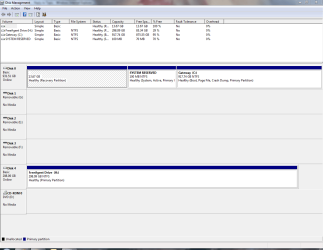
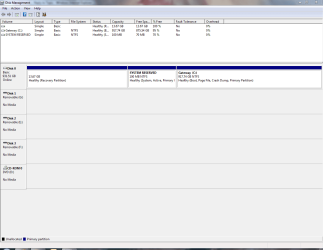
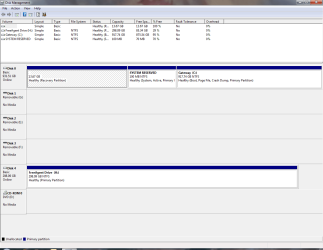
Here are the screenshots you requested.

Disk Management screen 01.PNG

Disk Management screen 02.PNG

Disk Management screen 03.PNG

The first and third pictures with the external drive attached look identical to me. The only difference is that the third is after rebooting with the external drive plugged in. Naturally, now that I started this thread I cannot reproduce the problem. I rebooted with the external HDD plugged in to the USB and it started without a problem. Kind of like taking the car to the mechanic and it doesn't make that funny noise anymore.

I'm still not going to reinstall Macrium Reflect though. Thanks for your help.

Art
 

My Computer My Computer

At a glance

Windows 7 Home Premium 64bit
OS
Windows 7 Home Premium 64bit
Thanks Gregrocker, I'll do that.

Art
 

My Computer My Computer

At a glance

Windows 7 Home Premium 64bit
OS
Windows 7 Home Premium 64bit
I don't doubt your problem is not real but apparently not visible now.
I would do nothing until it "reappears". I would be hesitant to format your external HDD until you know the cause of the problem.
If you decide to format it I would keep it as a primary not logical - it's a little (portable?) 320GB drive.

Given it's a Seagate Freeagent, I would download the free Seagate "SeaTools" from their website and run diagnostics on the drive.
Also try the Windows disk/filesystem check on H:
Open "Computer"
Highlight H: > rightclick > properties > Tools > Checknow

1) First run with top box only checked - this will check the file system
2) Second with only the bottom box checked - this will do a detailed scan for bad blocks. It will take ~ 1 hour or so.
 

My Computer My Computer

At a glance

Windows 7x64 Home Premium SP1Intel i7 2600kG.Skill Ripjaws (DDR3-1600) 2x4GBNvidia GeForce GTS 450; Intel HD Graphics 300...
Computer type
PC/Desktop
Computer Manufacturer/Model Number
Own build
OS
Windows 7x64 Home Premium SP1
CPU
Intel i7 2600k
Motherboard
ASUS P8Z68 Deluxe
Memory
G.Skill Ripjaws (DDR3-1600) 2x4GB
Graphics Card(s)
Nvidia GeForce GTS 450; Intel HD Graphics 3000(GT2+)
Monitor(s) Displays
Dell Ultrasharp IPS panel U2311H, Samsung SyncMaster P2350
Screen Resolution
1920x1080
Hard Drives
Samsung 850 Pro SSD 256GB, Samsung SSD 840 120GB, Seagates 1TB Barracuda ST31000528AS x2
PSU
Seasonic M12II 520W
Case
Lian Li Lancool PC-K60
Cooling
Case: 1x120mm, 3x140mm CPU: Hyper 212+
Keyboard
Logitech MK520 (wireless)
Mouse
Logitech MK520
Internet Speed
6-7 Mbps
Antivirus
Norton Security Premium, Malwarebytes on 2 (MSE on 3rd PC)
Browser
FireFox
Other Info
Audio: Logitech Z523 2.1
Back
Top