Solved Macrium Reflect (Free 5.0.4118): need help on "recover partition"

dsperber

New member
Guru
Gold Member
VIP
Local time
4:49 AM
Messages
2,752
Location
Marina Del Rey, CA
Macrium Reflect (Free 5.0.4118): need help on "recover partition"

I'm trying to recover just my WinXP partition (O, when viewed from Win7) out of a "system image" produced by Macrium Reflect Free (5.0.4118). That image copied both Win7 (C) as well as WinXP (O) in my dual-boot environment, because it is O which is the "active" partition and C where Win7 lives. I was running WinXP originally and installed Win7 as a second OS, hence my partitions and configuration.

Anyway, the creation of the "system image" went fine (two weeks ago).

I now have a need to restore just my WinXP partition, which is something I had believed was possible. I don't want to restore both WinXP and Win7. I only want to restore WinXP.

So I booted to the standalone Rescue CD and tried to follow the wizard. I had previously looked at (and had printed) the "how to recover your PC using the Linux Rescue CD - Part II" article on the Macrium Support Knowledgebase, so I thought this would be easy. Wrong.

(1) First problem... all of the screenshots in the article are NOT what the free 5.0.4118 program produces. Maybe the article was written for a prior program version or the for-money version, but it certainly is not what the program looks like now.

(2) I was able to extrapolate what the article told me I would see and what I was to do, to the current dialog screens put out by the current program, without too much trouble. However the results of doing what it told me to do were not what I would have expected.

(3) I was able to "locate image", by navigating their Explorer view to the proper drive and folder in which my "system image" lives. I then selected that file in the upper-right corner of the presentation, and sure enough in the lower-right corner of the presentation I saw the two partitions which were contained in the backup... namely both C and O. Perfect.

However I didn't know whether I should select the O partition in that lower-right corner, or if selecting the partition (from within the image) that I am wanting to restore will come on the next screen. What should I do here? The article suggests I should not do anything except except select "the correct partition image in the right window and click 'next'" but that wording is terribly vague.

Nevertheless I decided simply to select the image file itself (in the upper-right corner) and not select the O partition from the O and C shown in the lower-right corner. Then NEXT.

(4) I was then shown the "partition selection" screen, which for some reason only showed O listed... even though both O and C were actually in the image file, and I hadn't selected just O in the lower-right corner. So why was only O shown and not both O and C? I would have then un-checked C, but I still want to know why both partitions which are in that image file are not shown in this selection list for me to choose from???

Anyway, since O was presented and that was the partition i wanted to restore, I left it checked and pushed NEXT.

(5) I was then shown a "target selection" screen, which listed two of my three hard drives. I don't know why the third drive was not shown.

Nevertheless, the true location of O (which is where I wanted this restored system image to go, right over the existing O partition in exactly the same place on exactly the same drive) was on one of the two drives that were listed.

So I checked that drive and pushed NEXT. Again, I simply want to restore the O partition from that image file to exactly the same (and still current) O partition on exactly the same hard drive that it was and is still resident on. No change to anything... just restore that O partition.

(6) Well, the next screen gave me something else than what the tutorial article showed me I would receive. In fact it seemed to suggest that the target drive for the restore was NOT the drive I'd just checked... but instead was a different drive. In fact, it happened to be the very drive on which the Macrium backup folder lives inside of which is this image file that I'm trying to use to recover from.

Surely this is wrong. Something is very very wrong here, and is certainly not helped by the completely different screenshots in the tutorial article than what the program currently puts out.

Anyway, I decided to cancel my way out of this... since something was seriously wrong. I'd already gone through this very process earlier in the day and not noticed the inconsistent contents of screens, and just blindly went ahead. Well, it ended up destroying two of my hard drives (including the one with my backup and image files) before I discovered the disaster.

Fortunately, I was able to use Partition Wizard ("partition recovery wizard") to recover the three partitions on one of the destroyed drives. And the other drive had somehow been forced "offline" because of a "signature collision with another disk". This time I was able to use DISKPART to bring the drive online, and thankfully there was no data lost in the five partitions on that second drive.

So... miraculously... the super-damage done by [my misuse of] Macrium Reflect trying to restore just my O partition actually caused me zero loss of data. Thankfully.

And that's why tonight I found that knowledgebase article, and decided to try it a second time... being very careful to look very closely at everything, and not to let it go ahead unless I was sure.

Well... it seems to be a 100% total failure. Was I supposed to first delete that O partition from the drive, to make it unallocated free space, before specifying that drive? Is that why even though I checked that drive it didn't show me that drive in the next screen which seemed to be a "confirmation" dialog screen?

Or, should I have been able to restore O from the image directly over the existing O on the same drive, and not have to first delete it?


I've never had any problem in the past two years using Win7's "system image" functionality, either creating the image or restoring the image. But since I'd read Macrium Reflect could selectively restore partitions from within the image file it took, and also compressed its output to use less space, and also allowed an "ID" in each image file so that I could have more than one image on a drive... I decided to give this product a try.

But so far, this first attempt at trying to restore a partition from within that image file has been a 100% total disaster!!! The program simply does not work as documented and described. Or, I'm making the wrong assumptions in trying to adapt the old documentation to the new program.

Can somebody who's an "expert" on this latest 5.0.4118 please help me? Macrium has a policy that the free product is NOT SUPPORTED, so I can't ask them for help. And I'm certainly not going to buy a product which is dangerous and not functioning correctly in its free version, so I'm in a Catch 22.

I can easily revert to using standard Win7's "system image", despite its inflexibility and lack of versatility... because IT WORKS!!! I would certainly like to restore my O partition from the Macrium image if I could, but I can live without it if I can't.


Can someone please tell me how to use this program???

Many thanks.
 

My Computer My Computer

At a glance

Windows 7 Pro x64 (1), Win7 Pro X64 (2)i5-3350p 3.1Ghz/6MB-cache (1); E8400 3.0Ghz/6...8GB PC3-12800 DDR3 (1); 4GB PC3-10600 DDR3 (2)ATI HD7750 (1), (see TV cards); ATI R7 250 (2)
Computer type
PC/Desktop
Computer Manufacturer/Model Number
Home-built, two systems (1) and (2)
OS
Windows 7 Pro x64 (1), Win7 Pro X64 (2)
CPU
i5-3350p 3.1Ghz/6MB-cache (1); E8400 3.0Ghz/6MB-cache (2)
Motherboard
ASUS P8Z77-V Pro (1); ASUS P5Q3 (2)
Memory
8GB PC3-12800 DDR3 (1); 4GB PC3-10600 DDR3 (2)
Graphics Card(s)
ATI HD7750 (1), (see TV cards); ATI R7 250 (2)
Sound Card
Realtek ALC892 HD Audio (1); Realtek ALC1200 HD Audio (2)
Monitor(s) Displays
Eizo HD2441W LCD, Eizo S2433W (1); Eizo 24" S2433W (2)
Screen Resolution
1920x1200, 1920x1200 (1); 1920x1200 (2)
Hard Drives
(1) 1TB SATA-II (7200RPM), 2x2TB SATA-III (7200RPM), 250GB SATA-III (10000RPM) for OS; 2x2TB external USB 3.0

(2) 320GB SATA-II (7200RPM), 750GB SATA-II (7200RPM), 150GB SATA-II (10000RPM) for OS; 2TB external USB 3.0
PSU
Nesteq ECS-6001 600W (1); Nesteq ECS-5001 500W (2)
Case
Acousti-Case 360 (1) and (2)
Cooling
Noctua NH-U12P SE2 for CPU, 2x120mm case fans (1) and (2)
Keyboard
IBM PS/2 (1) and (2)
Mouse
Logitech MX Revolution wireless (1); Microsoft wired (2)
Internet Speed
100mbps down / 10mbps up
Antivirus
Microsoft Security Essentials; Malwarebyte Anti-Malware Pro
Browser
Firefox
Other Info
Ceton InfiniTV 4-tuner cablecard-enabled TV card as well as Hauppauge HVR-2250 OTA/ATSC 2-tuner TV card in (1), running under Win7 WMC
Hello dsperber, welcome to SevenForums.

I'll admit that was a bit much to read, so I might not have caught every detail. :) But two points I'd like to touch upon:

  1. You mention that the tutorial you tried to follow was for the Linux-based rescue disc. Is your disc the Linux one or did you you create the WinPE-based disc?
  2. I assume you're already aware of this, but just to make sure: The rescue disc has no knowledge of what the drive letter assignments on either of your Windows systems are, so the letters will be different while you're in the rescue environment. (Of course, the drive letters stored within the image file aren't affected by this, but they're only a reference at this point.)
You should definitely be able to restore your O: partition and simply overwrite the existing O: without any need for deleting or reformatting it. Nor should "cherry-picking" partitions out of an existing backup image be any problem.
At the moment it's hard to say where things are going wrong unless I did miss a detail while reading your post.

Would you be able to provide screenshots to illustrate your problem further?

EDIT: I just looked at the tutorial (should've done this first) and it's for the now-discontinued v4.2 version of Macrium Reflect. v5 would be rather different, unsurprisingly...
 

My Computer My Computer

At a glance

Windows 7 Professional SP1 32-bitIntel Core 2 Duo E6600 2.4GHz4GB DDR2-667 (4x1GB in dual-channel config)nVidia GeForce 9800 GT
Computer type
PC/Desktop
Computer Manufacturer/Model Number
Custom-built
OS
Windows 7 Professional SP1 32-bit
CPU
Intel Core 2 Duo E6600 2.4GHz
Motherboard
Asus PL5D2
Memory
4GB DDR2-667 (4x1GB in dual-channel config)
Graphics Card(s)
nVidia GeForce 9800 GT
Sound Card
Creative X-Fi XtremeMusic
Monitor(s) Displays
Acer P236H
Screen Resolution
1920x1200 (DVI)
Hard Drives
OCZ SSD Vertex Plus 60GB SATA (Firmware 3.55), 64MB cache
Hitachi HD321KJ SATA, 320GB, 7200rpm, 16MB cache
PSU
Antec TruePower 2.0
Case
Cooler Master Centurion
Cooling
Too many fans
Keyboard
Standard
Mouse
Microsoft wireless optical mouse
Internet Speed
AT&T U-verse (18mbit/sec)
Antivirus
Microsoft Security Essentials
Browser
Firefox
Other Info
Other devices:
Compaq CQ-60 laptop
Google Nexus 7 (2012) tablet
Nvidia SHIELD tablet (US/LTE)
Hardkernel ODROID-XU single-board computer (Samsung Exynos 5420)
DSPerber:

Good writeup and explanation.

I'm not the expert you need. That version is relatively new--I think most here are still on the earlier version, so I wonder if you will locate a qualified expert.

I have free 5.0 installed myself and have made images---I just have not attempted to restore any and hope to never have to do so.

One question: your image file contained 2 partitions:C and O.

Do you have any suspicion that you would not be in this situation if you had made 2 separate image files: C alone and O alone? I have long wondered if combining 2 partitions in a single image can lead to complications.
 

My Computer My Computer

At a glance

Windows 7 Home Premium SP1, 64-bitIntel Skylake i5-6600K, not overclocked8 GB HyperX DDR4-2666 (2 x 4 GB)none; graphics are integrated on CPU
Computer type
PC/Desktop
Computer Manufacturer/Model Number
Ignatz Special; 4 speed manual gearbox; factory air conditioning; one of one
OS
Windows 7 Home Premium SP1, 64-bit
CPU
Intel Skylake i5-6600K, not overclocked
Motherboard
AsRock Z170M Extreme 4, micro ATX
Memory
8 GB HyperX DDR4-2666 (2 x 4 GB)
Graphics Card(s)
none; graphics are integrated on CPU
Sound Card
onboard: Realtek ALC1150; external: USB Behringer UF0-202
Monitor(s) Displays
Dell S2340M 23 inch IPS
Screen Resolution
1600 x 900
Hard Drives
System: Crucial MX100 series SSD, 128 GB;
Data: Samsung Spinpoint 103SJ, 1 TB;
Backup: WD Caviar Green WD30EZRX-00D8PB0, 3 TB
PSU
Rosewill SilentNight 500 watt fanless, semi-modular
Case
Antec Solo II
Cooling
Noctua NH-U12S; Noctua F12 intake, Noctua S12A exhaust
Keyboard
Microsoft 200 6JH-00001 USB
Mouse
Dell or Microsoft optical wired; USB
Antivirus
Microsoft Security Essentials and Malwarebytes Premium
Browser
Pale Moon
Other Info
All fans PWM; speeds at idle: CPU circa 500 rpm; intake circa 600 rpm; exhaust circa 600 rpm; CPU temps 27 idle and 47 C load in a warm room (27 C/81 F) when running Intel Extreme Tuning Utility stress test.
You mention that the tutorial you tried to follow was for the Linux-based rescue disc. Is your disc the Linux one or did you you create the WinPE-based disc?
It's the Linux one, which is the one which is produced by the "free" version. The WinPE version only is available via the purchased product.


I assume you're already aware of this, but just to make sure: The rescue disc has no knowledge of what the drive letter assignments on either of your Windows systems are, so the letters will be different while you're in the rescue environment. (Of course, the drive letters stored within the image file aren't affected by this, but they're only a reference at this point.)
Sure. Same story using Partition Wizard standalone boot CD... there are no drive letters, but the partitions are clearly identifiable via their "label" values (which I have for each of my partitions).


You should definitely be able to restore your O: partition and simply overwrite the existing O: without any need for deleting or reformatting it.
That's what I would have thought. I was really only kind of scratching my head trying to figure out why when it asked me to pick the target disk for the restore of the partition which I'd also already picked, why the next screen showed a completely different target drive (or so it appeared), since I actually have no free unallocated space on ANY drive. But the desire to simply restore a partition from within a source image file, onto a target partition with no change of any other parameters... this is precisely what I thought the product could/would do.

Anyway, hence my confusion. And this is no doubt also why I'd unwittingly destroyed two drives earlier in the afternoon when I apparently wasn't paying close enough attention. Thankfully, no true destruction was done, and I was able to recover all eight partitions on the two drives without losing a single bit.


Nor should "cherry-picking" partitions out of an existing backup image be any problem.
Well the only confusion here is that it actually WAS possible to select (and thus highlight) the individual partition(s) in the lower-right pane of the first dialog screen, with the source image file selected in the upper-right pane. It wasn't obvious whether I should have selected my O partition here, or on the next screen (as the tutorial kind of implied)... but I was even further perplexed when the next screen didn't show both C and O, but rather only O.


Would you be able to provide screenshots to illustrate your problem further?
Well not from the standalone rescue CD usage that I was actually running from. But perhaps I can try to use the installed program itself (from within running Win7) if it's possible to do this same thing that that way. If so, then I can surely take screenshots (but with my luck it will behave differently in this mode).


EDIT: I just looked at the tutorial (should've done this first) and it's for the now-discontinued v4.2 version of Macrium Reflect. v5 would be rather different, unsurprisingly...
As I suspected.

Have you used the new version 5 to successfully selectively recover a partition from a multi-partition source image file as I'm trying to do?
 

My Computer My Computer

At a glance

Windows 7 Pro x64 (1), Win7 Pro X64 (2)i5-3350p 3.1Ghz/6MB-cache (1); E8400 3.0Ghz/6...8GB PC3-12800 DDR3 (1); 4GB PC3-10600 DDR3 (2)ATI HD7750 (1), (see TV cards); ATI R7 250 (2)
Computer type
PC/Desktop
Computer Manufacturer/Model Number
Home-built, two systems (1) and (2)
OS
Windows 7 Pro x64 (1), Win7 Pro X64 (2)
CPU
i5-3350p 3.1Ghz/6MB-cache (1); E8400 3.0Ghz/6MB-cache (2)
Motherboard
ASUS P8Z77-V Pro (1); ASUS P5Q3 (2)
Memory
8GB PC3-12800 DDR3 (1); 4GB PC3-10600 DDR3 (2)
Graphics Card(s)
ATI HD7750 (1), (see TV cards); ATI R7 250 (2)
Sound Card
Realtek ALC892 HD Audio (1); Realtek ALC1200 HD Audio (2)
Monitor(s) Displays
Eizo HD2441W LCD, Eizo S2433W (1); Eizo 24" S2433W (2)
Screen Resolution
1920x1200, 1920x1200 (1); 1920x1200 (2)
Hard Drives
(1) 1TB SATA-II (7200RPM), 2x2TB SATA-III (7200RPM), 250GB SATA-III (10000RPM) for OS; 2x2TB external USB 3.0

(2) 320GB SATA-II (7200RPM), 750GB SATA-II (7200RPM), 150GB SATA-II (10000RPM) for OS; 2TB external USB 3.0
PSU
Nesteq ECS-6001 600W (1); Nesteq ECS-5001 500W (2)
Case
Acousti-Case 360 (1) and (2)
Cooling
Noctua NH-U12P SE2 for CPU, 2x120mm case fans (1) and (2)
Keyboard
IBM PS/2 (1) and (2)
Mouse
Logitech MX Revolution wireless (1); Microsoft wired (2)
Internet Speed
100mbps down / 10mbps up
Antivirus
Microsoft Security Essentials; Malwarebyte Anti-Malware Pro
Browser
Firefox
Other Info
Ceton InfiniTV 4-tuner cablecard-enabled TV card as well as Hauppauge HVR-2250 OTA/ATSC 2-tuner TV card in (1), running under Win7 WMC
One question: your image file contained 2 partitions:C and O.

Do you have any suspicion that you would not be in this situation if you had made 2 separate image files: C alone and O alone? I have long wondered if combining 2 partitions in a single image can lead to complications.
Cannot do that. Both partitions are pre-checked, just as with Win7's "system image". You can't uncheck either partition, because BOTH are part of Win7's integrity (for me).

The O partition (from Win7's perspective) is the "active" boot partition on hard disk #1 (from the BIOS perspective), because that's where WinXP was installed many years ago. Then when I added Win7 as a second partition all that was required for the Win7 installer to do was to activate Boot Manager (installing the boot menu in that WinXP O partition, on which both OS's were identified) and install Win7 into my specified target partition (on a second hard drive, as it turns out). There's no 100MB "system reserved" ("active" boot, on a brand new drive if you install Win7 from scratch) in my case, because the WinXP partition was already the "active" boot partition, so there was no need for the installer to create that 100MB "active" partition.

So, just as Win7's "system image" will pre-check (and gray out so that you cannot un-check them) BOTH O and C when taking a "system image" (or BOTH "system reserved" and C if you have a 100MB "system reserved partition instead of a second bootable "active" Windows partition), Macrium did the same for me. So I cannot un-check O, as it's the "active" partition and thus required for a "system restore" in order to guarantee Win7 bootability integrity.
 

My Computer My Computer

At a glance

Windows 7 Pro x64 (1), Win7 Pro X64 (2)i5-3350p 3.1Ghz/6MB-cache (1); E8400 3.0Ghz/6...8GB PC3-12800 DDR3 (1); 4GB PC3-10600 DDR3 (2)ATI HD7750 (1), (see TV cards); ATI R7 250 (2)
Computer type
PC/Desktop
Computer Manufacturer/Model Number
Home-built, two systems (1) and (2)
OS
Windows 7 Pro x64 (1), Win7 Pro X64 (2)
CPU
i5-3350p 3.1Ghz/6MB-cache (1); E8400 3.0Ghz/6MB-cache (2)
Motherboard
ASUS P8Z77-V Pro (1); ASUS P5Q3 (2)
Memory
8GB PC3-12800 DDR3 (1); 4GB PC3-10600 DDR3 (2)
Graphics Card(s)
ATI HD7750 (1), (see TV cards); ATI R7 250 (2)
Sound Card
Realtek ALC892 HD Audio (1); Realtek ALC1200 HD Audio (2)
Monitor(s) Displays
Eizo HD2441W LCD, Eizo S2433W (1); Eizo 24" S2433W (2)
Screen Resolution
1920x1200, 1920x1200 (1); 1920x1200 (2)
Hard Drives
(1) 1TB SATA-II (7200RPM), 2x2TB SATA-III (7200RPM), 250GB SATA-III (10000RPM) for OS; 2x2TB external USB 3.0

(2) 320GB SATA-II (7200RPM), 750GB SATA-II (7200RPM), 150GB SATA-II (10000RPM) for OS; 2TB external USB 3.0
PSU
Nesteq ECS-6001 600W (1); Nesteq ECS-5001 500W (2)
Case
Acousti-Case 360 (1) and (2)
Cooling
Noctua NH-U12P SE2 for CPU, 2x120mm case fans (1) and (2)
Keyboard
IBM PS/2 (1) and (2)
Mouse
Logitech MX Revolution wireless (1); Microsoft wired (2)
Internet Speed
100mbps down / 10mbps up
Antivirus
Microsoft Security Essentials; Malwarebyte Anti-Malware Pro
Browser
Firefox
Other Info
Ceton InfiniTV 4-tuner cablecard-enabled TV card as well as Hauppauge HVR-2250 OTA/ATSC 2-tuner TV card in (1), running under Win7 WMC
Ok. I am able to invoke the same "partition restore from an image" function using the installed Win7 version of the program, although in the end it fails because that O partition is actually "in use" (I guess because it is the "active" boot partition, not because there's anything on it other than WinXP).

Not suprisingly, every screen produced by the installed version is different from the screens produced by the standalone Linux boot version, and seems clear and understandable and intuitive. Had I been restoring some other non-"active" partition I'm sure it would have worked just fine. It was only the standalone program's behavior that did not correspond, or perhaps I just misused it.

Anyway, using the installed version things went as follows:

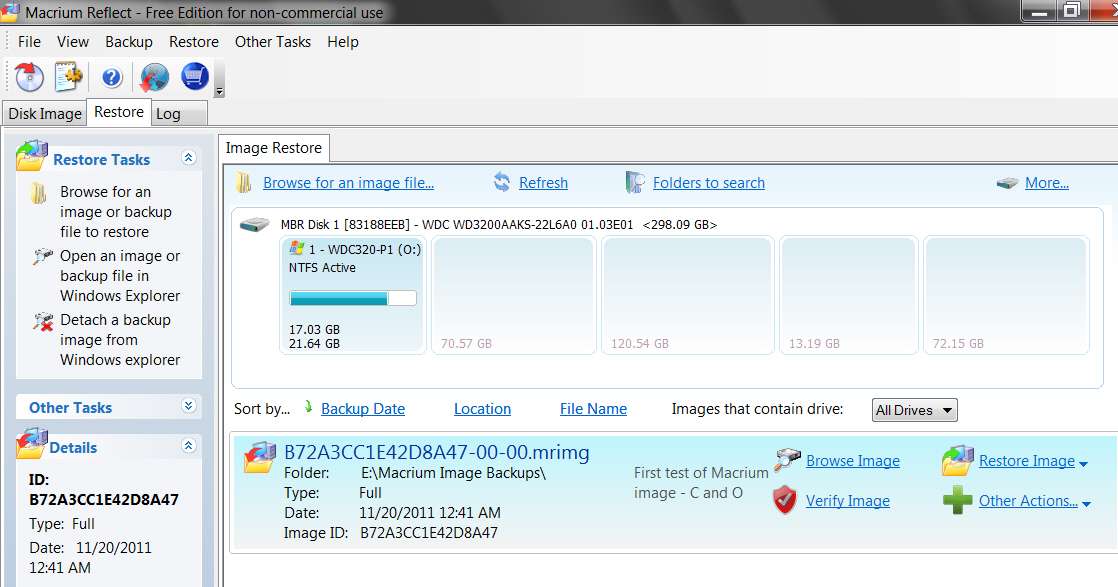
(1) start the program and select the RESTORE tab. My one and only Macrium image file (from two weeks ago) is shown:

recover01.jpg


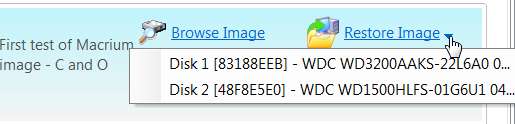
(2) click on the "restore image" button, and it presents both of the partitions contained inside that image file. There is no drive letter shown, but the other identifying information matches my C and O partitions:

recover02.jpg


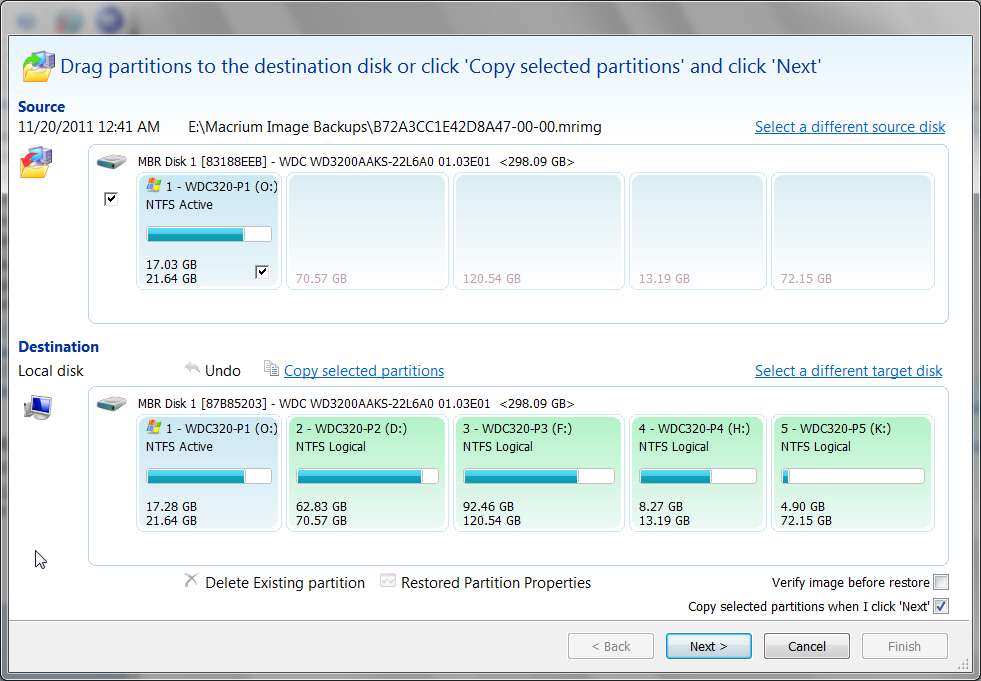
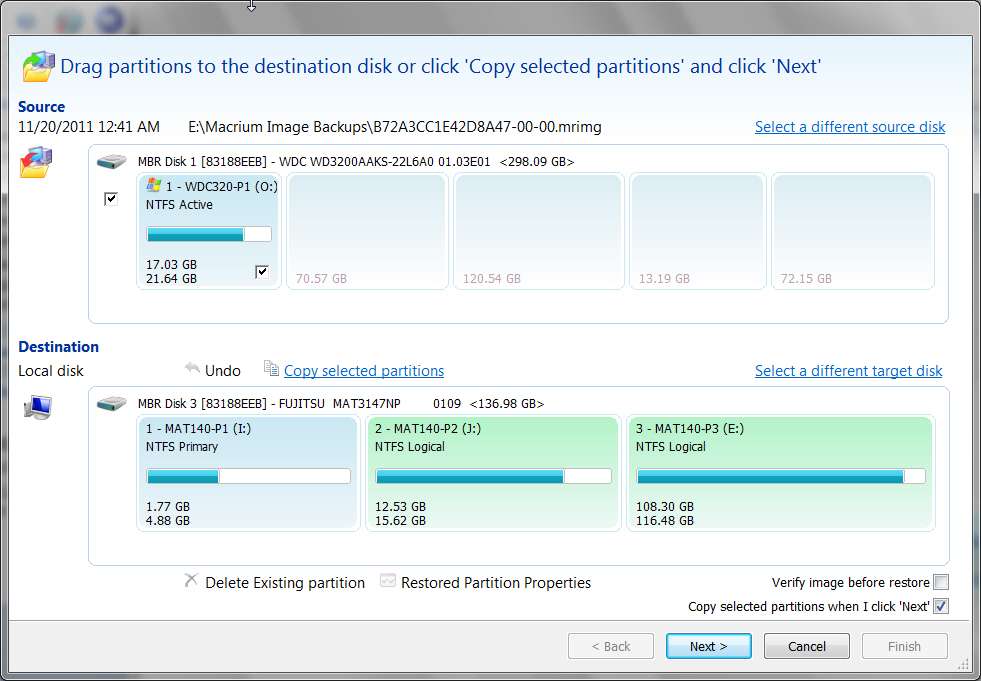
(3) I select the "Disk 1" line, because that is the O partition. Then the next screen shows the source O partition (pre-checked) on top, and the destination drive on the bottom. Initially a different target drive was presented but I clicked on the "select a different target disk" and then selected the true target disk, which is what is now shown at the bottom of this screen:

recover03.jpg


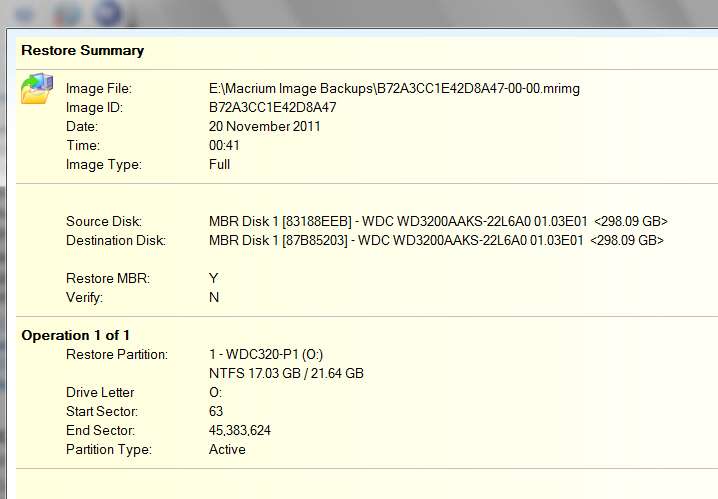
(4) I didn't make any changes to what was pre-checked, and then I was shown the following confirmation screen (which is correct) for the restore:

recover04.jpg


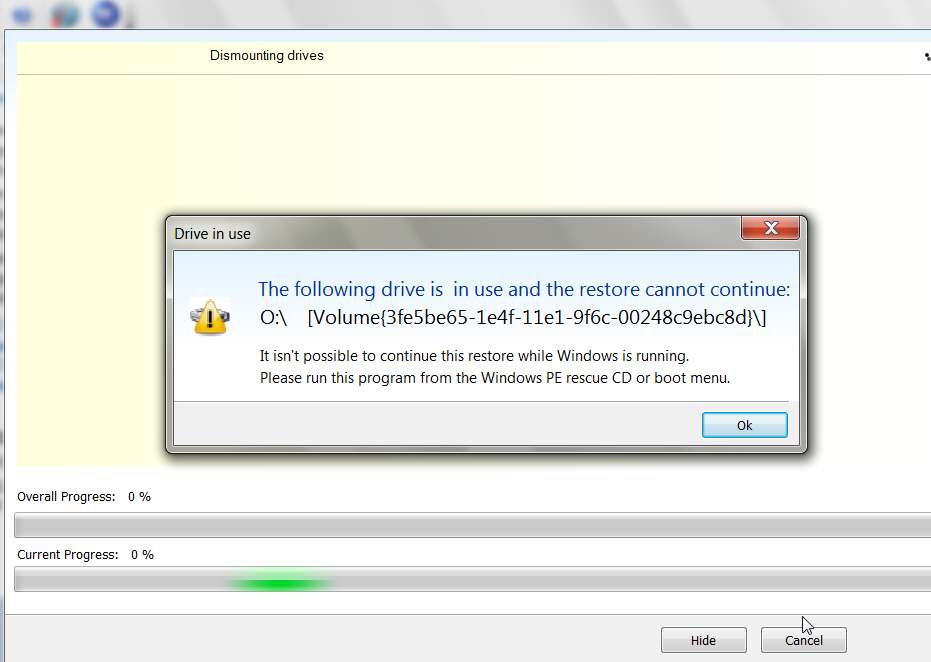
(5) The restore starts, but immediately halts because the target partition is "in use":

recover05.jpg


Had the standalone boot disk shown me the same screens I don't think I'd be asking for help here. The whole dialog seems to flow as I would intuitively expect it to flow, and I don't need a tutorial to explain any mysteries... because there are no mysteries. But the screens from the Linux disk are NOT what is shown here, and the standalone program's behavior does not match the installed program's behavior.

Having now run through this using the installed program, I'm going to try the standalone version one more time and see if I missed something the first two times I tried it.

Maybe there's a true issue with this new v5 standalone program.
 

My Computer My Computer

At a glance

Windows 7 Pro x64 (1), Win7 Pro X64 (2)i5-3350p 3.1Ghz/6MB-cache (1); E8400 3.0Ghz/6...8GB PC3-12800 DDR3 (1); 4GB PC3-10600 DDR3 (2)ATI HD7750 (1), (see TV cards); ATI R7 250 (2)
Computer type
PC/Desktop
Computer Manufacturer/Model Number
Home-built, two systems (1) and (2)
OS
Windows 7 Pro x64 (1), Win7 Pro X64 (2)
CPU
i5-3350p 3.1Ghz/6MB-cache (1); E8400 3.0Ghz/6MB-cache (2)
Motherboard
ASUS P8Z77-V Pro (1); ASUS P5Q3 (2)
Memory
8GB PC3-12800 DDR3 (1); 4GB PC3-10600 DDR3 (2)
Graphics Card(s)
ATI HD7750 (1), (see TV cards); ATI R7 250 (2)
Sound Card
Realtek ALC892 HD Audio (1); Realtek ALC1200 HD Audio (2)
Monitor(s) Displays
Eizo HD2441W LCD, Eizo S2433W (1); Eizo 24" S2433W (2)
Screen Resolution
1920x1200, 1920x1200 (1); 1920x1200 (2)
Hard Drives
(1) 1TB SATA-II (7200RPM), 2x2TB SATA-III (7200RPM), 250GB SATA-III (10000RPM) for OS; 2x2TB external USB 3.0

(2) 320GB SATA-II (7200RPM), 750GB SATA-II (7200RPM), 150GB SATA-II (10000RPM) for OS; 2TB external USB 3.0
PSU
Nesteq ECS-6001 600W (1); Nesteq ECS-5001 500W (2)
Case
Acousti-Case 360 (1) and (2)
Cooling
Noctua NH-U12P SE2 for CPU, 2x120mm case fans (1) and (2)
Keyboard
IBM PS/2 (1) and (2)
Mouse
Logitech MX Revolution wireless (1); Microsoft wired (2)
Internet Speed
100mbps down / 10mbps up
Antivirus
Microsoft Security Essentials; Malwarebyte Anti-Malware Pro
Browser
Firefox
Other Info
Ceton InfiniTV 4-tuner cablecard-enabled TV card as well as Hauppauge HVR-2250 OTA/ATSC 2-tuner TV card in (1), running under Win7 WMC
You mention that the tutorial you tried to follow was for the Linux-based rescue disc. Is your disc the Linux one or did you you create the WinPE-based disc?
It's the Linux one, which is the one which is produced by the "free" version. The WinPE version only is available via the purchased product.
Actually, disperser, you *can* create the WinPE rescue disk from the free version if you download the necessary files first. I did this and I much prefer it. Fortunately, I've not had need yet to perform a restore, but its UI and flexibility is a big step up from the Linux version.
 

My Computer My Computer

At a glance

Windows 7 Home Premium SP1 64bit
OS
Windows 7 Home Premium SP1 64bit
Ok. Just tried the standalone Linux version for a third time.

This time I selected BOTH (a) the image file in the upper-right pane, AND (b) the O partition in the lower-right pane, as the source image file and then the selected partition within that image file that I want to restore. This is obviously the equivalent of the 2-screen dialog with the installed version of the program. Anyway, this looks right.

Then the next screen is for selecting the target drive. I selected the proper drive, for which O is partition 1 on that drive.

The next screen is the confirmation, showing the source and target disks. Well... this seems to be the "smoking gun" that there is a major defect/bug in this standalone version of the program. The source disk is properly identified in all ways, both its ID=83188EEB, partition number 1, drive number 1, drive label WDC320-P1 and letter (O), as well as the size of the hard drive 298.089GB. The starting (63) and ending (45,383,624) sector numbers are also correct and exactly match my screenshot above from the Win7 installed version of the program.

However the target disk is WRONG. It correctly shows drive number 1 and signature 83188EEB, but it incorrectly shows description "FUJITSU MAT3147NP" and size 136.985GB. In fact these latter two items are for the drive that contains the folder in which the source image file lives. It should not be the target drive for the restore... it is actually the source drive holding the input source image file.

I believe I didn't see this mistake yesterday afternoon, and I just then pushed the RESTORE button to let it start. I remember then seeing a message warning about the fact that the target drive had three partitions which would be affected (as is true, since this is the WRONG target drive for the restore, and the size of the O partition would definitely have overwritten partitions 1 and 2 on the drive as well as the start of partition 3), and I blindly let it proceed. This is clearly how I destroyed this drive yesterday afternoon, and saw these partitions corrupted (at least in the partition boundary table). Fortunately no actual damage to the contents of the partitions actually occurred, as the corruption also made it impossible to actually READ that source input image file. And that's clearly why I was lucky enough to subsequently be able to use Partition Wizard and its "recover partition wizard" function to completely recreate the three partition boundaries on this drive, without losing anything at all.

Anyway, the description and size of the target disk should not have been what I saw in the standalone usage. Instead, it should have looked like the SOURCE and TARGET descriptions in the screenshot above from the Win7 installed version, with both SOURCE and TARGET identical.


This clearly looks like a bug in the program. Even though Macrium claims "no support" for the free program, surely they would want to know about this MAJOR defect that not only makes the core functionality of RESTORE FROM IMAGE not work, but even worse will destroy user hard drives in the process (and apparently, that drive on which the input source image file lives).

I will attempt to report this bug to them.

For now, I will stop using the program.
 

My Computer My Computer

At a glance

Windows 7 Pro x64 (1), Win7 Pro X64 (2)i5-3350p 3.1Ghz/6MB-cache (1); E8400 3.0Ghz/6...8GB PC3-12800 DDR3 (1); 4GB PC3-10600 DDR3 (2)ATI HD7750 (1), (see TV cards); ATI R7 250 (2)
Computer type
PC/Desktop
Computer Manufacturer/Model Number
Home-built, two systems (1) and (2)
OS
Windows 7 Pro x64 (1), Win7 Pro X64 (2)
CPU
i5-3350p 3.1Ghz/6MB-cache (1); E8400 3.0Ghz/6MB-cache (2)
Motherboard
ASUS P8Z77-V Pro (1); ASUS P5Q3 (2)
Memory
8GB PC3-12800 DDR3 (1); 4GB PC3-10600 DDR3 (2)
Graphics Card(s)
ATI HD7750 (1), (see TV cards); ATI R7 250 (2)
Sound Card
Realtek ALC892 HD Audio (1); Realtek ALC1200 HD Audio (2)
Monitor(s) Displays
Eizo HD2441W LCD, Eizo S2433W (1); Eizo 24" S2433W (2)
Screen Resolution
1920x1200, 1920x1200 (1); 1920x1200 (2)
Hard Drives
(1) 1TB SATA-II (7200RPM), 2x2TB SATA-III (7200RPM), 250GB SATA-III (10000RPM) for OS; 2x2TB external USB 3.0

(2) 320GB SATA-II (7200RPM), 750GB SATA-II (7200RPM), 150GB SATA-II (10000RPM) for OS; 2TB external USB 3.0
PSU
Nesteq ECS-6001 600W (1); Nesteq ECS-5001 500W (2)
Case
Acousti-Case 360 (1) and (2)
Cooling
Noctua NH-U12P SE2 for CPU, 2x120mm case fans (1) and (2)
Keyboard
IBM PS/2 (1) and (2)
Mouse
Logitech MX Revolution wireless (1); Microsoft wired (2)
Internet Speed
100mbps down / 10mbps up
Antivirus
Microsoft Security Essentials; Malwarebyte Anti-Malware Pro
Browser
Firefox
Other Info
Ceton InfiniTV 4-tuner cablecard-enabled TV card as well as Hauppauge HVR-2250 OTA/ATSC 2-tuner TV card in (1), running under Win7 WMC
Actually, dsperber, you *can* create the WinPE rescue disk from the free version if you download the necessary files first. I did this and I much prefer it. Fortunately, I've not had need yet to perform a restore, but its UI and flexibility is a big step up from the Linux version.
Thanks for this insight. I had seen the kind of complex multi-checkbox screen when creating the standalone media, and obviously didn't read it properly.

I've now re-run that builder program, and this time checked that box which results in the 1.7GB download of Microsoft's WAIK, in order to build the WinPE version of the standalone boot media.

I then built the new WinPE boot media, and tried again to do the selective restore of my O partition from the O+C system image file.

Well, sure enough just as you described, the user interface from the WinPE boot media actually is the same as that of the Win7 installed version, which as I mentioned previously, is very different from the standalone Linux version I'd had my problems with. This is what you must have been referring to in your own comment... and I agree, it is much superior to the Linux version.

Not only is it superior to the Linux version and the same as the Win7 installed version, but unlike the Linux version IT ACTUALLY WORKS!!! In other words, it actually did correctly produce the source and target disk drives in the confirmation screen. I even had the cojones to "let it go and restore"... and sure enough it ran, and did what it was supposed to, and finished successfully!!! And sure enough, my O partition was finally restored as I'd wanted all along.


So, I've opened a ticked with Macrium (and actually received a response, asking if it's possible for me to re-run the Linux version and send them photos of the source and destination and confimation screen).

But mostly, I thank you for suggesting I create the WinPE boot media. That turns out to be a solution that really works.

WARNING TO OTHERS: DO NOT USE THE LINUX BOOT MEDIA.
 

My Computer My Computer

At a glance

Windows 7 Pro x64 (1), Win7 Pro X64 (2)i5-3350p 3.1Ghz/6MB-cache (1); E8400 3.0Ghz/6...8GB PC3-12800 DDR3 (1); 4GB PC3-10600 DDR3 (2)ATI HD7750 (1), (see TV cards); ATI R7 250 (2)
Computer type
PC/Desktop
Computer Manufacturer/Model Number
Home-built, two systems (1) and (2)
OS
Windows 7 Pro x64 (1), Win7 Pro X64 (2)
CPU
i5-3350p 3.1Ghz/6MB-cache (1); E8400 3.0Ghz/6MB-cache (2)
Motherboard
ASUS P8Z77-V Pro (1); ASUS P5Q3 (2)
Memory
8GB PC3-12800 DDR3 (1); 4GB PC3-10600 DDR3 (2)
Graphics Card(s)
ATI HD7750 (1), (see TV cards); ATI R7 250 (2)
Sound Card
Realtek ALC892 HD Audio (1); Realtek ALC1200 HD Audio (2)
Monitor(s) Displays
Eizo HD2441W LCD, Eizo S2433W (1); Eizo 24" S2433W (2)
Screen Resolution
1920x1200, 1920x1200 (1); 1920x1200 (2)
Hard Drives
(1) 1TB SATA-II (7200RPM), 2x2TB SATA-III (7200RPM), 250GB SATA-III (10000RPM) for OS; 2x2TB external USB 3.0

(2) 320GB SATA-II (7200RPM), 750GB SATA-II (7200RPM), 150GB SATA-II (10000RPM) for OS; 2TB external USB 3.0
PSU
Nesteq ECS-6001 600W (1); Nesteq ECS-5001 500W (2)
Case
Acousti-Case 360 (1) and (2)
Cooling
Noctua NH-U12P SE2 for CPU, 2x120mm case fans (1) and (2)
Keyboard
IBM PS/2 (1) and (2)
Mouse
Logitech MX Revolution wireless (1); Microsoft wired (2)
Internet Speed
100mbps down / 10mbps up
Antivirus
Microsoft Security Essentials; Malwarebyte Anti-Malware Pro
Browser
Firefox
Other Info
Ceton InfiniTV 4-tuner cablecard-enabled TV card as well as Hauppauge HVR-2250 OTA/ATSC 2-tuner TV card in (1), running under Win7 WMC
Great. Glad it worked. To be honest, though, I wasn't 100% sure the UI was the same as Win7's, since I've never done a restore. I only checked that I could boot from the disk and took a cursory look. But it looked pretty close, IIRC.

So I'm wondering if I can uninstall WAIK, or would I be needing it for something else? I've archived the original download, so I could always re-install. What other uses are there for it, non-Macrium?
 

My Computer My Computer

At a glance

Windows 7 Home Premium SP1 64bit
OS
Windows 7 Home Premium SP1 64bit
Just a post-script here...

(1) I have been in touch with Macrium on this issue over the past few days. Despite the fact that I was using the "unsupported" free version of their product, their "parental pride" clearly motivated them to look into the bug and fix it... since it clearly may also have involved their non-free versions. Very impressed with their attitude, and prompt attention to this matter (which was a TOTAL DISASTER for me when it occurred, although I was eventually able to overcome 100% of the "damage" with ZERO loss of data... a true miracle).

Anyway, today I received an email from them advising that they'd found what they believed was the problem with that Linux version of the standalone program, and could I give it another try (at least up to the point of ensuring that the program's confirmation screen showed the correct information, even if I didn't go further with the true restore).

There email (and "release notes") mentioned that the correction dealt with disk signatures, and potential mis-handling by the Linux program under certain circumstances.

(2) I opened the installed Win7 program (build 4118) and it automatically detected that there was a new version available for download (4168). I installed this update, and then re-built the Linux standalone boot CD. Then I re-ran the preliminary steps of a restore of my O partition from that 11/20 MRIMG backup file using the new 4168 Linux CD. And sure enough, the "target drive" was now correctly described as the proper drive, not the incorrect drive. So I assume it would have now worked properly if I'd let it actually do the restore.

And thus I would conclude that their "fix" to the Linux program has actually accomplished what they wanted to fix.

(3) However their mention of "disk signature" got me to thinking. I thought back to what had happened this past weekend, when apparently using the 4118 Linux program to restore my O partition had also forced a duplicate disk signature to the target drive, which had then caused a "signature collision" when booting Win7, when had then caused that drive to be placed OFFLINE by Windows.

It was only when I used DISKPART, and ONLINE DISK x to bring the drive back online that it came back... somehow. So obviously there now was a unique signature for that drive, and no more duplicate "collision".

Well, with all of this running around in my head I decided to do a little investigation... of my current disk signatures, and also of what the Reflect MRIMG file looks like inside of it.

I then looked at my three hard drives, using DISKPART. They are as follows (I'll refer to them by their label abbreviations, for clarity):
Disk 0 WDC320 signature 0005420E partition O lives here
Disk 1 WDC150 signature 48F8E5E0 partition C lives here
Disk 2 MAT140 signature 83188EEB partition E lives here
Note that the E partition is mentioned because (a) that's where the output target folder lives which holds the MRIMG backup files, and (b) it is that drive's signature 83188EEB which shows up to be super-crucial to this bug.

Also, I'm sure that the signature of 0005420E for Disk 0 is NOT what it was back on 11/20 when my original MRIMG backup was created. It had to be something unique for sure, but it probably wasn't this. I believe the current value of 0005420E was newly assigned this weekend by the DISKPART command, ONLINE DISK x, which must have also performed a UNIQUEID DISK command inside of it in order to assign a new unique signature and thus resolve the "signature collision" and thus be able to bring the drive back online.

Anyway, while the 4118 Linux program may have been a "victim" and done the wrong thing, I am now convinced (and have communicated to Macrium) that the real problem was in the MRIMG file itself produced back on 11/20 by the 4118 Win7 version of the program.

The real 4118 problem is that the signature of my Disk 0 (where the O partition lives) was NOT written to the output MRIMG file. Instead, the signature of my Disk 2 (where the E partition lives) was written out. The second partition (C) in the MRIMG did get the correct signature for Disk 1 (where the C partition lives). But that first partition O, which was then tried to restore... it has the WRONG signature in the MRIMG file, namely that of Disk 2 instead of Disk 0.

(4) Having a very strong hunch about all of this, I then produced a new MRIMG file tonight but using the newly patched 4168 version of Reflect, again backing up O and C just as I'd done on 11/20 with the original flawed 4118 version of the program. So now I had two MRIMG files to examine, one from 11/20 produced by 4118 and the second from 12/7 produced by 4168.

I then began a restore (using the Win7 version so that I could take screenshots, even though I know I couldn't restore O except with standalone Linux/WinPE versions).

As you can see from the following screenshots, my suspicion is borne out by the evidence. And while Macrium certainly fixed the 4118 Linux program which had what I now feel to be a "minor" flaw, it really was a "victim" in the story. The real problem was, just as I suspected, with the 4118 Win7 version of Reflect which actually produced a flawed MRIMG file in that the first partition backed up had the incorrect disk signature (which apparently was the signature of the target folder's drive that would receive the MRIMG output file).

In fact, even the new 4168 Win7 Reflect, when starting the restore of O from the flawed 11/20 MRIMG file produced by 4118 Win7 Reflect, actually still defaults to the incorrect target drive to receive the restored partition... just as the original flawed 4118 Linux program did. So Macrium may have fixed restore in the 4168 Linux program, but they don't seem to have fixed what looks like the same problem in the Win7/WinPE version of the program... although again, they're "victims" too.

The real "culprit" is the flawed MRIMG file produced by 4118 Win7 Reflect, which incorrectly put the wrong disk signature in the first partition written out to the MRIMG file. And THAT is what causes all of the problems and confusion on restore... either by picking the wrong target drive by default, or by restoring a "duplicate signature" in the MBR of the drive receiving the restore partition.

The damage (i.e. "signature collision") comes from restoring an incorrect signature to the target drive, which happens to be the signature of the MRIMG drive for the first partition contained within that MRIMG file.


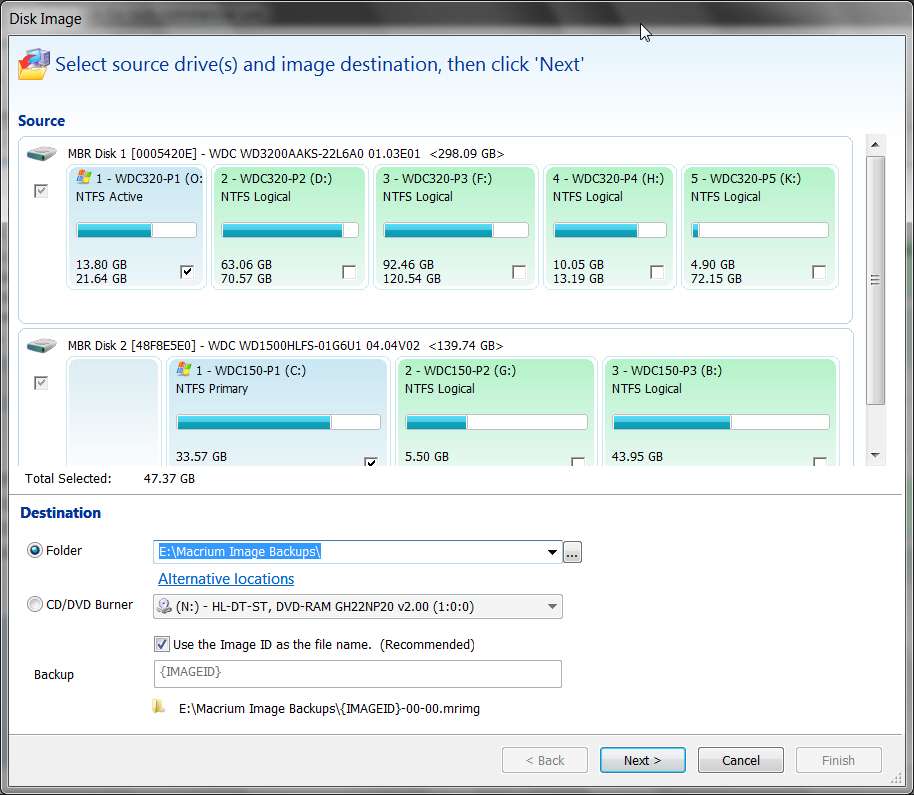
Here is the setup configuration for the 12/7 backup using the fixed 4168 Win7 Reflect. Notice the input O partition on Disk 0 (0005420E), input C partition on Disk 1 (48F8E5E0), and output target on E partition (83188EEB).

backup01.jpg


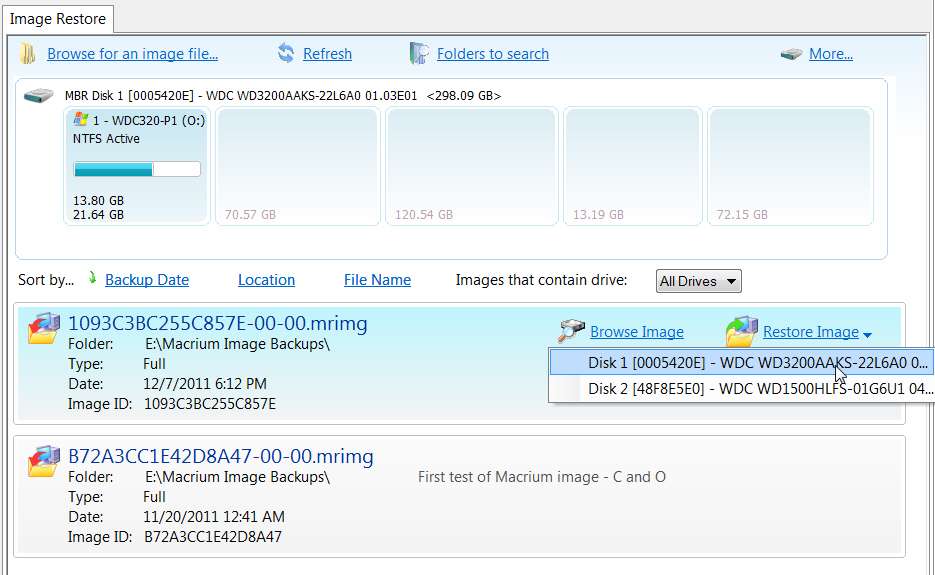
Looking at the resulting MRIMG as if I wanted to restore the O partition, note that the first partition file contained within it is correctly from Disk 0, and has the correct signature of 0005420E.

restoredisk1.jpg


Also, if I go to the next step of the restore note that the correct source and target drives are properly matched, namely Disk 0 with the signature of 0005420E which is genuinely where the O partition lived when the MRIMG was taken, and also by default where I want to restore it.

restoredisk2.jpg


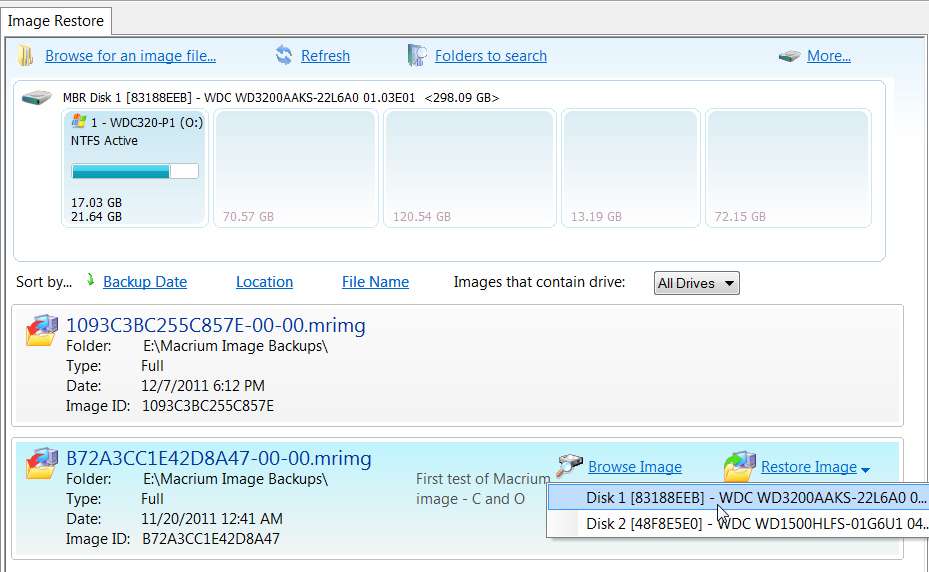
Now, in contrast, look at the same analysis (still using the new "fixed" 4168 version of Win7 Reflect) but reading the original flawed 11/20 MRIMG file which produced the disaster last weekend.

First, notice that the signature for the Disk 0 drive containing O partition is incorrect. It is not whatever it was back on 11/20 (not 0005420E I'm certain, but also 100% guaranteed absolutely not to be 83188EEB either)... namely the grossly incorrect 83188EEB! This is really the "giant clue" to the impending disaster.

restoredisk3.jpg


And, when I proceed to the confirmation screen, sure enough even this theoretically "fixed" 4168 Win7 version (though clearly Macrium did NOT fix this program as they did seem to fix the Linux version) picks the wrong default target drive (i.e. my Disk 2, with signature 83188EEB) instead of the proper Disk 0 where the O partition actually lives (and lived, even back on 11/20).

If I let the restore proceed, the O partition which should go to Disk 0 will actually go to Disk 2... clearly not what I want (but what I got over the weekend). And if I change the target drive to correctly point to Disk 0 it will probably replace the MBR signature with 83188EEB (as it mistakenly was on the MRIMG input file), thus producing a "signature collision" since now Disk 0 and Disk 2 will have the same signatures. One of the drives will be taken offline by Windows.

restoredisk4.jpg


And all of this is now obviously because of the wrong 83188EEB signature was mistakenly written for the O partition by the 4118 flawed Win7 Reflect on 11/20 when that MRIMG file was created.

It will cause problems because of that wrong signature in the MRIMG for the drive containing the O partition. Period. I'm now about to delete it.

Thankfully, the corrected 4168 version of the Win7 Reflect has fixed this problem (as proven by my screenshots above), in that now the proper signature of the first archived partition's hard drive is correctly written out to the MRIMG file. Thus there will NEVER be any problem for its restore, no matter what program is used to restore it (including an older 4118 version).

Again, the problem really was with the 4118 Win7 Reflect which wrote the incorrect signature out for that first partition in the MRIMG file.
 

My Computer My Computer

At a glance

Windows 7 Pro x64 (1), Win7 Pro X64 (2)i5-3350p 3.1Ghz/6MB-cache (1); E8400 3.0Ghz/6...8GB PC3-12800 DDR3 (1); 4GB PC3-10600 DDR3 (2)ATI HD7750 (1), (see TV cards); ATI R7 250 (2)
Computer type
PC/Desktop
Computer Manufacturer/Model Number
Home-built, two systems (1) and (2)
OS
Windows 7 Pro x64 (1), Win7 Pro X64 (2)
CPU
i5-3350p 3.1Ghz/6MB-cache (1); E8400 3.0Ghz/6MB-cache (2)
Motherboard
ASUS P8Z77-V Pro (1); ASUS P5Q3 (2)
Memory
8GB PC3-12800 DDR3 (1); 4GB PC3-10600 DDR3 (2)
Graphics Card(s)
ATI HD7750 (1), (see TV cards); ATI R7 250 (2)
Sound Card
Realtek ALC892 HD Audio (1); Realtek ALC1200 HD Audio (2)
Monitor(s) Displays
Eizo HD2441W LCD, Eizo S2433W (1); Eizo 24" S2433W (2)
Screen Resolution
1920x1200, 1920x1200 (1); 1920x1200 (2)
Hard Drives
(1) 1TB SATA-II (7200RPM), 2x2TB SATA-III (7200RPM), 250GB SATA-III (10000RPM) for OS; 2x2TB external USB 3.0

(2) 320GB SATA-II (7200RPM), 750GB SATA-II (7200RPM), 150GB SATA-II (10000RPM) for OS; 2TB external USB 3.0
PSU
Nesteq ECS-6001 600W (1); Nesteq ECS-5001 500W (2)
Case
Acousti-Case 360 (1) and (2)
Cooling
Noctua NH-U12P SE2 for CPU, 2x120mm case fans (1) and (2)
Keyboard
IBM PS/2 (1) and (2)
Mouse
Logitech MX Revolution wireless (1); Microsoft wired (2)
Internet Speed
100mbps down / 10mbps up
Antivirus
Microsoft Security Essentials; Malwarebyte Anti-Malware Pro
Browser
Firefox
Other Info
Ceton InfiniTV 4-tuner cablecard-enabled TV card as well as Hauppauge HVR-2250 OTA/ATSC 2-tuner TV card in (1), running under Win7 WMC
Post-post-script...

Macrium believes the problem was NOT that the 4118 version of the Win7 Reflect wrote the incorrect signature out to the MRIMG file for the O partition.

They believe that the 83188EEB signature value actually WAS the signature for Disk 0 originally, but that it was the "broken" Linux restore which mistakenly wrote the Disk 0 signature value to Disk 2 (which was the wrong target drive). And that is how the duplicate "signature collision" occurred, an how 83188EEB now comes to be the signature on Disk 2.

They insist that they made no change in 4168 to the backup function, but only to the restore function.

Anyway, my test of 4168 confirms that with a newly created MRIMG and the current state of drive signatures, the MRIMG file is correct... and the restore also is correct.

And this is true whether using the Linux or WinPE version of the standalone boot CD.

===>> be sure to update your version 5 Reflect to the latest 4168 build. Do not use the originally released 4118 build.
 

My Computer My Computer

At a glance

Windows 7 Pro x64 (1), Win7 Pro X64 (2)i5-3350p 3.1Ghz/6MB-cache (1); E8400 3.0Ghz/6...8GB PC3-12800 DDR3 (1); 4GB PC3-10600 DDR3 (2)ATI HD7750 (1), (see TV cards); ATI R7 250 (2)
Computer type
PC/Desktop
Computer Manufacturer/Model Number
Home-built, two systems (1) and (2)
OS
Windows 7 Pro x64 (1), Win7 Pro X64 (2)
CPU
i5-3350p 3.1Ghz/6MB-cache (1); E8400 3.0Ghz/6MB-cache (2)
Motherboard
ASUS P8Z77-V Pro (1); ASUS P5Q3 (2)
Memory
8GB PC3-12800 DDR3 (1); 4GB PC3-10600 DDR3 (2)
Graphics Card(s)
ATI HD7750 (1), (see TV cards); ATI R7 250 (2)
Sound Card
Realtek ALC892 HD Audio (1); Realtek ALC1200 HD Audio (2)
Monitor(s) Displays
Eizo HD2441W LCD, Eizo S2433W (1); Eizo 24" S2433W (2)
Screen Resolution
1920x1200, 1920x1200 (1); 1920x1200 (2)
Hard Drives
(1) 1TB SATA-II (7200RPM), 2x2TB SATA-III (7200RPM), 250GB SATA-III (10000RPM) for OS; 2x2TB external USB 3.0

(2) 320GB SATA-II (7200RPM), 750GB SATA-II (7200RPM), 150GB SATA-II (10000RPM) for OS; 2TB external USB 3.0
PSU
Nesteq ECS-6001 600W (1); Nesteq ECS-5001 500W (2)
Case
Acousti-Case 360 (1) and (2)
Cooling
Noctua NH-U12P SE2 for CPU, 2x120mm case fans (1) and (2)
Keyboard
IBM PS/2 (1) and (2)
Mouse
Logitech MX Revolution wireless (1); Microsoft wired (2)
Internet Speed
100mbps down / 10mbps up
Antivirus
Microsoft Security Essentials; Malwarebyte Anti-Malware Pro
Browser
Firefox
Other Info
Ceton InfiniTV 4-tuner cablecard-enabled TV card as well as Hauppauge HVR-2250 OTA/ATSC 2-tuner TV card in (1), running under Win7 WMC
Excellent info dsperber - I'm sure this will come in very helpful for someone in the future!
 

My Computer My Computer

At a glance

Windows 7 Professional SP1 32-bitIntel Core 2 Duo E6600 2.4GHz4GB DDR2-667 (4x1GB in dual-channel config)nVidia GeForce 9800 GT
Computer type
PC/Desktop
Computer Manufacturer/Model Number
Custom-built
OS
Windows 7 Professional SP1 32-bit
CPU
Intel Core 2 Duo E6600 2.4GHz
Motherboard
Asus PL5D2
Memory
4GB DDR2-667 (4x1GB in dual-channel config)
Graphics Card(s)
nVidia GeForce 9800 GT
Sound Card
Creative X-Fi XtremeMusic
Monitor(s) Displays
Acer P236H
Screen Resolution
1920x1200 (DVI)
Hard Drives
OCZ SSD Vertex Plus 60GB SATA (Firmware 3.55), 64MB cache
Hitachi HD321KJ SATA, 320GB, 7200rpm, 16MB cache
PSU
Antec TruePower 2.0
Case
Cooler Master Centurion
Cooling
Too many fans
Keyboard
Standard
Mouse
Microsoft wireless optical mouse
Internet Speed
AT&T U-verse (18mbit/sec)
Antivirus
Microsoft Security Essentials
Browser
Firefox
Other Info
Other devices:
Compaq CQ-60 laptop
Google Nexus 7 (2012) tablet
Nvidia SHIELD tablet (US/LTE)
Hardkernel ODROID-XU single-board computer (Samsung Exynos 5420)
A quick question..
I just have one internal drive on my laptop and four different partition on it. What i want to do is dedicate one of the partition to store the macrimiun image of the c drive. I created an image and tried to restore but found that i couldnt do it whilr windows is running. So i inserted the linux PE cd and tried to run the restore from there. But i couldnt go past the select target disk step as no disk was being displayed!
Do i necessarily need more than one disk (say external hdd) for this to work? Can i not do the restore from a partition on the local disk to another partition on the same disk? I used norton ghost before and it could do the same.
 

My Computer My Computer

At a glance

Windows Home Premium 64bitintel core i56 GB DDR3nVIDIA GEFORCE 630 M
Computer Manufacturer/Model Number
hp
OS
Windows Home Premium 64bit
CPU
intel core i5
Memory
6 GB DDR3
Graphics Card(s)
nVIDIA GEFORCE 630 M

My Computer My Computer

At a glance

win7 home premium-64bit-SP1-IE10T6600 2.2Ghz4 GbATI Mobility Radeon HD 4530
Computer type
Laptop
Computer Manufacturer/Model Number
HP pavilion DV6
OS
win7 home premium-64bit-SP1-IE10
CPU
T6600 2.2Ghz
Motherboard
HP Model 3628
Memory
4 Gb
Graphics Card(s)
ATI Mobility Radeon HD 4530
Sound Card
IDT High Definition
Screen Resolution
1366x768 @ 60Hz
Hard Drives
500Gb Western Digital
Antivirus
MSE
Other Info
Malwarebytes Antimalware + Spybot-Search&Destroy
Hi, I have V.5.5154. I tried the Linux USB-Stick Boot which doesn't bring any target disks on recovery. When I tried the WinPE (installed that 1.7G file etc.), after booting and loading the "rescue-with-winPE" it just reboots and never enters the recovery manager ...

any experience in this around ?

Thx,
Frank
 

My Computer My Computer

At a glance

Windows 7 Professional 64 bit
OS
Windows 7 Professional 64 bit
Hi Frank,

That sounds like a bad WinPE - please try this one.

Regards,
Golden
 

My Computer My Computer

At a glance

Windows 10 Pro x64 ; Xubuntu x64Intel i7 860 @ 2.80 GHz O/C'ed to 4.0GHz16GB Corsair Vengance DDR3 @ 661 MHz Dual Cha...EVGA NVidia GTX 560 1024MB
Computer type
PC/Desktop
Computer Manufacturer/Model Number
Golden Mk. I.4
OS
Windows 10 Pro x64 ; Xubuntu x64
CPU
Intel i7 860 @ 2.80 GHz O/C'ed to 4.0GHz
Motherboard
Gigabyte P55A-UD3R Rev.1. Award BIOS F13
Memory
16GB Corsair Vengance DDR3 @ 661 MHz Dual Channel (9-9-9-24)
Graphics Card(s)
EVGA NVidia GTX 560 1024MB
Sound Card
Realtek Integrated
Monitor(s) Displays
Dual Samsung SyncMaster 2494HS
Screen Resolution
1920*1080 and 1920*1080
Hard Drives
1*Samsung 840 EVO 120GB SSD;
1*OCZ Vertex 2 60GB SSD;
2*Samsung F3 SpinPoint 1TB in RAID0;
1*Samsung F1 SpinPoint 1TB;
2*Western Digital 1TB External USB 3.0
1*Western Digital 500GB External USB 3.0
1*Seagate 500GB External USB 2.0
PSU
Thermaltake ToughPower QFan 750W
Case
Thermaltake Element S VK60001W2Z
Cooling
Corsair H60 Water Cooling, 2*230mm and 2*80mm case fans
Keyboard
Logitech G110
Mouse
Logitech MX518
Hi Golden,
thx for your reply. I clicked the link, but it has no page ...

Regards,
Frank
 

My Computer My Computer

At a glance

Windows 7 Professional 64 bit
OS
Windows 7 Professional 64 bit
Oops sorry Frank, try this
 

My Computer My Computer

At a glance

Windows 10 Pro x64 ; Xubuntu x64Intel i7 860 @ 2.80 GHz O/C'ed to 4.0GHz16GB Corsair Vengance DDR3 @ 661 MHz Dual Cha...EVGA NVidia GTX 560 1024MB
Computer type
PC/Desktop
Computer Manufacturer/Model Number
Golden Mk. I.4
OS
Windows 10 Pro x64 ; Xubuntu x64
CPU
Intel i7 860 @ 2.80 GHz O/C'ed to 4.0GHz
Motherboard
Gigabyte P55A-UD3R Rev.1. Award BIOS F13
Memory
16GB Corsair Vengance DDR3 @ 661 MHz Dual Channel (9-9-9-24)
Graphics Card(s)
EVGA NVidia GTX 560 1024MB
Sound Card
Realtek Integrated
Monitor(s) Displays
Dual Samsung SyncMaster 2494HS
Screen Resolution
1920*1080 and 1920*1080
Hard Drives
1*Samsung 840 EVO 120GB SSD;
1*OCZ Vertex 2 60GB SSD;
2*Samsung F3 SpinPoint 1TB in RAID0;
1*Samsung F1 SpinPoint 1TB;
2*Western Digital 1TB External USB 3.0
1*Western Digital 500GB External USB 3.0
1*Seagate 500GB External USB 2.0
PSU
Thermaltake ToughPower QFan 750W
Case
Thermaltake Element S VK60001W2Z
Cooling
Corsair H60 Water Cooling, 2*230mm and 2*80mm case fans
Keyboard
Logitech G110
Mouse
Logitech MX518
... hmp, tried it but still same effect, reboots after loading the .iso
 

My Computer My Computer

At a glance

Windows 7 Professional 64 bit
OS
Windows 7 Professional 64 bit
Back
Top