Solved Macrium Reflect FREE question

abuela101

New member
Local time
11:07 AM
Messages
19
Fairly new to this software and have a question regarding it.

There are 2 selections available and those are:

1: Image selected disk on this computer.
2: Create an image of the partitions required to backup and restore windows.

I tried both 1 and 2.

1: showed 32.7 GB after imaging.
2: showed 29.0 GB after imaging.

What is the difference? What is #1 including what #2 is not including?

Which one is recommended to use to restore all what I need to restore Windows, including the software I installed?

TIA
 

My Computer

Computer type
PC/Desktop
Computer Manufacturer/Model Number
Dell Vostro
OS
Windows 7 Home Premium 64bit
Post a screen shot of Windows Disk Management.

You presumably have multiple partitions--maybe as many as 3. We need to know what's in them and that would be shown by the screen shot.

Choice 1 would appear to include a partition that is NOT needed to restore Windows. Choice 2 would likely be C only or possibly C plus another partition that happens to be marked as "system"---which the screen shot will reveal.

To restore Windows, you need to restore C and any separate partition marked as "system". On some PCs, C is "system", so that's all you'd have to restore. On others, it isn't--so you'd have to restore 2 partitions in that case. Macrium is smart enough to tell which partitions are needed--that's what is meant by "Create an image of the partitions required to backup and restore windows."

Unless you did something cuckoo, your software should be on C and would be included in both choice 1 or choice 2.
 

My Computer

Computer type
PC/Desktop
Computer Manufacturer/Model Number
Ignatz Special; 4 speed manual gearbox; factory air conditioning; one of one
OS
Windows 7 Home Premium SP1, 64-bit
CPU
Intel Skylake i5-6600K, not overclocked
Motherboard
AsRock Z170M Extreme 4, micro ATX
Memory
8 GB HyperX DDR4-2666 (2 x 4 GB)
Graphics Card(s)
none; graphics are integrated on CPU
Sound Card
onboard: Realtek ALC1150; external: USB Behringer UF0-202
Monitor(s) Displays
Dell S2340M 23 inch IPS
Screen Resolution
1600 x 900
Hard Drives
System: Crucial MX100 series SSD, 128 GB;
Data: Samsung Spinpoint 103SJ, 1 TB;
Backup: WD Caviar Green WD30EZRX-00D8PB0, 3 TB
PSU
Rosewill SilentNight 500 watt fanless, semi-modular
Case
Antec Solo II
Cooling
Noctua NH-U12S; Noctua F12 intake, Noctua S12A exhaust
Keyboard
Microsoft 200 6JH-00001 USB
Mouse
Dell or Microsoft optical wired; USB
Antivirus
Microsoft Security Essentials and Malwarebytes Premium
Browser
Pale Moon
Other Info
All fans PWM; speeds at idle: CPU circa 500 rpm; intake circa 600 rpm; exhaust circa 600 rpm; CPU temps 27 idle and 47 C load in a warm room (27 C/81 F) when running Intel Extreme Tuning Utility stress test.
Why don't you mount the images and see where the difference is.
 

My Computer

Computer Manufacturer/Model Number
HP, Dell, Gateway, Toshiba - 4 laptops and 2 desktops
OS
Vista, Windows7, Mint Mate, Zorin, Windows 8
CPU
from 1.6GHz Duo to i7
Monitor(s) Displays
2x HP w2207
Hard Drives
5x HDD, 7x SSD, 12x Externals
Keyboard
with trackball - no mices
Mouse
Trackball mice
Internet Speed
DSL 6000
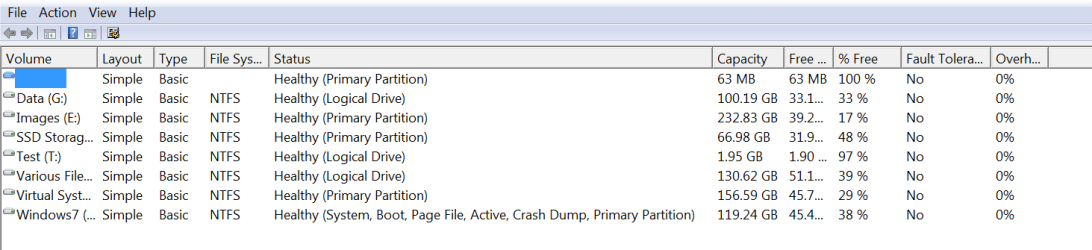
Thanks ignatzatsonic for the info. Here is the pic. Hopefully it's the one you wanted so see. EDIT: The blue square you see under volume is shown as blank.
 
Last edited:

My Computer

Computer type
PC/Desktop
Computer Manufacturer/Model Number
Dell Vostro
OS
Windows 7 Home Premium 64bit
@whs. I don't know how to do that because I'm a complete (senior) noob and goes way above my paygrade. Thanks anyway.
 

My Computer

Computer type
PC/Desktop
Computer Manufacturer/Model Number
Dell Vostro
OS
Windows 7 Home Premium 64bit
The difference is the Recovery partition isn't being included in the image of the partitions required to backup and restore windows. The Recovery partition is used to restore your computer back to the factory state should things get hopelessly fouled up. While most purists would say to image that partition separately from the System partitions and even move it to another drive, for you it would be much simpler to just image the entire C: drive, same as you did in Option 1. That way, you will have to make only the one image and it isn't all that much bigger than just imaging the other two.
 

My Computer

Computer type
PC/Desktop
Computer Manufacturer/Model Number
Custom Build
OS
Win 7 Ultimate 64 bit
CPU
Intel i7-3930K
Motherboard
ASUS P9X79 WS
Memory
Kingston HyperX Genesis 32GB Kit (8x4GB Modules) 1600MHz DDR
Graphics Card(s)
MSI R7850 Twin Frozr 2GD5/OC Radeon HD 7850 2GB 256-bit GDDR
Sound Card
Asus Xonar Essence STX
Monitor(s) Displays
3x Asus VG248QE 24", Vizio 32" TV
Screen Resolution
1920 x 1080, ?
Hard Drives
Samsung 128GB 840 Pro SSD (1),
Samsung 4TB 850 EVO SSDs (4)
Samsung 4TB 850 EVO SSDs (16) external backup drives used in 2.5" hot swap bays in the computer.
PSU
Corsair HX750w
Case
Antec Two Hundred v2 (modified)
Cooling
Cooler Master GeminII S524 120mm (fan replaced with a 140mm)
Keyboard
Logitech G510s
Mouse
Logitech M525 (two in use)
Internet Speed
=< 32Mbps down, 8Mbps up
Antivirus
AVAST!, MBAM, SAS, Spybot S&D (all but MBAM free) Glary Util
Browser
IE11
Other Info
LSI 9211-8i HBA card (8 SATA III ports), 2.5" & 3.5" Hot Swap Bays, HooToo HT-CR001 PCI-E to USB 3.0 Internal Hub + 6 Slot Card Reader, and LG Model CH12LS28 BD-ROM Optical Drive. Also, ScanSnap S1500 ADF duplexing scanner, Canon 9000F flat bed scanner, Corsair SP2500 2.1 speakers, Samsung CLP 415nw laser color printer, Cyberpower PP2200SW UPS
The recovery partition is marked "system". That's where your boot files are. That partition is needed to restore Windows for that reason, along with C.

This is a Dell. Dell has some weird ideas about where to put boot files. They choose to put them on the recovery partition, unlike most builders.

You could copy those boot files to C if you wanted, and then would only have to image C to restore Windows and programs.

Or leave things as they are and make a single image file of C and recovery.

Or leave things as they are and make separate image files of C and recovery.

Or leave things as they are and make a single image of C, recovery, and that partition with no letter.

Or leave things as they are and make separate images of C, recovery, and that partition with no letter.

I'm not sure what that unlettered partition is. Hmmm...no file system on it. Ask Dell.

Simplest thing to do is just make one image file of all of them, like Lady Fitzgerald recommended. Then you don't have to worry about it.
 

My Computer

Computer type
PC/Desktop
Computer Manufacturer/Model Number
Ignatz Special; 4 speed manual gearbox; factory air conditioning; one of one
OS
Windows 7 Home Premium SP1, 64-bit
CPU
Intel Skylake i5-6600K, not overclocked
Motherboard
AsRock Z170M Extreme 4, micro ATX
Memory
8 GB HyperX DDR4-2666 (2 x 4 GB)
Graphics Card(s)
none; graphics are integrated on CPU
Sound Card
onboard: Realtek ALC1150; external: USB Behringer UF0-202
Monitor(s) Displays
Dell S2340M 23 inch IPS
Screen Resolution
1600 x 900
Hard Drives
System: Crucial MX100 series SSD, 128 GB;
Data: Samsung Spinpoint 103SJ, 1 TB;
Backup: WD Caviar Green WD30EZRX-00D8PB0, 3 TB
PSU
Rosewill SilentNight 500 watt fanless, semi-modular
Case
Antec Solo II
Cooling
Noctua NH-U12S; Noctua F12 intake, Noctua S12A exhaust
Keyboard
Microsoft 200 6JH-00001 USB
Mouse
Dell or Microsoft optical wired; USB
Antivirus
Microsoft Security Essentials and Malwarebytes Premium
Browser
Pale Moon
Other Info
All fans PWM; speeds at idle: CPU circa 500 rpm; intake circa 600 rpm; exhaust circa 600 rpm; CPU temps 27 idle and 47 C load in a warm room (27 C/81 F) when running Intel Extreme Tuning Utility stress test.
@Lady Fitzgerald and ignatzatsonic. Thank you both so very much to give clarity to my question and therefore will continue to use #1 to make sure the image will have everything it needs in case a restore with Macrium needs to be done.

Since there is a 13.15 GB on Recovery I got confused because Macrium showed a difference of 3.7 GB between #1 and #2 which doesn't correspond with the 13.15 GB Recovery although Macrium compresses the info. So it's Dell that puts the stuff in there.

Signed, a grateful abuela101
 

My Computer

Computer type
PC/Desktop
Computer Manufacturer/Model Number
Dell Vostro
OS
Windows 7 Home Premium 64bit
1. To mount Macrium image, you only need to double click on the image file

2. This is a typical Dell setup with the recovery partition as the active partition. For boot purposed that recovery partition needs to be included into the image.

3. If you want to ignore the recovery partition, you can copy the bootmgr to the C partition. Here is how.
 

My Computer

Computer Manufacturer/Model Number
HP, Dell, Gateway, Toshiba - 4 laptops and 2 desktops
OS
Vista, Windows7, Mint Mate, Zorin, Windows 8
CPU
from 1.6GHz Duo to i7
Monitor(s) Displays
2x HP w2207
Hard Drives
5x HDD, 7x SSD, 12x Externals
Keyboard
with trackball - no mices
Mouse
Trackball mice
Internet Speed
DSL 6000
Since there is a 13.15 GB on Recovery I got confused because Macrium showed a difference of 3.7 GB between #1 and #2 which doesn't correspond with the 13.15 GB Recovery although Macrium compresses the info.
It is not the size of the recovery partition that determines the size of the image but the amount of data in that partition. Unfortunately you have posted an incomplete picture of your disk management which does not show how much space is actually being used.

This is how a snip of the complete disk management would look like.
 

Attachments

  • 2015-05-25_0040.png
    2015-05-25_0040.png
    43.9 KB · Views: 2

My Computer

Computer Manufacturer/Model Number
HP, Dell, Gateway, Toshiba - 4 laptops and 2 desktops
OS
Vista, Windows7, Mint Mate, Zorin, Windows 8
CPU
from 1.6GHz Duo to i7
Monitor(s) Displays
2x HP w2207
Hard Drives
5x HDD, 7x SSD, 12x Externals
Keyboard
with trackball - no mices
Mouse
Trackball mice
Internet Speed
DSL 6000
whs and all who have replied to my thread, thank you very much in helping me.

Here is a pic that will show you more of disk management.


To move the recovery disk to C: is above my paygrade as I am an old self-taught noob with absorbing new info and memory problems. Yes, whs, I read the entire link that you supplied in one of your previous posts.

The only thing that concerns me if the Recovery partition will eventually be full, what will then happen as the GBs seem to be increasing and not much space left of 1.94GB

I will continue to make images using the *Image selected disk on this computer.*
 

My Computer

Computer type
PC/Desktop
Computer Manufacturer/Model Number
Dell Vostro
OS
Windows 7 Home Premium 64bit
To move the recovery disk to C: is above my paygrade as I am an old self-taught noob with absorbing new info and memory problems. Yes, whs, I read the entire link that you supplied in one of your previous posts.
My tutorial does not suggest to move the recovery partition to C. It is only to copy the bootmgr from the recovery partition to C. That is only a few bytes. Then you need not image the recovery partition all the time.
 

My Computer

Computer Manufacturer/Model Number
HP, Dell, Gateway, Toshiba - 4 laptops and 2 desktops
OS
Vista, Windows7, Mint Mate, Zorin, Windows 8
CPU
from 1.6GHz Duo to i7
Monitor(s) Displays
2x HP w2207
Hard Drives
5x HDD, 7x SSD, 12x Externals
Keyboard
with trackball - no mices
Mouse
Trackball mice
Internet Speed
DSL 6000
The recovery partition should remain static. It was put there by the manufacturer and Windows or you should not be modifying or adding to it.

Your total occupied space for all 3 partitions is circa 64 GB.

A Macrium image of those 3 partitions should be somewhere around 30 GB in size. You should be able to get a bunch of them on your backup drive.
 

My Computer

Computer type
PC/Desktop
Computer Manufacturer/Model Number
Ignatz Special; 4 speed manual gearbox; factory air conditioning; one of one
OS
Windows 7 Home Premium SP1, 64-bit
CPU
Intel Skylake i5-6600K, not overclocked
Motherboard
AsRock Z170M Extreme 4, micro ATX
Memory
8 GB HyperX DDR4-2666 (2 x 4 GB)
Graphics Card(s)
none; graphics are integrated on CPU
Sound Card
onboard: Realtek ALC1150; external: USB Behringer UF0-202
Monitor(s) Displays
Dell S2340M 23 inch IPS
Screen Resolution
1600 x 900
Hard Drives
System: Crucial MX100 series SSD, 128 GB;
Data: Samsung Spinpoint 103SJ, 1 TB;
Backup: WD Caviar Green WD30EZRX-00D8PB0, 3 TB
PSU
Rosewill SilentNight 500 watt fanless, semi-modular
Case
Antec Solo II
Cooling
Noctua NH-U12S; Noctua F12 intake, Noctua S12A exhaust
Keyboard
Microsoft 200 6JH-00001 USB
Mouse
Dell or Microsoft optical wired; USB
Antivirus
Microsoft Security Essentials and Malwarebytes Premium
Browser
Pale Moon
Other Info
All fans PWM; speeds at idle: CPU circa 500 rpm; intake circa 600 rpm; exhaust circa 600 rpm; CPU temps 27 idle and 47 C load in a warm room (27 C/81 F) when running Intel Extreme Tuning Utility stress test.
To move the recovery disk to C: is above my paygrade as I am an old self-taught noob with absorbing new info and memory problems. Yes, whs, I read the entire link that you supplied in one of your previous posts.
My tutorial does not suggest to move the recovery partition to C. It is only to copy the bootmgr from the recovery partition to C. That is only a few bytes. Then you need not image the recovery partition all the time.
My bad whs, sorry. Memory problems here. Way to complicated for me but I appreciate your help very, very much.

I did Macrium images again today and all seems to be in order, no problems. Size discrepancy has disappeared. I removed a restore point (the only one) what seemed to be of an unusual large size that kept on eating away my free space on the HDD and created a manual one. After that all seems to be normal and no difference in size when creating 3 images today for testing purposes:

First #1: Image selected disk on the computer: 29 GB
Second: Create image of the partitions required to backup & restore: 29 GB
Third: C: only: 21.1 GB

So it seems that all is good in the end.

Again, thank you whs and appreciate your knowledge and expertise.
 

My Computer

Computer type
PC/Desktop
Computer Manufacturer/Model Number
Dell Vostro
OS
Windows 7 Home Premium 64bit
The recovery partition should remain static. It was put there by the manufacturer and Windows or you should not be modifying or adding to it.

Your total occupied space for all 3 partitions is circa 64 GB.

A Macrium image of those 3 partitions should be somewhere around 30 GB in size. You should be able to get a bunch of them on your backup drive.
Glad to know that the recovery partition should remain static. I wouldn't even know how to add or modify anything to it but will keep an eye on it. Thank you so very much for your help and explanation, much appreciated.

PS I don't see a button to show that this thread has been solved.
 

My Computer

Computer type
PC/Desktop
Computer Manufacturer/Model Number
Dell Vostro
OS
Windows 7 Home Premium 64bit
As a quick note: the 39MB partition most probably adds the Dell Diagnostics tools to the bios F12 boot menu. Usually you can just burn the Dell tools to a CD from their website. It does include some quite handy tools.
 

My Computer

Computer type
PC/Desktop
Computer Manufacturer/Model Number
Custom Build
OS
Win 7 Ultimate, Win 8.1 Pro, Linux Mint 19 Cinnamon (All 64-Bit)
CPU
Intel i5 4690K
Motherboard
Gigabyte Z97X-UD3H
Memory
Corsair Vengeance LP 32GB DDR3
Graphics Card(s)
MSI GTX 1060 GAMING X 6GB
Sound Card
Onboard
Hard Drives
Samsung 850 EVO 250GB SSD (x2)
Samsung 860 EVO 1TB SSD (x2)
Crucial MX300 525GB SSD
WD Blue 2TB 5400rpm Intellipark Disabled (x2)
PSU
Corsair HX750i
Case
Phanteks Enthoo Pro
Cooling
CM Hyper 212 EVO on CPU, Noctua Redux NF-P14S 1500rpm (x6)
Keyboard
Corsair K70 RGB LUX
Mouse
Corsair Sabre RGB
Antivirus
Avast Free, MalwareBytes, SAS & CryptoPrevent
Browser
Chrome
Other Info
StarTech PEXESAT322I 2 Port PCI-E SATA Card
ASUS PCE-AC56 Dual-band AC1300 Wireless Card
Akasa FC.Six Manual Fan Controller
And a Partridge in a Pear Tree!
Back
Top